Introduction
In digital marketing and Google Ads, conversions represent actions users take on your website or app that indicate engagement or value. These conversions are typically categorized into two types: macro conversions and micro conversions. Distinguishing between them is crucial for understanding your customer journey and optimizing your advertising efforts.
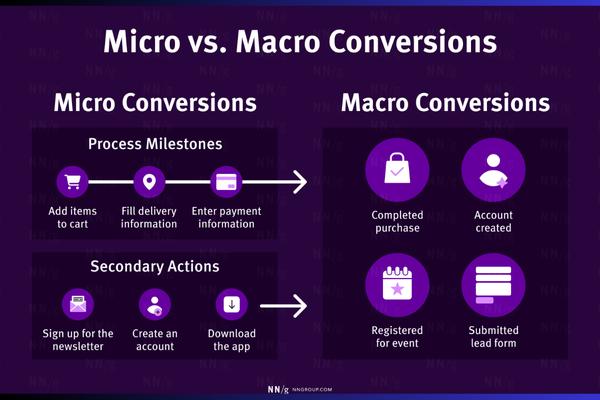
Macro conversions are your primary goals—the actions that directly contribute to your business revenue. Micro conversions are secondary actions that indicate a user’s interest or progress toward that primary goal.
Whether you’re running a fashion eCommerce site like Zara, a platform like Myntra, or a B2B service like Accosoft India, clearly defining your micro and macro conversions helps you better track, optimize, and report on your marketing performance.
What Are Macro Conversions?
Macro conversions are the main objectives of your website or app. These are the end-goals that reflect business success and usually involve a completed transaction or a major business milestone.
Examples of macro conversions:
– Purchase completed (e.g., buying a dress on Zara)
– Requesting a demo (e.g., Accosoft India SaaS software)
– Submitting a lead form
– Subscription payment
– App install (for app-based businesses)
– Booking a service
Business goal examples by brand:
– Zara: A user buys a jacket → macro conversion
– Myntra: A user places an order via the mobile app → macro conversion
– Accosoft India: A company books a product demo → macro conversion
These actions typically represent the final step in your marketing or sales funnel and have the highest value for your business.
What Are Micro Conversions?
Micro conversions are smaller, preliminary actions users take that indicate engagement, interest, or movement toward a macro conversion. They may not generate direct revenue but are important for understanding user behavior and intent.
Examples of micro conversions:
– Viewing a product or service page
– Adding items to cart
– Signing up for a newsletter
– Downloading a brochure or eBook
– Clicking on “Get a Quote” or “Contact Us”
– Watching a product video
– Spending more than X minutes on site
– Creating an account or logging in
Business goal examples by brand:
– Zara: A user clicks “Add to Cart” but doesn’t purchase → micro conversion
– Myntra: A user installs the app but doesn’t place an order → micro conversion
– Accosoft India: A visitor downloads a whitepaper → micro conversion
These conversions are essential for nurturing leads and understanding the user journey toward your macro goals.
Why You Need Both Micro and Macro Conversions
-
Full Funnel Tracking
Macro conversions only show end-results. Micro conversions show how users get there. Together, they paint a complete picture of user behavior. -
Better Optimization
If macro conversions are low, but micro conversions are high, it tells you that users are engaging but dropping off. You can then optimize checkout flows, forms, or follow-up campaigns. -
More Data for Learning
Google Ads’ machine learning uses conversions to optimize bidding. By tracking micro conversions, especially when macro conversions are limited, you feed more data to Google for smarter optimization. -
Identify Drop-Off Points
You can analyze which micro conversions occur before drop-off. For example, many users may add products to their cart but never complete the checkout. That insight helps you fix cart abandonment issues.
How to Define Micro and Macro Conversions in Google Ads or Analytics
Step 1: Define Your Business Goals
Ask yourself:
– What is the main action I want users to take?
– What are smaller actions that indicate interest or progress?
Step 2: List Key Conversions by Funnel Stage
Top of Funnel (Awareness & Interest):
– Page views
– Time on site
– Newsletter sign-ups
– Video views
(Usually micro conversions)
Middle of Funnel (Consideration):
– Add to cart
– Download guide
– Contact click
(Micro conversions)
Bottom of Funnel (Decision):
– Purchase
– Demo booking
– Final form submission
(Macro conversions)
Step 3: Implement Tracking
Set up conversion tracking using Google Ads or Google Analytics. For each conversion action:
– Mark whether it’s a primary (macro) or secondary (micro) goal
– Use Google Tag Manager or event tracking for custom actions
– In Google Ads, only use macro conversions for smart bidding (by default)
Step 4: Use Conversion Goals in Campaigns
When setting up a campaign in Google Ads, select the primary conversion actions you want it to optimize for (usually macro conversions). Still, track micro conversions to help understand the overall user journey.
Examples of Micro vs Macro Conversions in Different Industries
Ecommerce (Zara, Myntra)
– Macro: Product purchase, cart checkout completed
– Micro: Add to cart, view size guide, product filter used, video viewed
B2B (Accosoft India)
– Macro: Contact form submitted, demo booked
– Micro: Case study downloaded, pricing page viewed, email subscribed
Education/Coaching
– Macro: Course enrolled
– Micro: Webinar watched, syllabus downloaded
Real Estate
– Macro: Booking site visit or enquiry form
– Micro: Property brochure download, EMI calculator used
Conclusion
Defining micro and macro conversions is essential to building effective digital marketing strategies. While macro conversions reflect direct business success, micro conversions are the steps users take along the path. By tracking both, you gain a clearer view of user intent, identify friction points in your funnel, and feed more meaningful data into platforms like Google Ads and Analytics. Whether you’re running an eCommerce platform like Myntra, a retail brand like Zara, or a SaaS solution like Accosoft India, proper conversion tracking empowers smarter decisions, better optimizations, and ultimately—greater return on ad spend.