In the fast-evolving world of digital marketing in 2025, Customer Relationship Management (CRM) systems have become indispensable tools for businesses, organizations, and marketers aiming to build and maintain strong relationships with their audiences. CRMs are closely intertwined with email marketing, serving as a backbone for managing customer data, personalizing campaigns, and driving conversions. This article provides a comprehensive explanation of what a CRM is, its core functionalities, how it integrates with email marketing, the benefits of this synergy, and potential challenges. It concludes with a practical example illustrating how a small business leverages a CRM and email marketing to achieve its goals.
What is a CRM?
A Customer Relationship Management (CRM) system is a software platform designed to manage and analyze interactions with customers, prospects, and leads throughout their lifecycle. It centralizes customer data, streamlines communication, and automates processes to enhance relationships, improve customer satisfaction, and drive business growth. CRMs are used across industries—by businesses, educational institutions, nonprofits, and even freelancers—to organize customer interactions and optimize sales, marketing, and support efforts.
Core Functionalities of a CRM
- Contact Management: Stores detailed customer profiles, including names, email addresses, phone numbers, purchase history, preferences, and interactions.
- Lead Management: Tracks potential customers (leads) through the sales funnel, from initial contact to conversion.
- Segmentation: Groups contacts based on criteria like demographics, behavior, or engagement for targeted marketing.
- Automation: Automates repetitive tasks, such as sending follow-up emails, assigning leads to sales reps, or updating contact records.
- Analytics and Reporting: Provides insights into customer behavior, campaign performance, and sales metrics.
- Integration: Connects with other tools (e.g., email platforms, websites, social media) to streamline workflows.
- Sales Pipeline Management: Visualizes the stages of the sales process, helping teams prioritize and close deals.
- Customer Support: Manages support tickets, inquiries, and follow-ups to enhance customer experience.
Popular CRM platforms in 2025 include HubSpot, Salesforce, Zoho CRM, Brevo (formerly Sendinblue), and ActiveCampaign, each offering varying levels of features tailored to different business sizes and needs.
How CRM is Related to Email Marketing
Email marketing, a strategy for engaging audiences through targeted email campaigns, relies heavily on CRM systems to manage data, automate workflows, and deliver personalized content. The integration of CRMs with email marketing platforms creates a powerful synergy that enhances campaign effectiveness and customer relationships. Below are the key ways CRMs and email marketing are interconnected:
1. Centralized Customer Data for Personalization
CRMs act as a single source of truth for customer data, collecting information from multiple touchpoints (e.g., website forms, purchases, support interactions). This data fuels personalized email campaigns, which are critical for engagement in 2025.
- How It Works:
- CRMs store detailed contact profiles (e.g., name, purchase history, browsing behavior).
- Email platforms pull this data to personalize emails using merge tags (e.g., {FirstName}) or dynamic content (e.g., product recommendations based on past purchases).
- Segmentation in CRMs allows email campaigns to target specific groups (e.g., “High-Value Customers” who spent >$100).
- Example: A CRM like HubSpot syncs with its email tool to send a personalized email offering a discount to users who abandoned their cart on a website.
2. Automation of Email Workflows
CRMs enable the automation of email sequences, such as welcome series, abandoned cart reminders, or re-engagement campaigns, based on user actions or predefined triggers.
- How It Works:
- CRMs track user behavior (e.g., form submissions, purchases) and trigger emails via integrated email tools.
- Workflows are set up to send emails at specific intervals or based on conditions (e.g., “If user opens email, send follow-up in 2 days”).
- Automation reduces manual effort and ensures timely communication.
- Example: ActiveCampaign’s CRM triggers a 5-email onboarding series when a user signs up for a free trial, guiding them through product features.
3. Segmentation for Targeted Campaigns
CRMs allow marketers to segment audiences based on detailed criteria, ensuring emails are relevant and effective.
- How It Works:
- CRMs categorize contacts by attributes (e.g., location, interests) or behaviors (e.g., clicked a link, attended a webinar).
- Email platforms use these segments to send targeted campaigns, improving open rates (20–30% industry average) and click-through rates (3–5%).
- Example: Zoho CRM segments users who viewed a product page but didn’t purchase, enabling a targeted email with a limited-time offer.
4. Tracking and Analytics
CRMs provide robust analytics that complement email marketing metrics, offering a holistic view of customer interactions.
- How It Works:
- CRMs track email performance (open rates, CTR, conversions) alongside other touchpoints (e.g., website visits, support tickets).
- Integrated analytics dashboards reveal how email campaigns contribute to sales or engagement goals.
- Attribution models show the customer journey from email to conversion.
- Example: Salesforce integrates with its email tool, Pardot, to show that an email campaign drove 10% of total sales for a product launch.
5. Lead Nurturing and Sales Conversion
CRMs are designed to nurture leads through the sales funnel, and email marketing is a key channel for this process.
- How It Works:
- CRMs score leads based on engagement (e.g., email opens, website visits) to prioritize high-potential prospects.
- Email campaigns deliver educational content, promotions, or follow-ups to move leads toward conversion.
- Sales teams use CRM data to personalize outreach based on email interactions.
- Example: Brevo’s CRM identifies leads who opened three emails in a series and assigns them to a sales rep for a personalized call.
6. Compliance and List Management
CRMs help ensure email campaigns comply with regulations like GDPR, CAN-SPAM, and CCPA by managing consent and list health.
- How It Works:
- CRMs store opt-in records and consent preferences, ensuring only authorized contacts receive emails.
- Integration with validation tools (e.g., NeverBounce) removes invalid emails, reducing bounce rates (<2% industry standard).
- CRMs facilitate unsubscribe management and data deletion requests.
- Example: HubSpot’s CRM flags non-compliant contacts (e.g., no opt-in) before syncing with its email tool, ensuring GDPR compliance.
7. Integration with Other Channels
CRMs integrate email marketing with other channels (e.g., social media, SMS, websites), creating a unified customer experience.
- How It Works:
- CRMs sync data across platforms (e.g., Shopify, WordPress, LinkedIn) to inform email strategies.
- Multi-channel campaigns combine email with SMS or social ads, coordinated through the CRM.
- Example: Klaviyo’s CRM syncs with Shopify to send an email and SMS reminder to users who abandoned their cart.
Benefits of CRM-Email Marketing Integration
- Personalization at Scale: Delivers tailored content to thousands of contacts, boosting engagement.
- Time Efficiency: Automates repetitive tasks, freeing marketers to focus on strategy.
- Improved ROI: Targeted campaigns increase conversions, with email marketing yielding up to $45 per $1 spent.
- Holistic Customer Insights: Combines email and CRM data for a 360-degree view of customer behavior.
- Scalability: Handles growing contact lists and complex workflows without manual intervention.
- Compliance: Ensures adherence to data protection laws, reducing legal risks.
Challenges and Considerations
- Cost: CRM and email platform subscriptions can be expensive, especially for advanced features.
- Complexity: Setting up integrations and workflows requires technical knowledge or training.
- Data Quality: Inaccurate or outdated data in the CRM can lead to ineffective campaigns.
- Over-Reliance on Automation: Generic or excessive emails can disengage audiences.
- Integration Issues: Platform updates or API changes may disrupt data flow, requiring maintenance.
Best Practices in 2025
- Choose Integrated Platforms: Opt for CRMs with built-in email tools (e.g., HubSpot, Brevo) for seamless integration.
- Validate Data: Use tools like ZeroBounce to clean email lists regularly.
- Segment Strategically: Create dynamic segments based on real-time behavior (e.g., recent purchases).
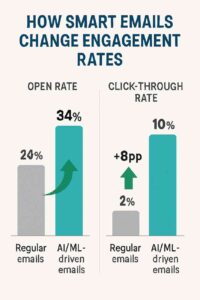
- Leverage AI: Use AI-driven features (e.g., Brevo’s send-time optimization) to enhance personalization.
- Monitor Metrics: Track open rates, CTR, conversions, and bounce rates to optimize campaigns.
- Ensure Compliance: Implement double opt-in and clear unsubscribe options.
Example: CRM and Email Marketing for a Small Fitness Studio
Scenario: “FitFlow,” a small fitness studio, uses Brevo’s CRM and email marketing platform to engage 1,500 subscribers, including current members and leads from a free trial signup form on their WordPress site. Their goal is to increase class bookings and convert trial users into paid members.
Implementation:
- CRM Setup:
- FitFlow uses Brevo’s CRM to store contact details (name, email, membership status, class history).
- They import 1,500 contacts from their website form and in-studio signups, ensuring double opt-in for GDPR compliance.
- Integration:
- Brevo integrates with FitFlow’s WordPress site via a plugin, syncing form submissions in real-time.
- Zapier connects Brevo to their booking system (Mindbody), updating contact profiles with class attendance data.
- Segmentation:
- FitFlow creates segments in Brevo’s CRM:
- “Active Members”: Attended a class in the last 30 days.
- “Trial Users”: Signed up for a free trial but haven’t converted.
- “Inactive Members”: No activity in 60 days.
- Segments are updated dynamically based on behavior (e.g., class bookings).
- FitFlow creates segments in Brevo’s CRM:
- Automated Email Series:
- Welcome Series (Trial Users):
- Trigger: User signs up for a free trial.
- Sequence: 5 emails over 10 days:
- Email 1: Welcome with trial details and class schedule.
- Email 2: Tips for first class with a booking link.
- Email 3: Success story of a member.
- Email 4: Reminder to book before trial ends.
- Email 5: 20% off first month’s membership.
- Re-Engagement Series (Inactive Members):
- Trigger: No activity in 60 days.
- Sequence: 3 emails over 6 days, offering a free class to return.
- Personalization: Emails use merge tags ({FirstName}) and dynamic content (e.g., recommend yoga classes to yoga attendees).
- Welcome Series (Trial Users):
- Validation:
- FitFlow uses Brevo’s integration with NeverBounce to validate emails, removing 100 invalid addresses (e.g., user@dead-domain.com), reducing bounce rates to 1%.
- Analytics and Optimization:
- Metrics (after 1 month):
- Welcome Series: 32% open rate, 8% CTR, 10% conversion rate (150 trial users join paid memberships).
- Re-Engagement Series: 25% open rate, 5% CTR, 5% conversion rate (30 inactive members return).
- Bounce Rate: 1%.
- Revenue: $7,500 from new memberships ($50/month).
- Adjustments: FitFlow tests a new subject line for Email 4 (“Last Chance: Book Your Free Class!”), increasing CTR to 10%.
- Metrics (after 1 month):
Results:
- The CRM-email integration drives 180 new memberships, exceeding the goal of 150.
- Automation saves 15 hours weekly, allowing staff to focus on in-studio operations.
- Segmentation and personalization boost engagement, with 90% inbox placement.
- Compliance ensures no GDPR violations, maintaining trust.
Key Takeaways:
- Brevo’s CRM centralizes data for targeted, automated campaigns.
- Integration with WordPress and Mindbody ensures real-time updates.
- Validation and analytics optimize performance and list health.
Conclusion
A CRM is a vital tool for managing customer relationships, and its integration with email marketing in 2025 amplifies the effectiveness of both. By centralizing data, enabling automation, supporting segmentation, and providing analytics, CRMs empower marketers to deliver personalized, timely, and compliant email campaigns. Benefits like improved ROI, scalability, and customer insights outweigh challenges like cost and complexity when best practices are followed. The FitFlow example illustrates how a small business can leverage a CRM like Brevo to automate email marketing, nurture leads, and drive conversions, making this synergy a cornerstone of modern digital marketing strategies.