Home Blog Page 56

Why do businesses use Google Ads?

Businesses use Google Ads because it offers one of the most effective, targeted, and measurable ways to reach potential customers online. Whether the goal is to increase sales, generate leads, grow brand awareness, or promote a product or service, Google Ads provides the tools and reach to achieve it efficiently.

Top Reasons Why Businesses Use Google Ads

  1. Massive Reach on Google
  • Google processes over 8.5 billion searches per day.
  • Your ads can reach users at the exact moment they’re searching for what you offer.
  • Appear across Google Search, YouTube, Google Maps, Gmail, and 2 million+ websites in the Google Display Network.
  1. Highly Targeted Advertising
  • Ads can be shown to users based on:
    • Keywords
    • Location
    • Demographics (age, gender, etc.)
    • Language
    • Interests and behavior
    • Device type (mobile, desktop)
  • Remarketing allows targeting past website visitors with tailored messages.
  1. Pay Only for Results (PPC Model)
  • Google Ads uses a pay-per-click (PPC) model—businesses only pay when someone clicks on their ad.
  • No money is wasted on impressions with no action.
  • Full control over budget and daily spend.
  1. Fast and Measurable Results
  • Unlike SEO, which takes time, Google Ads can start driving traffic within hours.
  • Detailed analytics and performance tracking help you measure:
    • Impressions
    • Clicks
    • Conversions
    • Return on investment (ROI)
  1. Brand Visibility & Awareness
  • Even when users don’t click, your ads create brand exposure.
  • Display and video ads increase brand recall among potential customers.
  1. Flexibility for All Budgets
  • Start with as little as ₹100–₹500/day.
  • Scale up or down depending on performance.
  • Suitable for small local businesses to large global enterprises.
  1. Multiple Ad Formats
  • Google Ads supports:
    • Search ads
    • Display banner ads
    • YouTube video ads
    • App promotion ads
    • Shopping ads
  • You can use images, videos, texts, or even dynamic ads with product feeds.
  1. Smart Automation & AI Features
  • Google uses AI to:
    • Suggest keywords
    • Optimize bids
    • Automatically place ads in the best-performing spots
    • Improve ad performance over time
  1. High Intent Audience
  • Users searching on Google are often in the buying stage of the funnel.
  • Ads target people with high intent, leading to better conversion rates.
  1. Competitor Presence
  • If your competitors are on Google Ads and you’re not, you’re missing potential customers.
  • Ads appear above organic search results—giving competitors a visibility edge.

📌 Example: A Business Using Google Ads

Business: Mehtagroccers.com (an online grocery store)

Goal: Drive local traffic and increase online orders.

Google Ads Campaign:

  • Search Ads: Target keywords like “buy groceries online in [city]”
  • Display Ads: Retarget users who visited the site but didn’t order
  • Local Ads: Promote store location with Google Maps integration
  • Budget: ₹500/day
  • Results:
    • 2,000+ clicks per month
    • Increased online orders by 35%
    • Cost per acquisition: ₹60
    • Visual product appeal matched perfectly with Shopping & Display Ads.

    • Targeted keywords ensured high-intent buyers reached their store.

    • Remarketing brought back potential buyers who didn’t convert initially.

    • Low-cost, high-conversion keywords gave strong ROI due to niche market.

      • Short video ads of installation demos and room transformations using Lazoro products.

      • Targeted niche interests: anime lovers, home decor hobbyists, interior design students.Helped build brand credibility even among non-buyers via visual impressions.

        Example: Lazoro.in – Handcrafted Metal Wall Art Business

        Business Overview:

        Lazoro is an Indian online brand that sells unique handcrafted metal wall art, including personalized pet tags, anime-inspired decor, and home wall pieces. The target audience includes homeowners, interior decorators, anime lovers, and pet owners looking for stylish decor.

        🎯 Goal

        • Increase online product sales

        • Drive targeted traffic to product pages

        • Build brand awareness among home decor and anime fans


        📢 Google ADs Strategy:

        1. Search Ads

        • Keywords Targeted:

          • “Buy metal wall art online”

          • “Anime metal wall art India”

          • “Custom name pet tag”

          • “Personalized dog wall decor”

        • Ad Copy Example:

          Headline: “Goku & Chi-Chi Metal Wall Art – Only ₹899”
          Description: “Perfect gift for anime fans! Premium handcrafted metal decor. Limited stock. Order now!”
          Landing Page: www.lazoro.in/goku-metal-wall-art

        2. Shopping Ads

        • Used for showcasing product images, prices, and availability directly in Google search results.

        • Featured top-selling products like:

          • Anime characters

          • Personalized pet name wall tags

          • Abstract home decor panels

        3. Display Ads (Remarketing)

        • Targeted users who visited the Lazoro website but didn’t make a purchase.

        • Showed visually appealing product images across:

          • News websites

          • Blogs

          • YouTube

          • Mobile apps

        4. YouTube Ads

    • 📊 Performance Metrics (Monthly Estimate):

      Metric Value
      Ad Spend ₹10,000
      Clicks 3,500+
      Conversions (Sales) ~150 orders
      Cost per Conversion ₹66
      Top Performing Products Anime Wall Art, Personalized Pet Tags
      ROAS (Return on Ad Spend) 4.5X

      Why Google Ads Worked for Lazoro:💡

      Takeaway

  • For niche businesses like Lazoro, Google Ads helps in:

    • Reaching specific audiences

    • Driving direct product sales

    • Scaling budget based on performance

    • Building a brand image in competitive digital marketplaces


🧠 Summary: Why Businesses Use Google Ads

Reason Description
🎯 Precise Targeting Reach the right people at the right time
💰 Pay-per-click Only pay when someone clicks your ad
📈 Measurable ROI Track and analyze every campaign detail
⚡ Fast Results Start getting traffic within hours
🔄 Scalability Suitable for small and large budgets
📢 Brand Awareness Keep your brand in front of potential customers
🧠 AI Optimization Smarter ads, better performance
🛍 Multiple Ad Types Search, Display, Video, Shopping, App

1. What are Google Ads?

Introduction

In today’s digital world, advertising has taken on a new face. Traditional methods like billboards, newspaper ads, or television commercials are no longer the only way to reach customers. Digital advertising—especially Google Ads—has transformed the landscape, offering businesses of all sizes an opportunity to reach potential customers online. Whether you’re a small local store or a global brand, Google Ads can help you grow your business effectively and efficiently.

Definition of Google Ads

Google Ads (formerly known as Google AdWords) is Google’s online advertising platform. It enables advertisers to display brief advertisements, service offerings, product listings, or videos to web users across a wide network. The platform operates primarily on a pay-per-click (PPC) basis, meaning advertisers pay each time a user clicks on one of their ads.

Launched in October 2000, Google Ads has grown into one of the most powerful digital advertising tools in the world, generating billions of dollars in ad revenue annually and helping countless businesses gain visibility.

How Google Ads Works

Google Ads uses a bidding system where advertisers compete to show their ads to users based on specific keywords, user intent, and targeting settings. When a user searches on Google, Google runs a quick auction to determine which ads will appear and in what order. Several factors determine this:

  1. Bid Amount – How much you’re willing to pay for a click.
  2. Quality Score – Based on ad relevance, click-through rate, and landing page experience.
  3. Ad Extensions & Formats – Use of additional links, phone numbers, ratings, etc.
  4. Expected Impact – How helpful the ad is likely to be to the user.

Ads are shown on Google Search, Google Display Network, YouTube, Google Maps, Gmail, and other Google partner websites.

Types of Google Ads

Google Ads offers several campaign types tailored for specific business goals:

  1. Search Ads
  • Appear on Google’s search engine results pages (SERPs).
  • Target users actively searching for specific keywords.
  • Example: A user searches for “best running shoes,” and an ad from Nike appears.
  1. Display Ads
  • Shown on websites and apps that are part of the Google Display Network.
  • Use banners, images, and rich media to capture attention.
  • Great for brand awareness.
  1. Shopping Ads
  • Ideal for eCommerce businesses.
  • Appear in Google’s Shopping tab and include images, prices, and store name.
  • Help drive product-specific traffic.
  1. Video Ads
  • Shown before, during, or after videos on YouTube.
  • Can be skippable or non-skippable.
  • Used for branding or driving awareness.
  1. App Promotion Ads
  • Promote app downloads across Google’s platforms.
  • Use Google Play Store data and AI to place ads automatically.
  1. Smart Campaigns
  • Automated campaigns designed for small businesses.
  • Google automates keyword targeting and bidding.
  1. Performance Max Campaigns
  • Uses AI to automate bidding, creatives, and placements across all Google networks.
  • Designed to meet a specific conversion goal.

Key Features of Google Ads

  1. Targeting Options

Google Ads allows advertisers to precisely define who they want to reach:

  • Keywords
  • Location (Geo-targeting)
  • Language
  • Device Type (Mobile/Desktop/Tablet)
  • Demographics (Age, Gender, Parental Status)
  • Interests and Behaviors
  • Remarketing (target users who previously interacted with your site)
  1. Ad Scheduling

Choose specific days and times your ads should run to optimize performance.

  1. Budget Control

Set daily or monthly budgets to control spending.

  1. Conversion Tracking

Measure the effectiveness of ads by tracking user actions like purchases, sign-ups, or form submissions.

  1. Performance Reports

Get detailed insights on impressions, clicks, conversions, cost per click (CPC), and return on ad spend (ROAS).

Benefits of Google Ads

  1. Immediate Visibility

Unlike SEO, which can take months, Google Ads can get you on the first page of Google within hours.

  1. Highly Targeted

With precise targeting, you can ensure your message reaches the right audience.

  1. Measurable Results

Every aspect of your campaign can be tracked and analyzed, offering clear ROI.

  1. Scalable

Whether you’re spending ₹500 or ₹5,00,000 per month, Google Ads can be scaled to suit any budget.

  1. A/B Testing

Run multiple ads to see which one performs best. Optimize continuously for better results.

Challenges and Considerations

  1. Google Ads can be expensive, especially for competitive keywords. Without proper management, costs can quickly add up.
  1. Complexity

The platform has a learning curve. Poorly structured campaigns can waste money.

  1. Competition

You’re bidding against others; if they’re better optimized, their ads will show more often.

  1. Click Fraud

Sometimes competitors or bots click on your ads to drain your budget.

Google Ads Example:

Business: Lazoro – A Handcrafted Metal Wall Art Store

Website: www.lazoro.in

Let’s say Lazoro wants to promote a new line of anime-inspired metal wall art.

Campaign Setup:

  • Goal: Drive product sales from users searching for anime home decor.
  • Campaign Type: Search Ads + Shopping Ads
  • Keywords Targeted:
  • “Buy anime metal wall art”
  • “Dragon Ball wall decor online”
  • “Goku metal poster”
  • “Anime home decor India”

Tips for Successful Google Ads Campaigns

  1. Use Negative Keywords
  • Prevent ads from showing for irrelevant searches.
  • g., exclude “free,” “download,” or unrelated terms.
  1. Write Compelling Ad Copy
  • Focus on user benefits, not just features.
  • Add calls to action (e.g., “Shop Now”, “Get 20% Off”).
  1. Optimize Landing Pages
  • Ensure fast loading, mobile-friendly, and aligned with ad messaging.
  1. Split Test Ads
  • Run multiple versions of ads to see which performs best.
  1. Monitor and Adjust Regularly
  • Pause underperforming ads.
  • Adjust bids, targeting, and budget based on results.
  1. Use Extensions-Add sitelinks, call buttons, price extensions to increase visibility.

Conclusion

Google Ads is a dynamic and powerful advertising platform that offers unmatched visibility, precise targeting, and measurable performance. Whether you’re looking to generate leads, increase sales, or boost brand awareness, Google Ads provides the tools you need to reach your goals.

Describe the life cycle of an affiliate sale from link click to payout.

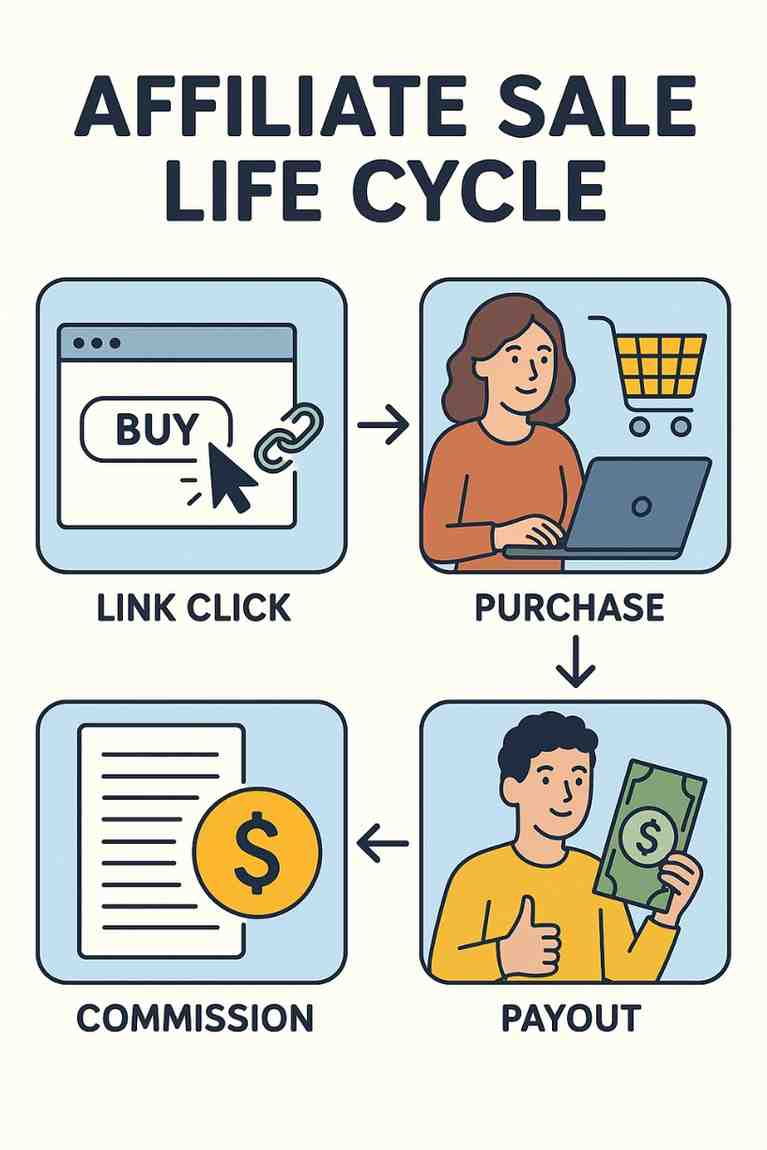
The Life Cycle of an Affiliate Sale: From Link Click to Payout

Affiliate marketing is a performance-based marketing model where affiliates earn commissions by promoting products or services. The life cycle of an affiliate sale encompasses all the steps from the moment a potential customer clicks an affiliate link to the affiliate receiving their payout. This process involves multiple stakeholders, including the affiliate, the merchant, the affiliate network, and the customer, and relies on sophisticated tracking systems to ensure accurate attribution and payment. Below, we explore the life cycle of an affiliate sale in detail, covering each stage, its significance, and potential challenges, followed by a practical example to illustrate the process.


Overview of the Affiliate Sale Life Cycle

The life cycle of an affiliate sale can be broken down into several key stages:

  1. Affiliate Link Click
  2. Tracking and Attribution
  3. Customer Action (Conversion)
  4. Sale Validation
  5. Commission Calculation
  6. Payout Processing

Each stage is critical to ensuring the affiliate is fairly compensated for their efforts, and the process is designed to maintain transparency and trust among all parties.


Stage 1: Affiliate Link Click

The life cycle begins when a potential customer clicks an affiliate’s unique referral link. Affiliates promote these links through various channels, such as blogs, social media, YouTube videos, email campaigns, or paid advertisements. The link is typically embedded in content that provides value, such as a product review, tutorial, or recommendation, to encourage clicks.

Mechanics:

  • The affiliate link contains a unique identifier (e.g., an affiliate ID or tracking code) that ties the click to the specific affiliate.
  • When clicked, the link directs the user to the merchant’s website, often a product page, landing page, or checkout page.
  • A tracking cookie is placed on the user’s browser to record the affiliate’s referral. Cookies have a predefined duration (e.g., 30 days), meaning the affiliate can still earn a commission if the user converts within that period, even if they don’t purchase immediately.

Significance:

  • The click is the affiliate’s first point of influence, requiring compelling content to drive traffic.
  • Accurate tracking at this stage ensures the affiliate is credited for the referral.

Challenges:

  • Users may block cookies or use ad blockers, disrupting tracking.
  • Competition among affiliates can make it harder to attract clicks in saturated niches.

Stage 2: Tracking and Attribution

Once the link is clicked, tracking systems record the referral and attribute it to the correct affiliate. This stage is critical for ensuring fairness in the affiliate marketing ecosystem.

Mechanics:

  • The affiliate link typically redirects through an affiliate network (e.g., Amazon Associates, ShareASale, or ClickBank) or the merchant’s in-house affiliate program, which logs the click.
  • The tracking cookie stores information like the affiliate ID, timestamp, and referral source.
  • If the merchant uses an affiliate network, the network acts as an intermediary, managing tracking, reporting, and payments.
  • Advanced tracking methods, such as server-side tracking or fingerprinting, may be used to complement cookies, especially in environments where cookies are less reliable.

Significance:

  • Accurate attribution ensures the affiliate who drove the sale is credited, even if the customer uses multiple devices or delays their purchase.
  • Tracking data provides insights into campaign performance, helping affiliates optimize their strategies.

Challenges:

  • Cookie expiration can result in lost commissions if the customer converts after the cookie’s lifespan.
  • Cross-device tracking issues may occur if the customer clicks the link on one device but purchases on another.
  • Technical glitches or improper link setup can lead to untracked clicks.

Stage 3: Customer Action (Conversion)

The customer takes a specific action on the merchant’s website, known as a conversion, which triggers the affiliate’s commission. Conversions vary by program and may include:

  • Purchasing a product or service.
  • Signing up for a subscription.
  • Filling out a lead form.
  • Downloading an app or completing a free trial.

Mechanics:

  • The customer navigates the merchant’s website, often guided by the affiliate’s content (e.g., a review that highlights product benefits).
  • Upon completing the conversion (e.g., placing an order), the merchant’s system logs the transaction and associates it with the affiliate’s tracking ID.
  • For subscription-based services, the affiliate may earn recurring commissions for ongoing customer payments.

Significance:

  • The conversion is the core of the affiliate sale, as it directly generates revenue for the merchant and commission for the affiliate.
  • The affiliate’s ability to pre-sell the product through persuasive content influences conversion rates.

Challenges:

  • High cart abandonment rates can reduce conversions, especially if the merchant’s checkout process is complex.
  • Customers may comparison-shop or be deterred by high prices, shipping costs, or lack of trust in the merchant.
  • Some customers may intentionally avoid affiliate links to prevent commissions, though this is rare.

Stage 4: Sale Validation

After the conversion, the merchant or affiliate network validates the sale to ensure it meets the program’s terms. This step prevents fraud and ensures commissions are paid only for legitimate transactions.

Mechanics:

  • The merchant reviews the transaction for issues like returns, cancellations, or fraudulent activity (e.g., fake orders or stolen credit cards).
  • Many programs have a “lock-in” period (e.g., 30–60 days) during which the sale is pending, allowing time for returns or cancellations.
  • Once validated, the sale is marked as approved, and the commission is queued for payment.

Significance:

  • Validation protects merchants from paying commissions on invalid sales, maintaining program integrity.
  • Affiliates benefit from clear validation policies, as they know when to expect payments.

Challenges:

  • Long lock-in periods delay payouts, affecting affiliates’ cash flow.
  • Strict validation rules (e.g., excluding sales from discounted items) can reduce commissions.
  • Disputes may arise if the merchant rejects sales without clear justification.

Stage 5: Commission Calculation

Once the sale is validated, the affiliate’s commission is calculated based on the program’s terms. Commissions vary widely and may be:

  • A percentage of the sale amount (e.g., 10% of a $100 purchase).
  • A fixed amount per conversion (e.g., $50 per signup).
  • Recurring for subscription-based services (e.g., 20% of monthly fees).

Mechanics:

  • The affiliate network or merchant’s system calculates the commission based on the sale value and commission rate.
  • Adjustments may be made for taxes, shipping fees, or discounts, depending on the program’s rules.
  • The affiliate can view their earnings through a dashboard provided by the merchant or affiliate network.

Significance:

  • Accurate commission calculation ensures affiliates are fairly compensated.
  • Transparent reporting builds trust between affiliates and merchants.

Challenges:

  • Discrepancies in reported sales (e.g., due to tracking errors) can lead to disputes.
  • Some programs exclude certain products or categories from commissions, reducing earnings.
  • Currency conversion or payment fees may slightly reduce the final payout.

Stage 6: Payout Processing

The final stage is the payout, where the affiliate receives their commission. Payouts are typically processed on a regular schedule, such as monthly or bi-weekly.

Mechanics:

  • The merchant or affiliate network aggregates approved commissions and prepares payments.
  • Affiliates must meet a minimum payout threshold (e.g., $50) before receiving funds.
  • Payments are made via methods like PayPal, direct bank transfer, wire transfer, or check.
  • Affiliates receive a statement detailing their earnings, deductions, and payment status.

Significance:

  • Timely payouts reward affiliates for their efforts and encourage continued promotion.
  • Flexible payment options accommodate affiliates worldwide.

Challenges:

  • High payout thresholds can delay earnings for new affiliates with low sales.
  • Payment delays or processing fees can frustrate affiliates.
  • International affiliates may face currency conversion losses or high transfer fees.

Example of an Affiliate Sale Life Cycle

Let’s walk through a hypothetical example to illustrate the life cycle of an affiliate sale.

Scenario: Alex, a tech blogger, is an affiliate for “TechGuru,” an online retailer selling gadgets. TechGuru offers a 5% commission on all sales through its affiliate program, managed by an affiliate network called “LinkTrack.” Alex promotes a $500 laptop on his blog.

Step-by-Step Process:

  1. Affiliate Link Click:
    • Alex writes a blog post titled “Top 5 Laptops for Remote Work in 2025,” featuring the TechGuru laptop. He embeds his unique affiliate link in the review.
    • On June 20, 2025, a reader named Sarah clicks the link while researching laptops. The link directs her to TechGuru’s product page, and a 30-day cookie is placed on her browser.
  2. Tracking and Attribution:
    • LinkTrack records Sarah’s click, associating it with Alex’s affiliate ID. The cookie ensures Alex is credited if Sarah purchases within 30 days.
    • Sarah browses the laptop page but doesn’t buy immediately, returning to TechGuru’s site a week later via a direct search.
  3. Customer Action (Conversion):
    • On June 27, 2025, Sarah returns to TechGuru’s site and purchases the $500 laptop. The cookie from Alex’s link is still active, so the sale is attributed to him.
    • TechGuru’s system logs the transaction, noting the $500 sale and Alex’s referral.
  4. Sale Validation:
    • TechGuru has a 30-day return policy, so the sale is marked as pending until July 27, 2025. Sarah keeps the laptop, and the sale is validated on July 28, 2025.
    • LinkTrack updates Alex’s dashboard to reflect the approved sale.
  5. Commission Calculation:
    • Alex’s commission is 5% of $500, or $25. LinkTrack calculates this amount and adds it to Alex’s earnings for the month.
    • No deductions apply, as the sale was full-priced with no returns.
  6. Payout Processing:
    • LinkTrack processes payouts on the 15th of each month for validated sales from the previous month. Alex’s $25 commission is included in the August 15, 2025, payout.
    • Alex has already met the $50 minimum threshold with other sales, so he receives $25 via PayPal, minus a $1 transaction fee, for a net payout of $24.

Analysis: This example shows how Alex earns a commission through strategic content creation. The process took nearly two months from click to payout due to the validation period and payout schedule, highlighting the importance of patience in affiliate marketing. If Alex promotes recurring services (e.g., a software subscription), he could earn ongoing commissions, extending the life cycle’s profitability.


Key Considerations for Affiliates

To navigate the affiliate sale life cycle successfully, affiliates should:

  • Choose Reliable Programs: Partner with merchants or networks known for accurate tracking and timely payouts.
  • Optimize Content: Create high-quality, targeted content to drive clicks and conversions.
  • Monitor Performance: Use analytics to track click-through rates, conversion rates, and earnings, adjusting strategies as needed.
  • Understand Terms: Review commission structures, cookie durations, and validation periods to set realistic expectations.
  • Diversify Promotions: Promote multiple products or programs to reduce reliance on a single revenue stream.

Conclusion

The life cycle of an affiliate sale—from link click to payout—is a multi-stage process that requires coordination between affiliates, merchants, and affiliate networks. Each stage, from attracting clicks to receiving payments, plays a critical role in ensuring affiliates are rewarded for their efforts. While challenges like tracking errors, customer churn, or delayed payouts exist, strategic planning and reliable partnerships can maximize success. The example of Alex and TechGuru demonstrates how affiliates can leverage this cycle to generate income, underscoring the potential of affiliate marketing as a scalable, performance-driven business model.

What is an affiliate program vs an affiliate network?

Affiliate marketing is a powerful digital strategy that enables businesses to expand their customer reach while rewarding marketers, influencers, and content creators (affiliates) who help generate traffic or sales. Two key terms within this system often cause confusion — affiliate program and affiliate network. While they both relate to how affiliate marketing works, they serve different purposes and operate in distinct ways.

In this detailed essay, we will explore what an affiliate program is, what an affiliate network is, how they differ, their advantages and disadvantages, and provide real-world examples to highlight their roles in the affiliate marketing ecosystem.


1. What Is an Affiliate Program?

Definition:

An affiliate program is a structured arrangement run by a business or company that offers commissions or other rewards to third-party affiliates who promote their products or services and generate traffic, leads, or sales.

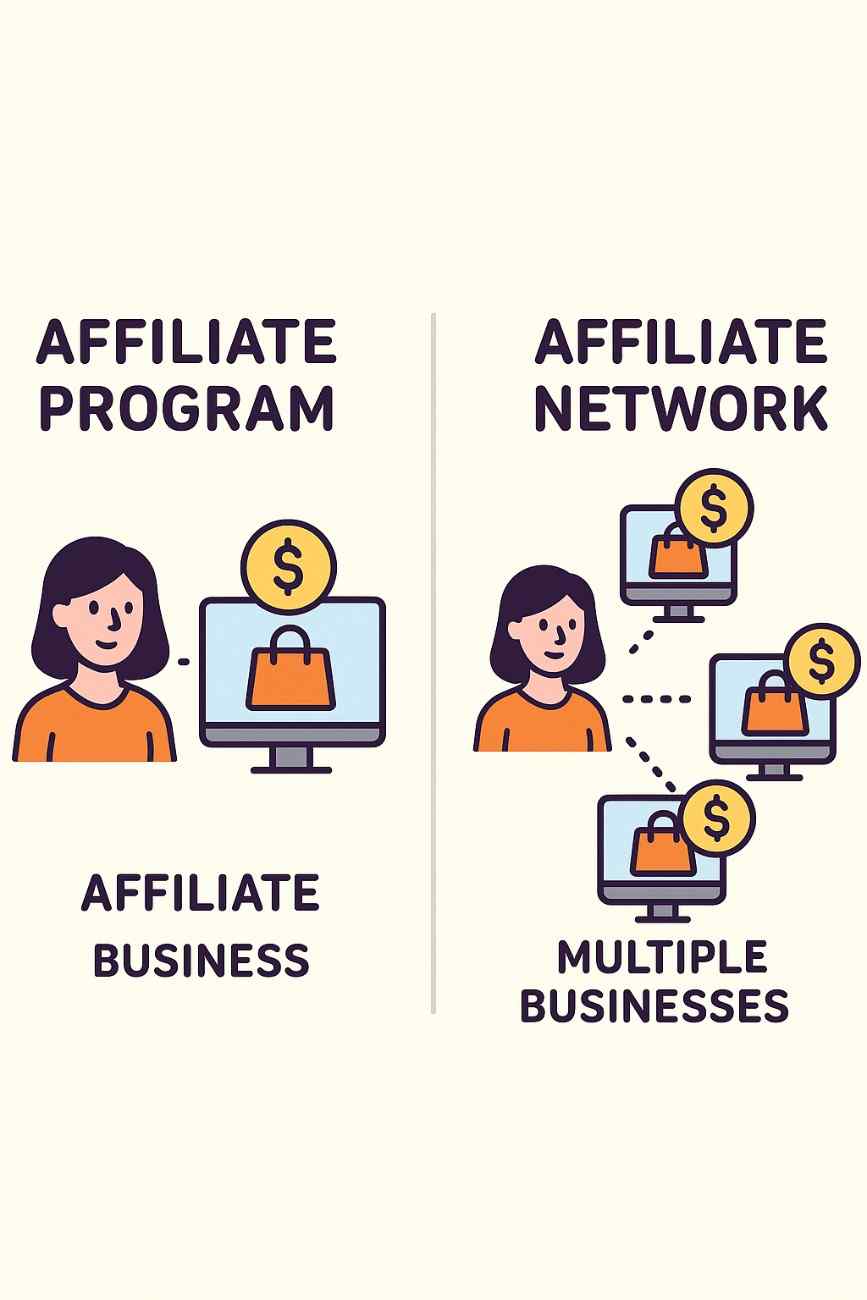
Affiliate programs are company-specific. That means a business independently sets up and manages its own program without involving third-party intermediaries. The company is responsible for generating tracking links, managing affiliates, handling commission payments, and analyzing performance.

Key Features of Affiliate Programs:

  • Managed by the company (in-house or with software)

  • Commission structures, tracking rules, and policies are set by the company

  • Affiliates join the program directly through the brand’s website

How It Works:

  1. A company launches an affiliate program.

  2. It provides marketing materials (affiliate links, banners, etc.) to approved affiliates.

  3. Affiliates promote the brand using these materials.

  4. Each time a referred user completes a defined action (click, lead, or purchase), the affiliate earns a commission.

  5. The company tracks the referral and pays the affiliate.

Popular Examples of Affiliate Programs:

  • Amazon Associates – Affiliates earn commission by promoting products on Amazon.

  • Shopify Affiliate Program – Pays commissions for referring users who sign up for Shopify plans.

  • Bluehost Affiliate Program – Pays ₹5,000 or more for each user who signs up for hosting via an affiliate.


2. What Is an Affiliate Network?

Definition:

An affiliate network is a third-party platform that acts as an intermediary between multiple businesses (advertisers) and affiliates. It provides a centralized place where businesses list their affiliate programs, and affiliates can find, apply, and promote products from different brands using a single platform.

Affiliate networks handle most of the backend work, including tracking, reporting, payments, and technical support. They simplify the process for both advertisers and affiliates by offering a ready-made system with hundreds or thousands of products and services to promote.

Key Features of Affiliate Networks:

  • Connects many advertisers and affiliates in one place

  • Manages tracking, payments, and compliance

  • Offers reporting dashboards and customer support

  • Usually charges merchants a fee for access

How It Works:

  1. A company joins the network and lists its affiliate program.

  2. Affiliates create an account with the network and apply to join specific programs.

  3. Once approved, they receive affiliate links to promote.

  4. The network tracks conversions using cookies and link identifiers.

  5. The network collects commissions from businesses and pays affiliates (often monthly).

Popular Examples of Affiliate Networks:

  • CJ Affiliate (formerly Commission Junction) – Offers access to big brands like GoDaddy, Expedia, and Lowe’s.

  • ShareASale – Hosts programs from thousands of merchants in fashion, tech, and home goods.

  • Rakuten Advertising – One of the oldest and most reputable networks.

  • Impact – Offers advanced tracking tools and integrations.

  • ClickBank – Specializes in digital products and online courses.


3. Key Differences Between an Affiliate Program and an Affiliate Network

Feature Affiliate Program Affiliate Network
Ownership Managed directly by the brand Managed by a third-party platform
Number of Merchants One brand only Multiple brands across industries
Affiliate Access Must apply individually to each program One account allows access to many programs
Tracking and Payments Done in-house or via affiliate software Handled by the network
Cost to Business Lower (mostly internal costs) Higher (includes platform fees and commissions)
Ease of Use for Affiliates More manual, single-brand focus Easier — many programs in one dashboard
Support Provided by the company itself Provided by the network

4. Advantages of Affiliate Programs

For Businesses:

  • Full Control: The company sets its own commission rates, rules, and promotional materials.

  • Direct Relationships: Builds stronger connections with loyal affiliates.

  • Lower Costs: No network fees — more budget for commissions or tools.

For Affiliates:

  • Exclusive Access: Direct communication with the brand.

  • Higher Payouts: No intermediary means companies may offer better commission rates.


5. Advantages of Affiliate Networks

For Businesses:

  • Access to a Large Pool of Affiliates: Reach thousands of affiliates quickly.

  • Ready Infrastructure: No need to build tracking or payment systems from scratch.

  • Fraud Detection & Analytics: Networks offer tools to detect fraudulent clicks or activity.

For Affiliates:

  • One-Stop Shop: Access to multiple products and services through one dashboard.

  • Consolidated Payouts: Earnings from multiple merchants paid together.

  • Trust Factor: Well-known networks often provide protection and dispute resolution.


6. Disadvantages of Affiliate Programs and Networks

Affiliate Programs:

  • Limited exposure — hard for new businesses to find affiliates

  • Requires investment in affiliate tracking software and team

  • Affiliates need to manage multiple logins and dashboards

Affiliate Networks:

  • Higher costs for businesses (setup and transaction fees)

  • Less flexibility in customizing the affiliate experience

  • Intense competition among affiliates promoting similar products


7. Real-Life Example: Comparing an Affiliate Program and a Network

Example 1: Affiliate Program (Direct with Brand)

Bluehost offers its own affiliate program. Priya, a content creator, signs up on Bluehost’s website and is given access to her personal dashboard.

  • Priya gets her unique tracking link.

  • She writes a blog post titled “How to Start a WordPress Blog” and includes the Bluehost link.

  • Readers click the link and sign up for hosting.

  • Bluehost tracks the conversions using cookies and pays Priya directly.

Benefits:

  • High commission rate (up to ₹6,000 per sale)

  • Direct contact with Bluehost’s affiliate manager

  • Exclusive content and promotional offers


Example 2: Affiliate Network (via ShareASale)

Let’s say a clothing brand, Stylify, lists its affiliate program on ShareASale.

  • Rohan, a fashion influencer, joins ShareASale and searches for fashion-related programs.

  • He applies to the Stylify program and gets approved.

  • He creates Instagram stories and blog posts linking to Stylify’s store.

  • ShareASale tracks each click, sale, and commission using their platform.

  • At the end of the month, ShareASale consolidates Rohan’s earnings (including commissions from other merchants) and pays him in a single payout.

Benefits:

  • Rohan can promote Stylify plus other brands from the same dashboard

  • ShareASale handles all technical and payment issues

  • He receives one combined payment for all his affiliate work


8. Which Is Better: Affiliate Program or Affiliate Network?

It depends on who you are:

For Businesses:

  • If you are a small-to-medium company with a focused affiliate base, starting with your own affiliate program might be better. It’s cost-effective and gives you more control.

  • If you’re aiming for mass reach, want quick access to many affiliates, or lack technical infrastructure, joining an affiliate network can provide faster results and scalability.

For Affiliates:

  • If you are loyal to or specialize in promoting specific brands, working directly through an affiliate program may offer better relationships and higher commissions.

  • If you want to promote multiple brands across niches, affiliate networks offer greater flexibility, easier management, and consolidated payments.


Conclusion

Both affiliate programs and affiliate networks are essential components of the affiliate marketing world. Understanding the difference between the two helps both affiliates and merchants make informed decisions that align with their goals and resources.

An affiliate program is ideal for businesses that want control over their partnerships and for affiliates who want to work closely with specific brands. In contrast, an affiliate network offers a more streamlined, all-in-one solution for both parties by acting as a marketplace that connects multiple advertisers with a wide array of affiliates.

Ultimately, whether you’re an affiliate marketer seeking reliable income streams or a business looking to expand reach through partnerships, knowing when to use a program versus a network can determine the success and sustainability of your affiliate marketing strategy.

Explain the concept of recurring commissions in affiliate programs.

Understanding Recurring Commissions in Affiliate Programs

Affiliate marketing has become a cornerstone of online business strategies, allowing individuals and companies to earn income by promoting products or services. Among the various compensation models in affiliate marketing, recurring commissions stand out as a particularly attractive option for affiliates seeking long-term, sustainable income. This model differs from one-time commission structures by offering ongoing payments for as long as the referred customer remains active with the service or product. Below, we delve into the concept of recurring commissions, exploring its mechanics, benefits, challenges, and real-world applications, with a detailed example to illustrate its practical implementation.

What Are Recurring Commissions?

Recurring commissions are a type of affiliate marketing compensation where affiliates earn a percentage of revenue or a fixed amount repeatedly, typically on a monthly or annual basis, for each customer they refer to a business. Unlike traditional affiliate programs that pay a one-time commission for a sale or lead, recurring commissions are tied to subscription-based or ongoing services where customers make regular payments. The affiliate continues to earn commissions as long as the referred customer maintains their subscription or continues using the service, without requiring additional effort from the affiliate after the initial referral.

This model is prevalent in industries offering subscription-based services, such as software-as-a-service (SaaS) platforms, hosting services, membership sites, online courses, and financial services. The recurring commission structure incentivizes affiliates to promote products that require ongoing payments, as it creates a passive income stream over time.

How Recurring Commissions Work

The mechanics of recurring commissions are straightforward but rely on specific conditions being met:

  1. Affiliate Promotion: An affiliate signs up for a program offering recurring commissions and receives a unique tracking link or code. They promote the product or service through various channels, such as blogs, social media, email marketing, or paid ads.
  2. Customer Acquisition: When a customer clicks the affiliate’s link and subscribes to the service (e.g., a monthly software subscription), the affiliate is credited for the referral. Tracking technology, such as cookies or affiliate software, ensures the affiliate is linked to the customer’s account.
  3. Ongoing Payments: The business charges the customer on a recurring basis (e.g., monthly, quarterly, or annually). For each payment made by the customer, the affiliate earns a commission, typically a percentage of the payment or a fixed amount.
  4. Commission Duration: The affiliate continues to earn commissions for as long as the customer remains subscribed, or until the terms of the affiliate agreement change (e.g., some programs cap the commission period).
  5. Payouts: Commissions are paid out according to the affiliate program’s schedule, often monthly, via methods like PayPal, bank transfer, or checks.

For example, if an affiliate refers a customer to a web hosting service with a 30% recurring commission and the customer pays $20 per month, the affiliate earns $6 every month for as long as the customer remains subscribed.

Benefits of Recurring Commissions

Recurring commissions offer several advantages for affiliates, businesses, and even customers, making them a win-win model in many cases.

  1. Passive Income for Affiliates: Once an affiliate secures a customer, they can earn income without additional effort, creating a scalable income stream. Over time, as more customers are referred, the cumulative effect can lead to substantial earnings.
  2. Long-Term Relationships: Businesses benefit from affiliates who focus on quality referrals, as recurring commissions incentivize affiliates to target customers likely to stay subscribed for the long term. This aligns the interests of the affiliate and the business.
  3. Predictable Revenue: For affiliates, recurring commissions provide a more predictable income compared to one-time commissions, which can fluctuate based on sales cycles. This stability allows affiliates to plan their finances better.
  4. Customer Retention Focus: Companies offering recurring commissions often prioritize customer satisfaction to reduce churn, ensuring affiliates continue earning commissions. This can lead to better service quality for customers.
  5. Scalability: Affiliates can scale their earnings by referring more customers without significantly increasing their workload, as the initial effort of acquiring a customer continues to pay off over time.

Challenges of Recurring Commissions

While recurring commissions are appealing, they come with challenges that affiliates and businesses must navigate:

  1. Delayed Gratification: Unlike one-time commissions, which provide immediate payouts, recurring commissions build up over time. Affiliates may need to wait months or years to see significant returns, requiring patience and persistence.
  2. Customer Churn: The biggest risk for affiliates is customer churn, where referred customers cancel their subscriptions, halting the commission stream. High churn rates can undermine the passive income potential.
  3. Program Terms and Changes: Some affiliate programs may alter their commission structures, reduce percentages, or impose caps on recurring payments, affecting long-term earnings. Affiliates must carefully review program terms.
  4. Higher Competition: Popular recurring commission programs, especially in lucrative niches like SaaS or web hosting, attract many affiliates, increasing competition and requiring more sophisticated marketing strategies.
  5. Tracking and Attribution Issues: Technical issues, such as cookie expiration or improper tracking, can result in lost commissions. Affiliates must choose programs with reliable tracking systems.

Key Considerations for Affiliates

To succeed with recurring commissions, affiliates should consider the following:

  • Choose High-Quality Programs: Select affiliate programs with reputable products, strong customer retention, and fair commission rates. Research the company’s reputation and customer reviews to ensure reliability.
  • Target the Right Audience: Focus on promoting products that align with your audience’s needs. For example, a tech blogger might promote web hosting services to website owners, increasing the likelihood of conversions and long-term subscriptions.
  • Understand the Terms: Read the affiliate program’s terms to understand commission rates, payment schedules, and any conditions (e.g., minimum customer subscription periods or commission caps).
  • Diversify Promotions: Promote multiple recurring commission programs to spread risk and increase income streams. This reduces dependency on a single program.
  • Invest in Evergreen Content: Create content like blog posts, tutorials, or videos that continue to attract traffic and referrals over time, maximizing the passive income potential.

Example of Recurring Commissions in Action

To illustrate how recurring commissions work, let’s consider a hypothetical scenario involving an affiliate promoting a SaaS platform.

Scenario: Jane, a digital marketing blogger, joins the affiliate program of “CloudTool,” a project management software offering a 25% recurring commission for each referred customer. CloudTool charges customers $50 per month for its premium plan. Jane’s audience consists of small business owners and freelancers, making CloudTool a relevant product to promote.

Step-by-Step Process:

  1. Joining the Program: Jane signs up for CloudTool’s affiliate program and receives a unique referral link. The program promises a 25% commission on all customer payments for the lifetime of the subscription.
  2. Content Creation: Jane writes a detailed blog post titled “Why CloudTool is the Best Project Management Software for Small Businesses.” The post includes her affiliate link, a review of CloudTool’s features, and a call-to-action encouraging readers to sign up for a free trial.
  3. Customer Referral: In the first month, 10 readers click Jane’s link and sign up for CloudTool’s premium plan after the trial. Each customer pays $50 per month, generating $500 in total revenue for CloudTool.
  4. Commission Earnings: Jane earns a 25% commission on each customer’s payment, equating to $12.50 per customer per month. With 10 customers, Jane earns $125 per month.
  5. Long-Term Income: Over the next year, 8 of the 10 customers continue their subscriptions, while 2 cancel after six months. Jane earns $100 per month (8 customers x $12.50) for the last six months of the year, plus $125 per month for the first six months, totaling $1,350 for the year from these referrals alone.
  6. Scaling Up: Inspired by her success, Jane creates more content, including YouTube tutorials and email campaigns, referring an additional 20 customers in the second year. With 28 active customers (20 new + 8 retained), Jane’s monthly earnings grow to $350 ($12.50 x 28), or $4,200 annually, assuming no further cancellations.

Analysis: This example demonstrates the power of recurring commissions. Jane’s initial effort in creating content continues to generate income without additional work, and her earnings grow as she refers more customers. However, she must monitor customer retention and CloudTool’s program terms to ensure continued profitability.

Real-World Examples of Recurring Commission Programs

Several industries and companies offer recurring commission programs, including:

  • Web Hosting: Companies like Bluehost and SiteGround offer recurring commissions for hosting plans, with affiliates earning a percentage of monthly or annual fees.
  • SaaS Platforms: Tools like ClickFunnels, ConvertKit, and Shopify provide recurring commissions for referring users to their subscription-based services.
  • Membership Sites: Platforms like Patreon or fitness membership programs offer affiliates recurring payouts based on referred members’ subscriptions.
  • Financial Services: Some investment or trading platforms offer recurring commissions for referred clients who maintain active accounts.

Conclusion

Recurring commissions in affiliate programs represent a powerful opportunity for affiliates to build sustainable, passive income streams. By promoting subscription-based products or services, affiliates can earn ongoing payments for each referred customer, creating a compounding effect over time. While challenges like customer churn and program changes exist, strategic planning, quality content, and careful program selection can maximize success. The example of Jane and CloudTool illustrates how affiliates can leverage recurring commissions to achieve long-term financial goals, making this model a cornerstone of modern affiliate marketing strategies.

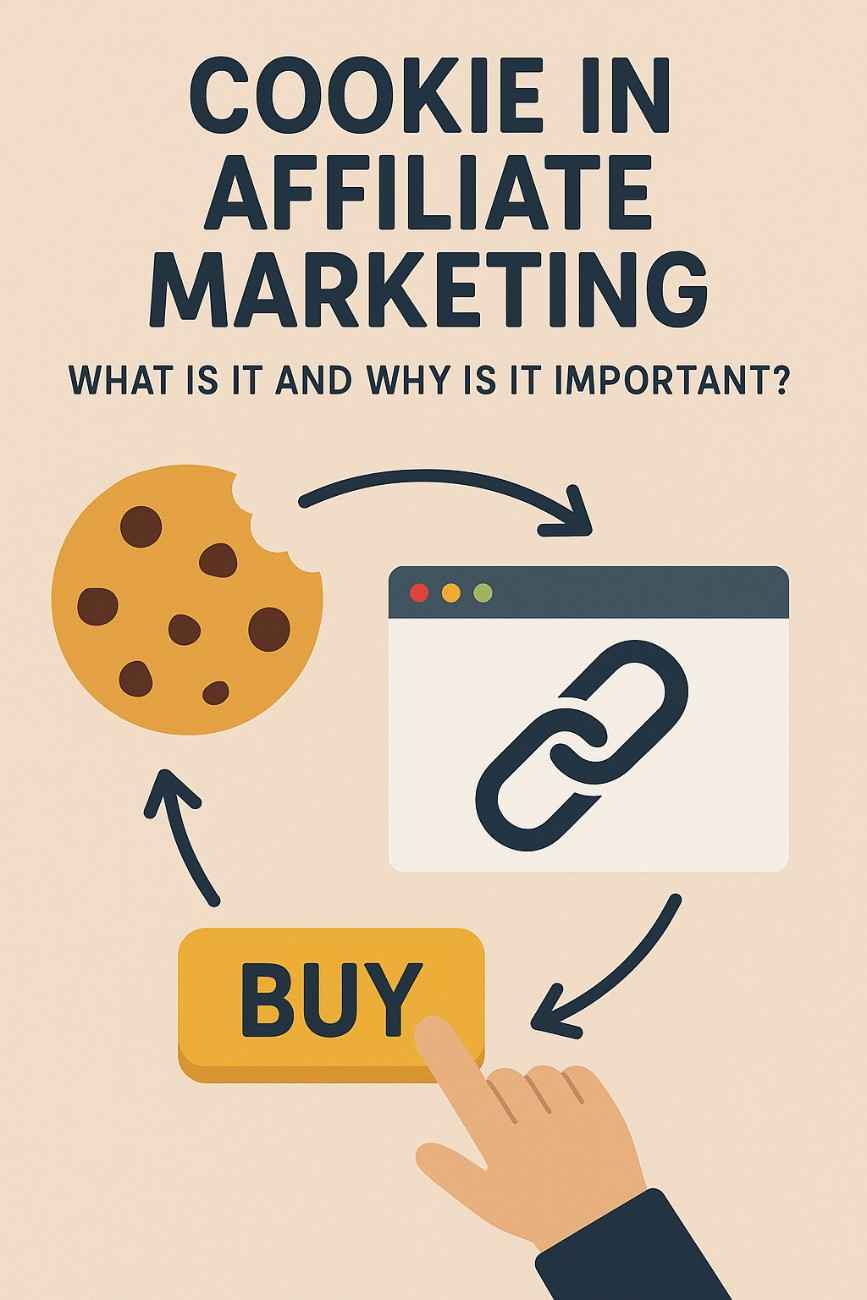
What is a Cookie in Affiliate Marketing, and Why Is It Important?

Affiliate marketing has revolutionized the way businesses promote their products and services in the digital age. It is a performance-based model where businesses pay commissions to individuals or companies (affiliates) who bring traffic, leads, or sales through their marketing efforts. One of the fundamental elements that makes this system work seamlessly is the cookie — a small but powerful tool used to track user behavior online.

In the context of affiliate marketing, cookies play a critical role in tracking and attributing sales or other conversions to the correct affiliate. Without cookies, it would be nearly impossible to ensure affiliates are accurately rewarded for their efforts. This essay will explore what cookies are in affiliate marketing, how they function, why they are essential, and provide a detailed example to demonstrate their role in action.


1. What Is a Cookie in Affiliate Marketing?

In simple terms, a cookie is a small text file that a website places on a user’s device (such as a computer, smartphone, or tablet) through the web browser. This file contains information about the user’s interaction with the website, such as the pages visited, items clicked, or actions taken.

In affiliate marketing specifically, cookies are used to store tracking information whenever a user clicks on an affiliate link. This information usually includes:

  • The affiliate’s ID or username

  • The date and time the link was clicked

  • The campaign or product ID

  • The referrer URL

  • Sometimes the device or browser information

This data allows affiliate networks and merchants to know which affiliate sent the customer, and whether the customer completed a desired action — such as purchasing a product or signing up for a newsletter.


2. How Cookies Work in Affiliate Marketing

To understand the importance of cookies in affiliate marketing, it’s useful to follow the typical journey of a user interacting with an affiliate link.

Step-by-Step Process:

Step 1: The Affiliate Promotes a Product

An affiliate joins a merchant’s affiliate program and receives a unique affiliate link. This link has an embedded tracking code or parameter that identifies the affiliate.

Example link:

perl
https://www.example.com/product?ref=affiliate123

Step 2: The User Clicks the Affiliate Link

A user reads a blog post, watches a video, or sees a social media post where the affiliate link is placed. When they click the link, they are redirected to the advertiser’s website.

Step 3: The Cookie Is Set

When the user lands on the advertiser’s site, the affiliate network or merchant sets a cookie in the user’s browser. This cookie logs the affiliate ID and other details related to the click.

Step 4: The User Takes Action (Now or Later)

If the user immediately purchases the product or signs up for a service, the cookie confirms that the affiliate who referred them gets the commission.

However, if the user doesn’t take immediate action but returns to the site later (within a certain period known as the cookie duration), the cookie ensures the affiliate still receives credit for the referral.

Step 5: Affiliate Commission is Tracked and Paid

Once the user completes the desired action (like buying the product), the merchant checks the cookie data to determine which affiliate referred the customer. The affiliate is then rewarded according to the program’s commission structure.


3. Importance of Cookies in Affiliate Marketing

Cookies may be small in size, but their role in affiliate marketing is massive. Here’s why:

a. Accurate Attribution

Cookies ensure that sales and conversions are correctly attributed to the affiliate who referred the customer. Without them, there would be no way to track the journey of the user or determine which affiliate influenced the decision.

b. Fair Compensation for Affiliates

Affiliate marketing is a performance-based model, so affiliates rely on accurate tracking to receive payment. Cookies help guarantee that affiliates are paid for their effort in promoting the product or service, even if the user does not take immediate action.

c. Delayed Conversions

Many users do not make immediate purchases after clicking an affiliate link. They may browse, compare, or come back days later to buy. Cookies enable delayed conversion tracking, so affiliates can still earn commission if the purchase happens within a specific time window.

d. Enhancing User Experience

Cookies also store user preferences, making return visits more personalized. For merchants, this means a higher chance of conversion. For affiliates, it means a better chance of earning commission even if the purchase is delayed.

e. Tracking Across Multiple Campaigns

Cookies help track user interactions across different marketing campaigns, providing valuable insights for advertisers and affiliates. For example, they can reveal which channel or campaign drove the most conversions.


4. Cookie Duration: What Is It and Why Does It Matter?

Cookie duration (also called the cookie window) refers to how long the tracking cookie remains active in the user’s browser. During this period, if the user completes the desired action, the affiliate is credited.

Cookie durations vary depending on the affiliate program:

  • Amazon Associates: 24 hours

  • Typical SaaS or eCommerce programs: 30 to 90 days

  • Some high-end programs: 180 days or even lifetime cookies

Why It Matters:

A longer cookie duration increases the affiliate’s chances of earning commission from delayed conversions. On the other hand, short-duration cookies (like Amazon’s 24-hour limit) require quicker action from users and more aggressive promotion from affiliates.


5. Limitations and Challenges of Cookie Tracking

While cookies are incredibly useful, they’re not foolproof. Several challenges can interfere with accurate tracking:

a. Browser Privacy Settings

Modern browsers like Safari, Firefox, and Brave have privacy settings that block third-party cookies by default. This limits the ability to track user behavior using cookies.

b. Ad Blockers

Many users install ad-blocking software, which can block affiliate links or prevent tracking pixels and cookies from being set.

c. Cross-Device Behavior

If a user clicks an affiliate link on their smartphone but makes a purchase later on a laptop, traditional cookie tracking may not capture the conversion, resulting in lost commissions.

d. Cookie Deletion

Users can clear their browser cookies manually or via browser settings, which would delete the tracking information before the conversion happens.


6. Solutions to Cookie Limitations

Affiliate marketers and networks are adapting to these challenges by using additional or alternative tracking methods:

a. First-Party Cookies

Instead of relying on third-party cookies, merchants now use first-party cookies stored directly on their own domain, which are more privacy-friendly and harder to block.

b. Server-to-Server (S2S) Tracking

This method uses a unique click ID passed between servers, avoiding reliance on browser cookies altogether. It’s often used in mobile app affiliate tracking and offers higher accuracy.

c. Email and Account-Based Attribution

When users log in or provide an email address, tracking can continue across devices and sessions, ensuring affiliates still receive credit.


7. Real-Life Example of Cookie Tracking in Affiliate Marketing

Scenario: Promoting a Hosting Service

Let’s imagine a digital marketer named Ayesha who runs a blog called SmartStartups.com, which helps entrepreneurs launch online businesses.

Ayesha signs up for Hostinger’s affiliate program, which offers a 60-day cookie duration and ₹1,200 commission per purchase.

Steps:

  1. Ayesha writes a detailed blog post titled “Top 5 Hosting Services for Small Businesses in 2025” and includes her affiliate link to Hostinger:

ruby
https://hostinger.in/?aff_id=ayesha101
  1. A reader named Rohit clicks on the link on June 5 but doesn’t purchase hosting right away.

  2. The Hostinger site sets a tracking cookie in Rohit’s browser with Ayesha’s affiliate ID and the date of the click.

  3. On June 20 — fifteen days later — Rohit revisits Hostinger directly and buys a 1-year hosting plan.

  4. Since it’s still within the 60-day cookie window, the system recognizes Ayesha as the referring affiliate.

  5. Ayesha receives her ₹1,200 commission.

If there were no cookie in place, Ayesha would not have received credit, and her effort would have gone unrewarded.


8. Conclusion

Cookies may be small data files, but they are monumental in the world of affiliate marketing. They are the digital breadcrumbs that ensure affiliates are accurately compensated for the traffic, leads, and sales they generate. Cookies make delayed purchases trackable, support fair compensation, enable performance analysis, and allow merchants to attribute results to the right marketing efforts.

However, as online privacy concerns grow and browsers evolve, the reliance on traditional cookie tracking is being challenged. To adapt, affiliates and businesses are embracing alternative methods like first-party cookies, server-side tracking, and more transparent data practices.

Still, understanding what a cookie is and why it’s important in affiliate marketing remains fundamental knowledge for anyone participating in this industry. Whether you’re a content creator, influencer, advertiser, or tech-savvy marketer, cookies are at the heart of how value is tracked and rewarded in the affiliate ecosystem.

By using cookies effectively — and responsibly — both affiliates and businesses can build stronger, more profitable, and more transparent partnerships.

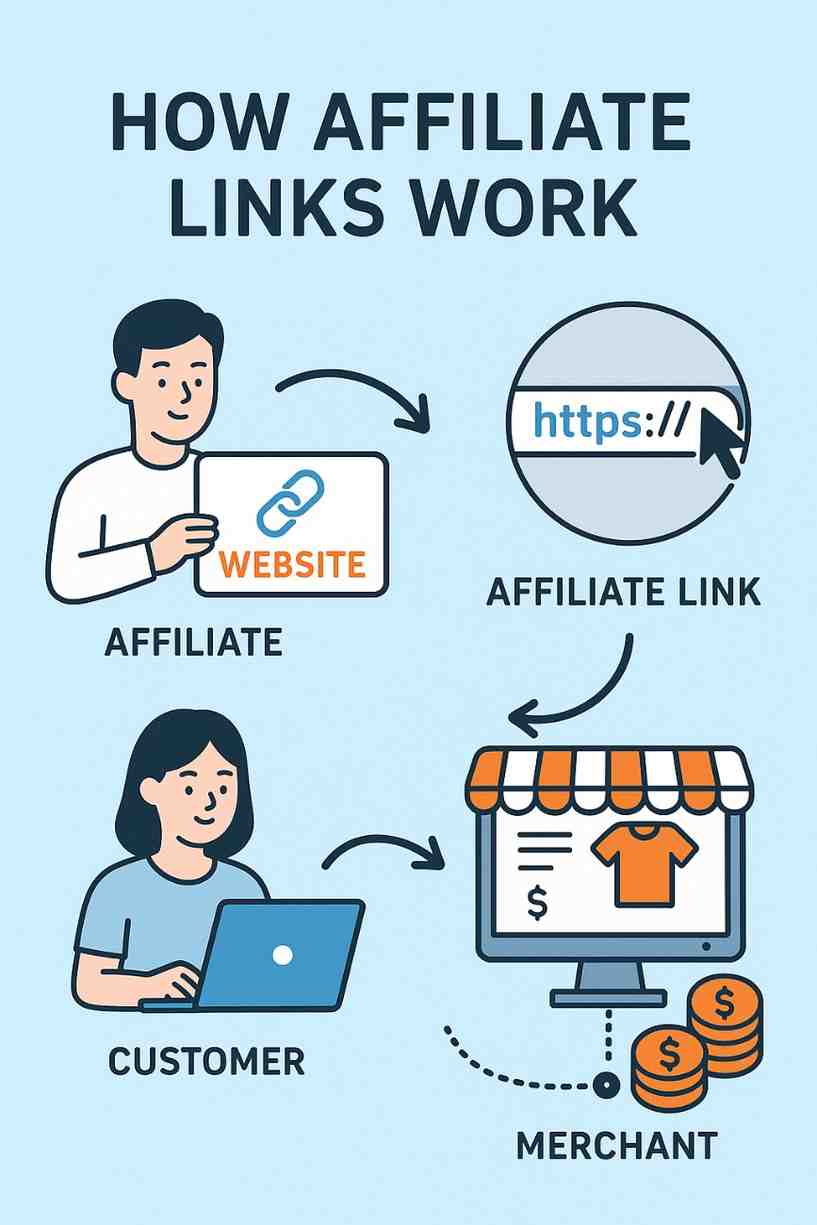
How Do Affiliate Links Work, and How Are They Tracked?

Affiliate marketing has become one of the most effective and widely used strategies in digital advertising. At the core of this system lies the concept of affiliate links — specially formatted URLs that allow businesses to track the performance of their marketing partners, also known as affiliates. These links ensure that affiliates are credited for their referrals and compensated accordingly.

In this detailed guide, we’ll explore how affiliate links work, how tracking is done, the technologies involved, and the practical application of affiliate link tracking through a real-world example.


1. What Is an Affiliate Link?

An affiliate link is a unique URL that contains an identifier (typically an affiliate ID or tracking code) used to track the activity of users referred by a specific affiliate. This link is generated when an affiliate joins an affiliate program and promotes a product, service, or brand.

Whenever a user clicks on this affiliate link and completes a specific action (such as making a purchase or signing up), the affiliate is rewarded based on the agreed-upon commission structure — which may be CPA (Cost Per Action), CPL (Cost Per Lead), or CPS (Cost Per Sale).

Structure of an Affiliate Link:

Affiliate links usually look something like this:

perl
https://www.example.com/product?ref=affiliate123

Or more complex:

arduino
https://www.example.com/product?aff_id=98765&utm_source=affiliate&utm_campaign=sale2025

In this URL:

  • aff_id=98765 is the unique affiliate ID.

  • utm_source=affiliate and utm_campaign=sale2025 are used for additional tracking via Google Analytics.


2. How Do Affiliate Links Work?

Affiliate links function by tracking the user’s behavior from the moment they click the link to the moment they complete an action (e.g., purchase, download, registration). The process involves several steps, which work seamlessly in the background using tracking technology.

Step-by-Step Process:

Step 1: Affiliate Joins a Program

The affiliate signs up with a company’s affiliate program or an affiliate network like Amazon Associates, ShareASale, or ClickBank. Upon approval, the affiliate receives access to a dashboard where they can generate their unique affiliate links for various products or services.

Step 2: Affiliate Promotes the Link

The affiliate embeds their affiliate links into content — such as blog articles, social media posts, YouTube videos, emails, or banner ads — and shares it with their audience.

Step 3: User Clicks the Link

When a consumer clicks on the affiliate link:

  • They are redirected to the advertiser’s website.

  • Simultaneously, the system captures the affiliate’s ID and stores a tracking cookie in the user’s browser.

Step 4: Tracking Begins

The tracking cookie collects information such as:

  • Affiliate ID

  • Time and date of the click

  • Campaign ID (if applicable)

  • Source of traffic

  • User’s IP address or device

The cookie duration (or “cookie window”) determines how long the affiliate will be credited for a purchase. It typically ranges from 24 hours to 90 days — though some programs offer lifetime cookies.

Step 5: User Converts

If the user completes the desired action within the cookie window (e.g., buying a product, signing up for a service), the system attributes the conversion to the affiliate who referred them.

Step 6: Affiliate Gets Paid

The affiliate platform or merchant tracks the transaction and rewards the affiliate based on the commission structure. This can be a flat fee or a percentage of the sale.


3. Technologies Used for Affiliate Tracking

Modern affiliate marketing relies on several technologies to accurately track user activity and ensure transparent reporting:

a. Cookies

Cookies are small pieces of data stored in the user’s browser when they click an affiliate link. The cookie contains the affiliate’s ID and other relevant data. If the user returns to the website and completes a conversion within the cookie period, the affiliate is credited.

  • Example: A cookie duration of 30 days means if a user clicks the link on June 1 and purchases on June 25, the affiliate still earns a commission.

b. Tracking Pixels

Tracking pixels are tiny, invisible images embedded in web pages or emails. When a user visits a page or completes an action, the pixel “fires” and notifies the server that a specific activity occurred.

Used primarily for:

  • Page views

  • Conversions

  • Email opens

c. Postback URLs (Server-to-Server Tracking)

This method doesn’t rely on browser cookies. Instead, it uses unique click IDs and passes them directly between servers. It’s more accurate and less affected by browser restrictions or cookie blocking.

  • Commonly used in mobile app installs and CPA networks.

d. UTM Parameters

UTM parameters are tags added to the end of a URL for tracking in tools like Google Analytics. While not directly tied to commission tracking, they help affiliates and advertisers analyze traffic sources, campaign performance, and user behavior.


4. Affiliate Link Redirection and Cloaking

To make affiliate links more user-friendly and secure, many affiliates use link cloaking or URL shortening. This practice masks the affiliate ID behind a cleaner and more trustworthy URL.

Original Link:

arduino
https://www.vendor.com/product?affiliate_id=89293&campaign=sale50

Cloaked Link:

arduino
https://www.mywebsite.com/recommends/productname

Benefits of cloaking:

  • Enhances credibility and aesthetics

  • Prevents affiliate link hijacking or commission theft

  • Helps track link clicks through your own system

Plugins like Pretty Links, ThirstyAffiliates, and Bitly are popular tools for this.


5. Cookie Duration: Why It Matters

Affiliate programs differ in terms of how long they store cookies. This window determines how long an affiliate has to earn a commission after the link is clicked.

Types of Cookie Durations:

  • Session-Based Cookies: Only track users during the active session. If the user leaves and comes back later, no commission.

  • 24-Hour Cookies: Amazon uses this model. If the user doesn’t purchase within 24 hours, the cookie expires.

  • 30-90 Days Cookies: Common among SaaS and eCommerce platforms.

  • Lifetime Cookies: If a user ever buys from the advertiser after clicking your link, you earn commission — forever.

The longer the cookie life, the better for affiliates, as it increases the chance of earning commissions.


6. Example: Affiliate Link in Real Life

Let’s look at a real-world example involving all elements of affiliate link tracking.

Scenario: Blogger Promotes a Web Hosting Service

  • Affiliate: Priya is a tech blogger who writes tutorials on building websites.

  • Advertiser: Bluehost offers an affiliate program with ₹5,000 per sale.

  • Tracking Method: Cookie-based with 60-day duration.

Step-by-Step Process:

  1. Priya signs up for Bluehost’s affiliate program and gets this link:

arduino
https://www.bluehost.in/track?affid=priya123
  1. She writes a blog titled “Best Hosting for WordPress in 2025” and embeds the affiliate link.

  2. A reader, Ramesh, clicks on the link but doesn’t buy immediately.

  3. The tracking system sets a 60-day cookie on Ramesh’s browser.

  4. Two weeks later, Ramesh returns to Bluehost directly and purchases a hosting plan.

  5. Because the original click is still within the cookie window, Priya is credited for the sale.

  6. Priya receives ₹5,000 in her affiliate dashboard.


7. Tools and Platforms for Managing Affiliate Links

Affiliate tracking can be managed using either in-house software or third-party affiliate networks.

Popular Affiliate Networks:

  • ShareASale

  • CJ Affiliate (Commission Junction)

  • Rakuten Advertising

  • Impact

  • ClickBank

In-House Programs:

Brands like Amazon, Flipkart, Shopify, and Hostinger manage their own affiliate programs using custom-built or licensed software.

These platforms provide:

  • Dashboard for affiliates

  • Tracking reports

  • Conversion and payout summaries

  • Marketing creatives and banners


8. Challenges in Affiliate Link Tracking

While affiliate link tracking is efficient, it’s not immune to challenges:

a. Cookie Blocking

Modern browsers like Safari and Firefox block third-party cookies by default. This can disrupt tracking unless server-side methods are used.

b. Ad Blockers

Some users use ad blockers that prevent tracking pixels or redirects from loading.

c. Cross-Device Attribution

A user may click a link on mobile and complete the purchase on a desktop — potentially breaking the tracking chain.

d. Link Hijacking

Competitors or unscrupulous individuals may replace or steal affiliate IDs to earn unearned commissions.


Conclusion

Affiliate links are the backbone of affiliate marketing. They enable precise tracking, attribution, and compensation for referrals. Through cookies, pixels, and server-to-server integrations, these links allow businesses to monitor affiliate-driven traffic and conversions with remarkable accuracy.

Whether it’s a blog, YouTube channel, or Instagram page, affiliate links make it possible for creators to monetize their influence — while allowing businesses to grow through a low-risk, performance-based model.

Understanding how affiliate links work and how they are tracked is essential for anyone looking to succeed in the affiliate marketing industry — ensuring transparency, accountability, and mutual benefit for both advertisers and affiliates.

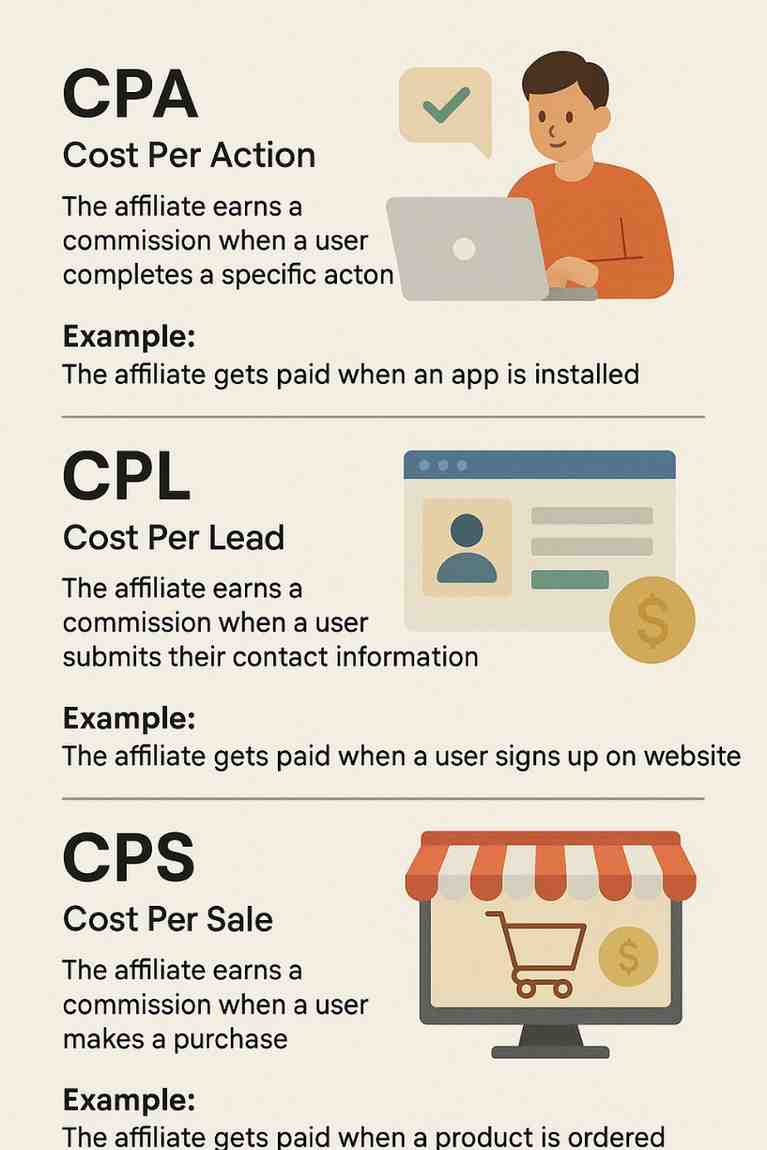
Define CPA, CPL, and CPS in Affiliate Marketing with Examples

Affiliate marketing is a dynamic and result-driven form of digital marketing in which a business rewards individuals (affiliates) for bringing in traffic, leads, or sales through the affiliate’s marketing efforts. Within affiliate marketing, different payout models define how and when an affiliate is compensated. Among the most commonly used models are CPA (Cost Per Action), CPL (Cost Per Lead), and CPS (Cost Per Sale).

Understanding these models is essential for both merchants and affiliates to optimize their campaigns effectively. Each model represents a different level of engagement from the consumer and carries varying levels of risk and reward for the parties involved.

In this comprehensive explanation, we will define CPA, CPL, and CPS in affiliate marketing, explore how each model functions, discuss their benefits and challenges, and provide real-life examples to illustrate their practical application.


1. What is CPA (Cost Per Action) in Affiliate Marketing?

Definition:

CPA stands for Cost Per Action (or sometimes Cost Per Acquisition). It is a broader affiliate marketing model where the affiliate earns a commission when the referred user completes a specific predefined action. This action can range from making a purchase, filling out a form, signing up for a newsletter, downloading an app, or watching a video.

The term “action” is generic and can be customized based on the advertiser’s goals. That’s what makes CPA one of the most flexible and popular models in affiliate marketing.

How It Works:

  1. An affiliate promotes an offer through a tracking link.

  2. A user clicks the link and is redirected to the advertiser’s page.

  3. If the user performs the required action (such as filling out a form or installing an app), the affiliate gets paid.

Key Characteristics:

  • Flexible: Includes CPL, CPI (Cost Per Install), and CPS as subsets.

  • Conversion-focused: Advertisers only pay when users complete a meaningful action.

  • Risk-controlled: Advertisers avoid wasting money on clicks or impressions that don’t convert.

Example:

A food delivery startup wants new users to download and sign up for its mobile app. They offer a CPA affiliate program paying ₹50 per successful sign-up.

  • An affiliate places the app link in their blog post titled “Top 5 Food Delivery Apps in India.”

  • A user clicks the link, installs the app, and signs up.

  • The affiliate earns ₹50 for that action.


2. What is CPL (Cost Per Lead) in Affiliate Marketing?

Definition:

CPL stands for Cost Per Lead. It is a subtype of the CPA model. In CPL, the affiliate is rewarded when the user they refer submits their contact information — often through a form — thereby becoming a “lead” for the business.

Leads are potential customers who have shown interest in a product or service but haven’t made a purchase yet. This model is especially popular with service providers, education companies, real estate firms, and B2B businesses.

How It Works:

  1. The affiliate promotes a lead generation offer, such as a free eBook download or webinar registration.

  2. A user clicks the link and submits a form with basic contact details (name, phone number, email).

  3. The advertiser captures this data for future sales efforts.

  4. The affiliate earns a fixed commission per lead.

Key Characteristics:

  • High conversion potential: Users don’t have to make a purchase — just share basic info.

  • Ideal for long sales cycles where nurturing leads is necessary.

  • Affiliates are paid quickly and reliably, even if a sale isn’t made.

Example:

A university launches an affiliate program offering ₹100 per student inquiry.

  • An affiliate runs Facebook ads promoting a “Download Free College Admission Guide” campaign.

  • Interested students fill out a form with their name, phone number, and email.

  • For each completed form, the affiliate earns ₹100.

If the campaign generates 300 leads, the affiliate earns ₹30,000 — regardless of whether any of the students actually enroll.


3. What is CPS (Cost Per Sale) in Affiliate Marketing?

Definition:

CPS stands for Cost Per Sale. This is one of the oldest and most common affiliate marketing models, also known as Pay Per Sale (PPS). In CPS, affiliates are paid a commission only when the referred user makes a successful purchase.

The affiliate earns a percentage of the sale amount or a fixed fee, depending on the terms set by the advertiser.

How It Works:

  1. An affiliate promotes a product (e.g., a book, software, or physical item) via a special tracking link.

  2. A user clicks on the link and purchases the item.

  3. The affiliate earns a share of the revenue from the sale.

Key Characteristics:

  • Low risk for advertisers: Payment is made only when a transaction occurs.

  • Encourages high-intent referrals.

  • Commission size often correlates with the product price and industry margins.

Example:

An e-commerce platform offers a 10% CPS commission on electronics.

  • An affiliate creates a YouTube video comparing smartphones and includes a link to one of the featured products.

  • A viewer clicks the affiliate link and purchases a smartphone worth ₹25,000.

  • The affiliate earns ₹2,500 (10% of the sale value).

If the affiliate refers five sales in a day, they earn ₹12,500 for that day.


Comparison Between CPA, CPL, and CPS

Feature CPA (Cost Per Action) CPL (Cost Per Lead) CPS (Cost Per Sale)
Action Required Any predefined action (sale, lead, install, etc.) User submits a form or basic info User completes a purchase
Ease of Conversion Moderate to High High (no purchase needed) Low to Moderate (requires purchase)
Affiliate Risk Moderate Low High
Advertiser Risk Low Moderate Very Low
Earning Potential Depends on the action Usually lower per conversion High commissions on each sale
Popular Use Cases App installs, trials, downloads Insurance, real estate, education E-commerce, SaaS, online stores

Advantages of CPA, CPL, and CPS Models

Advantages of CPA:

  • Flexibility in choosing the conversion action.

  • Aligns closely with specific campaign goals.

  • High scalability across industries.

Advantages of CPL:

  • Easier for users to convert since no payment is required.

  • Allows advertisers to build email lists and nurture prospects.

  • Effective for high-ticket services or B2B industries.

Advantages of CPS:

  • Highly profitable per transaction.

  • Promotes serious consumer intent.

  • Trusted and widely accepted in the affiliate world.


Challenges and Limitations

CPA Challenges:

  • Defining meaningful actions that result in actual customer interest.

  • Potential for fraud — bots or fake users completing basic tasks.

CPL Challenges:

  • Not all leads convert into customers.

  • Lead quality can vary, affecting advertiser ROI.

  • Requires strict validation rules to avoid fake submissions.

CPS Challenges:

  • Difficult to convert traffic into sales.

  • Requires more persuasive content, trust, and marketing skills.

  • Affiliates may earn nothing if users don’t complete the purchase.


Real-World Scenario Involving All Three Models

Let’s say a company, EduGrow, offers online courses in programming and digital marketing. They implement all three affiliate models.

  1. CPA – They run a campaign offering ₹30 for every user who signs up for a free webinar.

  2. CPL – They offer ₹100 for every user who fills out a detailed inquiry form about their courses.

  3. CPS – They offer a 20% commission on every course purchase. If a course costs ₹5,000, the affiliate earns ₹1,000 per sale.

A blogger, techcoach.in, joins the affiliate program and promotes EduGrow’s offerings:

  • 100 users sign up for the webinar (CPA) = ₹3,000

  • 40 users submit inquiries (CPL) = ₹4,000

  • 10 users buy a course (CPS) = ₹10,000

Total affiliate earnings = ₹17,000, leveraging all three models.


Conclusion

In affiliate marketing, CPA, CPL, and CPS are three foundational commission structures that define how affiliates are paid and how advertisers manage their performance-based marketing strategies.

  • CPA (Cost Per Action) provides flexible options based on any action deemed valuable by the business.

  • CPL (Cost Per Lead) is ideal for generating warm leads and building pipelines for long-term conversions.

  • CPS (Cost Per Sale) offers the most direct path to revenue but requires greater effort to persuade customers to purchase.

Each model serves a distinct purpose and is best suited for specific industries, products, and marketing goals. Affiliates must understand their audience and capabilities to select the most profitable model, while advertisers should align compensation with meaningful business outcomes. When used strategically, CPA, CPL, and CPS models can create win-win opportunities for both sides — driving conversions, boosting brand exposure, and generating income.

How to Become a Digital Marketing Specialist

Digital marketing is one of the fastest-growing fields today. Many people are interested in building a career in digital marketing, and becoming a digital...

What is SMM in Digital Marketing

SMM, or Social Media Marketing, is one of the most important parts of digital marketing. In simple words, SMM is the process of using...

What is Google Analytics in Digital Marketing

Google Analytics is one of the most important tools in digital marketing. It helps businesses understand how people interact with their websites and online...

What is Google AdWords in Digital Marketing

Google AdWords is one of the most important tools in digital marketing. Many businesses use AdWords to reach their target audience online and increase...

What Is CPM in Digital Marketing

In digital marketing, understanding how your ads are priced and measured is very important. Different advertising models help marketers track performance and control spending....