Home Blog Page 24

What are responsive search ads?

Responsive Search Ads (RSAs) are a dynamic ad format in Google Ads that allows advertisers to create flexible and highly relevant text ads for the Search Network. Unlike traditional text ads that have fixed headlines and descriptions, RSAs enable you to input multiple headlines and description lines. Google then automatically tests different combinations and learns which combinations perform best over time.

With Responsive Search Ads, you can add up to:

  • 15 different headlines (each up to 30 characters)

  • 4 different descriptions (each up to 90 characters)

Google will mix and match these elements in various ways to create ads tailored to users’ search queries. The goal is to improve ad relevance, click-through rate (CTR), and overall ad performance by showing the right message to the right user at the right time.

Why Responsive Search Ads Are Important

  1. Increased Flexibility: Google uses machine learning to serve the most effective combination of headlines and descriptions depending on the user’s search query, location, device, browsing history, etc.

  2. Improved Performance: Because RSAs test multiple combinations, they often result in better performance compared to static text ads.

  3. Time-Saving: Instead of creating multiple variations manually, you can create one responsive ad that adapts automatically.

  4. Greater Reach: RSAs can compete in more auctions by adapting to a wider range of search terms.

How RSAs Work in Practice – Example from Lenskart

Let’s say Lenskart wants to promote its “Buy 1 Get 1 Free Eyeglasses” offer.

They create a Responsive Search Ad with the following elements:

Headlines:

  • Buy 1 Get 1 Free Glasses

  • Stylish Eyewear for Men & Women

  • 100% UV Protection Lenses

  • Shop Eyeglasses Online Today

  • Free Home Eye Checkup

  • Top Eyewear Brands

  • Starting at ₹799

Descriptions:

  • Explore Lenskart’s latest eyeglasses collection with Buy 1 Get 1 offer.

  • Try glasses at home before you buy. Book a free eye test now!

  • Choose from 5000+ styles. Fast delivery & easy returns.

  • Perfect fit & lens protection. Trusted by 10 million+ users.

Google will automatically combine these headlines and descriptions in different ways, such as:

Ad Example 1:
Buy 1 Get 1 Free Glasses
Shop Eyeglasses Online Today
Explore Lenskart’s latest eyeglasses collection with Buy 1 Get 1 offer.

Ad Example 2:
Stylish Eyewear for Men & Women
Free Home Eye Checkup
Try glasses at home before you buy. Book a free eye test now!

Over time, Google tracks which combinations drive more clicks or conversions and prioritizes those. This helps Lenskart improve ad efficiency and reach more customers with relevant messages.

Best Practices for Responsive Search Ads

  • Use all 15 headlines and 4 descriptions if possible to give Google more testing options.

  • Make sure headlines are unique and highlight different benefits, features, or offers.

  • Include relevant keywords in some headlines to improve ad relevance.

  • Avoid repeating the same message across headlines or descriptions.

  • Use pinning carefully: Pinning lets you force a certain headline or description to appear in a specific position (like headline 1), but excessive pinning reduces flexibility and machine learning effectiveness.

  • Regularly review performance in the Google Ads interface. Look at combination performance, CTR, conversions, etc.

Conclusion

Responsive Search Ads are a powerful, AI-driven ad format that helps advertisers improve performance by automatically adapting ad messages to match user intent. They save time, improve CTR, and boost conversion rates by showing users more relevant combinations of ad headlines and descriptions. For businesses like Lenskart, RSAs help reach diverse customers more effectively, increase campaign flexibility, and improve return on investment across a wide range of search queries.
What is the difference between campaigns and ad groups?

In Google Ads, both campaigns and ad groups are essential components of the account structure, but they serve different purposes and operate at different levels. Understanding the difference between the two is crucial for running effective and well-organized ad campaigns. Campaigns control broader settings like budget and targeting, while ad groups help organize your keywords and ads around specific themes.

Definition of a Campaign

A campaign is the top-level structure used to organize your advertising strategy based on broader business goals. When you create a campaign in Google Ads, you decide important settings such as:

  • Campaign type (Search, Display, Shopping, Video, etc.)

  • Daily or monthly budget

  • Bidding strategy (Manual CPC, Maximize Conversions, Target CPA, etc.)

  • Geographic locations

  • Languages

  • Networks (Google Search Network or Display Network)

Each campaign should represent a major goal or category of your business. For example, if your business sells multiple product lines, each campaign can be dedicated to promoting a specific product line or service category.

Definition of an Ad Group

An ad group sits within a campaign and is used to group related ads and keywords. Each ad group contains:

  • A set of related keywords

  • One or more ads

  • Target URLs (landing pages)

Ad groups help ensure that your ads are relevant to the keywords being searched by users. A well-structured ad group improves your ad’s Quality Score, click-through rate (CTR), and relevance, which can reduce your cost-per-click and increase conversions.

Key Differences Between Campaigns and Ad Groups

  1. Level in Structure:

    • Campaigns are the higher-level structure in your Google Ads account.

    • Ad groups are nested within campaigns.

  2. Purpose:

    • Campaigns define overall goals, budget, and targeting.

    • Ad groups organize keywords and ads around specific themes for better relevance.

  3. Settings:

    • Campaign-level settings include budget, bidding, targeting, and networks.

    • Ad group settings include specific keywords and ad copy.

  4. Budget Control:

    • Budget is set at the campaign level.

    • Ad groups share the budget assigned to their parent campaign.

  5. Keyword and Ad Relevance:

    • Ad groups focus on keeping keywords and ad messages closely aligned.

    • Campaigns ensure that different marketing goals are separated and managed properly.

Example Based on Lenskart

Let’s use Lenskart, a major eyewear retailer in India, to illustrate the difference.

Lenskart wants to run different advertising campaigns for each of their major product lines.

Campaigns:

  • Campaign 1: Eyeglasses Promotion

  • Campaign 2: Sunglasses Summer Sale

  • Campaign 3: Contact Lenses Offer

Each campaign has a separate budget, geographic target, and bidding strategy based on the business goal.

Now, within Campaign 1: Eyeglasses Promotion, Lenskart sets up multiple ad groups based on the type of customer or product variation.

Ad Groups in Campaign 1:

  • Ad Group 1: Men’s Eyeglasses

  • Ad Group 2: Women’s Eyeglasses

  • Ad Group 3: Kids’ Eyeglasses

  • Ad Group 4: Premium Eyeglasses (Ray-Ban, Oakley)

  • Ad Group 5: Budget Eyeglasses (Under ₹999)

Each ad group contains a set of keywords and ads that specifically match that theme. For example, the “Men’s Eyeglasses” ad group may target keywords like:

  • buy eyeglasses for men

  • men’s spectacle frames online

  • stylish men glasses

And it will have ads like:
“Stylish Men’s Eyeglasses – Starting from ₹799 – Lenskart Exclusive Offer”

Each ad also links to the specific men’s eyeglasses landing page.

Meanwhile, the “Women’s Eyeglasses” ad group would use different keywords and direct users to a different section of the website.

Why the Difference Matters

The separation between campaigns and ad groups allows Lenskart to manage budgets and performance at multiple levels. For instance, if the Sunglasses Summer Sale campaign is performing very well, Lenskart can increase the budget just for that campaign without affecting the eyeglasses or contact lenses campaigns. Similarly, if the Premium Eyeglasses ad group within the eyeglasses campaign is getting more conversions than the Budget Eyeglasses ad group, they can adjust bids or refine keywords within that group without disrupting the entire campaign.

Aspect Campaign Ad Group
Definition Highest level in Google Ads structure A sub-level within a campaign
Purpose Sets overall marketing goal, budget, and targeting Groups related keywords and ads under one theme
Settings Controlled Budget, location, language, bidding, networks Keywords, ad copy, landing page URLs
Budget Level Budget is set at the campaign level Ad groups share the campaign’s budget
Targeting Broad targeting (e.g., by product category or goal) Narrow targeting (e.g., by audience segment or product type)
Example (Lenskart) Campaign: Eyeglasses Promotion Ad Groups: Men’s Eyeglasses, Women’s Eyeglasses, Kids’ Eyeglasses
Number Allowed One account can have many campaigns One campaign can have multiple ad groups
Keyword Management Not set at campaign level Specific keywords are set at the ad group level

Conclusion

In summary, campaigns and ad groups play different but equally important roles in the Google Ads structure. Campaigns help define the overall advertising strategy, including budget and targeting, while ad groups help organize your ads and keywords for relevance and precision. A well-structured account with clear campaign and ad group separation enables better control, higher ad performance, and more efficient budget use. For a brand like Lenskart, using campaigns and ad groups effectively helps them reach the right audience with the right message at the right time.

What is a Google Ads account structure?

A Google Ads account structure refers to the way your advertising campaigns, ad groups, keywords, ads, and targeting settings are organized within your Google Ads account. A well-structured account helps in better campaign management, performance tracking, budget control, and optimization. The structure impacts everything from how your ads are triggered to how your budget is spent, and even how effective your reporting will be. When your account is properly structured, it’s easier to monitor performance, make informed decisions, and improve your return on investment.

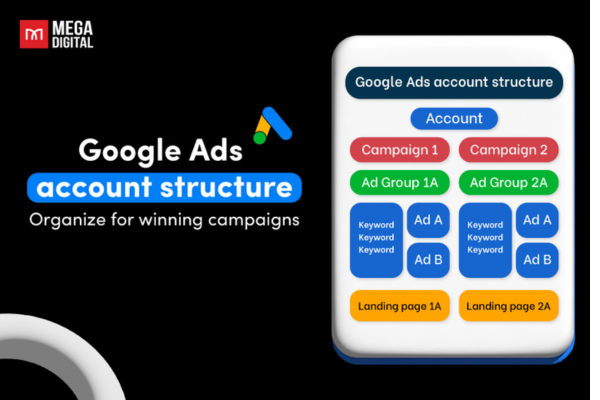
A Google Ads account is organized in a hierarchy that consists of the following three main levels: Account, Campaign, and Ad Group.

1. Account Level

This is the top-most level and includes your overall Google Ads login and settings. The account level contains information like your email address, billing details, and user access permissions. Each business usually has one Google Ads account to manage all their advertising campaigns.

2. Campaign Level

Under each Google Ads account, you can create multiple campaigns. A campaign represents a broader goal or category, such as promoting a product line, a service category, or a location-based offer. At the campaign level, you set key settings such as:

  • Campaign type (Search, Display, Shopping, Video, etc.)

  • Daily or monthly budget

  • Bidding strategy (e.g., Manual CPC, Maximize Conversions, Target ROAS)

  • Locations to target

  • Languages

  • Networks (Google Search Network or Display Network)

Each campaign should focus on a single objective to keep things organized and easier to analyze. For example, if you own an eyewear store, one campaign might focus on promoting eyeglasses, while another campaign could be created to advertise sunglasses.

3. Ad Group Level

Within each campaign, there are multiple ad groups. An ad group contains a set of related ads and keywords. All ads in an ad group share the same keyword targeting and landing page themes. The purpose of an ad group is to organize your ads around a common theme so that they match what users are searching for.

In each ad group, you define:

  • Keywords: the search terms you want your ads to show for

  • Ads: the text or creative content shown to users

  • Landing pages: the specific pages users are sent to when they click the ad

Organizing ad groups properly ensures better ad relevance, which helps improve your Quality Score, click-through rate (CTR), and ultimately your ad performance.

Why a Well-Structured Account Matters

A properly structured account gives you better control over your campaigns. It allows you to:

  • Measure and compare the performance of different products or services

  • Test different ad creatives and targeting strategies

  • Allocate budgets more efficiently between high- and low-performing campaigns

  • Apply settings like location targeting, ad scheduling, and bidding strategies at the appropriate level

  • Improve relevance between keywords, ads, and landing pages, which increases Quality Score and reduces cost-per-click (CPC)

Example Based on Lenskart

Let’s take the example of Lenskart, a well-known online eyewear retailer in India, to understand how they might structure their Google Ads account.

Google Ads Account
Business Name: Lenskart

Campaigns:

  • Campaign 1: Eyeglasses – Nationwide Promotion

  • Campaign 2: Sunglasses – Summer Sale

  • Campaign 3: Lenskart Blu – Screen Protection Glasses

  • Campaign 4: Contact Lenses – Monthly Deals

  • Campaign 5: Store Visits – Local Eye Check-up Offer

Each campaign has a separate budget and may target different locations or use different bidding strategies.

Ad Groups within Campaign 1 (Eyeglasses – Nationwide Promotion):

  • Ad Group 1: Men’s Eyeglasses

  • Ad Group 2: Women’s Eyeglasses

  • Ad Group 3: Kids’ Eyeglasses

  • Ad Group 4: Premium Brands – Ray-Ban, Oakley

  • Ad Group 5: Affordable Range – Under ₹1,000

Each ad group has a set of specific keywords. For example, the “Men’s Eyeglasses” ad group may include keywords like “buy men eyeglasses online,” “stylish eyeglasses for men,” “Lenskart men’s frames,” etc. Each of these ad groups has 2–3 text ads targeting those keywords and links to the most relevant landing page on the Lenskart website.

Benefits of This Structure for Lenskart

This account structure allows Lenskart to analyze which product category is generating the most conversions. For instance, they can easily compare whether men’s eyeglasses or women’s eyeglasses perform better. They can also allocate more budget to campaigns or ad groups that have a better ROI. Additionally, targeting and messaging are much more precise, leading to higher ad relevance and better user experience.

Conclusion

The Google Ads account structure is a critical foundation for running successful ad campaigns. With a well-organized structure, businesses can manage their ads more effectively, control costs, improve Quality Scores, and generate better results. Whether you are a small business or a large e-commerce platform like Lenskart, following a logical and strategic structure in your account makes it easier to grow, optimize, and scale your advertising efforts.

How do you set up conversion tracking?

Conversion tracking is a method used in digital marketing to measure what happens after a user interacts with your ad. It helps you understand whether your ad resulted in a desired action such as a purchase, form submission, phone call, sign-up, or app download. By setting up conversion tracking, you can evaluate the effectiveness of your ads and optimize your campaigns for better performance and higher return on investment.

Setting up conversion tracking allows you to see which ads, keywords, and campaigns are generating valuable actions on your website. This not only helps improve your advertising strategy but also ensures that your marketing budget is being spent efficiently. Below is a complete step-by-step guide to setting up conversion tracking using Google Ads, one of the most commonly used platforms.

Step 1: Sign in to Your Google Ads Account

Go to the Google Ads website (ads.google.com) and sign in using your Google account credentials.

Step 2: Access the Conversions Section

Click on the “Tools & Settings” icon in the top right corner. Under the “Measurement” column, select “Conversions.” Then click the “+ New Conversion Action” button to start creating a new conversion tracking setup.

Step 3: Choose the Conversion Source

You will be asked to choose the type of conversion you want to track. Google provides four options:

  1. Website – for tracking purchases, form submissions, and other actions on your site.

  2. App – for tracking mobile app installs and in-app actions.

  3. Phone calls – for tracking calls made directly from your ads or website.

  4. Import – for tracking conversions that happen offline, such as sales that occur through a CRM system.

For most businesses, especially e-commerce websites like Lenskart, you would choose “Website” to track online purchases and other actions.

Step 4: Set Up the Conversion Details

Now you need to enter the details of the conversion action:

  • Conversion Name: Name your conversion action, for example, “Purchase Completed” or “Form Submission.”

  • Category: Select the appropriate category, such as Purchase, Sign-up, Lead, or Add to Cart.

  • Value: You can assign a fixed value for every conversion or set different values for each transaction (useful for e-commerce).

  • Count: Choose whether to count every conversion or only one per ad click. Use “Every” for purchases and “One” for leads.

  • Conversion window: Set how long after an ad interaction a conversion should be counted (default is 30 days).

  • Include in ‘Conversions’: Keep this checked if you want to include this data in your main reports.

  • Attribution model: Choose an attribution model like Last Click or Data-Driven to decide how credit is assigned.

After filling these out, click “Create and Continue.”

Step 5: Install the Conversion Tracking Tag

Once your conversion is created, Google will provide you with a code snippet to place on your website. There are two parts:

  • Global Site Tag (gtag.js): This should be placed in the <head> section of every page on your website. If it’s already there (for example, from Google Analytics), you don’t need to add it again.

  • Event Snippet: This code goes on the specific page where the conversion happens—like the thank-you page after a purchase or form submission.

You can install the code manually, use Google Tag Manager, or send it to your web developer. After installing, click “Next” and then “Done.”

Step 6: Test and Verify

It’s important to make sure your conversion tag is working correctly. You can do this by:

  • Visiting your website and completing the conversion action.

  • Using the Google Tag Assistant Chrome extension to check if the tag fires correctly.

  • Checking the “Conversions” section in Google Ads after a few hours to see if any conversions have been recorded.

Additional Tips for Successful Setup

If you’re using Google Tag Manager, you can set up conversion tracking without touching your website code. Just add a new tag for Google Ads Conversion Tracking, paste the conversion ID and label, and set a trigger for your thank-you page or specific event.

For dynamic e-commerce tracking like Lenskart, where each product has a different value, use dynamic conversion values. These can be passed using variables from the checkout page.

If you use Google Analytics to track goals, you can also import those goals directly into Google Ads and treat them as conversions.

Use Enhanced Conversions in Google Ads to improve accuracy. This feature allows you to use first-party data (like email or phone number) securely to track more conversions, even if cookies are blocked.

Why Conversion Tracking is Important for Businesses Like Lenskart

Let’s take an example from Lenskart. Suppose they are running a Google Ads campaign offering “Buy 1 Get 1 Free Eyeglasses.” A user clicks on the ad, lands on a promotional page, selects two pairs, completes the checkout, and lands on the thank-you page. If a Google Ads conversion tag is placed on that thank-you page, Google will register that a purchase was completed. This information is then tied back to the specific ad and keyword that triggered the action.

Now, the marketing team at Lenskart knows which ad drove the conversion. They can increase their budget on high-performing keywords, pause underperforming ones, and refine their targeting. If they notice that many users drop off before reaching the thank-you page, they may also identify issues in the checkout flow.

Other types of conversions Lenskart may track include users who:

  • Add products to their cart.

  • Use the “Try On” feature.

  • Sign up for email updates.

  • Download the mobile app.

  • Schedule an eye test.

Conversion tracking gives them insights into every part of the customer journey.

Conclusion

Setting up conversion tracking is essential for any business that wants to grow through digital advertising. It gives you clear insights into which ads, keywords, and campaigns are generating real business results.

What is conversion tracking?

What is Conversion Tracking?

Conversion tracking is a digital marketing method used to monitor and measure the actions users take on a website after clicking on an ad. These actions, called conversions, can include purchases, signups, form submissions, adding a product to the cart, or any other valuable user interaction. Conversion tracking helps advertisers understand how effective their ads are in achieving business goals.

When you run online ads, it’s important to know whether those ads are producing results. Conversion tracking provides this insight. It works by placing a small piece of code—called a conversion tag or pixel—on a specific page of your website, usually the “thank you” or “order confirmation” page. When a user completes a certain action and lands on that page, the tag fires and records the action as a conversion.

This data allows marketers to analyze which ads, keywords, or campaigns are generating the most value. With this information, businesses can optimize their ad strategies, reallocate budgets, improve messaging, and eliminate underperforming elements of their campaigns.

Example of Conversion Tracking on Lenskart Website

To understand conversion tracking in a real-world scenario, let’s take the example of Lenskart, one of India’s leading online eyewear stores.

Imagine Lenskart is running a Google Ads campaign promoting a “Buy 1 Get 1 Free Eyeglasses Offer.” A user searches for “affordable eyeglasses online” on Google and clicks on the Lenskart ad that appears in the search results. This ad directs the user to a dedicated landing page on the Lenskart website that showcases the Buy 1 Get 1 collection.

The user browses through the eyeglasses, applies filters, selects two frames, adds them to the shopping cart, and completes the checkout process. After making the payment, the user is taken to an order confirmation page. On this page, Lenskart has placed a Google Ads conversion tag. As soon as the page loads, the tag activates and records the conversion. This data is then sent back to the Google Ads platform.

This means that Google Ads now knows that the user who clicked on the ad completed a valuable action—making a purchase. The platform also associates that conversion with the specific keyword, ad group, and campaign that drove the user to the site. This information helps the Lenskart marketing team understand which part of their advertising strategy is delivering actual business results.

By analyzing this data, Lenskart can make informed decisions. For example, if they find that a lot of conversions are coming from the keyword “affordable eyeglasses,” they may decide to increase their bid on that keyword. On the other hand, if some keywords are generating clicks but not leading to conversions, they may choose to pause or refine those keywords to avoid wasting budget.

Types of Conversions Lenskart Might Track

There are many actions that Lenskart may track as conversions, depending on their goals. These can include:

Completed purchases: This is the most direct and valuable conversion, showing that the user bought a product.

Add to cart: Tracking when users add items to their shopping cart helps understand buying interest.

Clicking on “Try with 3D” feature: This indicates product engagement, especially with their AR feature.

Form submissions: Users booking an eye test or requesting a call back can be tracked as conversions.

Newsletter sign-ups: Growing their email list is important for remarketing.

Downloading the Lenskart mobile app: Encouraging app usage is a valuable long-term goal.

By setting up conversion tracking for these actions, Lenskart can build a complete picture of how users interact with their ads and their website.

Why Conversion Tracking is Important for Lenskart

Conversion tracking offers measurable insights into advertising performance. It shows whether the money spent on ads is generating results. Without it, Lenskart would only see how many users clicked on ads—but not whether those users became paying customers.

It also helps in better budget allocation. By knowing which keywords and ads are converting, Lenskart can invest more in what works and reduce spend on what doesn’t. This improves return on ad spend (ROAS).

With conversion data, Lenskart can make smarter bidding decisions. For instance, they can enable automated bidding strategies like “Maximize Conversions” or “Target CPA” in Google Ads, which use conversion data to optimize bids in real-time.

It provides insights into the customer journey. For example, they may learn that users are more likely to convert after interacting with the AR “Try On” feature. This could influence their ad creatives or landing page design.

It supports A/B testing. Lenskart can create two versions of a landing page or ad and use conversion tracking to see which one performs better. Over time, this helps refine messaging, design, and targeting for maximum results.

Conclusion

Conversion tracking is an essential part of any performance-driven marketing campaign. It allows businesses like Lenskart to connect the dots between ad clicks and customer actions. By knowing exactly which ads are turning browsers into buyers, they can optimize campaigns, improve user experience, and achieve better ROI. Whether the goal is to increase sales, boost sign-ups, or encourage app downloads, conversion tracking ensures that every advertising rupee is spent wisely. For Lenskart, it’s the difference between running blind ads and making data-driven decisions that grow the business efficiently.

Why is landing page experience important?

Introduction

In the competitive world of digital advertising, attracting clicks through compelling ads is only half the battle. The real challenge begins once a user lands on your website. This is where the importance of the landing page experience comes into play. The landing page is the destination where potential customers are directed after clicking on an ad. Whether they take a desired action—such as making a purchase, signing up, or filling out a form—largely depends on the quality and relevance of the landing page. A positive landing page experience not only improves user satisfaction but also plays a critical role in reducing advertising costs, improving conversions, and building long-term trust with users.

What is Landing Page Experience?

Landing page experience refers to how well your website’s landing page meets the expectations of users who click on your ad. It involves aspects like content relevance, page loading speed, mobile-friendliness, ease of navigation, transparency, and clarity of information. In simple terms, it answers the user’s question: “Did I find what I expected when I clicked on this ad?”

If a landing page is slow, irrelevant, confusing, or hard to use, users are likely to leave it within seconds. That leads to a high bounce rate and lower chances of conversion. On the other hand, a landing page that is relevant, fast, visually appealing, and easy to use can encourage the visitor to take action, improving the overall success of your marketing campaigns.

Why It Matters in Digital Advertising

In advertising platforms like Google Ads, the landing page experience directly affects the Quality Score, which is a metric Google uses to determine the relevance and effectiveness of your ads. A better landing page experience means a higher Quality Score, which leads to lower cost-per-click (CPC), higher ad rankings, and better ROI. A poor landing page, no matter how good your ad is, will lower your ad performance.

In other words, a well-optimized landing page benefits your business in three key ways:

  1. Improves user satisfaction and trust

  2. Increases conversion rates

  3. Reduces advertising costs by improving Quality Score

Example: MakeMyTrip Case Study

Imagine a user searches for “Goa holiday packages” on Google. They see an ad from MakeMyTrip that says: “Explore Goa Holiday Packages – Starting at ₹5,999 – Book Flights + Hotels Now!” If the user clicks this ad and lands on a generic homepage showing all destinations like Shimla, Kerala, or Manali, they’ll feel confused and might leave immediately.

Now imagine instead that the ad takes the user directly to a landing page that clearly displays Goa holiday packages with prices, filters by hotel star rating, travel dates, and a “Book Now” button. The content is relevant, the page loads quickly, and it’s easy to book. This positive experience aligns with the ad’s promise, builds trust, and increases the chances that the user will make a booking. That’s the power of an effective landing page.

Important Factors That Contribute to Good Landing Page Experience

1. Relevance of Content

The most basic requirement of a good landing page is that it should match the user’s intent and the message of the ad. If the ad promotes “Buy Nike Running Shoes at 50% Off,” the landing page should feature Nike running shoes with the discount clearly visible. Misleading or unrelated content causes users to bounce and damages your credibility.

2. Page Loading Speed

According to studies, if a page takes more than 3 seconds to load, over 50% of users abandon it. A fast-loading page reduces bounce rate and keeps the user engaged. Tools like Google PageSpeed Insights can help you improve your site’s performance.

3. Mobile-Friendliness

Today, more than half of users access websites via smartphones. A landing page that isn’t optimized for mobile will have poor usability—buttons may be hard to click, text may be too small, or the layout may break. Google gives preference to mobile-optimized sites in search rankings and ad quality.

4. Clear Call-to-Action (CTA)

Users should never have to wonder what to do next. Whether it’s “Shop Now,” “Sign Up,” “Book a Demo,” or “Get a Quote,” your CTA should be bold, visible, and actionable. It should also be placed strategically to guide users through the conversion funnel.

5. Ease of Navigation

Users should be able to find what they’re looking for within seconds. A cluttered layout or poor structure increases friction. Organize the content with headers, bullets, images, and short paragraphs. Include filters or drop-down menus if needed.

6. Transparency and Trust Signals

A good landing page builds user trust by showing clear contact information, return policies, customer reviews, certifications, and secure payment badges. These elements help reduce doubt and increase confidence in your brand.

7. Visual Design and Readability

Design affects how users feel about your site. Use white space, contrasting colors, and clean typography. Avoid overwhelming users with too much information. Images and videos should be high-quality and relevant to the offer.

8. Conversion Tracking and Analytics

By setting up tools like Google Analytics and conversion tracking, you can measure the performance of your landing page. High bounce rates, short session durations, and low conversion rates may signal that the landing page experience needs improvement.

Impact on Quality Score and Ad Rank

Google Ads uses a metric called Quality Score to evaluate the relevance and usefulness of your ads, keywords, and landing pages. A good Quality Score leads to:

  • Higher Ad Rank (your ad appears in better positions)

  • Lower Cost-per-Click (you pay less for each click)

  • Better Return on Investment

Landing page experience is one of the core components of Quality Score. If your landing page is slow, confusing, or irrelevant, your Quality Score drops, your ad position lowers, and your ad budget becomes less effective.

How It Helps in Brand Building

A landing page is often the first real interaction a potential customer has with your brand. If the experience is positive, it sets the tone for a lasting relationship. A well-crafted landing page with consistent branding, messaging, and design builds credibility and strengthens your brand image. Users who trust your landing page are more likely to return, recommend your service, or follow you on social media.

Landing Page Experience in Remarketing

Even if a user doesn’t convert on the first visit, a good experience makes them more likely to return later. This is especially useful in remarketing campaigns. A clean and professional landing page helps build familiarity and trust, which are key in turning a warm lead into a customer during the second or third visit.

Final Thoughts

In conclusion, landing page experience is not just about aesthetics or technical performance—it is a critical component of your digital marketing strategy. It bridges the gap between a user’s interest and their final action. By focusing on creating landing pages that are relevant, fast, mobile-friendly, trustworthy, and easy to navigate, you can significantly improve your advertising performance and user satisfaction.

The competition in online marketing is fierce, and attention spans are short. Businesses that invest time and effort into creating meaningful landing page experiences not only drive better results from their advertising campaigns but also build lasting relationships with their customers. Whether your goal is sales, signups, or engagement, your landing page is where it all happens—so make sure it delivers on every promise your ad makes.

How does Pinterest influence consumer behavior?


1. A Visual Search Engine Shaping Intent

Pinterest functions less like a social feed and more like a visual discovery engine. Users don’t browse for updates—they search for ideas. Whether it’s “minimalist living room ideas” or “vegan dinner inspiration,” Pinterest presents images aligned with consumer intent—and often before users can articulate it.

  • 97% of top searches on Pinterest are unbranded, showing users begin with inspiration—not brand names (dotndot.com).
  • 66% of users turn to Pinterest first when starting a project or looking to buy .

This positions Pinterest as an early stage in the consumer journey—where ideas become intent.


2. Long Decision Loops & High Conversion Intent

Unlike platforms where content lifespan is short, Pinterest Pins can go viral months or even years after posting, nurturing long-term consumer consideration.

  • Users spend 14.5 minutes per session browsing, often starting long before a purchase (dotndot.com).
  • 6 in 10 visual product searches end in a purchase—a remarkably high conversion rate (thunderbit.com).
  • Users spend twice as much per month than those on other platforms (bloggingwizard.com).

Pinterest users engage in “slow shopping”—they explore, save, revisit, and convert over time.


3. Discovery of New Brands & Products

Pinterest’s preference for unbranded content opens the door for new product discovery.

That discovery begins with visual curiosity—not brand loyalty—leading to genuine consumer interest.


4. High ROI & Referral Power

For advertisers, Pinterest delivers strong returns:

  • Ads on Pinterest cost 2.3× less per conversion than other platforms (arxiv.org, influencermarketinghub.com).
  • For every $1 spent, advertisers see $4.30 in sales .
  • Pinterest drives 33% more referral traffic to e-commerce sites vs Facebook (socialpilot.co).

These metrics indicate that Pinterest users are both highly engaged and purchase-ready.


5. Video & Product Tags Drive Purchase Actions

Pinterest Pins often include shoppable features—like tags and catalogs.

This shows that Pinterest’s content formats are intentionally designed to shorten the path from discovery to purchase.


6. Trend Forecasting and Cultural Impact

Pinterest also influences broader consumer behavior through trend prediction:

  • Pinterest Trends, a native tool, reveals top search topics that outperform traditional search engines for predicting trends (voguebusiness.com).
  • The platform’s pop-up stores (e.g., “Western Gothic”) help translate viral aesthetics into real-world purchases via Pinterest’s QR-enabled shopping experience (wired.com).
  • Gen Z—who make up over 40% of users—is increasingly treating Pinterest as a shopping platform (wired.com).

Brands use Pinterest not just for sales but to anticipate what shoppers will want next.


7. Social Responsibility & Sustainable Consumption

Pinterest also fosters conscious consumption:

  • Searches for eco-friendly content have surged—“sustainable living for beginners” up by 265% YoY (voguebusiness.com, sustainablebrands.com).
  • Millennials and Gen Z are 2× more likely to engage with sustainability topics than older users (bloggingwizard.com).
  • Brands like Rothy’s and prAna attribute increased web traffic to Pinterest’s discovery funnel (sustainablebrands.com).

This indicates Pinterest not only reflects but can steer socially responsible consumer choices.


🎯 Real-Life Example: Launch of a Sustainable Water Bottle

A brand named EcoSip launches a reusable water bottle with eco-friendly materials.

Strategy:

  1. Create rich content:
    • Vertical Pins featuring product close-ups and lifestyle shots.
    • Video Pins showing the journey from plastic to eco-friendly production.
  2. Shoppable features:
    • Product tagging and catalog integration for direct clicks.
  3. Target ads:
    • Target audiences browsing “sustainable living,” “zero waste,” and “eco fashion.”
    • Keyword targeting for searches like “reusable water bottle.”
  4. Tap into trends:
    • Use Pinterest Trends to promote “zero waste kitchen” in spring.
  5. Track results:
    • Monitor saves, clicks, and conversions via Pinterest Analytics and website tags.

Results:

  • High discovery:
    • 80% of weekly users may see their product even if they are unfamiliar with the brand.
  • Strong conversion:
    • Pins with product tags achieve 30% higher checkout rates.
  • Long-tail performance:
    • Continued referrals over months, not just days.
  • Budget-friendly ROI:
    • Cost-per-conversion half that on other social platforms.
  • Social impact:
    • Appealing to the sustainability-conscious Gen Z and Millennials.

8. Cautions & Ethical Considerations

While Pinterest has positive influence, attention is needed for:

  • Overconsumption risk:
    Some users note Pinterest can fuel materialistic urges through endless “haul” content (en.wikipedia.org, blog.hootsuite.com, influencermarketinghub.com).
  • Echo chambers:
    Trends and ads heavily personalized can limit exposure to alternatives.
  • Credibility:
    Brand content must maintain authenticity to avoid consumer skepticism.

Still, many users report Pinterest as more positive and inspiring vs. other platforms (dotndot.com).


✅ Summary

Pinterest influences consumer behavior by:

  1. Acting as a visual search engine, initiating consumer intent.
  2. Facilitating slow, intention-based discovery via evergreen Pins.
  3. Promoting brand and product discovery through unbranded searches.
  4. Delivering higher ROI and referral traffic for advertisers.
  5. Using shoppability and video to accelerate conversions.
  6. Forecasting trends through native tools and pop-up activations.
  7. Encouraging sustainable consumerism among younger demographics.
  8. Empowering businesses to engage in long-term, meaningful influence rather than quick ephemeral engagement.

What is Pinterest Analytics, and how is it useful?


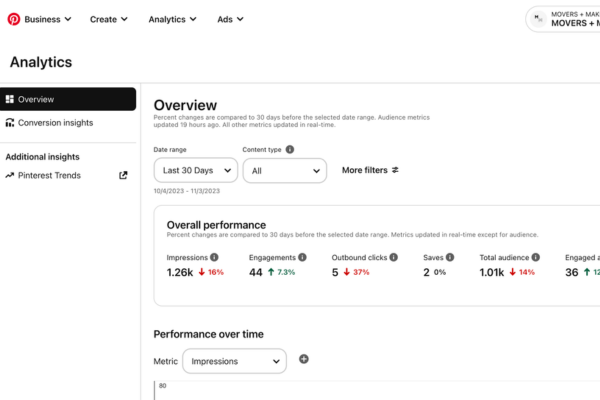
📊 What Is Pinterest Analytics?

Pinterest Analytics is a suite of built-in reporting tools (available with free Business accounts) that provides insights into how your content performs. It tracks both organic and paid activity, offering data on:

  • Impressions: how often your Pins appear on users’ screens
  • Engagements: total interactions (saves, clicks, swipes)
  • Closeups (Pin clicks): times users zoom into Pins
  • Saves (Repins): how many users saved your Pins to their boards
  • Outbound clicks: clicks leading users back to your website
  • Engaged audience: number of distinct users interacting with your content
  • Demographics & device use: breakdown by age, gender, device
  • Top-performing Pins and Boards: highlights of your most successful content
  • Video-specific stats: view counts, watch time for video Pins (help.pinterest.com, help.pinterest.com, publer.com)

These metrics can be filtered by date range, content type (organic/paid), Pin format (image/video), device, and other variables (help.pinterest.com).


🎯 Why It’s Useful

1. Understand Reach & Interest

Impressions tell you how widely your content is shown, while Closeups reveal what piques interest. A high Closeup-to-Impression ratio suggests your imagery is compelling .

2. Measure Engagement

Saves and Engagement rate show if your content resonates enough to be bookmarked for later. A high Save rate indicates value and shareability .

3. Track Traffic & Conversions

Outbound clicks measure how many people clicked through to your site—crucial for e-commerce, lead gen, or traffic-driven goals. CTR and Click Rate help gauge conversion potential .

4. Spot Top Content

Analytics surfaces your Most Repinned and Most Clicked Pins over any timeframe. These reveal what your audience values so you can create more of it (socialmediaexaminer.com).

5. Tell When to Post

By analyzing timing and device data, you can discover when and how people engage with your content—peak times, mobile vs desktop behavior—helping you optimize scheduling (famups.com).

6. Learn About Your Audience

Demographic breakdowns (age, gender, country) and Audience Affinities (interests and categories your followers engage with) help you tailor strategies and content themes (viidigital.com).

7. Refine Campaigns & Trends

Built-in filters allow marketers to slice data by organic vs paid, Pin format, or even product-specific groups, and to A/B test creatives and messaging (help.pinterest.com).


🛠️ How to Use It Effectively

  1. Switch to a Business Account to unlock Analytics .
  2. Monitor metrics weekly to catch early trend signals.
  3. Identify top-performing Pins, analyze what’s working (style, theme, keywords).
  4. Create more of what resonates—use proven content formats or aesthetics.
  5. Refine timing based on engagement patterns and demographics.
  6. Test variations: A/B test visual style, titles, or CTAs; compare using metrics (famups.com, socialmediaexaminer.com).
  7. Use exportable data for deeper analysis, trend spotting, or reporting .
  8. Track outward clicks to measure conversions or interest in linked content (uschamber.com).
  9. Merge insight with external tools: compare Pinterest’s data with Google Analytics—pin clicks vs site visits (reddit.com).

📘 Example: Growing a Small Lifestyle Blog

Meet “Serena’s Cozy Life”, a blog focusing on sustainable living, simple recipes, and home crafts.

Step 1: Set Goals

  • Increase blog visits by 30% via Pinterest over 3 months.
  • Boost engagement with sustainable crafts content.

Step 2: Post Weekly

  • Vertical Pins (1000×1500 px) linking to blog posts.
  • Mix of tutorials, recipe visuals, and craft ideas.

Step 3: Use Pinterest Analytics

  • Track impressions, saves, clicks.
  • Review “Most Repinned” and “Most Clicked” pins weekly.
  • Observe audience (mostly 25-34 women, mobile users).

Insights:

  • Craft tutorial Pins get double the saves and clicks compared to recipes.
  • Best engagement on Tuesdays and Thursdays evening.
  • Pins about “peel-off face scrub DIY” get high outbound clicks.

Step 4: Refine Strategy

  • Publish two Jewel-Toned Craft Pins each week with CTAs: “Save this for later.”
  • Pin at optimal times (7pm local time).
  • Launch Idea Pin tutorial (multi-step) for higher engagement.

Step 5: Measure Results

  • After 2 months, craft blog referrals are up 40%.
  • Pinterest profile impressions rose 25%, outbound clicks increased by 50%.
  • Pin series “DIY Felt Wallet” drove sustained engagement and seasonal traffic peaks.

Step 6: Iterate

  • Revamp descriptions with long-tail craft keywords (“Eco-friendly felt wallet tutorial”).
  • Create group boards for sustainable craft collaboration.
  • Export CSV to compare engagement trends month-over-month.

⚠️ Tips & Limitations

  • Analytics may vary: Pinterest metrics can differ from Google Analytics λόγω tracking vs UI engagement (voguebusiness.com, contentstudio.io, socialmediaexaminer.com, reddit.com). Use cross-referencing.
  • Delay in attribution: Repins and impressions may accumulate slowly—Pins often perform long-term.
  • Limitations in real-time data: Not all metrics update instantly—some data windows lag (uschamber.com).
  • Privacy filters: Some demographic data may omit low-sample categories .

✅ Final Takeaway

Pinterest Analytics is a robust tool—part content scanner, part audience profiler—offering insights that help you:

  • See what resonates and why
  • Discover when your audience engages
  • Plan content around trends and audience interests
  • Grow your reach, website traffic, and conversions
  • Build a strategic, data-informed Pinterest presence

By layering impressions, saves, clicks, engagement rate, and demographics, Pinterest Analytics provides a guided path from creativity to measurable results. Whether for a blog, business, or brand, it’s the dashboard that turns inspiration into strategy.


How to Become a Digital Marketing Specialist

Digital marketing is one of the fastest-growing fields today. Many people are interested in building a career in digital marketing, and becoming a digital...

What is SMM in Digital Marketing

SMM, or Social Media Marketing, is one of the most important parts of digital marketing. In simple words, SMM is the process of using...

What is Google Analytics in Digital Marketing

Google Analytics is one of the most important tools in digital marketing. It helps businesses understand how people interact with their websites and online...

What is Google AdWords in Digital Marketing

Google AdWords is one of the most important tools in digital marketing. Many businesses use AdWords to reach their target audience online and increase...

What Is CPM in Digital Marketing

In digital marketing, understanding how your ads are priced and measured is very important. Different advertising models help marketers track performance and control spending....