Home Blog Page 25

How does Pinterest compare to Instagram in visual content?


📌 1. Purpose & User Intention

Pinterest is a visual discovery engine and idea-planning tool. Users turn to it to gather inspiration—DIYs, décor, recipes, style ideas—and organize content into boards they can revisit anytime (investopedia.com).

Instagram is primarily a social media platform focused on personal sharing, real-time updates, and building connections. Content is about authenticity and immediacy—moments, experiences, opinions—with visual appeal as a byproduct .


🖼️ 2. Content Format: Static vs. Dynamic

  • Pinterest emphasizes static, vertical images (ratio 2:3, 1000×1500 px) and long-form visual content like infographics or step-by-step tutorials (katieharpcreative.com).
  • Instagram offers diverse formats: square/portrait posts, multi-image carousels, Stories, Reels, and IGTV. It supports dynamic, narrative-driven content (productlondondesign.com).

In essence, Pinterest is for evergreen inspiration, while Instagram thrives on ephemeral engagement.


🔄 3. Content Lifespan & Discoverability

Pinterest content has a long tail—Pins can garner views, saves, and clicks months or years after posting due to its search-driven and repinnable nature (difbetween.com).

Instagram posts have a short window of visibility (24–48 hours), after which they quickly fade, unless boosted via Stories or promoted posts .

“Pinterest emphasizes more on long‑term engagement…The lifespan of Pins is much higher than that of Instagram posts.” (reddit.com)


🔍 4. Search & Discovery

  • Pinterest operates like a search engine: users enter keywords or browse categories. The platform surfaces related and visually similar Pins via its robust algorithm and visual search tools (ratedsuccess.com).
  • Instagram relies on Explore pages and hashtags. Discovery is semi-random and heavily based on social signals like engagement, but not via traditional search queries .

👍 5. Engagement Patterns

  • Pinterest engagement is primarily passive—saving Pins, clicking links. Comments and messages are rare (braidenmckee.com).
  • Instagram is highly interactive: likes, comments, shares, DMs, poll stickers. Engagement is immediate and encouraged by design (braidenmckee.com).

This means Instagram is better for conversations and relationship-building, while Pinterest is ideal for browsing and inspiration.


🛒 6. E-commerce & Monetization

  • Pinterest integrates shoppable Pins, product catalogs, and Promoted Pins, making it a strong driver for intent-based shopping (difbetween.com).
  • Instagram also offers shoppable content via tagged posts, Stories links, and Shop tabs, but the funnel often requires manual navigation (difbetween.com).

Pinterest excels in conversion-driven traffic, while Instagram leans into brand awareness and lifestyle marketing.


📊 7. Analytics & ROI

  • Pinterest Analytics tracks impressions, saves, clicks, CTR, and content performance over time .
  • Instagram Insights focuses on reach, engagement, follower demographics, and interaction metrics. It favors short-term performance evaluation (ocoya.com).

Pinterest drives steady, long-term growth, while Instagram delivers immediate engagement data.


🎯 8. Best Suited For…

Feature Pinterest Instagram
Content Goal Inspiration, planning, evergreen ideas Real-time sharing & personal branding
Ideal Formats Pins, infographics, tutorials Posts, Stories, Reels, Carousels
Discovery Mechanism Search & algorithmic (long tail) Hashtags, Explore, algorithmic (short tail)
Engagement Style Saves, clicks (passive) Likes, comments, DMs (active)
Content Longevity Months to years Days to weeks
Best for E-commerce High intent shopping Brand storytelling & discovery

👥 Example: Launching a Lifestyle Brand

Scenario: You’re launching an eco-friendly homeware brand.

  • On Pinterest:
    Create vertical Pins featuring product lifestyle shots, tutorials (e.g., “DIY Upcycled Planter”), and guides.
    Use SEO-style descriptions and target keywords like “sustainable kitchen decor,” to drive organic search traffic and repins.
  • On Instagram:
    Post square lifestyle images, behind-the-scenes Stories/Reels showcasing production, and engage directly via comments.
    Use shoppable tags to connect viewers with product listings; utilize influencer takeovers or collaborations.

Outcome:

  • Pinterest Pins serve as a long-term funnel, bringing steady website traffic from search and inspiration-driven users.
  • Instagram builds community and brand engagement, driving brand loyalty and immediate awareness.

🧭 Final Thoughts

While both platforms center around visuals, they cater to different user mindsets:

  • Pinterest is about discovery, planning, and inspiration that lasts.
  • Instagram is about social connection, story-telling, and immediacy.

For creators or brands, the best strategy is to use both platforms in complementary ways:

  1. Use Pinterest to capture long-term interest and drive discovery via search-driven content.
  2. Use Instagram to build community and brand identity through timely, interactive content.

By understanding the distinct strengths of each, you can tailor your visual content strategy for maximum reach, engagement, and growth—turning inspiration into action, and followers into customers.
What are promoted pins, and how are they targeted?


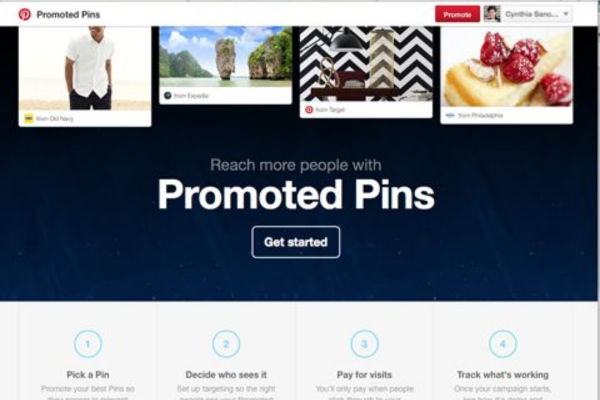
Promoted Pins are paid advertisements on Pinterest that look like regular Pins but are marked with a “Promoted” label. Unlike organic content, these are strategically placed in users’ feeds, search results, and category recommendations to help brands reach a larger audience, drive engagement, and boost traffic or sales (investopedia.com).


🔍 1. Where Promoted Pins Appear

Promoted Pins are seamlessly integrated across the platform. They show up in:

  • Home Feed: among organic Pins relevant to user interests
  • Category Feeds: top of browsing categories like “Fashion” or “Wedding”
  • Search Results: for keywords targeted by advertisers (instapage.com)

These ads appear on both mobile and desktop, ensuring visibility wherever users engage with Pinterest .


🎯 2. Objectives Brands Can Choose

Advertisers can tailor campaigns to different goals:

  1. Awareness (CPM) – Pay per thousand impressions, ideal for broad brand exposure (yellowhead.com).
  2. Engagement (CPA) – Pay when a user interacts with the Pin: saves, clicks, or close-ups (abigidea.in).
  3. Traffic (CPC) – Pay per click to drive visitors to your website (yellowhead.com).
  4. App Install – Aim to install apps, paying per install or click (abigidea.in).

Some advertisers can also run Video View campaigns to promote video Pins (theguardian.com).


🧭 3. Targeting Promoted Pins

Pinterest offers multiple targeting strategies that let advertisers connect with the right audience:

⚙️ Targeting Type 🧠 Description
Interest Targeting Target users based on Pinterest-defined interests (e.g., “Yoga,” “Home Decor”) (medium.com)
Keyword Targeting Match search keywords using broad, phrase, or exact match to reach users actively searching relevant terms
Audience Targeting Retarget users who have previously visited your site, app, or engaged with your Pins
Actalike (Lookalike) Find new users similar to your best-performing audience
Expanded Targeting Automatically broadens your reach based on performance signals for better ROAS

Demographic and contextual settings include:


💡 4. Auction-Based Bidding

Pinterest uses an auction model where advertisers set maximum bids based on their objectives:

  • CPM (cost per 1,000 impressions) for awareness
  • CPC (cost per click) for traffic/engagement
  • CPA (cost per action/install) for conversions or app installs (abigidea.in)

Pinterest provides benchmark bid ranges and recommendations to help advertisers. A/B testing different bids and targeting combinations helps optimize cost-efficiency .


📊 5. Measurement & ROI

Advertisers can track success using:

  • Pinterest Analytics: impressions, clicks, saves, CTR, engagement rates (medium.com)
  • Conversion Tracking: via Pinterest tags on websites to measure real actions like sign-ups or sales

Promoted Pins often yield long-term benefits as repins create sustained visibility and organic reach long after the paid campaign ends (ezoic.com).


🎉 6. Example: Launching a Promoted Pin Campaign

Brand: “GreenPage” – an eco-friendly notebook company
Objective: Drive traffic to a new bamboo notebook collection
Campaign Setup:

  1. Objective & Budget
    • Goal: Traffic (CPC)
    • Budget: ₹500/day, ₹3,500 total over a week
  2. Pin Selection
    • Choose a high-quality vertical image Pin featuring the bamboo notebook on a clean backdrop
    • Ensure info-rich description and relevant alt text
  3. Targeting Setup
    • Interest: eco-friendly products, sustainable living
    • Keywords: bamboo notebook (exact), eco notebook (phrase), sustainable stationery (broad)
    • Audience: retarget recent site visitors
    • Actalike: enable to broaden reach to similar users (craftindustryalliance.org, yellowhead.com)
  4. Placement & Bidding
    • Opt for both Home Feed and Search
    • Set CPC bid at ₹2.50 (~$0.03), with campaign schedule aligned to back-to-school season
  5. Launch & Monitor
    • Campaign runs and delivers 10,000 impressions, 200 clicks
    • CTR: 2%, decent engagement for niche audience
  6. Post-Campaign:
    • 500 repins generate ongoing organic traffic
    • Introduce similar Pins with adjusted visuals and test different call-to-actions (instapage.com, ezoic.com)

🚀 Best Practices for Promoted Pins

  1. Start with high-performing organic Pins—ads built on already popular Pins tend to perform better .
  2. Use a mix of target types—combine interests, keywords, and audience retargeting for stronger reach (yellowhead.com).
  3. Include 30–50 keywords—experiment with broad, phrase, and exact matches for search targeting (craftindustryalliance.org).
  4. Design native, visually rich content—use vertical dimensions, text overlays, video Pins, and clear branding (instapage.com).
  5. Time around trends—align campaigns with seasonality like holidays, school seasons, festivals .
  6. Monitor and iterate—adjust bids, messaging, and visuals using performance data (arxiv.org).

✅ Summary

Promoted Pins are native-look ads that blend seamlessly with organic content. They’re shown in feeds and search results and tailored through robust targeting—including interests, keywords, audience retargeting, lookalike expansion, and more. Campaigns are structured around specific objectives (awareness, engagement, traffic, app installs) via an auction-based system. Advertisers track success through analytics and conversion tags, leveraging repins and user actions to sustain impact.

Used strategically, Promoted Pins can deliver both immediate engagement and long-term visibility—driving real-world results like clicks, sign-ups, or sales. If you’d like help budgeting your campaign, designing a winning Pin, or selecting targets, I can guide you through the setup step-by-step!

How can a student build a Pinterest profile based on interests?


🎯 Why Build a Pinterest Profile as a Student?

Pinterest is not just for crafts—it’s a personal learning and planning tool. As a student, a well-structured Pinterest profile can help you:

  • Discover study techniques, career paths, design trends, wellness hacks.
  • Organize ideas visually into Boards that mirror your interests.
  • Showcase your personality and interests—great for digital portfolios.
  • Connect with like-minded peers, group boards, and communities.

Step 1: Define Your Interests & Niche 🎓

Start by listing 3–5 main themes you’re passionate about: e.g., Study Hacks, Minimalist Fashion, Plant Care, Healthy Recipes, DIY Room Decor.

This focus helps you:

  • Create targeted content
  • Add thematic consistency to Boards
  • Attract followers who share those interests

Example: A student could choose:

  1. Academic Tips & Study Aesthetics
  2. Budget-Friendly Outfits
  3. Plant Parenting
  4. Dorm DIY & Organization

Step 2: Set Up Your Profile Strategically

2.1 Profile Name & Bio

Use your real name or a nickname plus a keyword (e.g. “Priya • Study & Style”).
Write a keyword-rich bio like: “Student sharing study hacks, thrift fashion, plant care tips & budget dorm DIY.”

2.2 Profile Picture & Links

Choose a clear, friendly photo or themed avatar.
Connect links to your blog, Instagram, or LinkedIn—anywhere you want followers to connect more deeply. (reddit.com, reddit.com)


Step 3: Create Organized, Keyword-Rich Boards

3.1 Title & Description

Give each board a clear, keyword-rich title (e.g., “Healthy College Recipes,” “Minimalist Dorm Bathroom DIY”) with descriptions like:
“Quick ✓ Budget-Friendly Vegan Recipes for college students.”

3.2 Use Sections

Divide boards into subsections to stay organized. (community.pinterest.biz)
Example: “DIY Dorm Decor” might have sections: Curtains, Lighting, Wall Art

3.3 Board Covers

Choose consistent, visually appealing covers that match your aesthetic theme.


Step 4: Pin Thoughtfully and Consistently

4.1 Quality over Quantity

Pin 5–10 times daily: a mix of your own Pins and repins. (reddit.com)

4.2 High-Quality Pins

Use vertical (e.g., 1000×1500 px), sharp images with readable text overlays. (reddit.com)

4.3 Keyword-Rich Descriptions

Write descriptive text with relevant long-tail keywords. E.g., “10 budget-friendly vegan recipes for busy students.” (reddit.com)

4.4 Include Calls to Action

Encourage saves and clicks: phrases like “Save this for later!” or “Try this tonight!”


Step 5: Engage with the Pinterest Community

5.1 Follow Relevant Pinners and Boards

Look for active accounts in your niches. Follow, like, and comment to connect and show activity. (theloveofblogging.com)

5.2 Join Group Boards

Search and request to join group boards in your niches (e.g., college study hacks, DIY students). (reddit.com)

5.3 Consistent Interaction

Daily pinning and repinning makes Pinterest recognize your activity and boosts reach. (reddit.com)


Step 6: Optimize for Discovery & SEO

6.1 Use Pinterest Search

Type topics into the search bar and note the suggested keywords for titles/descriptions.

6.2 Keywords Everywhere

Consider tools like Keywords Everywhere to check search volume—great for refining descriptions. (blog.hubspot.com)

6.3 Alt-Text & Hashtags

Use alt-text for accessibility and 2–3 relevant hashtags (#StudyTips, #DormDIY). (reddit.com)


Step 7: Track Performance & Adjust

7.1 Pinterest Analytics

Switch to a Business account to access analytics: impressions, saves, clicks.

7.2 Learn from High Performers

Spot which Pins are getting traction and create more content like those.

7.3 Refine Content

If a board isn’t performing, add relevant keywords or update its title/cover image. (reddit.com)


Step 8: Create Your Own Content

8.1 Rich & Idea Pins

Share tutorials or step-by-step guides using multi-page Idea Pins.

8.2 Showcase Personal Projects

Pin photos of your own study spaces, thrifted outfits, room decor, or plant setups.

8.3 Link to Your Work

If you have a blog or Instagram art page, Pin your work to drive traffic back there.


Example Student Build-Out: “Arjun’s Academic & Lifestyle Hub”

Profile Setup:

  • Username: Arjun • Study & Style
  • Bio: “3rd‑year student sharing study routines, thrift fashion finds, easy dorm recipes & plant care tips.”

Boards Created:

  1. Study & Productivity
    • Sections: “Note-Taking Methods,” “Pomodoro Study,” “Desk Setup Inspo”
  2. Thrift & Minimalist Style
    • Sections: “Winter Layering,” “Affordable Accessories,” “Seasonal Wardrobe”
  3. Dorm DIY & Decor
    • Sections: “Wall Art,” “Storage Hacks,” “Lighting”
  4. Student Cooking
    • Sections: “Easy Vegan,” “Microwave Meals,” “Snack Ideas”
  5. My Indoor Jungle
    • Sections: “Low-Light Plants,” “Succulent Care,” “Terrarium DIYs”

Pinning Strategy:

Community Engagement:

  • Pins to group boards like “College Study Hacks” and “Dorm Decor DIY”
  • Follows popular student fashion and productivity influencers
  • Explores community pins for inspiration and adds comments

Optimize & Analyze:

  • Uses search suggestions for SEO
  • Monitors Analytics, notes study tips board getting most saves
  • Adjusts content to include more note-taking visuals & actionable steps

Creates Own Content:

  • Posts Idea Pin: “5-minute desk setup refresh” with 5 slides
  • Links to a blog post detailing his desk setup routine

Outcome Over Semester:

  • Profile grows from 50 to 300 followers
  • Traffic to personal blog doubles from pins
  • Becomes a recognized peer resource for productivity hacks and budget style inspiration

✅ Summary: Checklist for Students

  1. Identify themes that match interests
  2. Craft a keyword-rich profile
  3. Design organized Boards with clear titles and sections
  4. Pin quality content consistently (5–10 daily)
  5. Engage with peers, group boards, and influencers
  6. Optimize for SEO using search and keyword tools
  7. Analyze data and tweak your strategy
  8. Create and share your own Pins and Idea Pins
  9. Iterate and refine over time to grow influence

🎓 Final Word

Building a Pinterest profile based on your interests is like curating a digital expression of your passions. As a student, this process helps you:

  • Collect inspiration and resources
  • Organize ideas visually
  • Create a personal brand or portfolio
  • Engage with a community of learners

Discuss how Pinterest inspires DIY projects and creativity.


🧭 1. A Vast Visual Idea Library

Pinterest is a massive digital scrapbook filled with user-curated inspiration. Each Pin, whether it’s a photo of a plant, a stylish piece of furniture, or a tutorial video, acts as creative fuel. It’s easy to search for very specific projects—“painted terra-cotta pot ideas,” “DIY rope shelf,” or “easy wall art”—and instantly access hundreds of visuals that spark ideas. This sheer volume means something fresh is always at your fingertips (ask.com).


🎯 2. Curated Mood Boards Focused on Intent

Rather than aimlessly browsing, users create mood boards: thematic collections such as “Patio DIY,” “Upcycled Furniture,” or “Gardening Hacks.” These Boards serve as focused incubators for creative projects. Each time you pin something to a Board, Pinterest’s algorithm refines suggestions to match your style, materials, or theme . Over time, the Board becomes a visual roadmap for action.

Example: You see a cool rope plant hanger. You pin it to “Plant DIYs,” and before you know it, Pins with knotting instructions, rope art, and macramé tutorials populate your board.


🛠️ 3. Step-by-Step Resources & Tutorials

Many Pins link to blogs and video tutorials, making complex projects feel doable—even for beginners. DIYers love the accessible instructions that accompany each Pin, from beginner balloon garlands to upcycled furniture refinishing (ask.com). These detailed guides reduce the friction between inspiration and action.

Plus, Idea Pins (Pinterest’s multi-page format) allow users to see each stage of a project—uploading the process without ever leaving the app.


🌱 4. Real-Life Examples Fuel Motivation

Pinterest isn’t limited to staged tutorials. It’s full of real-world, relatable projects documented by everyday users or creators. For example, a college student shared their “dorm décor transformation” driven entirely by inspiration from Pinterest—complete with DIY drapes and clever wall hooks (wired.com, thecommamamaco.com, teenvogue.com). Seeing authentic, achievable outcomes builds the belief that “if they can do it, I can do it.”


🛋️ 5. Design and Resource Refinement Through Visual Search

When users spot something they like—say, a hanging chair—they use Pinterest’s visual search to find similar designs, materials, or instructions within the image. This visual discovery tool allows people to zero in on textures, styles, or color schemes without needing precise keywords (en.wikipedia.org). It’s a powerful way to explore derivations of a project you envision.


👫 6. Social Collaboration and Community Feedback

DIY projects thrive on shared ideas and encouragement:

  • Group Boards let friends and collaborators pin together—great for party decor or collaborative crafts.
  • Users can comment and ask questions under Pins, fostering local creativity and shared learning (appmaus.com, ask.com).
  • Communities often share hacks—like reusing curtain hooks for string lights or painting techniques—reinforcing the belief that creativity is accessible to everyone.

🔄 7. Iterative Experimentation Builds Creativity

Because Boards function like progressive folders, pins scale up over time. You might originally pin a simple painted pot and later add styling ideas, plant care tips, and where to buy supplies. This gradual evolution keeps creative projects alive and alive, not one-off items. Additionally, Pinterest’s suggestion algorithms regularly surface new angles—bringing fresh inspiration to old Stars (medium.com).


📅 8. Seasonal & Trend-Based Inspiration

Pinterest adapts content to seasonality—spring gardening projects, fall wreaths, holiday crafts—making it timely. The “Today” tab highlights trending DIY ideas seasonally; users planning Easter will suddenly find egg-dying tutorials and basket decor weeks in advance .


📈 9. Real Success Stories Illustrate Pinterest’s Power

Real-life examples highlight how Pinterest transforms inspiration into action:

Emma (DIY blogger “cuchikind”) saw her blog traffic skyrocket by creating targeted Pins with DIY tutorials, before/after shots, and infographic-style images. Her “10 Ways to Transform Dollar Store Items” pinned project went viral—50k+ saves—with most traffic coming directly from Pinterest. She used focused Boards and seasonal content to hook viewers—leading to over 3,500 weekly visitors (wired.com).

Rachel Valente redecorated her 90 sq. ft. bathroom on just $670, with mood boards guiding her choices. Her step-by-step process photos were pinned and repinned, helping her stay motivated—and helped others replicate her methods .


🧠 10. Creativity Unlocked Through Reflection

Perhaps the most profound value in Pinterest is reflective self-discovery. As you save ideas without overthinking, patterns emerge in your tastes—color palettes, forms, textures. This becomes a form of introspection, guiding creative direction . When you collate enough items, you start to see your own aesthetic; these Boards become projects in disguise.


✅ Putting It All Together: A Step‑by‑Step Example

Scenario: You want to renovate your balcony into a cozy plant zone.

  1. Search Broadly: Start with “DIY balcony planter ideas.”
  2. Curated Mood Board: Create a private Board called “Balcony Garden Renovation.”
  3. Pin Inspiration: Save diverse images—vertical pallets, hanging planters, budget bench seating.
  4. Find Tutorials: Pin guides—like tutorials for handmade self-watering planters.
  5. Use Visual Search: On a hanging planter you like, click the magnifier to find similar tutorials.
  6. Add Real-Life DIY Stories: Save Pins like “90 sq. ft. bathroom reno” to stay motivated.
  7. Collaborate: Share your Board with a friend, pin together on design components.
  8. Track Progress: Upload your own photos of paint test swatches or pot layouts.
  9. Refine via Iteration: As you learn (e.g. raised beds), add new pins on soil mixes.
  10. Seasonal Adjustments: In spring, add Pins about flowering balcony plants; in winter, add lighting or frost protection ideas.

Over time, your Board becomes a living project folder—from dreamy inspo to actual prep and progress. Pinterest has guided your process, offered accountability via saved Pins, and fueled your creativity.


🎨 Final Takeaways: Why Pinterest Works for DIY & Creativity

Feature Benefit
Visual Discovery Sparks ideas quickly
Focused Boards Organize inspiration into actionable clusters
Tutorial Access Makes complex projects achievable
Real-Life Cases Boosts confidence via replication examples
Visual Search Enables discovery beyond keywords
Community Feedback Provides support and social learning
Iterative Evolution Keeps creative momentum alive
Seasonal Trends Aligns projects with timely occasions
Reflective Self-Discovery Helps users uncover their own aesthetic direction

🎯 Conclusion

Pinterest is more than an image platform—it’s a creative assistant. It inspires DIY projects by combining visual discovery, curated organization, actionable tutorials, community engagement, and reflective self-guidance. Whether you’re a first-timer looking to refresh your space or a seasoned creator launching a blog-worthy tutorial, Pinterest helps you bridge the gap from inspiration to finished project.

How can Pinterest be used in art, fashion, and design education?


🎨 1. Visual Mood Boards & Inspiration Archives

Pinterest’s foundation as a visual discovery engine makes it perfect for building digital mood boards—a core tool in creative education.

  • Art and design students can curate visual references for styles (e.g., Bauhaus, Minimalism), color palettes, materials, and textures.
  • By organizing Boards into project-specific sections, students can trace design evolution and refine their aesthetic direction.
  • For example, a graphic design student gathering inspiration for a brand identity project may create a Board titled “Eco Brand Identity,” pinning logos, packaging, typography, and sustainability-focused visual themes. This aligns with how professionals use mood boards: to translate vague ideas into cohesive visuals (en.wikipedia.org, en.wikipedia.org).

🧑‍🎓 2. Structured Lesson Planning & Resource Libraries

Educators benefit by building Boards rich with tutorials, how-tos, and process breakdowns:

  • Teachers can create Boards like “Watercolor Techniques” or “Fashion Draping Methods” with Pins linking to step-by-step guides, infographics, videos, and templates.
  • Students can then explore, comment, and even annotate these visual resources, deepening their hands-on understanding (sturiel.com).
  • For example, an instructor teaching textile design could pin a series of videos explaining block printing techniques, accompanied by infographics outlining materials required and troubleshooting tips.

🤝 3. Collaborative Projects & Peer Feedback

Pinterest allows both teachers and students to collaborate on shared boards, making group work transparent and dynamic:

  • Students can jointly pin ideas and resources for projects like exhibition design, garment development, or installation art.
  • Teachers can monitor participation, offer feedback in comments, and guide the idea flow (digitalinformationworld.com, sturiel.com).
  • Consider a ceramic design class working on a mortar-and-pestle project. A shared board allows students to compile references, upload sketches and prototypes, and allow armchair critiques—all visually organized.

🛍️ 4. Connecting with Industry Trends and Real-World Practice

Pinterest surfaces a global lens on art, fashion, and design:

  • Users can follow industry leaders, brands, and trend forecasts (e.g., Rococo Revival or sustainable fashion trends) (teachthought.com, en.wikipedia.org, realsimple.com).
  • In fashion education, second-year students at a US university used Pinterest to engage directly with consumer preferences through their Pin-boards, building a dialogue loop between designers and audiences (en.wikipedia.org).
  • Teachers can create Boards showcasing “Industry Runway Trends” or “Sustainable Textiles,” encouraging students to integrate real-world insights into class projects.

🧠 5. Enhancing Visual Literacy & Critical Analysis

Pinterest isn’t just about collecting—it cultivates interpretation and critical thinking:

  • Students can analyze composition, color use, design motifs, semiotics and visual rhetoric through curated visuals .
  • Teachers may ask students to create thematic boards (e.g., propaganda posters, pantone palettes) and submit written reflections on stylistic intent, cultural context, or emotional impact.
  • A digital arts curriculum might require students to deconstruct three images—a Pin of Surrealist artwork, a modern UI design, and a product package—then compare visual strategies and user engagement—grounded in strong visual literacy principles.

🖥️ 6. Portfolio Building & Student Showcases

Pinterest offers a sleek, shareable format for student work:

  • Students can curate boards featuring their best visual work—illustrations, runway sketches, interior design layouts, or prototype photography.
  • Teachers can create class “Showcase” or “Portfolio” boards highlighting top projects for parent-teacher events, guest juries, or online exhibitions .
  • For instance, a fashion instructor might maintain a “Class Showcase” board where students pin their capsule collections, runway shots, studio backdrops, and mood boards—offering a live archive of design development.

🧭 7. Project-Based Learning & Idea Documentation

Pinterest supports project-based learning by encouraging iterative exploration:

  • Students can start exploratory boards—“Low-Fidelity Packaging Concepts”—and evolve with sketches, feedback, and final mockups.
  • Teachers can guide them to additional thematic boards like “Prototype Display Techniques” or “Sustainable Packaging” and tie everything back to learning outcomes (sturiel.com).
  • Example: A interdisciplinary project combining graphic design with sustainability could lead students to pin eco-material examples alongside packaging form-factor explorations, then build prototypes and record final work directly onto the same Board.

🧪 8. Cross-Disciplinary & Cultural Awareness

Pinterest’s wealth of content fosters cross-cultural learning and interdisciplinary inspiration:

  • Boards like “Japanese Minimalist Interiors” or “African Textile Art” broaden students’ design vocabulary and encourage cultural sensitivity.
  • In art education, this tool can help expose students to global art movements, diverse techniques, and cultural traditions—enhancing empathy and creativity.
  • A furniture design class might include Boards titled “Scandinavian vs Mediterranean Craft,” encouraging students to merge techniques (e.g., joinery styles from different cultures).

🚀 9. Professional Development & Teacher Collaboration

Teachers themselves can use Pinterest to:

  • Stay updated on pedagogical strategies (e.g., flipped classroom, skill rubrics).
  • Share boards with colleagues across schools or disciplines (blogs.ubc.ca).
  • Curate Boards like “Emerging UX Design Resources” or “VR in Art Education” to continuously evolve instructional practice.

🧩 10. Using Pinterest’s Design Features

Pinterest offers tools to support creative process:

  • Idea Pins allow photo/video slideshows showing technique progression or storyboard sequences (e.g., fashion draping steps or UI flows).
  • Rich Pins automatically import recipe details or product specs—useful in textile labs or materials classes.
  • Shuffles (Pinterest’s collage app) lets students create layered visual experiments directly in-app (en.wikipedia.org, voguebusiness.com).

✅ Real-World Example: A Semester-Long Fashion Design Project

Course Context:
Undergraduate fashion students are tasked with designing a sustainable capsule collection that reflects Gen Z trends.

How Pinterest is Integrated:

  1. Week 1 — Mood Board Creation
    Students make a private Board: “Capsule Mood Board.” They pin textures, runway looks, color palettes (e.g., “Cherry Coded” trend), and eco-friendly materials (realsimple.com).
  2. Week 2 — Material & Technique Research
    Students pin tutorials on digital textile printing, upcycled fabrics, and zero-waste sewing.
  3. Week 3 — Sketch Iterations
    They upload concept art and pin similar commercial examples, refining silhouette and aesthetic.
  4. Week 5 — Prototype Documentation
    Photo-document prototypes and pin process images and notes, building a visual journal.
  5. Week 7 — Collaborative Peer Reviews
    Shared Boards allow peer and instructor notes via comments, forming a virtual critique session.
  6. Weeks 9–12 — Final Showcase
    A public Board featuring final looks, materials, mood board, and technique breakdowns is shared.
  7. Reflection Assignment
    Students write reflective posts referencing key pins and explain their design journey and decisions.

Outcomes:

  • Students build a coherent design narrative from inspiration to realization.
  • Instructors gain ongoing insight into student progress and conceptual evolution.
  • Students graduate with a digital design portfolio, shareable with industry recruiters.

🌟 Benefits & Impact

Benefit Educational Impact
Visual Organization Encourages pattern recognition & refined aesthetics
Collaborative Learning Enhances peer critique and group learning
Embedded Feedback Real-time guidance via comments and shared boards
Cultural & Trend Awareness Exposes students to global perspectives and design trends
Portfolio Readiness Prepares students for professional presentation
Teacher Professional Growth Facilitates resource sharing and pedagogical exchange

🛠️ Best Practices for Educators

  1. Set clear Board guidelines (privacy, structure).
  2. Integrate reflections: Ask narrative descriptions of pin choices.
  3. Encourage peer feedback via comments.
  4. Use varied Pin formats: rich Pins, Idea Pins, Shuffles.
  5. Model pinning behavior: curate public faculty Boards.
  6. Link to assessment: Boards serve as cumulative project portfolios.

🎯 Conclusion

Pinterest is far more than a trendy image app—it’s a dynamic educational platform that supports visual thinking, collaborative creation, cultural literacy, and professional presentation in art, fashion, and design education.

When thoughtfully integrated, Pinterest empowers students to:

  • Collect and analyze visual material,
  • Document and reflect their conceptual development,
  • Collaborate with peers and instructors,
  • Showcase their creative journeys to real audiences.

From art classrooms to fashion studios, Pinterest offers an inspiring digital canvas for creative learning.

What are the best practices for creating viral pins?


🎯 Why Viral Pins Matter

Viral Pins drive major engagement—more saves, clicks, and shares. They get featured in others’ feeds, show up in search results, and can significantly boost traffic or brand visibility. Designing viral Pins isn’t luck—it’s about following proven best practices.


1. Use High-Quality, Vertical Images

  • Aspect ratio: 2:3 (e.g., 1000×1500 px) or slightly longer (e.g., 700×1350) (tailwindapp.com)
  • Resolution: Crisp, well-lit photos—originals or top-tier stock (depositphotos, Canva Pro) (marketwithmiranda.com)
  • Appeal: Warm colors (orange, red, yellow) work best for emotional resonance and visibility (frugalmomguide.com)
  • Stand Out: Flip, crop, or tweak stock photos for uniqueness (frugalmomguide.com)

2. Craft Strong, Readable Text Overlays

  • Fonts: Use clean, sans‑serif or bold fonts—no more than two on a Pin (tailwindapp.com)
  • Legibility: Large enough for mobile; high contrast between text and image
  • Content: Use numbers or power words (e.g., “10 Tips,” “Ultimate Guide”) (artsandbudgets.com)

3. Visual Branding

  • Subtle logo or URL: Include brand identity (minimum intrusion) (reddit.com)
  • Consistent aesthetic: Cohesive colors, fonts, and style cultivate recognition (marketwithmiranda.com)

4. Optimize Titles & Descriptions

  • Titles: Use compelling, descriptive phrases like “25 Budget Décor Hacks” (backendteams.com)
  • Descriptions: Self‑explanatory and keyword‑rich; add CTAs like “Save this for later” (backendteams.com)
  • Keywords: Include relevant long‑tail terms in title, description, alt-text, and board names (backendteams.com)

5. Leverage Rich or Idea Pin Formats

  • Rich Pins: Automatically show product, recipe, or article metadata (earn-rupees.com)
  • Idea Pins: Multi‑page stories/tutorials make content immersive, engaging, and evergreen (annblogger.com)

6. Time Posts for Trends & Seasonality

  • Plan ahead: Start posting seasonal Pins 1–2 months early (yearsofmoney.com)
  • Follow Pinterest Trends: Use “Today” tab to tap into early signals (backendteams.com)

7. Maintain Consistency & Use Schedulers

  • Pin frequency: 5–15 Pins daily—including fresh and repinned content (backendteams.com)
  • Schedulers: Tailwind, Buffer, or Viraltag help automate and optimize posting (lifewire.com)

8. Engage the Pinterest Community

  • Group Boards: Share your best Pins in niche collaborative spaces (backendteams.com)
  • Interaction: Comment, follow, and repin to build engagement and visibility (earn-rupees.com)

9. Experiment & Monitor Performance

  • A/B testing: Try different images, titles, colors, layouts
  • Metrics: Track saves, impressions, clicks; pivot based on results (reddit.com, backendteams.com)
  • Patience: Pins can go viral after 3–6 months—avoid premature changes (reddit.com)

✅ Example: A Viral Pin for “10 Easy Plant Care Tips”

1. Concept & Visuals

  • Theme: Plant lovers seeking quick tips
  • Image: An original flat-lay (pots, watering can) on a warm-toned background, 1000×1500 px
  • Edit: Flip or crop to differentiate it from stock

2. Design Elements

  • Text overlay: “10 Easy Plant Care Tips” in bold, sans-serif, with warm accent colors
  • Overlay format: Semi-transparent bar behind text for clarity
  • Branding: Small logo and URL subtly in corner (not obstructed)

3. Copy & Keywords

  • Title: “10 Easy Plant Care Tips for Busy Homes”
  • Description: “Discover 10 simple plant care tips for beginners—drainage, watering hacks & more. Save for your next green project! 🌿”
  • Keywords: plant care tips, beginner houseplants, indoor gardening

4. Format & SEO

  • Pin type: Standard Rich Pin linked to a detailed blog post
  • Board: “Indoor Gardening Tips” (keyword-optimized)
  • Alt text: “Flat lay of plant pots with plant care tips text overlay”

5. Posting Strategy

6. Engagement & Iteration

  • Track performance: saves, clicks, impressions
  • If trending, promote via Idea Pin with step-by-step plant care visuals
  • Test variations: simpler layout, different accent color

7. Results
Over weeks, the Pin gains traction via visual search and board suggestions. It gets shared in multiple group boards, increasing visibility and driving traffic to the blog. After a few months, it becomes a consistent referral source, demonstrating how following best practices can create evergreen, viral content.


🧩 Final Takeaways

By combining these strategies—vertical, high-quality visuals; strong text overlays; effective keywords; thoughtful formatting; consistent posting; and engagement—you set your Pins up for success.

In closing:

  1. Start strong: with unique, eye-catching design
  2. Optimize: for searchability and readability
  3. Strategize: around timing and posting consistency
  4. Engage & adapt: based on community feedback and performance

Explain how Pinterest recommendations are generated.

Pinterest is a unique platform where discovery meets personalization. Unlike traditional social media, which focuses on social interaction, Pinterest is a visual discovery engine—a place where users can find inspiration, plan projects, and save ideas. What makes Pinterest particularly effective is its ability to present each user with highly personalized recommendations. These are not random or generic but thoughtfully curated based on what each person likes, searches, and interacts with.

This article explores how Pinterest generates recommendations in depth, detailing the key components of its algorithmic systems, how personalization works, and concluding with a real-world example to illustrate the entire process.


Why Pinterest Needs a Powerful Recommendation System

Pinterest is home to billions of Pins and millions of users. Without a recommendation engine, the sheer volume of content would make finding useful ideas nearly impossible. Pinterest’s goal is to help people discover content they didn’t even know they were looking for. To do that, it must:

  • Understand user preferences (both long-term and recent).
  • Analyze content meaning (visually and textually).
  • Surface the most relevant, timely, and engaging Pins.

The Building Blocks of Pinterest Recommendations

Pinterest’s recommendation system is made up of several key technologies and methodologies. These work together to surface the right content to the right user at the right time.


1. Graph-Based Recommendations: The Pixie Algorithm

One of Pinterest’s core systems is called Pixie—a real-time graph-based recommendation algorithm.

  • Imagine every Pin and Board as a node in a massive web.
  • When users save Pins to Boards, those items are connected.
  • Pixie uses a technique called a random walk on this graph: it starts at Pins you’ve interacted with and explores neighboring nodes (other Pins and Boards) to find ones that are closely connected.

This process helps generate a list of candidate Pins—those that are potentially relevant to you based on what others have saved in similar contexts.


2. Content-Based Filtering: Visual and Textual Analysis

Once candidate Pins are selected, Pinterest applies content-based filtering to refine the list. This involves analyzing the features of the Pin itself, such as:

  • Visual characteristics: color, object types, image style.
  • Textual metadata: title, description, tags.
  • Category: Is it about fashion, home décor, recipes, etc.?

Pinterest uses computer vision and natural language processing (NLP) to understand the meaning and aesthetic of Pins. If you like images with neutral colors and modern furniture, Pinterest will look for Pins that match those features—even if they’re in different categories.


3. Collaborative Filtering: Learning from Similar Users

Another important method is collaborative filtering, which analyzes user behavior patterns.

  • If two users frequently save similar Pins, Pinterest assumes they have shared interests.
  • It will recommend Pins that one user saved to the other, even if they haven’t seen them before.

This creates a network of shared discovery, using group behavior to inform individual recommendations.


4. Personalized Embeddings with Machine Learning

Pinterest uses deep learning to create embeddings—mathematical representations of Pins and users in high-dimensional space.

  • Each Pin has an embedding based on visual and textual content.
  • Each user has one or more embeddings based on their history and interests.

The closer two embeddings are, the more similar they are. When Pinterest wants to recommend content, it simply looks for Pins whose embeddings are closest to your user profile.


5. Real-Time User Modeling

People’s interests change over time. Pinterest recognizes this by constantly updating your user profile based on your latest activity:

  • Recent searches
  • Pins you saved or clicked
  • Boards you created
  • Time spent on a Pin
  • Pins you skipped or hid

These signals allow Pinterest to identify both your long-term interests and short-term intent (like planning a birthday party next week). This helps them deliver recommendations that feel both familiar and fresh.


6. Contextual and Seasonal Adjustments

Pinterest also accounts for contextual factors, such as:

  • Time of day: Morning vs. evening interests may differ.
  • Season: Summer fashion vs. winter recipes.
  • Location: A user in Canada might get snowboarding gear; a user in India might get monsoon decor tips.
  • Device type: Mobile browsing may favor quick recipes; desktop might surface design projects.

These insights fine-tune the recommendations so they match not just your interests, but also your current context.


7. Feedback Loops and Manual Controls

Pinterest doesn’t just guess what you like—it listens. Users can influence their feed directly by:

  • Hiding Pins they don’t like
  • Reporting irrelevant or offensive content
  • Following specific Boards or topics
  • Clearing their search or browsing history

Every action—positive or negative—is a feedback signal that Pinterest uses to adjust future recommendations.


8. Ranking and Final Selection

After generating and filtering candidates, Pinterest applies a ranking algorithm to decide what to show at the top.

Factors include:

  • Predicted engagement score (likelihood you’ll save or click)
  • Content freshness
  • Diversity of content types and themes
  • Prior interactions with similar content
  • Advertiser bids (for promoted Pins)

The result is a dynamic, personalized feed optimized to inspire, engage, and encourage exploration.


Real-Life Example: How Recommendations Are Generated for a User

Let’s look at a user named Amira, a 32-year-old event planner interested in home decor, vegan recipes, and sustainable living.

Week 1:

Amira creates a board called “Eco-Friendly Kitchen” and saves several Pins related to glass jars, composting, and zero-waste shopping. She also clicks on a few minimalist kitchen photos.

What Happens:

  • Pixie starts from the saved Pins and explores Boards where others saved similar items.
  • It finds more Pins about zero-waste lifestyles and minimalist home designs.
  • Pin embeddings identify common visual themes like white tones, bamboo accessories, and natural light.
  • Collaborative filtering notices that people who saved similar items also saved Pins on indoor herb gardens and vegan meal planning.

Week 2:

Amira searches for “vegan lunch recipes” and saves Pins about grain bowls and mason jar salads. She spends time on a Pin for meal-prep ideas and hides a Pin about meat-based dishes.

What Happens:

  • Her recent activity shifts her short-term interest profile toward food.
  • Real-time modeling kicks in to prioritize recipe-related Pins.
  • The system also notes her hide behavior and reduces the visibility of meat-based content.
  • Ranking algorithms boost Pins that fit her current interest in fast, sustainable meals.

Week 3:

Amira doesn’t search anything but scrolls through her home feed. Pinterest shows her a mix of:

  • Indoor plant decor
  • Sustainable cleaning products
  • Easy vegan recipes
  • Minimalist bedroom ideas

These are drawn from a blend of long-term (sustainability and decor) and recent (vegan cooking) interests. The balance between familiar and novel keeps her engaged and exploring new ideas.


Benefits of Pinterest’s Recommendation System

Pinterest’s recommendation engine provides several clear advantages:

Highly Personalized Experience

Users feel that the platform “knows” them and adapts to their evolving tastes.

Efficient Discovery

Pinterest reduces the time it takes to find relevant content by showing what’s likely to resonate from the start.

Inspiration-Driven, Not Popularity-Driven

Unlike TikTok or Instagram, Pinterest doesn’t prioritize the most viral content. Instead, it focuses on what’s useful to you.

Intent-Based Recommendations

Because many users come with a purpose (e.g., planning a wedding, finding workout ideas), recommendations are better aligned with goals.


Conclusion

Pinterest’s recommendation engine is a masterclass in personalization and contextual understanding. By combining graph algorithms like Pixie, machine learning models like PinSage, and real-time behavioral signals, Pinterest creates a feed that feels like it was curated just for you.

It’s not just about finding content you already like—it’s about discovering things you didn’t even know you needed.

This dynamic recommendation process is what transforms Pinterest from a digital scrapbook into a powerful engine of inspiration. Whether you’re planning an event, redesigning your home, or exploring new hobbies, Pinterest ensures you’re always just one Pin away from your next great idea.


How does Pinterest drive traffic to websites and blogs?

In an era where content creators, entrepreneurs, and businesses are competing fiercely for digital attention, Pinterest stands out as a unique and powerful tool for driving consistent, long-term traffic to websites and blogs. Unlike other platforms where content gets buried within hours or days, Pinterest acts more like a visual search engine, allowing pins (posts) to remain relevant and clickable for months or even years.

Whether you’re a blogger, e-commerce store owner, marketer, or service provider, understanding how Pinterest drives traffic can be the difference between sporadic page views and a steady stream of engaged visitors.

Let’s explore the mechanisms, strategies, and benefits of using Pinterest to drive traffic, followed by a real-world example.


What Makes Pinterest Different from Other Platforms?

Before diving into the technical “how,” it’s important to understand why Pinterest is so uniquely suited for driving traffic:

1. Pinterest is a Search Engine, Not a Social Feed

Unlike Instagram or Facebook, Pinterest doesn’t operate on a chronological or social feed algorithm. Instead, it functions as a visual discovery engine. Users search for content using keywords, and Pinterest returns results that match those queries.

2. Evergreen Content Lifespan

On Pinterest, content (or pins) can resurface in user feeds weeks, months, or even years after being posted. A high-performing pin can continue driving traffic indefinitely if optimized well.

3. High User Intent

People use Pinterest to plan and act. From travel plans and wedding ideas to recipes and home renovations, Pinterest users are often ready to click, explore, and take action—which makes them ideal visitors for your website or blog.


How Pinterest Drives Traffic: The Key Mechanics

1. Clickable Pins

Every Pinterest pin includes a clickable link. When a user clicks on the image or link, they are redirected to the creator’s website, blog post, product page, or online store.

That makes each pin a potential traffic gateway.

2. Search Optimization (Pinterest SEO)

Pinterest relies heavily on keywords. To help users find your content, Pinterest scans:

  • Pin titles and descriptions
  • Board names and descriptions
  • Profile bio
  • Image text overlays

When optimized properly, your pins can appear in search results and related pins, significantly boosting visibility and traffic.

3. Rich Pins

Rich Pins pull metadata directly from your website and display it on your pins. This makes the pins more informative and credible. There are several types:

  • Article Pins: Include headline, author, and description (perfect for blog posts).
  • Product Pins: Show real-time pricing, availability, and links to purchase.
  • Recipe Pins: List ingredients, cook time, and instructions.

Rich Pins increase trust and click-through rates (CTR) by providing valuable context before the user even clicks.

4. Tailored Content for Niches and Seasons

Pinterest is deeply seasonal and niche-specific. Tailoring content to topics like:

  • “Fall outfit ideas”
  • “Back-to-school lunch recipes”
  • “2025 digital marketing trends”
    makes it more discoverable and timely, resulting in higher click-through traffic to related posts or landing pages.

5. Idea Pins and Video Pins (Indirect Traffic Drivers)

While traditional pins are direct traffic drivers, Idea Pins and Video Pins can help grow your brand visibility, leading to indirect traffic:

  • Users follow you after seeing engaging content.
  • Future standard pins from you show up in their feed.
  • They visit your profile, where website links are available.

Idea Pins help build trust and authority, encouraging users to later explore your other content.


Example: How a Food Blogger Uses Pinterest to Drive Traffic

Creator: Emma’s Everyday Eats

Goal: Drive traffic to her food blog and earn ad revenue, affiliate income, and email subscribers.

Step 1: Creating Optimized Blog Content

Emma writes a blog post titled:
“10 Quick Weeknight Dinners for Busy Families”

She ensures the post is keyword-rich, includes high-quality images, and has an enticing title.

Step 2: Designing Pins

She creates three Pinterest graphics (1000 x 1500 px):

  • A title image with “10 Easy Dinners for Busy Weeknights”
  • A step-by-step image showing one of the meals
  • A collage of all 10 dishes

Each pin:

  • Includes her blog name and subtle branding
  • Has a keyword-optimized description (e.g., “quick dinners, weeknight recipes, healthy family meals”)
  • Links back to the blog post

Step 3: Uploading and Pinning

Emma uploads the pins to a relevant board titled “Easy Weeknight Recipes”, with a description like:

“Fast, healthy dinner recipes for busy families. Discover meal ideas that take under 30 minutes to prepare.”

She also shares to relevant group boards and schedules pins using Tailwind (a Pinterest-approved scheduler).

Step 4: Results

Within a week:

  • The pin starts ranking for keywords like “easy dinners” and “quick meals”
  • Users begin clicking through to her blog
  • Blog traffic increases by 35%
  • She gains new email subscribers and earns from display ads on the post

Over time, the pin continues circulating in Pinterest search results, driving passive traffic each month.


Pinterest Best Practices for Driving Traffic

To make the most of Pinterest’s traffic-driving potential, content creators and businesses should follow these best practices:

1. Use Keyword-Rich Titles and Descriptions

Incorporate long-tail keywords relevant to your content. Think like your audience: What would they search for?

Example: Instead of “Great Recipes,” use “Healthy Gluten-Free Dinner Recipes for Kids”

2. Design Click-Worthy Pins

  • Use eye-catching colors and readable fonts
  • Include a strong call to action (e.g., “Get the Free Checklist” or “Read the Full Guide”)
  • Avoid clutter and use high-resolution images

3. Link to Value-Packed Content

Each pin should link to content that delivers on the promise. Don’t link a “7-Step DIY Project” pin to a sales page—users expect authenticity and utility.

4. Pin Consistently

Regular activity signals to the Pinterest algorithm that you’re a reliable source of content. Use tools like Tailwind or native scheduling in Pinterest to stay consistent.

5. Leverage Multiple Pins per Post

Create 3–5 different pins for each blog post or product page. Vary the design, image, and description to appeal to different users and increase reach.

6. Use Pinterest Analytics

Monitor which pins drive the most traffic and replicate that success. Look at:

  • Outbound clicks
  • Saves
  • Engagement rates

Refine your strategy based on what resonates.


Types of Websites That Benefit Most from Pinterest Traffic

Pinterest is especially beneficial for websites and blogs in the following niches:

  • Food and Recipes
  • DIY and Crafts
  • Home Decor
  • Travel
  • Health and Wellness
  • Parenting
  • Fashion and Beauty
  • Education and Printables
  • Marketing, Blogging, and Entrepreneurship

That said, any niche that can be translated into visual storytelling and offers value to a curious or planning-minded audience can thrive on Pinterest.


The Power of Long-Term Pinterest Traffic

Perhaps the most underrated feature of Pinterest is its ability to generate long-term passive traffic. Unlike social media platforms where posts have short lifespans, Pinterest pins often gain momentum over time as they get saved, repinned, and surfaced in related searches.

Some creators report that a single well-optimized pin continues to bring in hundreds or thousands of visitors per month, even a year after it was published.

This makes Pinterest not just a promotional tool but a strategic investment in long-term content marketing.


Conclusion

Pinterest is more than a platform for saving pretty pictures—it’s a powerful traffic engine for websites and blogs. Through its visually driven, search-based structure, Pinterest allows content creators, bloggers, and businesses to reach users who are actively searching for inspiration, ideas, and solutions.

By creating optimized, compelling pins that link directly to value-packed content, users can build a reliable stream of high-quality traffic. The combination of evergreen content visibility, keyword-based discovery, and a high-intent audience makes Pinterest a must-use platform for anyone serious about growing their digital presence.

If you’re looking to scale your blog, sell digital products, grow your email list, or boost your brand visibility, Pinterest is one of the most reliable and cost-effective platforms to achieve those goals.


How to Become a Digital Marketing Specialist

Digital marketing is one of the fastest-growing fields today. Many people are interested in building a career in digital marketing, and becoming a digital...

What is SMM in Digital Marketing

SMM, or Social Media Marketing, is one of the most important parts of digital marketing. In simple words, SMM is the process of using...

What is Google Analytics in Digital Marketing

Google Analytics is one of the most important tools in digital marketing. It helps businesses understand how people interact with their websites and online...

What is Google AdWords in Digital Marketing

Google AdWords is one of the most important tools in digital marketing. Many businesses use AdWords to reach their target audience online and increase...

What Is CPM in Digital Marketing

In digital marketing, understanding how your ads are priced and measured is very important. Different advertising models help marketers track performance and control spending....