Home Blog Page 30

What is the future of LinkedIn in a rapidly changing job market?

The job market today is evolving faster than ever before. Advances in technology, globalization, shifting economic landscapes, and changes in workforce expectations are reshaping how people find, apply for, and engage in work. In this dynamic environment, LinkedIn, as the world’s largest professional networking platform, stands at the forefront of career development and recruitment innovation.

This essay explores the future of LinkedIn in a rapidly changing job market by examining emerging trends, new features, its role in skill development, AI integration, diversity and inclusion, remote work facilitation, and how it will continue to connect talent and opportunities globally. The explanation is supported by an example to illustrate LinkedIn’s evolving role.


1. The Changing Job Market Landscape

Before diving into LinkedIn’s future, it is important to understand the forces reshaping the job market:

  • Technological Advancements: Automation, artificial intelligence (AI), and digital transformation are disrupting traditional job roles, requiring workers to adapt continuously.
  • Remote and Hybrid Work: The COVID-19 pandemic accelerated the adoption of remote work, creating new demands for virtual collaboration and flexible work arrangements.
  • Gig Economy and Freelancing: More professionals are embracing freelance and contract-based work, often requiring new networking and project-finding tools.
  • Diversity, Equity, and Inclusion (DEI): Companies prioritize inclusive hiring practices, diversity in leadership, and equitable workplace cultures.
  • Lifelong Learning: Rapid skill obsolescence necessitates ongoing education and upskilling.
  • Globalization: Talent pools and job markets have become international, expanding competition and opportunities.

2. LinkedIn’s Future: Embracing AI and Data-Driven Personalization

LinkedIn is already harnessing AI and machine learning, but the future promises even deeper integration:

a. Personalized Job Recommendations

Using AI, LinkedIn will deliver hyper-personalized job and career development recommendations based on an individual’s skills, interests, engagement history, and market trends. This helps job seekers discover relevant opportunities they might miss through traditional search.

b. AI-Driven Resume and Profile Optimization

LinkedIn could soon offer enhanced AI tools that automatically optimize users’ profiles and resumes to match desired roles, suggesting keyword improvements and highlighting relevant achievements to boost visibility.

c. Intelligent Networking Suggestions

AI will improve how LinkedIn suggests connections, mentors, and groups, fostering more meaningful relationships aligned with users’ goals.


3. Focus on Skill Development and Lifelong Learning

The future of work requires continuous learning. LinkedIn Learning will play a central role by:

  • Expanding course offerings in emerging technologies and soft skills.
  • Integrating learning pathways tailored to specific careers.
  • Offering certifications and digital badges that can be directly displayed on profiles.
  • Using AI to recommend personalized learning plans based on career aspirations and job market needs.

This development transforms LinkedIn from a networking site into a holistic career development platform.


4. Supporting Remote Work and Global Talent Mobility

LinkedIn is adapting to the remote work revolution by:

  • Providing features to highlight remote work experience and remote-friendly job postings.
  • Offering virtual networking and event tools to connect talent worldwide.
  • Facilitating collaborations across borders by connecting professionals with complementary skills regardless of location.

This shift allows companies to tap into global talent pools, and job seekers to access international opportunities.


5. Driving Diversity, Equity, and Inclusion (DEI)

As DEI gains importance, LinkedIn is positioned to be a leader in:

  • Providing tools that reduce hiring bias, such as anonymized applications or skills-based assessments.
  • Enabling companies to showcase DEI initiatives and progress transparently.
  • Offering resources and communities that support underrepresented groups.
  • Promoting inclusive job descriptions and company cultures via its platform.

6. Enhancing Employer Branding and Candidate Experience

For companies competing for talent, LinkedIn will continue evolving features to:

  • Showcase employer brand with rich multimedia, employee testimonials, and culture highlights.
  • Use AI chatbots and messaging to provide timely candidate engagement.
  • Streamline recruitment with integrated applicant tracking and video interview scheduling.

This enhances how companies attract and retain the best candidates.


7. Integration of Freelance and Gig Economy Features

Recognizing the rise of freelance work, LinkedIn is expected to:

  • Expand freelance marketplaces and project-based job postings.
  • Provide portfolio and project showcase features.
  • Facilitate contract management and secure payments.

This shift supports flexible work and entrepreneurial career paths.


8. The Role of Data Privacy and Security

With increased reliance on data and AI, LinkedIn will need to prioritize:

  • Transparent data use policies.
  • Enhanced privacy controls for users.
  • Robust cybersecurity to protect sensitive career data.

Building trust will be crucial for continued growth.


9. Example: How LinkedIn’s Future Trends Impact a Job Seeker — Meet Sarah

Sarah is a mid-career marketing professional looking to transition into data analytics—a field growing rapidly but requiring new skills. Here’s how LinkedIn’s future developments help her:

  • Personalized Job Matching: AI recommends analytics roles based on her current profile and interests, including some remote positions.
  • Learning Pathways: LinkedIn Learning suggests a customized course track to build her analytics skills, complete with certifications that boost her profile’s appeal.
  • Profile Optimization: AI tools suggest improvements to her LinkedIn summary and skills section, making her more discoverable to recruiters.
  • Networking: Intelligent suggestions connect her with data analytics professionals and mentors.
  • Freelance Opportunities: She discovers freelance projects that allow her to gain practical experience.
  • DEI Support: She finds companies that highlight inclusive hiring and supportive work cultures.
  • Secure Data: She feels confident sharing her career information knowing her privacy is protected.

By leveraging LinkedIn’s evolving platform, Sarah successfully transitions careers in a dynamic market.


10. Conclusion

The future of LinkedIn is bright and promising in the context of a rapidly changing job market. As technological innovations, new work models, and shifting workforce expectations reshape careers, LinkedIn will evolve from a networking site into a comprehensive career ecosystem. Its focus on AI-driven personalization, lifelong learning, remote work facilitation, DEI, and enhanced employer-candidate engagement positions it as an essential platform for job seekers and employers alike.

For individuals and organizations willing to adapt and innovate alongside LinkedIn, the platform offers unparalleled opportunities to thrive in the future of work.

How can a student create their first LinkedIn post?

Introduction

LinkedIn is the world’s largest professional networking platform, making it an essential tool for students entering the workforce or looking to build their personal brand. Creating a LinkedIn profile is just the first step; actively engaging by posting content can significantly boost a student’s visibility, showcase skills, and connect with professionals in their field.

For many students, however, posting on LinkedIn for the first time can feel intimidating. What should they post? How formal or casual should the tone be? How to make the post engaging yet professional? This essay provides a comprehensive guide on how students can create their first LinkedIn post, including key considerations, structure, tips for engagement, and a concrete example.


1. Why Should Students Post on LinkedIn?

Before diving into the “how,” it’s important to understand why posting on LinkedIn matters:

  • Builds Professional Presence: Posting relevant content signals that you’re active and engaged professionally.
  • Showcases Skills and Interests: You can highlight projects, achievements, or topics you care about.
  • Expands Network: Engaging posts attract comments and connection requests from like-minded professionals.
  • Attracts Opportunities: Recruiters and employers often notice active LinkedIn users.
  • Practices Communication: Writing posts develops your professional voice and storytelling skills.

2. Preparing to Make the First Post

2.1 Define Your Objective

Before posting, ask yourself:

  • What message do I want to convey?
  • Who is my target audience (classmates, professors, recruiters, industry professionals)?
  • What action or impression do I want to inspire?

Examples of objectives:

  • Share excitement about completing a course or internship.
  • Reflect on a learning experience.
  • Showcase a project or skill.
  • Express gratitude for mentorship or support.

2.2 Choose the Post Type

LinkedIn supports various content formats:

  • Text-only posts: Short and direct messages.
  • Image or video posts: Visuals increase engagement.
  • Document uploads: Share presentations, reports, or portfolios.
  • Articles: Long-form content for deep dives on a subject.

For a first post, a simple text post with an image or text with a link often works well.


3. Structure of an Effective LinkedIn Post

An effective LinkedIn post typically includes:

3.1 A Hook or Opening Line

Grab attention with an interesting question, a bold statement, or an expression of enthusiasm.

Example hooks:

  • “Excited to share…”
  • “What I learned from…”
  • “Here’s how I overcame…”
  • “Grateful for the opportunity to…”

3.2 Body Content

Clearly share your story, achievement, insight, or thought. Keep it concise but informative.

  • Use short paragraphs or bullet points for readability.
  • Be authentic and personal but maintain professionalism.
  • Avoid jargon or overly casual language.

3.3 Call to Action or Closing

Encourage interaction or reflection, such as:

  • Asking for advice or experiences.
  • Inviting comments or feedback.
  • Expressing hope to connect with others in the field.

4. Writing Tips for Students

4.1 Be Authentic and Positive

Your first post doesn’t need to be perfect. Speak honestly about your experiences or aspirations. Positivity attracts engagement.

4.2 Proofread Carefully

Check spelling, grammar, and punctuation. LinkedIn is a professional platform, so errors can detract from your message.

4.3 Use Relevant Hashtags

Hashtags increase visibility. Use 3-5 relevant hashtags related to your industry, topic, or skills. For example, #InternshipExperience, #DataScience, or #CareerGrowth.

4.4 Tag People or Institutions

If appropriate, tag mentors, professors, or organizations to acknowledge them and expand your post’s reach.

4.5 Use Visuals

Posts with images or videos generally perform better. Even a simple photo related to your post (like a certificate or project screenshot) helps.


5. Step-by-Step Guide: Creating the First Post

  1. Log in to LinkedIn: Open your LinkedIn homepage.
  2. Click “Start a post”: This button is usually at the top of your feed.
  3. Write your message: Follow the structure—hook, body, closing.
  4. Add media (optional): Click the camera icon to upload an image or video.
  5. Add hashtags: Type relevant hashtags after your text.
  6. Tag connections (optional): Use “@” to tag people or organizations.
  7. Review: Read through your post carefully to catch errors.
  8. Post: Click the “Post” button to share with your network.

6. Example: First LinkedIn Post by a Student

Scenario:

Sophia, a final-year marketing student, just completed an internship at a digital marketing agency and wants to share her experience.


Sophia’s LinkedIn Post:


Excited to share the completion of my internship at BrightWave Digital! 🌟

During the past three months, I had the incredible opportunity to work alongside talented marketers and gain hands-on experience in SEO, content creation, and social media campaigns. Some key takeaways for me were:

  • Understanding the importance of data-driven decision-making 📊
  • Enhancing my skills in Google Analytics and AdWords
  • Collaborating effectively in a fast-paced team environment 🤝

I’m incredibly grateful to my mentors and colleagues who supported me throughout this journey. This internship has solidified my passion for digital marketing, and I’m eager to apply these skills in future roles.

If you have any advice for recent grads entering the marketing field, I’d love to hear from you! 🙌

#InternshipExperience #DigitalMarketing #CareerGrowth #MarketingStudent


Image attached: A photo of Sophia at her internship workplace, smiling with colleagues.


7. Analyzing the Example

  • Hook: Sophia starts with excitement, catching attention.
  • Body: She summarizes her experience and lists specific skills and insights gained.
  • Gratitude: She acknowledges mentors, showing professionalism.
  • Call to Action: She invites advice, encouraging engagement.
  • Hashtags: Relevant hashtags increase discoverability.
  • Visual: The image adds authenticity and draws more views.

8. Encouraging Engagement After Posting

After creating the post, students should:

  • Respond promptly to comments to build relationships.
  • Like and comment on others’ posts to increase visibility.
  • Share the post in relevant LinkedIn groups or with connections who might be interested.

9. Common Mistakes to Avoid

  • Posting overly casual or personal content unrelated to professional goals.
  • Making the post too long or too vague.
  • Neglecting to proofread.
  • Ignoring comments or failing to engage with the audience.
  • Using too many or irrelevant hashtags.

10. Conclusion

Creating a first LinkedIn post can be a transformative experience for students starting their professional journey. By preparing thoughtfully, crafting an authentic and structured message, and engaging with the community, students can establish a strong professional presence early on.

Remember, LinkedIn is a platform for growth, learning, and networking—your first post is just the beginning of building your digital professional brand.


What role does LinkedIn play in entrepreneurship and startup ecosystems?

In today’s interconnected world, entrepreneurship and startups have become crucial drivers of innovation, economic growth, and job creation. However, starting and growing a successful business requires more than just a great idea—it demands networking, access to resources, market visibility, and continuous learning. LinkedIn, as the leading professional networking platform, plays a vital role in supporting entrepreneurs and startups in achieving these goals.

This essay explores how LinkedIn influences entrepreneurship and startup ecosystems by facilitating networking, funding, marketing, talent acquisition, and knowledge sharing. It also provides an example of a startup leveraging LinkedIn effectively to grow its business.


1. LinkedIn as a Networking Powerhouse for Entrepreneurs

a. Building Professional Connections

Networking is the backbone of entrepreneurship. Founders need access to mentors, advisors, potential co-founders, partners, and customers. LinkedIn provides an ideal platform for entrepreneurs to:

  • Connect with industry experts: Entrepreneurs can reach out to seasoned professionals for advice and mentorship.
  • Join relevant groups: LinkedIn hosts numerous groups centered on startups, entrepreneurship, and specific industries, offering discussion forums, peer support, and collaboration opportunities.
  • Expand reach beyond geography: Unlike traditional local networking events, LinkedIn enables entrepreneurs to connect globally.

b. Building a Personal and Brand Presence

A strong LinkedIn presence helps entrepreneurs establish credibility and thought leadership. By sharing insightful content, startup updates, and industry trends, founders can position themselves as trusted voices, attracting followers and potential collaborators.


2. LinkedIn in Startup Fundraising and Investor Relations

a. Connecting with Investors

Raising capital is a major challenge for startups. LinkedIn helps bridge this gap by:

  • Allowing entrepreneurs to identify and connect with venture capitalists, angel investors, and funding bodies.
  • Enabling founders to research investor interests and previous investments to tailor their pitch.
  • Facilitating introductions through mutual connections, increasing trustworthiness.

b. Showcasing Traction and Progress

LinkedIn allows startups to share milestones, press releases, and user testimonials, which can impress potential investors researching the company.


3. Talent Acquisition Through LinkedIn

a. Recruiting Skilled Professionals

A startup’s success heavily depends on its team. LinkedIn offers startups a platform to:

  • Post job openings and receive applications.
  • Search for candidates with specific skills and experience.
  • Review candidate profiles and recommendations.
  • Reach passive candidates who may not be actively job hunting but are open to opportunities.

b. Employer Branding

Startups can use LinkedIn to build an attractive employer brand by sharing stories about company culture, employee achievements, and work environment, attracting top talent in competitive markets.


4. Marketing and Customer Engagement

a. Content Marketing and Brand Awareness

LinkedIn is an excellent channel for startups to:

  • Publish articles, videos, and posts to educate and engage their target audience.
  • Establish thought leadership on relevant industry topics.
  • Share product updates, success stories, and testimonials to build trust.

b. Lead Generation and Business Development

Startups can use LinkedIn’s Sales Navigator and advertising tools to identify and engage potential clients or partners, nurturing leads through personalized outreach.


5. Learning and Development

Entrepreneurship requires continuous learning. LinkedIn Learning offers entrepreneurs access to courses on leadership, marketing, finance, technology, and more, enabling them to upgrade skills and stay competitive.


6. Community Building and Ecosystem Support

a. Fostering Collaboration

LinkedIn groups and events foster collaboration among entrepreneurs, investors, service providers, and other ecosystem players. These communities share knowledge, resources, and sometimes form partnerships.

b. Showcasing Success Stories

Highlighting success stories on LinkedIn inspires other entrepreneurs and attracts attention to emerging startup hubs.


7. Example: How “EcoSolutions” Used LinkedIn to Grow Their Startup

EcoSolutions is a startup focused on sustainable packaging solutions. The founders leveraged LinkedIn extensively throughout their entrepreneurial journey:

  • Networking: The founders connected with environmental experts, packaging industry leaders, and potential clients through LinkedIn groups and direct outreach.
  • Fundraising: Using LinkedIn, they identified and approached impact investors interested in green technology, securing their first round of seed funding.
  • Talent acquisition: They posted job openings and shared company culture content, attracting skilled engineers passionate about sustainability.
  • Marketing: By regularly publishing articles about sustainable packaging trends and their innovative solutions, EcoSolutions gained visibility and built a loyal follower base.
  • Learning: The founders used LinkedIn Learning to enhance their knowledge of digital marketing and financial planning.
  • Community: EcoSolutions participated actively in entrepreneurial groups, contributing insights and forming strategic partnerships.

Thanks to LinkedIn, EcoSolutions accelerated its growth, secured funding, built a talented team, and positioned itself as a thought leader in sustainable packaging.


8. Conclusion

LinkedIn plays a multifaceted and indispensable role in entrepreneurship and startup ecosystems. From enabling founders to network and raise capital to recruiting talent, marketing products, and continuously learning, LinkedIn provides the tools and connections startups need to thrive. By leveraging LinkedIn strategically, startups can enhance their visibility, credibility, and growth potential in a competitive landscape.

Entrepreneurs who embrace LinkedIn not only benefit their individual ventures but also contribute to the vibrancy and dynamism of startup ecosystems worldwide.


How does LinkedIn handle fake profiles or spam?

Introduction

LinkedIn has established itself as the leading professional networking platform globally, boasting over 900 million users as of 2025. It serves as a vital space for professionals to connect, share expertise, seek jobs, and grow their careers. However, like any popular social network, LinkedIn faces challenges from fake profiles and spam—two issues that can undermine trust, degrade user experience, and pose security risks.

To maintain the integrity and professionalism of its platform, LinkedIn has developed a comprehensive strategy combining advanced technology, user participation, and strict policies to identify, mitigate, and remove fake profiles and spam. This essay explores how LinkedIn manages these problems, the technologies and policies involved, and presents a real-world example demonstrating the platform’s effectiveness.


1. Understanding Fake Profiles and Spam on LinkedIn

1.1 What Are Fake Profiles?

Fake profiles on LinkedIn are accounts created with false identities, often using stolen photos, fabricated work histories, or misleading information. These accounts can be used for:

  • Phishing and scams
  • Data harvesting
  • Spreading misinformation
  • Inflating follower counts or endorsements artificially
  • Impersonation of real professionals or companies

Fake profiles undermine trust by deceiving users into engaging with inauthentic personas.

1.2 What Constitutes Spam on LinkedIn?

Spam involves unsolicited and repetitive messages or posts that add no real value, such as:

  • Bulk promotional messages
  • Fake job offers
  • Scam links
  • Unwanted advertisements
  • Connection requests sent en masse without personalization

Spam degrades the quality of user experience and can also be a vector for malicious attacks.


2. LinkedIn’s Strategies to Handle Fake Profiles

2.1 User Verification and Real-Name Policy

LinkedIn enforces a real-name policy, encouraging users to register with their true names and accurate professional details. This policy helps limit the creation of blatantly fake profiles.

Additionally, LinkedIn asks users to provide verifiable information such as:

  • Current and past employers
  • Education credentials
  • Skills endorsements and recommendations from actual connections

This information creates a digital footprint that can be cross-checked to flag inconsistencies.

2.2 AI and Machine Learning Detection

LinkedIn leverages sophisticated AI and machine learning algorithms to identify patterns typical of fake profiles:

  • Inconsistent or suspicious account creation activity (e.g., multiple accounts from the same IP address).
  • Duplicate photos or profile data used across several accounts.
  • Unusual behavior like rapid, mass connection requests or messaging.
  • Profiles with incomplete or contradictory information.

Once flagged, accounts undergo further scrutiny by human moderators or automated restrictions.

2.3 Human Moderation and Review

While AI helps flag suspicious profiles, LinkedIn employs human moderators to manually review reports and algorithmic flags.

  • Moderators assess reported profiles for authenticity.
  • They analyze profile content, connection patterns, and user reports.
  • Confirmed fake accounts are promptly removed.
  • Repeat offenders or networks of fake accounts may trigger broader investigations.

Human oversight adds accuracy to the detection process and prevents wrongful bans.

2.4 User Reporting System

LinkedIn empowers users to actively participate by reporting suspicious profiles via a straightforward reporting tool.

  • Users can report profiles for impersonation, false information, or spammy behavior.
  • Reported profiles are fast-tracked for review.
  • The community-driven approach significantly amplifies detection.

This system helps capture fake profiles that automated tools might miss.


3. How LinkedIn Handles Spam

3.1 Spam Detection Algorithms

LinkedIn’s AI scans messages, posts, and connection requests for spam indicators such as:

  • Identical or repetitive messages sent to multiple users.
  • Links to suspicious or harmful websites.
  • Keywords often associated with scams or phishing.
  • Sudden spikes in messaging behavior inconsistent with normal usage.

Flagged content is either hidden from feeds or restricted pending review.

3.2 Limiting Automated and Bulk Actions

To prevent spam, LinkedIn restricts certain behaviors:

  • Limiting the number of connection requests that can be sent daily.
  • Restricting mass messaging capabilities.
  • Detecting and blocking automated bots that create or interact with accounts.

These controls prevent users from exploiting the platform for spam campaigns.

3.3 Spam Reporting and Consequences

Users can report spammy messages or posts, which LinkedIn reviews promptly.

Consequences for spamming include:

  • Temporary restrictions on messaging or connection requests.
  • Removal of spam content.
  • Suspension or permanent banning of repeat offenders.

These measures deter spammers and maintain a high-quality networking environment.


4. Example: LinkedIn’s Response to a Fake Recruitment Scam

Scenario:

In 2023, LinkedIn users reported a spike in fake recruitment profiles claiming to offer lucrative remote job opportunities. These profiles used stolen photos and fabricated company names to lure job seekers into sharing personal information and paying for fake background checks.

LinkedIn’s Action:

  • Detection: LinkedIn’s AI algorithms flagged multiple accounts exhibiting suspicious behavior—new accounts with similar IP addresses sending identical job offers.
  • User Reports: Numerous users reported these profiles for impersonation and scams.
  • Moderation: Human moderators swiftly reviewed these reports, confirming the accounts were fraudulent.
  • Removal: LinkedIn removed hundreds of these fake profiles and posted warnings to educate users on identifying scams.
  • Prevention: LinkedIn enhanced its algorithms to detect similar patterns proactively and restricted the ability to send unsolicited job offers to users outside established professional connections.

Outcome:

  • The scam was largely neutralized within weeks.
  • User trust was preserved through transparent communication.
  • LinkedIn reinforced its reputation as a safe and professional networking platform.

5. Additional Measures to Maintain Platform Integrity

5.1 Transparency and User Education

LinkedIn regularly publishes guidelines and tips on how to recognize fake profiles and avoid scams. This proactive education helps users safeguard themselves.

5.2 Collaboration with Law Enforcement

In severe cases of fraud or impersonation, LinkedIn collaborates with law enforcement agencies to take legal action against malicious actors.

5.3 Continuous Improvement

LinkedIn continuously updates its AI models and policies to adapt to new types of fake profiles and spam tactics, ensuring ongoing protection for its users.


6. Limitations and Challenges

Despite these efforts, LinkedIn faces ongoing challenges:

  • Sophisticated fakes: Fraudsters constantly improve tactics, making detection harder.
  • Scale: With hundreds of millions of users, monitoring all content is a massive task.
  • False positives: Balancing aggressive spam removal without mistakenly restricting genuine users.

LinkedIn’s commitment to technology and human oversight helps it navigate these challenges effectively.


7. Conclusion

LinkedIn’s approach to handling fake profiles and spam is multifaceted and robust, involving:

  • Enforcement of real identity policies.
  • Advanced AI and machine learning for automated detection.
  • Human moderation for accurate review.
  • Empowering the user community to report suspicious content.
  • Restricting behaviors conducive to spam.
  • Education and collaboration to maintain trust.

These combined efforts allow LinkedIn to preserve a safe, credible, and professional environment essential for meaningful networking and career development.


Example Summary:
In 2023, LinkedIn successfully tackled a surge of fake recruitment scams by employing AI detection, user reporting, and human moderation to swiftly remove fraudulent profiles and warn users. This incident illustrates how LinkedIn’s layered approach to fake profiles and spam maintains platform integrity and user trust.


What is the difference between a company page and a personal profile?

LinkedIn is a powerful professional networking platform that serves multiple purposes, from personal career development to corporate branding and marketing. Two fundamental elements of LinkedIn are Personal Profiles and Company Pages. While they might seem similar at first glance, they serve very different functions and audiences on the platform.

Understanding the distinction between a LinkedIn personal profile and a company page is crucial for individuals, businesses, marketers, and recruiters to use LinkedIn effectively. This essay explores the differences between these two features, their purposes, functionalities, and how they complement each other on LinkedIn. It will also provide an example to illustrate the practical application of both.


1. Definition and Purpose

a. Personal Profile

A personal profile on LinkedIn represents an individual user. It is a digital resume and professional branding tool designed to showcase a person’s skills, experiences, education, and career achievements. The main purpose of a personal profile is to:

  • Connect with other professionals.
  • Network for career opportunities.
  • Share insights, articles, and accomplishments.
  • Apply for jobs.
  • Build a professional reputation.

A personal profile is essentially the online professional identity of an individual.

b. Company Page

A company page is a LinkedIn profile created for an organization, business, nonprofit, or institution. It serves as the official presence of the company on LinkedIn. The primary goals of a company page include:

  • Branding and marketing the company.
  • Sharing company news, updates, and job openings.
  • Engaging with followers and potential customers.
  • Showcasing products, services, and company culture.
  • Recruiting and attracting talent.

Unlike personal profiles, company pages represent entities rather than individuals.


2. Ownership and Control

Personal Profile

  • Owned and managed by the individual: Only the person who creates the profile can update or control it.
  • Represents the personal career journey of the user.
  • The content reflects the individual’s experiences, thoughts, and professional network.

Company Page

  • Owned and managed by multiple admins or company representatives: Usually maintained by marketing, HR, or communications teams.
  • Represents the organization’s collective identity.
  • Content focuses on company-related information, updates, and branding.

3. Content and Communication Style

Personal Profile

  • Content is personalized and often conversational.
  • Posts can include career updates, professional opinions, shared articles, and achievements.
  • The tone is usually first-person, reflecting the individual’s voice and personality.
  • Users engage by commenting on posts, sending messages, and joining groups.
  • Personal profiles allow posting articles on LinkedIn to establish thought leadership.

Company Page

  • Content is brand-centric and formal.
  • Posts typically include company announcements, product launches, industry news, job openings, and marketing campaigns.
  • The tone is professional and aligned with the company’s branding guidelines.
  • Company pages interact by responding to comments and engaging followers.
  • They can publish LinkedIn Articles to provide in-depth industry insights or company stories.

4. Features and Functionalities

Personal Profile

  • Includes sections like Summary, Experience, Education, Skills, Recommendations, and Endorsements.
  • Allows for personal networking—connecting with colleagues, classmates, recruiters, and professionals.
  • Users can showcase certifications, volunteer work, projects, and publications.
  • Messaging and InMail services enable direct communication.
  • Job seekers use personal profiles to apply for jobs and get discovered by recruiters.

Company Page

  • Displays company information such as logo, location, industry, website, and company size.
  • Shows a list of current job openings.
  • Features “Life” tabs highlighting company culture through photos and employee stories.
  • Provides analytics on follower demographics, post engagement, and page performance.
  • Enables running LinkedIn Ads to promote products or jobs.
  • Followers can get updates but cannot “connect” like personal profiles—interaction is through following and engagement.

5. Audience and Connections

Personal Profile

  • Users can connect with other individuals.
  • Connections are typically limited to 1st-degree (direct connections), 2nd-degree (connections of connections), and so on.
  • A personal profile’s network reflects an individual’s professional circle, including friends, colleagues, mentors, and recruiters.

Company Page

  • Users follow company pages rather than connect.
  • Followers receive updates and posts in their news feed.
  • Company pages can attract a broader audience including potential customers, job seekers, partners, and industry peers.
  • The relationship is more one-directional compared to the personal profile’s mutual connections.

6. Use Cases and Objectives

Personal Profile

  • Building a professional personal brand.
  • Job searching and career advancement.
  • Networking with professionals.
  • Sharing personal insights and achievements.
  • Thought leadership and personal marketing.

Company Page

  • Establishing and promoting corporate brand identity.
  • Marketing products or services.
  • Recruiting talent and showcasing company culture.
  • Engaging with clients and customers.
  • Publishing corporate news and thought leadership content.

7. Example to Illustrate the Difference

Example: Emma and Her Startup “GreenTech Solutions”

Emma’s Personal Profile:

Emma is the CEO and founder of GreenTech Solutions, a startup specializing in eco-friendly energy products. On her personal LinkedIn profile, Emma highlights her educational background in environmental science, her entrepreneurial journey, key skills like leadership and strategic planning, and her previous work experience. Emma shares posts about innovation in clean energy, her speaking engagements, and insights from her startup journey. She connects personally with other entrepreneurs, investors, and professionals in the environmental sector.

GreenTech Solutions’ Company Page:

GreenTech Solutions has a LinkedIn company page managed by Emma’s marketing team. The company page features the company’s mission, products, and impact in the sustainable energy industry. The page posts updates about product launches, company milestones, sustainability tips, and job openings for engineers and marketing professionals. Followers include potential customers interested in eco-friendly technology, job seekers, and business partners.


Why Both Matter:

  • Emma’s personal profile helps build her reputation as a thought leader and entrepreneur, facilitating personal connections and opportunities.
  • The company page promotes the startup’s brand, engages a wider audience, attracts talent, and serves as a platform for official communications.

8. How Personal Profiles and Company Pages Complement Each Other

  • A strong personal profile can amplify the reach of the company page when employees share company posts.
  • Company pages rely on employee advocacy, where individuals share their company’s content, helping build trust and authenticity.
  • Executives like Emma can use their personal profiles to tell stories behind the brand, adding a human element to the company’s professional presence.
  • Together, they provide a holistic LinkedIn presence covering both individual career development and corporate branding.

9. Summary Table of Key Differences

Feature Personal Profile Company Page
Represents Individual professional Organization or business
Ownership Individual user Company admins
Connection Type Connect (mutual relationships) Follow (one-directional)
Content Focus Personal experience, achievements Company news, products, culture
Tone Personal, conversational Formal, brand-aligned
Audience Professional network Customers, job seekers, followers
Job Posting Applies to jobs Posts job openings
Messaging Direct messaging to connections Limited to comments and sponsored ads
Analytics Personal insights Page analytics and follower data

10. Conclusion

Understanding the difference between a LinkedIn personal profile and a company page is essential for leveraging LinkedIn’s full potential. While the personal profile is about representing and marketing yourself as an individual professional, the company page focuses on promoting and branding an organization. Both serve unique, complementary purposes.

For professionals like Emma, building a compelling personal profile alongside a vibrant company page maximizes reach and impact, helping both personal career goals and organizational objectives. Whether you are a student, entrepreneur, employee, or marketer, knowing when and how to use each will enhance your LinkedIn strategy.


How does LinkedIn maintain professionalism in its content?

Introduction

LinkedIn is recognized globally as the premier professional networking platform, designed to connect individuals and businesses across various industries. Unlike other social media platforms that emphasize casual interaction and entertainment, LinkedIn’s core value is to foster a professional environment where users can share expertise, seek career opportunities, and build credible networks.

Maintaining professionalism in its content is essential for LinkedIn to preserve its brand identity, ensure user trust, and create meaningful engagement. This essay explores the various methods and policies LinkedIn employs to maintain professionalism in the content shared on its platform, including community guidelines, algorithmic curation, user empowerment, and educational initiatives. It also provides an example demonstrating the effectiveness of these mechanisms in practice.


1. Community Guidelines and Content Policies

1.1 Clear Community Standards

At the heart of LinkedIn’s approach to professionalism lies its Community Guidelines. These guidelines clearly define what constitutes acceptable and unacceptable content on the platform. They emphasize respect, authenticity, and relevance to professional life.

Key points include:

  • No hate speech or harassment: Content that promotes discrimination, bullying, or harassment is strictly prohibited.
  • No spam or scams: LinkedIn bans unsolicited advertising, deceptive content, and fraudulent schemes.
  • Respectful communication: Users are encouraged to engage in respectful discussions and refrain from inflammatory language.
  • No misinformation: LinkedIn works to limit the spread of false or misleading professional information.

By establishing these clear rules, LinkedIn sets a baseline for content professionalism, guiding user behavior toward constructive and relevant interactions.


2. Content Moderation and Enforcement

2.1 Human and AI Moderation

LinkedIn uses a hybrid system of human moderators and artificial intelligence (AI) algorithms to monitor and enforce its content policies.

  • AI tools automatically detect potentially harmful content such as hate speech, spam, or misinformation by scanning posts, comments, and messages.
  • When flagged, content is reviewed by human moderators who assess whether it violates LinkedIn’s standards.
  • Violations can result in content removal, warnings, or account restrictions, depending on the severity.

This proactive moderation ensures that unprofessional content is swiftly addressed, maintaining the platform’s overall integrity.

2.2 Reporting Mechanism

LinkedIn empowers users to report inappropriate or unprofessional content. Reporting is straightforward, accessible on posts, comments, and profiles. Users can flag content that is spam, offensive, irrelevant, or misleading.

This community-driven policing helps keep LinkedIn professional, as users actively participate in maintaining quality standards.


3. Algorithmic Curation for Professional Content

3.1 Feed and Search Algorithms

LinkedIn’s content recommendation algorithms prioritize professional, insightful, and relevant posts over sensational or trivial content.

  • Posts that receive meaningful engagement such as thoughtful comments or shares are more likely to be surfaced.
  • Content aligned with users’ professional interests, industries, and connections is prioritized.
  • Spammy or low-quality posts are downranked or hidden.

This algorithmic curation helps promote quality professional content and reduces noise, encouraging users to engage in purposeful discussions.


4. Profile Verification and Authenticity

LinkedIn maintains professionalism by encouraging users to create authentic and verified profiles. Features include:

  • Real-name policy: Users are required to use their actual names and professional information, discouraging anonymity that could lead to unprofessional behavior.
  • Profile completeness: LinkedIn encourages detailed profiles, including verified employment history, education, and skills, increasing trustworthiness.
  • Endorsements and recommendations: These features allow peers to vouch for each other’s skills and character, reinforcing professionalism.

Authentic profiles create an environment where users are accountable, fostering respectful and meaningful interactions.


5. Educational Resources and Professional Development

LinkedIn actively promotes professionalism through LinkedIn Learning, an educational platform offering courses on communication skills, leadership, diversity, ethics, and more.

  • These resources help users develop not only hard skills but also soft skills critical for professional conduct.
  • LinkedIn’s editorial content, including articles and newsletters, often features best practices for workplace behavior, networking etiquette, and career growth.

By investing in user education, LinkedIn encourages a culture of continuous professional improvement and ethical conduct.


6. Promoting Thought Leadership and Expert Content

LinkedIn encourages professionals, industry experts, and organizations to share thought leadership content. This kind of content tends to be:

  • Research-based
  • Insightful and informative
  • Constructive and solution-oriented

LinkedIn’s algorithm boosts such content, creating a professional knowledge-sharing ecosystem. This helps set a tone of seriousness and expertise across the platform.


7. Example: LinkedIn’s Handling of Misinformation During the COVID-19 Pandemic

A notable example demonstrating LinkedIn’s commitment to professionalism is how it managed content related to the COVID-19 pandemic.

  • Problem: Like many platforms, LinkedIn faced a surge of misinformation about the virus, vaccines, and public health policies, which could undermine trust and safety.
  • Action: LinkedIn employed AI tools to detect posts spreading false claims and collaborated with health authorities such as the WHO and CDC to promote verified information.
  • Moderation: False or misleading posts were removed or flagged with warnings.
  • Educational push: LinkedIn amplified content from credible sources, including health experts, to educate users.

This balanced approach helped maintain a professional atmosphere by curbing misinformation while providing accurate information, reflecting LinkedIn’s role as a responsible platform for professionals.


8. How Users Contribute to Maintaining Professionalism

LinkedIn’s culture of professionalism also relies on the behavior of its users:

  • Users tailor content to their professional audience, focusing on career achievements, industry insights, and constructive discussions.
  • Many users self-moderate their posts and comments, avoiding unprofessional language or controversial topics not relevant to their professional persona.
  • Professionals often engage respectfully, even when opinions differ, fostering healthy debates rather than conflict.

This collective effort helps preserve LinkedIn’s reputation as a professional space.


9. Limitations and Challenges

Despite its robust mechanisms, LinkedIn faces challenges such as:

  • Balancing freedom of expression with content moderation.
  • Handling the sheer volume of posts and messages daily.
  • Preventing the spread of subtle or sophisticated misinformation.
  • Ensuring consistent enforcement globally across different cultures and legal systems.

LinkedIn continuously updates its policies and technology to address these challenges while maintaining professionalism.


10. Conclusion

LinkedIn maintains professionalism in its content through a multifaceted approach involving:

  • Clear community guidelines setting behavioral expectations.
  • Robust moderation combining AI and human oversight.
  • Algorithmic content curation favoring relevant, respectful, and insightful posts.
  • Encouragement of authentic profiles and verified information.
  • Provision of educational resources and promotion of thought leadership.
  • Empowering users to participate in maintaining content quality.

This comprehensive framework fosters a professional environment that supports networking, learning, and career advancement. The platform’s handling of COVID-19 misinformation exemplifies LinkedIn’s commitment to responsible content management.

For professionals seeking a serious, respectful digital space to grow their careers or businesses, LinkedIn remains a trusted platform largely because of its dedication to maintaining professionalism in all content shared.


Example Summary:
During the COVID-19 pandemic, LinkedIn effectively used AI moderation, expert collaboration, and educational content promotion to maintain professionalism and combat misinformation. This preserved user trust and demonstrated LinkedIn’s ability to handle critical challenges while upholding its professional standards.


Discuss the importance of writing a good summary on LinkedIn.

In the world of professional networking and job searching, LinkedIn stands out as the foremost platform where millions of individuals showcase their skills, experiences, and professional journeys. Among all the components of a LinkedIn profile, the summary section—sometimes called the “About” section—plays a pivotal role in creating a strong first impression and effectively communicating one’s personal brand.

This essay discusses why writing a good summary on LinkedIn is critical, the key elements of an effective summary, the benefits it provides, and concludes with an example of a well-crafted summary to illustrate the concepts.


1. What is the LinkedIn Summary?

The LinkedIn summary is a section near the top of the profile where users can write a brief narrative about who they are professionally. Unlike a resume’s bullet points, the summary offers a chance to tell a story, express passion, highlight unique strengths, and connect with profile visitors on a more personal level.

Typically, the summary can be up to 2,600 characters long, giving ample room to craft a compelling overview of a professional identity.


2. Why is a Good LinkedIn Summary Important?

a. First Impression Matters

When someone visits your LinkedIn profile—be it a recruiter, potential employer, client, or collaborator—the summary is often one of the first things they read. It sets the tone for the rest of the profile. A poorly written or empty summary can create confusion, reduce interest, or give the impression of a lack of professionalism.

b. Storytelling to Stand Out

The job market and professional world are highly competitive. Many candidates may have similar skills or education. A well-written summary helps you stand out by telling your story: what motivates you, what unique value you bring, and what your career goals are.

c. Showcases Personality and Soft Skills

Resumes typically focus on hard skills and accomplishments. The LinkedIn summary allows you to reveal your personality, work style, values, and interpersonal skills. This humanizes your profile and makes you memorable.

d. Search Optimization

LinkedIn’s search algorithm uses keywords from your profile, including the summary, to match you with relevant opportunities and connections. A summary with well-chosen keywords improves your chances of appearing in search results.

e. Calls to Action

You can use the summary to invite specific actions—whether it’s connecting, viewing your portfolio, or contacting you for collaboration—making the profile interactive and goal-oriented.


3. Key Elements of an Effective LinkedIn Summary

To write a compelling LinkedIn summary, consider including the following elements:

a. Clear Introduction

Start with a brief introduction of who you are professionally. For example, your current role, industry, or area of expertise.

b. Professional Passion and Motivation

Explain what drives you. This could include your passion for the industry, a personal mission, or the impact you want to make.

c. Key Skills and Achievements

Highlight your core skills and major accomplishments that define your professional value.

d. Career Goals or Aspirations

Share your short- or long-term career objectives, showing ambition and focus.

e. Personal Touch

Add something unique about your personality or interests that may resonate with your audience.

f. Keywords

Use industry-relevant keywords to improve visibility in LinkedIn searches.

g. Call to Action

Invite readers to connect, message, or view your work.


4. Benefits of a Well-Written LinkedIn Summary

a. Attracts Recruiters and Hiring Managers

Recruiters often skim through profiles quickly. A concise, engaging summary grabs attention and motivates them to read further or reach out.

b. Builds Professional Brand

Your summary is your digital elevator pitch. It communicates your brand clearly and consistently across professional interactions.

c. Enhances Networking Opportunities

A good summary encourages connections and conversations by showing you as approachable and engaging.

d. Provides Context

For career changers, students, or those with diverse experiences, the summary helps explain your background and how your skills transfer.

e. Supports Job Search and Career Growth

By incorporating keywords and showcasing aspirations, the summary helps you align with roles and industries you want to pursue.


5. Common Mistakes to Avoid

  • Being Too Vague: Avoid generic phrases like “hardworking” or “team player” without examples.
  • Overloading with Buzzwords: Use keywords but don’t sound robotic.
  • Too Long or Too Short: Aim for clarity and impact within a reasonable length.
  • Ignoring the Audience: Tailor your summary for who you want to attract.
  • Neglecting Proofreading: Spelling or grammar errors reduce professionalism.

6. Example of a Good LinkedIn Summary

Let’s consider the example of Maya, a marketing professional aiming to transition into digital marketing leadership roles:


Example Summary:

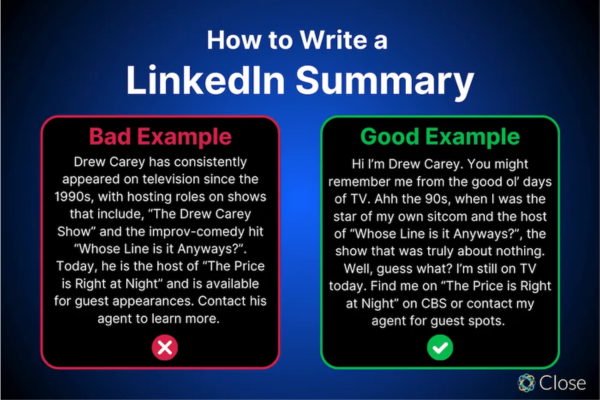
“As a passionate marketing strategist with over 5 years of experience driving brand growth and digital engagement, I thrive at the intersection of creativity and data. My expertise lies in crafting innovative campaigns that increase customer acquisition and retention across diverse industries including tech and retail.

I specialize in SEO, content marketing, and social media analytics, leveraging data-driven insights to optimize campaigns and deliver measurable ROI. During my tenure at XYZ Corp, I led a digital campaign that boosted website traffic by 60% and increased lead generation by 35% in under a year.

What excites me most is the ever-evolving landscape of digital marketing and the opportunity to harness emerging technologies to tell compelling brand stories. Currently, I am pursuing advanced certifications in Google Analytics and HubSpot to sharpen my skills further.

Outside of work, I enjoy mentoring aspiring marketers and volunteering with nonprofit organizations focused on digital literacy.

If you’re interested in discussing innovative marketing strategies or potential collaborations, feel free to connect or message me!”


This summary is:

  • Clear and concise.
  • Highlights key skills and achievements.
  • Shows passion and motivation.
  • Includes a personal touch.
  • Ends with a call to action.

7. Conclusion

A well-written LinkedIn summary is a powerful tool that enhances your profile, attracts opportunities, and establishes your professional identity. For students, job seekers, or seasoned professionals alike, investing time and effort into crafting a compelling summary can make a significant difference in how you are perceived and the connections you build.

By telling your unique story, showcasing your skills and goals, and inviting meaningful interaction, your LinkedIn summary becomes the gateway to professional success.


What is LinkedIn Premium, and what are its advantages?

Introduction

LinkedIn is the world’s largest professional networking platform, with over 900 million users globally. While the core platform is free to use and offers extensive features to connect, share, and build professional relationships, LinkedIn also provides a premium subscription service known as LinkedIn Premium. This subscription unlocks a suite of advanced features designed to enhance networking, job searching, business development, and recruitment capabilities.

This essay explains what LinkedIn Premium is, its different subscription tiers, the benefits and features it offers, and how these advantages can transform a professional’s or business’s LinkedIn experience. A real-world example will illustrate how LinkedIn Premium can be leveraged effectively.


1. What is LinkedIn Premium?

LinkedIn Premium is a paid subscription service offered by LinkedIn that provides users with additional tools and capabilities beyond the basic free account. It is designed to cater to different types of users such as job seekers, sales professionals, recruiters, and entrepreneurs. The subscription offers enhanced access to insights, messaging, search filters, and visibility, which are not available to free account holders.

LinkedIn Premium Plans

LinkedIn Premium is available in several plans, each tailored to specific needs:

  • Premium Career: Designed for job seekers wanting to stand out to recruiters.
  • Premium Business: Focused on business professionals looking to grow their network and access business insights.
  • Sales Navigator: Tailored for sales professionals to find and engage with leads.
  • Recruiter Lite: Created for recruiters to find and connect with top talent.

Each plan offers a unique set of features, but all share core advantages over the free account.


2. Advantages of LinkedIn Premium

2.1 Enhanced Profile Visibility

One of the key advantages of LinkedIn Premium is increased profile visibility. Premium users can see:

  • Who viewed their profile in the last 90 days.
  • Detailed information about profile viewers, even if those viewers have browsed in private mode.
  • More analytics on how their profile ranks compared to other professionals in similar roles or industries.

This insight helps users understand who is interested in their professional background and tailor their networking efforts accordingly.


2.2 Access to InMails

A standout feature of LinkedIn Premium is access to InMails—private messages that can be sent to any LinkedIn user, even if they are not connected. Free users can only message their 1st-degree connections.

InMails allow professionals to:

  • Reach out to recruiters, potential clients, collaborators, or prospects beyond their immediate network.
  • Personalize outreach to start new conversations that would otherwise be impossible without a direct connection.
  • Receive credits that can be used monthly depending on the subscription type (e.g., Premium Career users get 5 InMail credits per month).

This expands networking and business development opportunities significantly.


2.3 Advanced Search Filters

Premium users benefit from advanced search filters that allow more precise targeting of LinkedIn members based on:

  • Company size
  • Seniority level
  • Years of experience
  • Geography
  • Industry, and more

These filters are especially valuable for recruiters searching for candidates, sales professionals prospecting leads, or job seekers targeting specific employers.


2.4 Access to LinkedIn Learning

LinkedIn Premium includes access to LinkedIn Learning, a vast library of online courses covering topics like leadership, marketing, programming, data analysis, and soft skills.

  • Users can upskill at their own pace.
  • Access to certifications and course completion badges enhances resumes.
  • Learning new skills can improve job prospects or business performance.

2.5 Competitive Insights for Job Seekers

For job seekers, LinkedIn Premium Career offers exclusive insights including:

  • How applicants compare to other candidates applying for the same job.
  • The ability to see salary insights for job listings.
  • Access to featured applicant status, which highlights your application to recruiters.
  • Insights on job poster activity.

These advantages improve the chances of landing interviews and making informed career decisions.


2.6 Business Insights

Premium Business users gain access to detailed business insights about companies, such as:

  • Growth trends
  • Employee distribution
  • New hires
  • Competitor analysis

This helps entrepreneurs, marketers, and sales professionals understand market dynamics and plan strategies accordingly.


2.7 Expanded Network Visibility

Premium users can view profiles beyond their immediate network, allowing them to see the full profiles of 2nd- and 3rd-degree connections. This access helps users identify potential collaborators or decision-makers and facilitates introductions.


3. Practical Example: How a Sales Professional Uses LinkedIn Premium

Background:

Sarah is a sales manager at a software company specializing in cloud solutions. She relies heavily on LinkedIn to find potential clients and expand her professional network. Initially, Sarah used a free LinkedIn account but realized she was limited by restricted messaging capabilities and limited profile insights.

How Sarah Uses LinkedIn Premium:

  • Advanced Search: Using Premium’s advanced search filters, Sarah identifies CTOs and IT managers in mid-size companies within her target industries and regions.
  • InMails: She sends personalized InMails to these prospects, introducing her company’s software solutions and requesting a meeting. This allows her to reach decision-makers who are not in her network.
  • Profile Insights: Sarah monitors who views her profile and follows up with interested prospects, increasing her chances of engagement.
  • LinkedIn Learning: She completes courses on sales negotiation and digital marketing to improve her skills.
  • Business Insights: Sarah analyzes company growth trends to prioritize leads with the highest potential for adopting cloud solutions.

Results:

  • Within three months, Sarah booked 15 meetings with high-value prospects sourced through LinkedIn Premium.
  • Her network grew by 50+ relevant contacts.
  • Her improved skills helped close more deals.
  • The ROI from Premium subscription far exceeded the cost due to increased sales opportunities.

4. Additional Benefits

  • Priority Customer Support: Premium users often get faster customer support from LinkedIn.
  • Ad-Free Experience: The browsing experience can be smoother without some ads.
  • Applicant Insights: Job applicants get notified about the competitiveness of their applications, helping them tailor efforts better.

5. Considerations Before Choosing LinkedIn Premium

While LinkedIn Premium offers numerous benefits, it is important to:

  • Evaluate your professional goals to select the right plan (Career, Business, Sales Navigator, Recruiter Lite).
  • Make consistent use of InMails and insights to get value.
  • Consider the subscription cost and whether it fits your budget.
  • Regularly review subscription ROI to decide on renewal.

6. Conclusion

LinkedIn Premium enhances the user experience by providing powerful tools designed to accelerate professional growth, job searching, networking, and business development. From advanced search capabilities and the ability to send InMails to exclusive access to LinkedIn Learning and profile analytics, the advantages offered by Premium are substantial.

For professionals like Sarah, leveraging LinkedIn Premium can open doors to new opportunities and competitive advantages that free accounts do not provide. Whether you are actively seeking a new job, aiming to expand your business network, or looking to improve your professional skills, LinkedIn Premium offers tailored solutions to meet those needs.

Ultimately, the decision to subscribe should be guided by your goals and how effectively you can use the tools to boost your career or business success.


How to Become a Digital Marketing Specialist

Digital marketing is one of the fastest-growing fields today. Many people are interested in building a career in digital marketing, and becoming a digital...

What is SMM in Digital Marketing

SMM, or Social Media Marketing, is one of the most important parts of digital marketing. In simple words, SMM is the process of using...

What is Google Analytics in Digital Marketing

Google Analytics is one of the most important tools in digital marketing. It helps businesses understand how people interact with their websites and online...

What is Google AdWords in Digital Marketing

Google AdWords is one of the most important tools in digital marketing. Many businesses use AdWords to reach their target audience online and increase...

What Is CPM in Digital Marketing

In digital marketing, understanding how your ads are priced and measured is very important. Different advertising models help marketers track performance and control spending....