Home Blog Page 31

How can students use LinkedIn to research colleges and careers?

In today’s digitally connected world, LinkedIn is much more than a platform for job hunting and professional networking—it has evolved into an essential tool for students to explore educational institutions, understand career paths, and prepare for the future. With millions of professionals, alumni, companies, and academic institutions represented, LinkedIn offers students unique access to insights that can inform their choices about colleges and careers.

This essay will explore the various ways students can use LinkedIn to research colleges and careers, providing practical tips and concluding with an illustrative example of a student who used LinkedIn effectively for these purposes.


1. LinkedIn as a Research Tool for Colleges

Choosing the right college is a critical decision that impacts students’ academic and professional futures. LinkedIn offers several features that help students research colleges beyond what traditional brochures or websites offer.

a. Exploring College Pages on LinkedIn

Many colleges and universities maintain official LinkedIn pages where they post updates, news, and highlight alumni achievements. Students can:

  • Follow College Pages: This allows them to receive regular updates about events, programs, and achievements.
  • Explore Alumni Data: LinkedIn displays data about where alumni work, what they studied, and the skills they gained. This “Alumni” tab can reveal career outcomes of graduates, helping students gauge the effectiveness of programs.
  • Discover Academic Offerings: Colleges sometimes share information about courses, research centers, and faculty highlights on their pages.

b. Alumni Network Insights

LinkedIn’s powerful alumni search tool enables students to analyze where graduates from particular colleges are employed, what industries they work in, and what job roles they occupy. Students can filter alumni by:

  • Graduation year
  • Location
  • Job title or company
  • Field of study

This insight helps students understand potential career trajectories associated with each college.

c. Connecting with Alumni

Students can directly connect with alumni from colleges they are interested in. By messaging alumni, students can ask questions about campus life, academic rigor, internship opportunities, and career support services. Alumni often provide candid advice and can serve as mentors or professional contacts in the future.


2. Using LinkedIn to Research Careers

Understanding career options and requirements is crucial for students to plan their education and skill development. LinkedIn offers several features to facilitate comprehensive career research.

a. Exploring Job Titles and Descriptions

By searching for job titles on LinkedIn, students can find out:

  • Typical responsibilities and duties associated with roles.
  • Required skills, qualifications, and certifications.
  • Career progression and related roles.

LinkedIn job postings provide a real-time snapshot of industry demands and expectations.

b. Analyzing Career Paths

LinkedIn’s “Career Explorer” and the data on individual profiles allow students to see how professionals have progressed in their careers. By studying profiles of people with desired roles, students can observe:

  • Educational backgrounds commonly held.
  • Early career experiences.
  • Additional certifications or skills acquired over time.
  • Lateral moves or industry changes.

This helps students plan their own career path realistically.

c. Following Companies and Industry Leaders

Students can follow companies and industry leaders to keep up with trends, company culture, and job openings. This exposure provides a broader understanding of the industries they are interested in and helps identify potential employers.

d. Accessing LinkedIn Learning for Skill Development

To prepare for specific careers, students can use LinkedIn Learning (integrated into LinkedIn) to acquire relevant skills through online courses, increasing their readiness for future jobs.


3. Practical Steps for Students to Use LinkedIn for College and Career Research

Step 1: Create a Professional Profile

Even before starting research, students should create a basic LinkedIn profile. This will allow them to:

  • Access all LinkedIn features.
  • Connect with alumni and professionals.
  • Receive personalized content and recommendations.

Step 2: Use the Search Bar Intelligently

Students can type in the name of colleges or careers and explore associated pages, people, and job listings.

Step 3: Explore Alumni

From a college’s LinkedIn page, use the “Alumni” feature to filter and analyze career outcomes, locations, and industries of past graduates.

Step 4: Connect and Engage

Reach out to alumni or professionals politely asking for informational interviews or advice. Many users are open to helping curious students.

Step 5: Follow Companies and Thought Leaders

This helps students stay updated with career trends and opportunities.

Step 6: Leverage LinkedIn Learning

Identify skills needed for desired careers and take relevant courses.


4. Example: How Sarah Used LinkedIn to Research Colleges and Careers

Sarah is a high school senior deciding between pursuing a degree in Environmental Science or Data Analytics. Here’s how she used LinkedIn to inform her decisions:

  • Researching Colleges: Sarah searched for universities she was interested in and explored their official LinkedIn pages. She used the Alumni tab to filter graduates who majored in Environmental Science and Data Analytics separately. She found that the Environmental Science graduates mostly worked in non-profits and government agencies, while Data Analytics graduates were employed in tech firms and finance.
  • Connecting with Alumni: Sarah messaged several alumni from each program asking about their college experiences, internships, and job search tips. They provided insights into course difficulty, research opportunities, and career services.
  • Exploring Careers: Sarah searched for common job titles like “Environmental Consultant” and “Data Analyst.” She read job descriptions and noted the skills and certifications commonly required. She realized that data analytics demanded strong programming skills, which she could begin learning now.
  • Following Companies: She followed environmental NGOs and tech companies to understand industry trends and job opportunities.
  • Using LinkedIn Learning: To test her interest, Sarah took introductory courses in data analysis and environmental science topics available on LinkedIn Learning.

Outcome:
After gathering data and feedback, Sarah decided to pursue Data Analytics, feeling confident it aligned better with her skills and career aspirations. She also built a network of professionals and alumni she could turn to during her college years and beyond.


5. Benefits of Using LinkedIn for College and Career Research

  • Real-World Data: Unlike traditional college brochures, LinkedIn shows actual career outcomes and connections.
  • Networking Opportunities: Students build relationships with alumni and professionals early on.
  • Access to Trends: Following companies and thought leaders keeps students informed about industry changes.
  • Skill Development: LinkedIn Learning enables targeted skill acquisition.
  • Informed Decision Making: Comprehensive insights lead to better educational and career choices.

6. Conclusion

LinkedIn offers students a rich ecosystem to research colleges and careers in a way no other platform does. By leveraging college pages, alumni networks, job postings, company insights, and LinkedIn Learning, students can make informed decisions about their education and career paths. The platform’s blend of data, networking, and learning tools empowers students like Sarah to confidently navigate their future and start building a professional brand early.
What are InMails, and how do they differ from messages?

Introduction

LinkedIn is a leading platform for professional networking, enabling users to connect, communicate, and build relationships in the business world. One of the key communication tools on LinkedIn includes InMails and messages. While both serve the purpose of enabling conversations, they differ significantly in terms of scope, usage, accessibility, and strategic value.

Understanding these differences is essential for maximizing LinkedIn’s potential, whether you’re a job seeker, recruiter, sales professional, or business owner. This essay explains what InMails are, how they differ from regular LinkedIn messages, and how to use them effectively. It also includes a real-world example to demonstrate their practical application.


1. Defining LinkedIn Messages

1.1 What Are LinkedIn Messages?

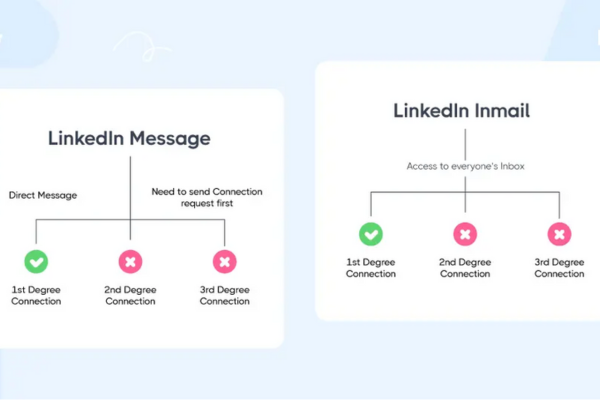
LinkedIn messages are private communications exchanged between users who are connected on LinkedIn. When two people are 1st-degree connections (meaning they have accepted each other’s connection requests), they can message each other directly through LinkedIn’s messaging platform. This system works similarly to email but is integrated within LinkedIn’s professional network.

1.2 Features of LinkedIn Messages

  • Free to use: Messaging your connections does not incur any cost.
  • Direct communication: Allows for back-and-forth conversations.
  • Attachments and multimedia: Users can send files, images, links, and emojis.
  • Group messaging: Users can create group chats with multiple connections.
  • Read receipts: Senders can see if their messages have been read.

2. Defining LinkedIn InMails

2.1 What Are InMails?

InMails are LinkedIn’s premium messaging feature that allows users to send messages to other LinkedIn members who are not in their network (i.e., not connected). Unlike regular messages, InMails enable professionals to reach out to potential clients, recruiters, or collaborators beyond their immediate connections.

InMails are part of LinkedIn’s paid subscription plans such as LinkedIn Premium, Sales Navigator, and Recruiter Lite, and come with a limited number of InMail credits per month depending on the subscription.

2.2 Features of InMails

  • Reach outside your network: Send messages to any LinkedIn member.
  • Paid feature: Requires a Premium subscription or purchase of InMail credits.
  • Response guarantee: If the recipient does not reply within 90 days, LinkedIn often refunds the InMail credit.
  • Professional outreach: Used primarily for recruiting, sales prospecting, and business development.
  • Personalization: Highly customizable messages to engage the recipient.

3. Key Differences Between InMails and Messages

Feature LinkedIn Messages LinkedIn InMails
Who can you message? Only 1st-degree connections (your network) Any LinkedIn user, regardless of connection status
Cost Free Requires Premium subscription or InMail credits (paid)
Access Available to all LinkedIn users Available only to Premium or Sales Navigator users
Purpose Casual or ongoing conversations with known contacts Cold outreach to new prospects or contacts
Message volume Unlimited within connections Limited number of InMails per month based on subscription
Response guarantee No refund for unread messages Refund of InMail credit if no response within 90 days
Visibility Visible only to connected users Messages go to recipient’s LinkedIn inbox, sometimes filtered into “Other” folder
Features Can include attachments, images, emojis Same as messages, but typically more formal and targeted

4. When to Use LinkedIn Messages vs. InMails

4.1 Use LinkedIn Messages When:

  • You want to communicate with people you already know or have connected with.
  • You need to maintain or nurture existing relationships.
  • You want to have ongoing, multi-message conversations.
  • Your communication is informal or personalized for familiar contacts.

4.2 Use LinkedIn InMails When:

  • You want to reach new prospects, potential employers, or clients who are not in your network.
  • You are recruiting candidates who are not connected to you.
  • You are prospecting for sales leads beyond your current network.
  • You want to initiate first contact professionally and stand out in crowded inboxes.

5. Best Practices for Using InMails Effectively

  • Personalize your message: Avoid generic outreach; tailor your InMail to the recipient’s profile and interests.
  • Be concise and clear: State your purpose quickly and professionally.
  • Add value: Explain why connecting with you benefits them (job opportunity, collaboration, shared interests).
  • Include a call to action: Ask for a meeting, a call, or a reply.
  • Respect their time: Keep it polite and professional.
  • Follow-up wisely: If no response, send a courteous follow-up after some time.

6. Example: How a Recruiter Uses InMails vs Messages

Background:
Jessica is a recruitment specialist at a tech company. She uses LinkedIn extensively to find and connect with talented software engineers.

Using LinkedIn Messages:

Jessica connects with candidates she has met through referrals, industry events, or previous applications. Once connected, she sends direct LinkedIn messages to discuss job openings, interview schedules, and follow-ups. Since they are connected, these messages are free, and she can maintain ongoing communication easily.

Using LinkedIn InMails:

To expand her talent pool, Jessica also searches for potential candidates outside her network who match the job requirements but have not connected with her yet. Using LinkedIn’s Recruiter Premium account, she sends personalized InMails to these prospects introducing herself, the opportunity, and inviting them to apply or chat. This allows her to reach passive candidates who might not be actively job hunting but could be interested if approached professionally.

Jessica crafts each InMail to highlight the candidate’s skills and the unique aspects of her company, increasing the likelihood of a response. If candidates don’t respond within 90 days, LinkedIn refunds her InMail credits, making it cost-effective.

Results:

  • Jessica successfully filled several roles by reaching candidates outside her immediate network through InMails.
  • Her messages to connected candidates helped maintain good relationships and coordinate hiring steps smoothly.
  • The combination of InMails and messages enhanced her recruitment effectiveness and built her professional network.

7. Summary of Key Points

  • LinkedIn messages are free, direct communications between connected users.
  • LinkedIn InMails allow paid, targeted outreach to users outside your network.
  • Messages are best for maintaining relationships; InMails are ideal for cold outreach.
  • InMails require personalization and strategy for effectiveness.
  • Using both tools strategically can significantly enhance professional networking, sales prospecting, recruiting, and business development.

8. Conclusion

LinkedIn provides both messages and InMails as essential communication tools tailored for different networking needs. Messages enable free, seamless communication with your network, fostering relationship building and ongoing conversations. InMails expand your reach beyond existing connections, empowering professional outreach for recruiting, sales, or new collaborations.

Understanding these differences and using them appropriately helps professionals maximize LinkedIn’s value. Whether you’re nurturing contacts or seeking new opportunities, mastering messages and InMails is key to professional success in today’s digital landscape.

The example of Jessica, the recruiter, shows how combining LinkedIn messages and InMails can streamline hiring processes and expand talent reach. By crafting personalized InMails and maintaining connections through messages, Jessica efficiently sources candidates and builds lasting relationships.


How does LinkedIn’s job search feature work?

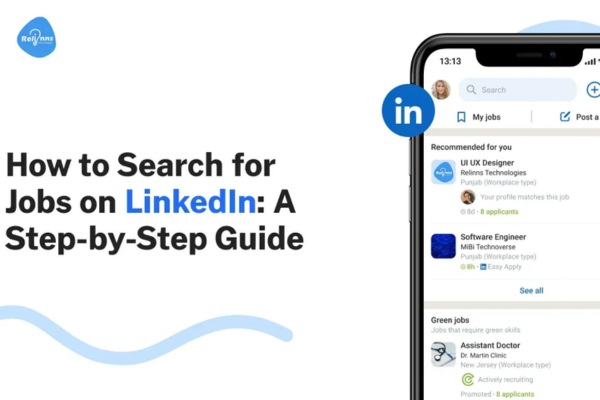
LinkedIn, as the world’s largest professional networking platform, has become an essential tool not only for networking and personal branding but also for job hunting. Its job search feature is one of the most powerful and widely used functionalities on the platform, helping millions of users worldwide find and apply for job opportunities tailored to their skills, preferences, and career goals. This essay explores how LinkedIn’s job search feature works, the tools it offers, the ways it benefits users, and how to leverage it effectively to maximize job search success.


1. Overview of LinkedIn’s Job Search Feature

LinkedIn’s job search feature is integrated into the platform as a dedicated “Jobs” section that allows users to browse, filter, and apply for millions of job listings posted by companies, recruiters, and staffing agencies worldwide. Unlike traditional job boards, LinkedIn’s job search is deeply connected with its networking capabilities and user profile data, enabling highly personalized job recommendations and direct interaction with recruiters.

The feature includes:

  • Job search engine with multiple filters.
  • Personalized job recommendations.
  • Job alerts and notifications.
  • Easy application processes, including “Easy Apply.”
  • Insights into companies and hiring trends.
  • Connections with recruiters and employees.

2. How to Access and Use LinkedIn’s Job Search Feature

a. Navigating to the Jobs Tab

On the LinkedIn homepage, users find the “Jobs” tab in the top menu. Clicking this opens a search page where users can enter keywords, job titles, or company names along with a preferred location to find relevant job postings.

b. Job Search Engine and Filters

Users can enter various search queries such as “Marketing Manager,” “Software Engineer,” or “Data Analyst.” The job search engine allows refining results through multiple filters, including:

  • Location: Specify city, state, country, or remote opportunities.
  • Date Posted: Filter jobs posted within the past 24 hours, week, month, etc.
  • Experience Level: Entry-level, associate, mid-senior, director, etc.
  • Company: Search for jobs by specific employers.
  • Job Type: Full-time, part-time, contract, internship, freelance.
  • On-site/Remote/Hybrid: Choose work environment preferences.
  • Easy Apply: Jobs where users can apply with their LinkedIn profile instantly.

These filters help users narrow down to the most relevant jobs.

c. Personalized Job Recommendations

LinkedIn uses algorithms that analyze the user’s profile—such as skills, experience, location, and job searches—to generate customized job recommendations. This means the platform shows jobs that align with the user’s background and interests even before the user searches explicitly.

d. Job Alerts

Users can set up job alerts based on specific search criteria, receiving notifications via email or on LinkedIn’s app when matching jobs are posted. Alerts help users stay up-to-date and apply quickly.


3. The Application Process on LinkedIn

LinkedIn provides two primary ways to apply for jobs:

a. Easy Apply

“Easy Apply” is a streamlined application process where users can apply to a job directly on LinkedIn with their profile and an uploaded resume without leaving the site. This is convenient and faster for both applicants and recruiters.

Benefits of Easy Apply:

  • Saves time by avoiding external application portals.
  • Allows attaching a cover letter or answering quick screening questions.
  • Ensures recruiter access to a complete LinkedIn profile along with the resume.

b. Apply on Company Website

For some postings, LinkedIn redirects users to the employer’s official website to complete the application process. These jobs may require filling out detailed forms or uploading additional documents.


4. Additional Features Enhancing the Job Search

a. “Open to Work” Feature

Users can signal recruiters that they are actively seeking job opportunities by enabling the “Open to Work” feature on their profile. They can specify the types of roles, locations, and start dates they are open to, increasing their visibility to recruiters.

b. Insights and Company Research

LinkedIn provides valuable insights about companies, including employee count, company growth, recent updates, and reviews. Users can view connections working at the company, which may help in getting referrals.

c. Interview Preparation and Salary Insights

LinkedIn offers tools like interview preparation tips, common questions for roles, and salary estimates based on location and position, helping candidates prepare better and negotiate offers.

d. Networking with Recruiters and Hiring Managers

LinkedIn enables users to connect with recruiters, HR professionals, and employees at companies they are interested in, facilitating conversations that can boost chances of landing an interview.


5. How LinkedIn’s Job Search Algorithm Works

LinkedIn’s job search algorithm considers multiple factors to rank job postings in search results and recommendations:

  • Relevance: How closely the job matches the user’s profile keywords, skills, and experience.
  • Engagement: Jobs that receive more applications, views, and clicks may rank higher.
  • Activity: Recent postings often appear first to keep results fresh.
  • Network: Jobs posted by companies connected to the user or their network may be prioritized.
  • Applicant Fit: LinkedIn estimates how well the candidate fits the job based on their profile and past behavior.

This personalization improves the efficiency and success of the job search process.


6. Example: How a Recent Graduate Used LinkedIn’s Job Search Feature

Meet Aisha, a recent computer science graduate looking for her first full-time software engineering job.

  • Profile Preparation: Aisha first updated her LinkedIn profile, adding skills like Python, Java, and data structures, and highlighting her internship and capstone project.
  • Job Search Setup: She used the Jobs tab to search for “Software Engineer” roles in New York City, filtering for “Entry-Level” and “Full-Time.”
  • Personalized Recommendations: LinkedIn suggested several roles at startups and tech firms that matched her skills.
  • Job Alerts: Aisha set job alerts to get notified about new openings daily.
  • Applying via Easy Apply: For many listings, she used the “Easy Apply” feature, submitting her LinkedIn profile and tailored resume quickly.
  • Networking: She sent connection requests to recruiters and engineers working at companies she applied to, sometimes asking for advice or referrals.
  • Open to Work: Aisha enabled the “Open to Work” frame on her profile photo to signal recruiters.
  • Research and Preparation: She reviewed company pages, employee profiles, and salary data on LinkedIn to prepare for interviews.

Outcome:
Within two months, Aisha secured multiple interview calls and accepted a software engineer position at a mid-sized tech company.


7. Tips to Maximize LinkedIn Job Search Effectiveness

  • Optimize Your Profile: A complete and keyword-rich profile improves job recommendations.
  • Use Advanced Filters: Refine searches to target ideal roles.
  • Leverage Easy Apply Wisely: Tailor resumes even for Easy Apply jobs.
  • Set Job Alerts: Stay updated and apply quickly.
  • Network Actively: Connect and engage with industry professionals.
  • Regularly Update Your Profile: Reflect new skills or experiences.
  • Engage on LinkedIn: Share content related to your field to stay visible.

8. Conclusion

LinkedIn’s job search feature combines the power of a traditional job board with personalized algorithms and networking capabilities, making it an invaluable resource for job seekers at all career stages. By using its comprehensive filters, personalized recommendations, and networking tools, users can efficiently discover relevant job opportunities and connect with hiring professionals.

As the example of Aisha illustrates, students and recent graduates can particularly benefit by showcasing their skills on their profiles, leveraging easy application processes, and actively engaging with the LinkedIn community. When used strategically, LinkedIn’s job search can significantly improve the chances of landing meaningful and rewarding employment.


What are LinkedIn groups, and how can they be useful?

Introduction

LinkedIn, as the world’s largest professional networking platform, offers numerous features designed to help users build connections, share knowledge, and grow professionally. One of its most powerful yet sometimes underutilized features is LinkedIn Groups. These groups serve as virtual communities within the platform where professionals with shared interests, industries, or goals can gather to network, discuss ideas, and collaborate.

This essay explores the concept of LinkedIn Groups, their structure, the types of groups available, and how individuals and businesses can leverage them for networking, learning, personal branding, and business development. A real-world example will illustrate the practical application and benefits of engaging with LinkedIn Groups.


1. What Are LinkedIn Groups?

LinkedIn Groups are online communities within the LinkedIn platform where members can:

  • Post and participate in discussions.
  • Share articles, insights, questions, and advice.
  • Network with like-minded professionals.
  • Access industry-specific content.
  • Seek support, mentorship, or opportunities.

Groups are typically centered around a common theme such as a profession (e.g., marketing professionals), industry (e.g., healthcare), geographic region (e.g., London business leaders), or shared interests (e.g., startups, entrepreneurship).


2. Structure and Types of LinkedIn Groups

2.1 Group Types

LinkedIn Groups fall into three main categories:

  • Public Groups: Anyone can join, see the group content, and participate freely. These groups maximize exposure and networking opportunities.
  • Private Groups: Require approval from the group administrator to join. Content and discussions are visible only to members, providing a more exclusive environment.
  • Unlisted Groups: Invite-only groups that are not visible in searches or to non-members. These are often for companies, executive teams, or special interest groups.

2.2 Group Features

  • Discussion Boards: The core of group activity where members post topics, questions, and share content.
  • Announcements: Group admins can post important messages or updates.
  • Events: Groups can organize virtual or physical events.
  • Member Directory: Members can see a list of other participants to connect or message.
  • Rules and Moderation: Each group has guidelines to maintain focus and professionalism, with moderators ensuring discussions remain relevant.

3. How Are LinkedIn Groups Useful?

LinkedIn Groups offer several strategic benefits for professionals and businesses. They provide a platform for networking, learning, sharing expertise, and building a personal or corporate brand.

3.1 Networking and Relationship Building

Groups gather professionals with similar interests or industries, making it easier to:

  • Connect with peers: Build relationships with professionals you might not meet otherwise.
  • Engage with industry leaders: Some groups have influencers and thought leaders who share valuable insights.
  • Find collaborators or mentors: Group interactions can lead to mentorship opportunities or partnerships.
  • Grow your network: Engage actively in groups to increase your visibility and connect requests.

3.2 Knowledge Sharing and Learning

Groups are knowledge hubs where members exchange ideas, best practices, and updates:

  • Ask questions: Get quick answers from experts.
  • Stay current: Follow trends and news in your field.
  • Access diverse viewpoints: Learn from a global community with different experiences.
  • Participate in discussions: Share your expertise and learn by engaging with others’ perspectives.

3.3 Personal Branding and Thought Leadership

Active participation in LinkedIn Groups can help you:

  • Showcase expertise: Regularly contribute high-value content and thoughtful comments.
  • Build credibility: Gain recognition as a knowledgeable professional.
  • Increase visibility: Your activity is visible to members, attracting connections and opportunities.
  • Drive traffic: Share links to your articles, website, or portfolio (in line with group rules).

3.4 Business Development and Recruitment

For businesses and recruiters, groups can be a goldmine:

  • Lead generation: Connect with potential clients by providing solutions to their problems.
  • Market research: Understand customer pain points and industry challenges.
  • Recruitment: Source candidates actively engaged in niche professional groups.
  • Brand awareness: Promote your company culture or offerings subtly through participation.

3.5 Support and Community

Groups provide a support system for professionals facing challenges or transitions by offering:

  • Peer support: Share experiences and advice during job searches or career changes.
  • Encouragement: Motivate members through success stories and encouragement.
  • Resource sharing: Exchange tools, templates, and resources.

4. Example: How a Software Developer Leveraged LinkedIn Groups for Career Growth

Background:
Michael is a mid-level software developer specializing in Python and machine learning. Although skilled, he felt disconnected from the broader tech community and wanted to expand his professional network and learn about the latest industry trends.

Actions Taken:

  1. Joining Relevant Groups:
    Michael joined several LinkedIn Groups such as “Python Developers Worldwide,” “Machine Learning & AI Innovators,” and “Tech Career Growth.”
  2. Active Participation:
    He regularly participated by answering questions on coding challenges, sharing articles about new machine learning algorithms, and asking for advice on career development.
  3. Networking:
    Through the groups, Michael connected with senior developers, recruiters, and tech influencers. He sent personalized connection requests referencing group discussions.
  4. Learning and Growth:
    Michael stayed up to date with industry news shared in groups and attended virtual events organized within the communities.
  5. Career Opportunities:
    Recruiters from top tech companies noticed his active presence and invited him to interview for roles matching his skills.

Results:

  • Michael expanded his network by 200+ relevant connections within six months.
  • He secured a new job with a company leading in AI technology.
  • He gained recognition within groups as a helpful and knowledgeable contributor.
  • His active participation boosted his confidence and visibility in the tech industry.

5. Best Practices for Using LinkedIn Groups Effectively

To maximize benefits from LinkedIn Groups, consider the following:

  • Choose groups wisely: Select groups relevant to your industry, interests, and goals.
  • Be active but respectful: Post regularly but avoid spamming or self-promotion.
  • Engage authentically: Comment thoughtfully and build genuine relationships.
  • Follow group rules: Respect guidelines to maintain professionalism.
  • Leverage events: Participate in group webinars or virtual meetups.
  • Use groups for research: Observe trends and discussions to inform your own work or business strategy.

6. Conclusion

LinkedIn Groups are vibrant professional communities that offer immense value to members willing to engage meaningfully. They provide opportunities for networking, learning, personal branding, and business growth that go beyond simple connection-building. By joining and participating in groups, professionals can position themselves as thought leaders, build lasting relationships, and open doors to new career and business opportunities.

The example of Michael, the software developer, demonstrates how LinkedIn Groups can transform a professional’s career by fostering continuous learning and strategic networking. Whether you are an individual professional seeking growth or a business looking to connect with prospects, LinkedIn Groups offer a unique and powerful tool to achieve your goals.


Discuss how students can showcase their academic achievements on LinkedIn.

LinkedIn has evolved far beyond a job search platform to become a comprehensive digital portfolio and professional networking site. For students, it offers a unique opportunity to showcase academic achievements, skills, projects, and extracurricular activities to potential employers, internship coordinators, mentors, and peers. Presenting academic accomplishments effectively on LinkedIn helps students build a strong personal brand, stand out in a competitive job market, and open doors to professional opportunities early in their careers.

This essay will explore how students can showcase their academic achievements on LinkedIn through different profile sections, posts, articles, and multimedia content. It will also highlight best practices to maximize visibility and impact, concluding with a real-life example of a student who successfully used LinkedIn to highlight academic success.


1. Why Is Showcasing Academic Achievements on LinkedIn Important for Students?

Academic achievements often represent the most significant accomplishments for students before they accumulate professional experience. By showcasing these, students can:

  • Build credibility: Demonstrate their knowledge, diligence, and skills to recruiters.
  • Highlight relevant skills: Show technical and soft skills gained through coursework, research, and projects.
  • Create networking opportunities: Attract mentors, peers, and recruiters who value academic excellence.
  • Stand out from peers: In highly competitive fields, academic accolades can differentiate candidates.
  • Support career aspirations: Reflect interests and expertise relevant to future roles.

2. Key LinkedIn Sections to Showcase Academic Achievements

LinkedIn’s profile is divided into sections, each providing students with tools to present their academic accomplishments. Students should carefully curate and update these sections:

a. Headline

The headline is the first thing viewers see after your name. Students can include their current academic status, major, and notable achievements.

Example:
“Computer Science Undergraduate | Dean’s List Recipient | AI Research Intern”

b. About Section (Summary)

This section allows students to tell their academic story in their own words. They should highlight:

  • Their field of study and passion.
  • Major academic achievements (scholarships, honors, GPA if impressive).
  • Relevant projects, research, or internships.
  • Career goals and motivation.

Writing in the first person adds a personal touch.

c. Education Section

This is the most direct way to display academic credentials.

  • Include the full name of the institution and degree.
  • Add expected graduation date.
  • Mention GPA (if strong, usually 3.5+ on a 4.0 scale).
  • List academic honors such as Dean’s List, Cum Laude, or scholarships.
  • Add activities and societies (e.g., Math Club, Student Government).
  • Use the description box to mention coursework relevant to career interests.
  • Add media such as certificates, project reports, or presentations.

d. Experience Section

Even though this typically features jobs or internships, students can add:

  • Research assistantships.
  • Teaching assistant roles.
  • Leadership positions in academic clubs.
  • Volunteer work related to their field.

Detailing responsibilities and skills learned here is vital.

e. Licenses & Certifications

If students have earned certifications (e.g., Google Analytics, Microsoft Office Specialist, language proficiency), adding them here builds credibility.

f. Projects Section

Showcase class projects, capstones, or independent studies here.

  • Include project title, dates, and brief descriptions.
  • Mention tools, techniques, and outcomes.
  • Add links to presentations, GitHub repositories, or websites.

g. Honors & Awards

Highlight scholarships, fellowships, competitions, or awards here.

  • Be specific about the award and criteria.
  • Mention competitive or prestigious recognitions.

h. Skills & Endorsements

List skills developed through coursework or projects, such as programming languages, statistical analysis, or teamwork.

  • Encourage classmates and mentors to endorse skills.
  • Having relevant skills helps recruiters find the profile.

i. Recommendations

Students can request professors, mentors, or supervisors to write recommendations emphasizing academic strengths.


3. Using Content to Showcase Academic Success

Beyond profile sections, students can also leverage LinkedIn’s content features:

a. Posts

Students can share announcements about:

  • Scholarship awards.
  • Conference presentations.
  • Publication of research papers.
  • Successful completion of significant projects.
  • Invitations to speak at webinars or events.

These posts help build visibility and demonstrate active engagement.

b. Articles

Writing articles on LinkedIn allows students to:

  • Discuss research findings.
  • Share insights on industry trends related to their academic work.
  • Reflect on learning experiences or challenges.
  • Demonstrate thought leadership even as a student.

c. Multimedia Uploads

Adding images, videos, or documents (PDFs of papers, presentation slides, project demos) to posts and profile sections enriches the profile and provides tangible proof of accomplishments.


4. Best Practices for Students to Showcase Academic Achievements on LinkedIn

a. Be Authentic and Specific

Avoid vague statements; instead, quantify achievements and describe them clearly.

Example: Instead of “Good grades,” write “Graduated top 10% of class with a GPA of 3.8/4.0.”

b. Keep It Professional

Use formal language and avoid slang. Treat the profile as a digital resume and portfolio.

c. Use Keywords

Incorporate industry and academic keywords to improve searchability.

d. Update Regularly

Keep the profile current with new projects, internships, and academic milestones.

e. Network Actively

Connect with peers, professors, alumni, and professionals in the field. Commenting on relevant posts increases visibility.

f. Customize Profile URL

Make the LinkedIn URL clean and professional (e.g., linkedin.com/in/janesmith).


5. Real-Life Example: Showcasing Academic Achievements Effectively

Meet Rahul Mehta — Engineering Student

Rahul is a final-year electrical engineering student aspiring to enter the renewable energy sector. Here’s how he successfully showcases his academic achievements on LinkedIn:

  • Headline:
    “Final Year Electrical Engineering Student | Research Intern at SolarTech | IEEE Member”
  • About Section:
    Rahul writes about his passion for sustainable energy, his academic journey maintaining a 3.7 GPA, and his internship experience working on solar panel optimization. He briefly highlights his senior capstone project designing an efficient energy storage system.
  • Education:
    Rahul lists his university and degree with expected graduation date. He adds his GPA and mentions “Dean’s List” for four consecutive semesters. Under description, he lists relevant courses like Power Electronics and Renewable Energy Systems.
  • Experience:
    He details his internship at SolarTech, describing his responsibilities in data collection and prototype testing. Rahul also adds his role as IEEE student chapter secretary, where he organized workshops and seminars.
  • Projects:
    He includes his senior capstone project with a detailed description, tools used (MATLAB, Simulink), and links to a presentation and project report.
  • Honors & Awards:
    Rahul lists the “Best Undergraduate Research Award” he received for his project proposal.
  • Skills:
    He lists technical skills like MATLAB, Python, Circuit Design, and Analytical Skills, with endorsements from classmates and professors.
  • Content:
    Rahul regularly posts about his research insights, shares articles about renewable energy trends, and announces academic milestones like conference presentations.
  • Recommendations:
    He has two recommendations from professors praising his technical skills and work ethic.

Outcome

Rahul’s detailed, authentic profile attracted attention from renewable energy companies and research labs. He secured a summer internship at a leading firm and was invited to present his work at an international conference.


6. Conclusion

For students, LinkedIn is a powerful tool not just for job searching but for showcasing their academic journey and building a professional identity early on. By thoughtfully curating their LinkedIn profiles — leveraging sections like education, projects, and honors, and actively sharing content — students can demonstrate their achievements effectively to a broad audience.

Crafting a clear, professional, and engaging profile supported by concrete examples of academic success helps students stand out in a competitive market. Rahul Mehta’s example illustrates that when students present their academic credentials strategically on LinkedIn, they can unlock meaningful opportunities and set the stage for a successful career.


How do LinkedIn connections and followers differ?

Introduction

LinkedIn is a powerful professional networking platform used by millions globally to build careers, find jobs, recruit talent, and share knowledge. One of the core elements of LinkedIn’s user interaction is the ability to connect with others or follow them. While these two actions might seem similar at first glance—both involving building a professional network—they serve different purposes and have distinct implications for engagement, visibility, and relationship building.

Understanding the difference between LinkedIn connections and followers is essential for maximizing the platform’s potential, whether you are an individual professional, recruiter, entrepreneur, or business. This essay explores these differences in detail, discusses their strategic uses, and provides an example demonstrating their practical impact.


1. Defining LinkedIn Connections and Followers

1.1 LinkedIn Connections

A connection on LinkedIn is a two-way, mutual relationship. When you connect with someone, both parties agree to be part of each other’s professional network. This mutual acceptance allows:

  • Both parties to view each other’s shared posts and updates.
  • Access to each other’s contact information (depending on privacy settings).
  • The ability to message each other directly without limitations.
  • Visibility of each other’s shared connections (i.e., 2nd-degree connections).

Connections are similar to “friends” on Facebook in that they imply a closer, more personal professional relationship.

1.2 LinkedIn Followers

A follower is a one-way relationship where one LinkedIn user subscribes to another user’s public updates and posts without a mutual connection. When you follow someone:

  • You see their posts, articles, and shared content in your feed.
  • They do not see your posts by default, unless they follow you back or connect with you.
  • There is no requirement for mutual approval; following is unilateral.
  • You cannot send direct messages to someone you only follow unless they allow it through specific settings or you have LinkedIn Premium.

Followers are akin to subscribing to a public figure or influencer on platforms like Twitter or Instagram.


2. Differences Between LinkedIn Connections and Followers

2.1 Nature of the Relationship

  • Connections represent a mutual, agreed-upon professional relationship.
  • Followers represent an interest-based, one-sided subscription to content without mutual acknowledgment.

2.2 Visibility and Engagement

  • Connections: Both parties’ updates appear more frequently in each other’s feeds. Connections can see each other’s contact details and endorsements.
  • Followers: Followers primarily see posts and public updates but have limited interaction options unless the person they follow reciprocates or has open messaging enabled.

2.3 Communication

  • Connections: Can message each other freely, fostering direct and private communication.
  • Followers: Generally cannot message the person they follow unless messaging permissions are open or through premium services.

2.4 Network Expansion

  • Connections: When you connect with someone, you become part of each other’s networks, which can expand your reach to their connections as 2nd-degree contacts.
  • Followers: Following someone does not expand your network or give access to their network beyond content visibility.

2.5 Invitation and Acceptance

  • Connections: Requires an invitation to connect and acceptance from the other party.
  • Followers: No invitation or acceptance is needed; you can follow anyone with a public profile.

3. When to Use Connections vs Followers

3.1 Building Close Professional Relationships

If your goal is to build a professional relationship with mutual trust and communication, such as with colleagues, clients, or mentors, connections are the best choice.

3.2 Expanding Audience for Thought Leadership

If you want to broadcast your ideas broadly without necessarily engaging in personal dialogue, building followers is effective. This is common for:

  • Influencers
  • Public speakers
  • Industry leaders
  • Brands

4. LinkedIn’s Default Settings and How They Affect Connections and Followers

By default, when you send a connection request, if accepted, you become 1st-degree connections. When users choose to “follow” instead of connecting, they subscribe to public updates without direct network expansion.

Also, LinkedIn allows users to set their profile to “Follow” mode, where people see the option to follow rather than connect, which is useful for public figures who want large audiences but not necessarily personal connections.


5. Example: Differences in Action – How an Entrepreneur Uses Connections and Followers

Case: Laura, a Marketing Consultant

Laura is an entrepreneur and marketing consultant who uses LinkedIn both to build close client relationships and to establish herself as a thought leader in digital marketing.

Using Connections

Laura sends personalized connection requests to:

  • Past and current clients.
  • Colleagues in the marketing industry.
  • Potential clients she meets at networking events.
  • Marketing professionals she admires.

These connections allow her to:

  • Message directly about potential projects.
  • View their contacts and network through them.
  • Endorse and be endorsed for skills.
  • Share recommendations.

By growing her connections, Laura creates a trusted network she can tap into for referrals, collaborations, and client projects.

Using Followers

At the same time, Laura creates and shares insightful marketing content such as articles, videos, and trends analysis. People interested in marketing, including those outside her immediate professional circle, follow her to see her updates regularly.

Followers give Laura a wider audience without the need for mutual approval, allowing her to influence and build credibility in the marketing community globally.

Some followers later become connections when there’s a business opportunity or a desire for closer interaction.


6. Strategic Benefits of Understanding Connections vs Followers

6.1 For Job Seekers

Connections allow job seekers to network closely with recruiters, hiring managers, and peers, increasing the likelihood of referrals and direct communication. Followers help build visibility for personal branding and showcasing expertise.

6.2 For Recruiters

Recruiters build large networks of connections to tap into trusted professional circles but also accumulate followers who regularly engage with their content, increasing the reach of job posts and employer branding.

6.3 For Businesses

Businesses encourage followers for brand awareness while fostering connections through company page admins and key employees to interact more personally with prospects and clients.


7. Conclusion

While LinkedIn connections and followers might seem similar at first, they represent fundamentally different types of relationships. Connections are mutual professional relationships that enable direct communication and network expansion, making them ideal for building meaningful, trusted contacts. Followers, in contrast, represent a unilateral interest in someone’s content, perfect for amplifying reach and influence without requiring mutual engagement.

Understanding when to prioritize connections versus followers is critical to leveraging LinkedIn effectively for networking, personal branding, job searching, or business development.

The example of Laura, the marketing consultant, highlights how both connections and followers serve complementary roles: connections nurture close relationships and business development, while followers help grow thought leadership and brand influence at scale.


What makes a LinkedIn profile stand out?

In today’s professional world, LinkedIn is the foremost platform for networking, job hunting, and personal branding. With over 900 million users globally, standing out on LinkedIn is both a challenge and an opportunity. A compelling LinkedIn profile acts as your digital resume, portfolio, and networking hub all in one — and it’s often the first impression recruiters, colleagues, or clients have of you.

This essay explores what makes a LinkedIn profile stand out. We will break down the essential components of an effective profile, highlight strategies for optimization, and explain why each element matters. Finally, we’ll illustrate these concepts with an example of a standout LinkedIn profile.


1. Importance of a Strong LinkedIn Profile

Before diving into specifics, it’s important to understand why having a strong LinkedIn profile matters:

  • Visibility: LinkedIn’s search algorithm prioritizes profiles that are complete and optimized.
  • Credibility: A well-crafted profile builds trust and professionalism.
  • Networking: It encourages meaningful connections and opportunities.
  • Recruitment: Many recruiters use LinkedIn as their primary tool to find candidates.
  • Personal Branding: Your profile is a platform to showcase your unique value and career story.

2. Components of a Standout LinkedIn Profile

a. Professional Profile Photo

Your profile picture is the first visual impression. Profiles with photos get far more views and connection requests than those without.

  • Tips: Use a high-resolution, well-lit image with a neutral or professional background. Dress appropriately for your industry. Smile and look approachable.

b. Custom Background Banner

The banner (cover photo) at the top of your profile can reinforce your personal brand. It’s often overlooked but adds visual interest and context.

  • Tips: Use banners related to your profession, personal logo, or inspirational quotes. Make sure it looks professional and complements your profile photo.

c. Compelling Headline

The headline appears below your name and is one of the most important keywords for search.

  • Beyond Job Titles: Instead of just stating your job title, craft a headline that showcases your expertise and value proposition.

Example:
“Digital Marketing Specialist | Helping Brands Grow with Data-Driven Strategies | Content Creator & Speaker”

d. Informative and Engaging Summary (About Section)

The summary is your chance to tell your story in your own words.

  • Tips: Write in the first person. Highlight your skills, experiences, passions, and what makes you unique. Include achievements and aspirations. Keep it concise but impactful.

e. Detailed Experience Section

Like a traditional resume, this section lists your past roles but can be richer with descriptions, media, and links.

  • Tips: Use bullet points to describe accomplishments and responsibilities. Quantify results when possible (e.g., “Increased sales by 30%”). Add multimedia like presentations or links to projects.

f. Skills and Endorsements

LinkedIn allows you to list skills that others can endorse, validating your expertise.

  • Tips: List relevant skills to your field and keep them updated. Actively seek endorsements from colleagues, professors, or supervisors.

g. Recommendations

Recommendations are testimonials from connections who can vouch for your skills and character.

  • Tips: Request recommendations from people you’ve worked closely with. Provide them with guidance on what to emphasize to ensure relevance.

h. Education and Certifications

Include all relevant educational background and any certifications, licenses, or courses completed.

  • Tips: Add details like honors, activities, or projects related to your field. Certifications from platforms like LinkedIn Learning or industry bodies can boost credibility.

i. Accomplishments and Projects

LinkedIn allows users to highlight awards, patents, languages, publications, and projects.

  • Tips: Showcase your achievements beyond the resume to differentiate yourself.

j. Customized LinkedIn URL

A personalized URL makes your profile easier to share and looks professional.


3. Optimization Strategies to Make Your Profile Discoverable

a. Use Keywords Wisely

Incorporate keywords relevant to your industry, role, and skills in your headline, summary, and experience. This improves your profile’s chances of appearing in recruiter searches.

b. Engage with Content

Posting, commenting, and sharing relevant content increases your visibility and portrays you as an active professional.

c. Network Strategically

Connect with people in your industry, alumni, colleagues, and recruiters. Personalize connection requests to make a positive impression.

d. Keep Your Profile Updated

Regularly update your profile with new skills, roles, and accomplishments to stay relevant.


4. Why Each Element Matters

  • Profile Photo: Humans are visual creatures; photos create trust.
  • Headline: Acts like a mini-advertisement — it grabs attention.
  • Summary: Tells your story beyond bullet points, adding personality.
  • Experience: Validates your capabilities with evidence and context.
  • Skills & Recommendations: Social proof builds credibility.
  • Engagement: Shows you are active, knowledgeable, and invested in your profession.

5. Real-World Example: Standout LinkedIn Profile of a Marketing Professional

Meet Priya Sharma

Priya Sharma is a digital marketing specialist who wanted to transition from a small agency to a multinational corporation. Here’s how she made her LinkedIn profile stand out:

  • Profile Photo: Priya chose a clear, friendly, and professional photo in business casual attire with a simple background.
  • Banner Image: She designed a banner highlighting key marketing terms and her tagline: “Driving Growth with Data & Creativity.”
  • Headline: Instead of “Marketing Specialist,” her headline reads:
    “Digital Marketing Strategist | SEO & SEM Expert | Helping Brands Achieve 3X Growth Through Data-Driven Campaigns.”
  • Summary: Priya wrote a compelling summary starting with her passion for digital marketing, followed by her key skills, significant achievements like “managed campaigns that increased client ROI by 250%,” and ended with her career goals.
  • Experience: She detailed her roles with clear bullet points, adding links to campaigns and videos she managed.
  • Skills & Endorsements: Priya listed 20+ skills relevant to her field and actively sought endorsements from clients and colleagues.
  • Recommendations: She had glowing recommendations from previous managers and clients focusing on her creativity, professionalism, and results.
  • Certifications: She added certificates from Google Ads, HubSpot, and LinkedIn Learning.
  • Engagement: Priya regularly posts about marketing trends, shares insightful articles, and comments on posts by industry leaders.
  • Customized URL: She uses linkedin.com/in/priyasharma which she added to her email signature and resume.

Result

Within 3 months of optimizing her profile, Priya was contacted by multiple recruiters and received interview calls from top companies. Her active engagement led to an invitation to speak at a marketing webinar. Ultimately, she secured a senior marketing role at a multinational firm.


6. Conclusion

A standout LinkedIn profile is a blend of professionalism, storytelling, strategic optimization, and active engagement. Each component — from your photo to your headline to your endorsements — plays a vital role in creating a profile that attracts attention, builds trust, and opens doors to opportunities.

By investing time in crafting a comprehensive and compelling LinkedIn profile, professionals like Priya Sharma can effectively showcase their unique value, expand their networks, and accelerate their careers in today’s competitive landscape.


How can LinkedIn be used for personal branding?

Introduction

In today’s digitally driven professional landscape, personal branding has become a crucial factor in career growth, business success, and professional recognition. Personal branding involves consciously shaping and communicating your unique skills, expertise, values, and personality to stand out in your industry. With over one billion users worldwide, LinkedIn has emerged as the premier platform for building and enhancing a personal brand professionally.

LinkedIn offers a wide range of tools and features that empower individuals to present themselves strategically, connect with the right audience, and establish authority in their field. This essay explores how LinkedIn can be leveraged effectively for personal branding, covering key strategies, practical steps, and an example that highlights its power in action.


1. Understanding Personal Branding on LinkedIn

Personal branding on LinkedIn is about creating a consistent, professional online identity that reflects your strengths and aspirations. Unlike a traditional resume, which is static and limited to your job history, LinkedIn allows you to tell a more dynamic story through:

  • A well-crafted profile.
  • Engaging and relevant content.
  • Active networking and relationship-building.
  • Visible endorsements and recommendations.
  • Participation in groups and industry discussions.

It’s not just about listing what you do, but demonstrating who you are, what you stand for, and why others should pay attention to you professionally.


2. Why Use LinkedIn for Personal Branding?

  • Global Reach: LinkedIn connects you to professionals worldwide, expanding your influence beyond geographic boundaries.
  • Professional Audience: The platform’s users are primarily business professionals, recruiters, and industry experts, making it ideal for career-related branding.
  • Searchability: Recruiters and potential clients often search for talent on LinkedIn using keywords related to skills and expertise.
  • Content Sharing: LinkedIn supports multiple content types—posts, articles, videos—that help you showcase knowledge and insights.
  • Credibility Building: Endorsements, recommendations, and a strong network increase your professional credibility.

3. Key Components of Personal Branding on LinkedIn

3.1. Crafting a Strong LinkedIn Profile

Your LinkedIn profile is your digital first impression and acts as the cornerstone of your personal brand.

  • Professional Profile Photo: A clear, high-quality headshot conveys professionalism.
  • Compelling Headline: Instead of just a job title, use the headline to highlight your value proposition. For example, “Marketing Strategist | Driving ROI through Data-Driven Campaigns.”
  • Custom URL: Personalize your LinkedIn URL to make it easier to share and remember.
  • Summary/About Section: Write a narrative that tells your story—your passion, achievements, skills, and career goals.
  • Detailed Experience: Highlight not just roles but achievements and impact.
  • Skills and Endorsements: List key skills that reflect your expertise; encourage peers to endorse you.
  • Recommendations: Request and display testimonials from colleagues, clients, or managers.
  • Accomplishments: Add certifications, awards, publications, and projects.

3.2. Creating and Sharing Valuable Content

Content is the engine of personal branding. By consistently sharing valuable insights, you:

  • Showcase your expertise.
  • Engage your network.
  • Grow your visibility.

Types of content include:

  • Posts: Share quick insights, questions, or industry news.
  • Articles: Write in-depth pieces on topics related to your field.
  • Videos: Create tutorials, interviews, or thought leadership videos.
  • Polls and Surveys: Engage your audience with interactive content.

3.3. Engaging with Your Network

Building a brand is not just about broadcasting but also about dialogue.

  • Comment on Posts: Add thoughtful comments to industry discussions.
  • Join LinkedIn Groups: Participate in niche groups related to your profession.
  • Connect Strategically: Send personalized connection requests to relevant professionals.
  • Message Personally: Build relationships through meaningful conversations.

Engagement increases your visibility and establishes you as an approachable expert.


3.4. Leveraging LinkedIn Features

  • LinkedIn Stories: Share daily professional moments or quick tips.
  • LinkedIn Live: Host live sessions to interact with your audience in real-time.
  • Newsletters: Build a subscriber base by regularly sharing curated content.
  • Skill Assessments: Validate your skills through LinkedIn’s tests to boost credibility.

4. Example: How Sarah Used LinkedIn for Personal Branding to Advance Her Career

Background:
Sarah Johnson, a mid-career digital marketing professional, wanted to transition into a leadership role but felt overshadowed in her company. She decided to focus on building her personal brand on LinkedIn to gain visibility and credibility.

Actions Sarah Took:

  1. Profile Optimization:
    Sarah revamped her profile with a professional photo, a headline that read “Digital Marketing Leader | Driving Growth through Data & Creativity,” and a well-written summary highlighting her passion and achievements.
  2. Content Strategy:
    She began posting weekly insights about digital marketing trends, sharing case studies of successful campaigns she managed, and writing LinkedIn articles on leadership in marketing.
  3. Active Engagement:
    Sarah joined LinkedIn groups for marketing professionals and leadership development. She regularly commented on posts by industry experts, adding value and making connections.
  4. Networking:
    She sent personalized connection requests to marketing leaders, recruiters, and alumni from her university, gradually expanding her network to over 1,500 relevant contacts.
  5. Recommendations and Endorsements:
    Sarah requested recommendations from former managers and colleagues and endorsed others’ skills, which encouraged reciprocal endorsements.
  6. LinkedIn Live Session:
    She hosted a live session discussing “Data-Driven Marketing Strategies” that attracted over 300 viewers and generated several new connection requests.

Results:

  • Sarah’s profile views increased tenfold within six months.
  • She received several direct messages from recruiters and industry peers.
  • She was invited to speak at a virtual marketing conference.
  • Sarah secured a leadership role at a larger firm within eight months, attributing much of her success to the personal brand she built on LinkedIn.

5. Tips for Effective Personal Branding on LinkedIn

  • Be Authentic: Share your true professional journey, including challenges and lessons.
  • Be Consistent: Regular posting and engagement maintain your presence.
  • Be Strategic: Tailor your brand to align with your career goals and target audience.
  • Measure Impact: Use LinkedIn analytics to understand what content resonates most.
  • Keep Learning: Stay updated on LinkedIn’s new features and professional branding trends.

6. Conclusion

LinkedIn offers an unparalleled platform for professionals to develop and amplify their personal brand. Through a well-crafted profile, consistent content sharing, active engagement, and strategic networking, individuals can position themselves as credible, knowledgeable, and approachable experts in their fields. The case of Sarah Johnson exemplifies how deliberate personal branding on LinkedIn can open doors to new career opportunities, recognition, and growth.

In the competitive modern job market, building a strong personal brand on LinkedIn is no longer a luxury but a necessity. By investing time and effort into LinkedIn, professionals can control their narrative, expand their influence, and achieve their career aspirations with greater confidence and visibility.


How to Become a Digital Marketing Specialist

Digital marketing is one of the fastest-growing fields today. Many people are interested in building a career in digital marketing, and becoming a digital...

What is SMM in Digital Marketing

SMM, or Social Media Marketing, is one of the most important parts of digital marketing. In simple words, SMM is the process of using...

What is Google Analytics in Digital Marketing

Google Analytics is one of the most important tools in digital marketing. It helps businesses understand how people interact with their websites and online...

What is Google AdWords in Digital Marketing

Google AdWords is one of the most important tools in digital marketing. Many businesses use AdWords to reach their target audience online and increase...

What Is CPM in Digital Marketing

In digital marketing, understanding how your ads are priced and measured is very important. Different advertising models help marketers track performance and control spending....