Home Blog Page 33

What is LinkedIn, and how is it different from other social media platforms?

LinkedIn is a professional networking platform designed to help individuals connect with colleagues, recruiters, businesses, and industry leaders. Launched in 2003, LinkedIn has grown to become the world’s largest professional network, boasting over 1 billion users across 200+ countries as of 2025. Unlike other social media platforms that focus primarily on entertainment, lifestyle, or casual communication, LinkedIn’s primary goal is to foster professional connections and career development.

In this essay, we will explore what LinkedIn is, how it works, what makes it unique compared to other social media platforms like Facebook, Instagram, or Twitter, and how users — from students to CEOs — benefit from its features. We will also provide a real-world example of how someone used LinkedIn to grow professionally.


1. Understanding LinkedIn: A Professional Network

LinkedIn is often referred to as “Facebook for professionals,” but this comparison only scratches the surface. The platform serves as a digital resume, networking tool, job board, and publishing platform — all rolled into one. LinkedIn helps users achieve various professional goals:

  • Create a personal brand or digital resume
  • Connect with professionals in the same industry
  • Search and apply for jobs
  • Receive and give professional endorsements
  • Stay informed through industry-related news
  • Learn new skills via LinkedIn Learning

The platform is used by job seekers, recruiters, students, freelancers, entrepreneurs, companies, and even educators to share knowledge, showcase experience, or build professional communities.


2. Key Features of LinkedIn

a. Profile Creation

Users create a profile that resembles a digital CV. This includes their photo, headline, experience, education, skills, endorsements, recommendations, certifications, volunteer work, and interests.

b. Networking

Users can “connect” with others, send messages, and engage with posts. These connections are categorized as 1st-degree (direct), 2nd-degree (friends of friends), and 3rd-degree connections.

c. Newsfeed and Content Sharing

Similar to Facebook, LinkedIn has a newsfeed where users can post updates, share articles, or write original content. However, the focus is professional — people share job updates, work achievements, career advice, and thought leadership content.

d. Job Search and Recruitment

LinkedIn is a powerful job search engine. Users can search for jobs by title, company, location, or keyword, and apply directly. Recruiters use LinkedIn to scout potential candidates by viewing profiles and reaching out with offers.

e. LinkedIn Learning

This feature offers thousands of courses on topics like leadership, coding, marketing, and more. Many users use LinkedIn Learning to upskill and earn certificates that appear on their profile.


3. How LinkedIn Differs from Other Social Media Platforms

While LinkedIn shares some common features with platforms like Facebook, Twitter, or Instagram, it has several defining differences:

a. Purpose and Tone

  • LinkedIn: Focused on careers, networking, and professional growth. The tone is formal and respectful.
  • Facebook/Instagram: Focused on social interaction, entertainment, and personal life. The tone is casual and friendly.

Example: On Instagram, someone might post a vacation photo or a meme. On LinkedIn, they’d share a blog post about productivity or a milestone like a job promotion.

b. Audience

  • LinkedIn users include job seekers, entrepreneurs, business owners, and professionals from all industries.
  • Platforms like TikTok and Snapchat cater more to casual users, younger demographics, and creators focused on entertainment or lifestyle content.

c. Content Types

  • LinkedIn posts include career advice, company updates, hiring announcements, industry news, and educational articles.
  • Facebook or Twitter posts are typically personal updates, memes, political opinions, or news from various sources.

d. Professional Branding

  • LinkedIn is a space where users curate their professional identity. Every post, comment, or like reflects on one’s professional image.
  • Other platforms are often used for personal identity, humor, or community engagement without a professional consequence.

e. Networking Value

While all social media platforms allow some form of connection, LinkedIn’s entire structure is built around strategic networking — not just following, but building mutual professional value.


4. Why LinkedIn Matters in Today’s World

a. Career Advancement

LinkedIn allows users to showcase their achievements and build a professional brand that is visible to recruiters and peers. A well-optimized profile can attract job offers, freelance gigs, or speaking invitations.

b. Global Opportunities

Because LinkedIn is international, users can connect with professionals from all over the world, enabling remote work, global collaborations, or international recruitment.

c. Learning and Thought Leadership

Through posts, blogs (LinkedIn Articles), and videos, users can establish themselves as thought leaders. Meanwhile, LinkedIn Learning helps users develop new skills to stay competitive.

d. Company Branding

Companies use LinkedIn to build employer branding. They post job openings, share company culture updates, or publish whitepapers. It’s a critical space for organizations to attract top talent.


5. Drawbacks or Limitations of LinkedIn

While LinkedIn is powerful, it is not without criticism:

a. Over-Professionalization

Some users complain about the platform becoming overly curated or “performative,” where people exaggerate achievements or post inauthentic content to impress others.

b. Spammy Messaging

As with all platforms, LinkedIn has its share of spam, especially in messages from people trying to sell services or promote irrelevant content.

c. Algorithm Challenges

LinkedIn’s algorithm promotes high-engagement content, which sometimes favors viral or emotionally charged stories over truly insightful professional content.


6. A Real-World Example: How a Student Used LinkedIn to Start a Career

Name: Riya Sharma
Hobby/Talent: Graphic Design
Background: Riya, a final-year design student from India, started using LinkedIn to showcase her college projects and freelance work.

Step 1: Building a Strong Profile

Riya updated her LinkedIn profile with:

  • A professional headshot
  • A catchy headline: “Graphic Design Student | UI/UX Enthusiast | Freelance Visual Artist”
  • A detailed summary showcasing her design interests and software skills
  • Uploaded portfolio links via Behance and PDF attachments

Step 2: Content Creation

She started sharing:

  • Before/after design transformations
  • Tutorials on using Adobe tools
  • Lessons learned from freelance clients
  • Student-friendly tips for building a portfolio

Her content was professional but approachable, gaining traction among fellow students and design professionals.

Step 3: Networking

Riya began connecting with alumni, designers from top agencies, and startup founders. She commented thoughtfully on their posts and participated in design-related LinkedIn groups.

Step 4: Opportunities

One of her carousel posts showcasing a website redesign went viral within the design community. A hiring manager from a startup noticed her work and offered her a paid internship, which later turned into a full-time role.

Result:

Within a year, Riya had built a strong network, a personal brand, and a thriving career — all starting from consistent, strategic use of LinkedIn.


7. LinkedIn for Students and Freshers

LinkedIn is especially useful for students looking to enter the job market. Key steps for students include:

  • Follow companies you admire to get updates on job openings and industry trends.
  • Connect with alumni from your college for mentorship or job referrals.
  • Join LinkedIn groups relevant to your career interests.
  • Engage with posts by industry leaders to gain visibility.

Conclusion

LinkedIn stands apart from other social media platforms because of its professional focus, networking opportunities, and potential for career development. While platforms like Instagram or Facebook are great for personal storytelling or entertainment, LinkedIn is where people build their professional stories, share achievements, learn new skills, and connect with others who can influence their careers.

Whether you’re a student trying to land your first job, a freelancer looking for clients, or a professional building thought leadership, LinkedIn provides a powerful toolkit. What makes it truly different is its ability to combine digital visibility with real-world opportunity — turning posts and profiles into job offers, collaborations, and lasting professional relationships.
What ethical concerns are associated with Instagram usage?

Introduction

Instagram, a platform boasting over two billion users globally, is a powerful social media tool that shapes how people connect, express themselves, and consume content. Originally designed to share photos and videos, Instagram has evolved into a multifaceted platform used by influencers, brands, celebrities, and everyday users alike. While it offers many benefits—community building, entertainment, business growth, and self-expression—it also presents significant ethical concerns.

These concerns touch on a wide range of issues: mental health, privacy, data exploitation, misinformation, representation and bias, addiction, and commercial influence—especially regarding young and impressionable audiences. As digital platforms continue to shape societal norms, ethics become increasingly critical to ensure that technology serves people fairly and responsibly.

This essay explores the major ethical concerns surrounding Instagram usage and includes an example that highlights how these concerns manifest in real-world situations.


1. Mental Health and Self-Image

1.1. Unrealistic Beauty Standards

Instagram’s visual nature encourages the curation of “perfect” images through filters, lighting, poses, and editing. Many influencers and users post highly edited, idealized versions of their lives and bodies.

  • This can lead to unrealistic expectations and distorted perceptions of normal appearance.
  • Studies show that prolonged exposure to such content can result in low self-esteem, body dissatisfaction, and even eating disorders.
  • The pressure to conform can be especially damaging for teenagers and young adults, who are still forming their self-identity.

1.2. “Compare and Despair” Culture

Instagram promotes a culture of comparison—comparing bodies, lifestyles, wealth, and achievements.

  • Seeing others’ highlight reels can cause users to feel inadequate about their own lives.
  • This can contribute to anxiety, depression, and feelings of social isolation.

Example: The Facebook Whistleblower Case (Frances Haugen)

In 2021, former Facebook employee Frances Haugen revealed internal documents showing that Meta (formerly Facebook) was aware of Instagram’s harmful impact on teenagers’ mental health, especially teen girls. One study cited in the leak stated, “We make body image issues worse for one in three teen girls.” Despite this, the company continued to prioritize engagement over user well-being. The case drew global scrutiny and highlighted ethical failures around corporate responsibility and algorithmic influence.


2. Data Privacy and Surveillance

2.1. Data Collection and Targeted Advertising

Instagram, like its parent company Meta, collects massive amounts of user data:

  • Location, behavior, interactions, and even time spent looking at a post.
  • This data is used to serve highly targeted ads, which raises questions about informed consent and data ownership.

Many users are unaware of how much of their personal data is being harvested and used to influence their behavior.

2.2. Facial Recognition and Tracking

Although Instagram has scaled back facial recognition technology, third-party apps and advertisers may still use this data for profiling or surveillance.

  • Users often unknowingly agree to privacy-invasive terms.
  • Data may be shared with governments or third parties, raising ethical and legal concerns.

3. Misinformation and Manipulation

3.1. Spread of False Information

Instagram is increasingly used to share news and opinions, but misinformation—about politics, health, science, or social issues—can spread rapidly.

  • During events like the COVID-19 pandemic or elections, false claims can influence public behavior dangerously.
  • Instagram has taken steps to combat misinformation, but critics argue these measures are inconsistent and insufficient.

3.2. Algorithmic Bias

Instagram’s algorithm prioritizes content that generates strong reactions—often sensational, polarizing, or misleading content.

  • This can create echo chambers, reinforce biases, and escalate extreme views.
  • Users are not informed about how the algorithm decides what they see, reducing transparency.

4. Influence and Manipulation of Young Users

4.1. Advertising and Commercial Pressure

Instagram is filled with sponsored content, influencer partnerships, and ads.

  • Much of this content blurs the line between organic and paid, especially when influencers fail to disclose promotions.
  • Teens and children are especially susceptible to subliminal marketing.
  • There’s an ethical concern when young audiences are manipulated into consumerism without clear disclosure.

4.2. Addictive Design and Attention Economy

Instagram is designed to maximize user time on the app through features like:

  • Infinite scrolling
  • Push notifications
  • Algorithmic content loops

This design feeds into the attention economy, where user attention is commodified for profit. The ethical dilemma lies in exploiting psychological vulnerabilities to increase screen time, potentially leading to digital addiction.


5. Censorship and Content Moderation

5.1. Arbitrary Censorship

Instagram sometimes removes content without clear justification:

  • Artistic nudity may be censored while harmful content goes undetected.
  • Cultural expression can be misclassified as “inappropriate.”
  • The lack of consistency in content moderation can silence marginalized voices.

5.2. Shadow Banning and Algorithmic Suppression

Some creators claim their content is being “shadow banned”—made less visible without notification—due to algorithmic biases.

  • Certain hashtags, political views, or identities may be unfairly deprioritized.
  • This raises issues of freedom of expression and algorithmic discrimination.

6. Environmental and Social Responsibility

Instagram promotes fast fashion, luxury lifestyles, and overconsumption.

  • Influencer culture often encourages unsustainable behaviors.
  • The environmental cost of promoting mass consumerism through digital platforms is rarely addressed.

Ethically, platforms have a responsibility to balance promotion with sustainability and social values.


7. Digital Identity and Consent

7.1. Posting Without Consent

It’s common for users to post photos or videos featuring others—often without their knowledge or permission.

  • This raises issues about consent, digital identity, and control over personal images.
  • For minors, it’s especially concerning when parents or schools share content without consent.

7.2. Deepfakes and Identity Theft

As editing tools become more advanced, deepfake content and impersonation profiles are rising.

  • This can lead to reputational damage, fraud, or emotional distress.
  • Instagram faces ethical pressure to develop stronger verification and security protocols.

8. Ethical Responsibilities of Influencers and Brands

Influencers and brands have significant power over followers, especially when promoting products, lifestyles, or ideas.

  • Lack of transparency (e.g., undeclared sponsored content) is a breach of ethical marketing.
  • Influencers should consider the impact of promoting unrealistic standards or controversial products.
  • Brands should be held accountable for who they partner with and how they use Instagram to shape public behavior.

Conclusion

Instagram, while a powerful tool for connection, creativity, and commerce, is also a complex ecosystem fraught with ethical concerns. From mental health and privacy to misinformation and algorithmic bias, the platform presents significant challenges that require urgent attention from developers, regulators, creators, and users.

The example of Frances Haugen’s whistleblower revelations highlights how corporate negligence can have real consequences, particularly on vulnerable groups like teenagers. It underscores the need for ethical responsibility, transparent practices, and user-centered design in digital platforms.

Going forward, ethical Instagram use demands a multi-stakeholder approach. Platforms must be more transparent and accountable. Governments must enforce data and consumer protection laws. Influencers and brands must act with integrity. And users must be educated to think critically, protect their well-being, and use technology responsibly.

In doing so, we can create a digital culture that values not just likes and engagement, but human dignity, truth, and fairness.


How has Instagram changed the way we consume information and news?

Instagram, originally launched in 2010 as a photo-sharing app, has evolved into a powerful multimedia platform that influences how billions of people interact, express themselves, and stay informed. One of the most profound impacts Instagram has had in recent years is its role in reshaping how we consume information and news. What was once dominated by newspapers, television, and long-form journalism has now shifted — at least in part — to bite-sized, image-driven, and often opinion-rich content that appears on our screens in the form of stories, reels, and posts.

In this essay, we will explore the transformation of news consumption due to Instagram, including the platform’s strengths, weaknesses, and implications. We’ll also look at how different types of news — from global events to social causes — spread through Instagram, and we’ll close with a real-world example of how Instagram has played a role in raising awareness or changing perspectives.


1. The Visual Shift in News Consumption

Traditionally, news was consumed through text-heavy mediums: newspapers, magazines, and websites. Instagram flipped that model on its head by placing visuals — photos, videos, graphics — at the core of its experience. This shift has affected the format, speed, and engagement of news consumption.

a. Bite-sized Information

Instagram encourages short, concise messaging. Users are more likely to engage with a post that gets straight to the point in a few slides or under a minute. As a result, complex issues are often broken down into infographics, quick headlines, or short video explainers. This style makes information easier to digest but can oversimplify nuanced topics.

b. Infographics and Carousel Posts

Slide posts (carousel format) are often used to present news in a step-by-step manner. These make information more engaging and encourage users to swipe through, simulating a reading experience without overwhelming them with text.


2. News Through Influencers and Creators

Another major shift brought by Instagram is the decentralization of news sources. In the past, we relied on professional journalists and traditional media outlets. On Instagram, anyone — from influencers to activists to regular users — can share news, analysis, or opinions, and their content can go viral.

a. Citizen Journalism

With the help of smartphones, ordinary people can capture events in real-time and post them immediately. Videos of protests, natural disasters, or political events often appear on Instagram before they reach traditional newsrooms. This has empowered people to document truth, especially in places where free press is restricted.

b. Activists and Niche Voices

Social and political activists use Instagram to spread awareness about issues like climate change, gender equality, mental health, and racial justice. Their reach often exceeds that of traditional news channels, especially among younger audiences.

Example: During the Black Lives Matter movement in 2020, activists used Instagram to post educational resources, protest updates, and calls to action. The hashtag #BlackLivesMatter trended globally, and carousel posts about systemic racism were shared by millions.


3. Instagram Stories and Reels as News Platforms

a. Stories for Real-time Updates

Instagram Stories, which disappear after 24 hours, are ideal for breaking news and quick updates. News organizations, influencers, and individuals often use Stories to share updates on developing situations, polls, or user-submitted content. Their temporary nature encourages daily check-ins and high engagement.

b. Reels for Explainers

Reels, Instagram’s answer to TikTok, are widely used to deliver short, entertaining news explainers. Journalists and content creators simplify headlines or controversial topics into 30- to 60-second videos, often with graphics, voiceovers, and music. This caters especially to younger users who prefer watching over reading.


4. Algorithmic Influence on Information Exposure

The Instagram algorithm decides what content appears on a user’s feed, Explore page, or Reels tab based on previous interactions. This means users are more likely to see content that aligns with their interests or beliefs — including news.

a. Echo Chambers and Filter Bubbles

While personalization can make content more relevant, it also creates echo chambers where users are exposed only to viewpoints similar to their own. This can reinforce biases and limit exposure to diverse perspectives, making it harder for users to understand complex or controversial issues fairly.

b. Virality Over Accuracy

The algorithm favors content with high engagement (likes, shares, comments), not necessarily content that is accurate or balanced. Sensational headlines, emotionally charged graphics, or polarizing opinions often outperform well-researched, nuanced posts. This can lead to the spread of misinformation.


5. Impact on Traditional News Outlets

Recognizing Instagram’s reach and influence, many traditional news organizations have created Instagram accounts to stay relevant and connect with younger audiences.

a. Adaptation of Content

Outlets like BBC, CNN, The New York Times, and Al Jazeera now create platform-specific content: short videos, quote graphics, and Instagram Lives with correspondents. This has led to a more interactive form of journalism where users can comment, ask questions, and share posts instantly.

b. Loss of Gatekeeping

Because Instagram allows anyone to share news, traditional media’s gatekeeping role — the filtering and fact-checking of information — has weakened. While this democratizes information, it also raises concerns about reliability and verification.


6. The Role of Hashtags and Viral Movements

Hashtags are central to how information spreads on Instagram. They make it easy to search for related content and amplify campaigns or movements.

a. Awareness Campaigns

Hashtags like #MeToo, #FridaysForFuture, #SaveTheAmazon, and #PrayForBeirut have helped raise global awareness about specific causes and events. These movements often gain traction through viral Instagram posts.

b. Calls to Action

Many of these campaigns lead to real-world action: protests, donations, petitions, or political pressure. Instagram, therefore, doesn’t just inform but also mobilizes.


7. The Psychological Impact of Instagram News

While Instagram makes news more accessible and engaging, it also brings emotional and cognitive challenges.

a. Information Overload

The constant stream of updates — especially during crises like wars, pandemics, or political turmoil — can lead to anxiety, fatigue, or a sense of helplessness among users.

b. Activism Burnout

Young users, in particular, may feel pressured to always stay informed or vocal on social issues, leading to burnout. Instagram’s visual nature amplifies this, as users see polished, emotionally intense content all the time.


Real-World Example: The 2020 Beirut Explosion

On August 4, 2020, a massive explosion devastated the port of Beirut, Lebanon. While global news outlets took time to report in full, Instagram users in Beirut shared firsthand videos and images within minutes. Hashtags like #BeirutBlast and #PrayForBeirut trended globally.

How Instagram Played a Role:

  • Immediate Awareness: Graphic footage of the explosion was shared in real-time, alerting the world before traditional news broke the story.
  • Fundraising: Influencers and NGOs used Stories and Reels to promote relief efforts. Donation links were added to bios or shared through swipe-up features.
  • Accountability: Lebanese citizens used Instagram to call out government negligence, share testimonies, and demand political change.
  • Global Solidarity: Users from around the world reshared visuals and messages of support, showing how Instagram enabled instant empathy and global reach.

This event highlighted Instagram’s role as a hybrid of journalism, community activism, and emotional storytelling.


Conclusion

Instagram has dramatically changed the way we consume information and news. It has made news more visual, accessible, and interactive, especially for younger generations. Users no longer rely solely on journalists or newsrooms; they turn to peers, creators, and influencers for updates and perspectives.

While this shift democratizes information and empowers voices previously unheard, it also presents challenges — including misinformation, algorithmic bias, and emotional overwhelm. Therefore, as consumers, we must learn to navigate Instagram critically: verify sources, diversify viewpoints, and balance digital engagement with offline reflection.

In a world where news can spread across the globe in seconds through a single Story or Reel, Instagram has emerged as not just a social media app, but a powerful information network that’s here to stay.

What are Instagram Live sessions, and how are they used?

Introduction

In a world dominated by fast-paced digital communication and visual storytelling, Instagram continues to evolve to meet the demands of its users. Among its many features, Instagram Live stands out as one of the most interactive and engaging tools on the platform. Launched in 2016, Instagram Live allows users to broadcast live video content in real time to their followers. It has since become a versatile feature used by individuals, influencers, celebrities, educators, and businesses alike.

This essay will explore what Instagram Live is, how it works, and the many ways it can be used — particularly by businesses, content creators, and communities — to build stronger connections, promote products, and engage audiences. An example of a real-world brand effectively using Instagram Live will help illustrate its practical benefits.


1. What Is Instagram Live?

Instagram Live is a feature within Instagram Stories that allows users to stream video content live to their followers.

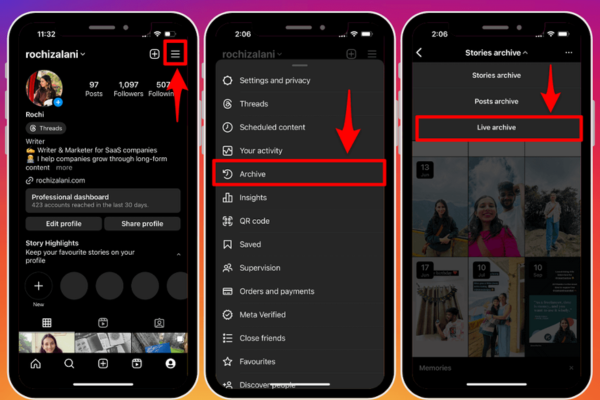
  • The live video appears at the top of the followers’ feed with a “Live” badge on the user’s profile picture.
  • Followers can join the session in real time, interact by posting comments, and react using emojis.
  • Once the broadcast ends, the host can choose to save the video to their IGTV (Instagram TV) or make it available for 24 hours as a Story replay.

Key Functionalities of Instagram Live:

  • Real-time engagement: Viewers can comment, ask questions, and interact live with the host.
  • Guest feature: Hosts can invite other users to join the live video, creating a split-screen session.
  • Live Rooms: Hosts can go live with up to three additional guests, allowing for group discussions or interviews.
  • Q&A feature: Viewers can submit questions ahead of time, and hosts can display and answer them during the session.
  • Shopping Integration: Businesses can tag products directly during the live, making it shoppable in real time.

2. How Instagram Live Works

Starting an Instagram Live session is simple and intuitive:

  1. Open the Instagram app and swipe right to open the Stories camera.
  2. Scroll to the “Live” option at the bottom.
  3. Tap the record button to go live.
  4. Followers receive a notification that the user is live.
  5. During the session, viewers can comment, send hearts (likes), and ask questions.
  6. Once the session ends, users can choose to save or discard the recording.

Live sessions can last up to 4 hours, and users can monitor real-time engagement metrics such as the number of viewers, comments, and interactions.


3. Uses of Instagram Live

Instagram Live serves a wide range of purposes across different sectors. Here are several common use cases:


A. For Personal and Creator Use

1. Q&A Sessions

Creators use Instagram Live to host question-and-answer sessions with their followers.

  • This helps build a more personal connection with fans.
  • Q&As can be casual, educational, or thematic (e.g., wellness, fashion tips).

2. Behind-the-Scenes Content

Creators show aspects of their daily life, projects, or creative processes in real time.

  • Increases transparency and relatability.
  • Enhances viewer trust and engagement.

B. For Businesses and Brands

1. Product Launches and Demos

Businesses use Instagram Live to launch new products or demonstrate how they work.

  • Real-time format builds excitement and anticipation.
  • Live demonstrations allow for instant feedback and questions.

2. Live Shopping

Using Instagram’s shopping features, businesses can sell products during a Live session.

  • Viewers can click tagged products and make purchases without leaving the app.
  • Creates a home shopping network experience in a mobile-friendly way.

3. Webinars and Tutorials

Brands host educational sessions related to their niche.

  • A makeup brand might host a live tutorial using its products.
  • A tech company might explain how to use new software features.

4. Interviews and Collaborations

Bringing guests into a Live session enables collaborative content.

  • Interviews with influencers, industry experts, or team members.
  • Increases reach by tapping into multiple audiences.

C. For Community Engagement and Events

1. Live Events

Companies or creators can stream events such as concerts, workshops, or panels.

  • Offers accessibility to followers unable to attend in person.
  • Drives FOMO (fear of missing out) and encourages future participation.

2. Fundraisers and Social Causes

Instagram Live is increasingly used for activism and fundraising.

  • Nonprofits can engage supporters and share stories from the field.
  • Live donations and calls to action increase participation.

4. Benefits of Using Instagram Live

1. Authenticity

Live video is raw and unedited, creating a sense of realness that polished posts lack. Audiences appreciate unscripted, spontaneous moments that make creators and brands seem more human.

2. Increased Visibility

Instagram prioritizes live content:

  • Followers receive notifications when a user goes live.
  • Live videos appear first in the Stories feed.
  • This boosts visibility and reach organically.

3. Direct Engagement

Instagram Live creates an immediate line of communication between the host and viewers.

  • Unlike static posts, live sessions allow for conversational interaction.
  • Real-time feedback fosters stronger relationships.

4. Cost-Effective

Going live requires no production budget — just a smartphone and an idea.

  • Ideal for small businesses and creators with limited resources.
  • Saves time and money while maintaining high engagement.

5. Challenges and Considerations

While powerful, Instagram Live has some limitations:

  • Technical issues like poor connectivity can disrupt sessions.
  • Unfiltered comments may lead to spam or inappropriate content.
  • Time zone differences may reduce live attendance for global audiences.
  • Without a proper plan, sessions may appear unorganized or unprofessional.

Thus, hosts should prepare talking points, moderate comments, and promote the session in advance for maximum effectiveness.


6. Example: Sephora’s Use of Instagram Live

Sephora, a global beauty retailer, is a prime example of using Instagram Live effectively.

What They Did:

  • Sephora hosted a weekly Instagram Live series called “Beauty Uncomplicated.”
  • In these sessions, makeup artists and skincare experts discussed tips, trends, and tutorials using Sephora products.
  • They invited influencers and brand ambassadors as co-hosts.
  • Viewers could ask questions, request demonstrations, and shop featured products via Instagram Shopping tags.

Why It Worked:

  • The content was educational and entertaining, not overly promotional.
  • Sephora built a sense of community by addressing live questions.
  • The shopping integration enabled immediate purchases, boosting sales.

This strategy helped Sephora maintain relevance during the COVID-19 pandemic when in-store experiences were limited — keeping customers engaged and sales flowing through digital channels.


7. Tips for Hosting a Successful Instagram Live

Here are some practical tips for making the most of Instagram Live:

  1. Promote in advance — Use countdown stickers in Stories.
  2. Have a plan — Outline the session flow, key points, and timing.
  3. Engage early — Welcome new viewers and address comments.
  4. Use good lighting and sound — Clear visuals and audio matter.
  5. Pin important comments — Such as links or topics.
  6. Save and repurpose — Share the Live on IGTV or other platforms.
  7. Be consistent — Schedule regular Lives to build a loyal audience.

Conclusion

Instagram Live is a dynamic and powerful feature that fosters authentic, real-time interaction between creators, brands, and audiences. Whether used for Q&As, product launches, interviews, or tutorials, Live sessions bring a sense of immediacy and intimacy that traditional content formats cannot replicate.

For businesses, Instagram Live offers a low-cost yet highly effective way to promote products, build trust, and drive sales. For individuals and influencers, it’s a platform to share ideas, grow communities, and express creativity. As shown in the case of Sephora, when done well, Instagram Live can significantly enhance engagement, boost brand visibility, and deliver measurable results.

As the digital world becomes increasingly saturated with polished and edited content, Instagram Live offers a refreshing return to real-time connection, making it an invaluable tool for anyone looking to deepen their impact online.


How can a student start and grow an Instagram page based on a hobby or talent?

Starting and growing an Instagram page based on a hobby or talent can be an exciting and rewarding journey for a student. Whether it’s photography, art, music, cooking, fitness, writing, or even gaming, Instagram provides a free and highly visual platform to share your passion, build a personal brand, and connect with like-minded people. With the right strategy and consistency, students can even turn their hobby-based Instagram page into a side hustle, a portfolio, or a stepping stone for future opportunities.

In this guide, we’ll explain step-by-step how a student can start and grow an Instagram page based on a hobby or talent. We’ll cover everything from setting up the page to content strategies, engagement, growth techniques, and monetization. We’ll also include an example to make the process more relatable and practical.


1. Choosing the Hobby or Talent

The first step is selecting a hobby or talent that the student is genuinely passionate about. This is crucial because creating content requires time, creativity, and consistency. The chosen niche should ideally meet these three criteria:

  • Passion: Something the student loves doing (e.g., painting, baking, playing an instrument).
  • Skill or Learning Journey: Something they’re good at or actively improving.
  • Audience Interest: Something that others are also interested in consuming or learning.

Example: A student named Aisha is passionate about baking. She often experiments with recipes and loves decorating cakes. She decides to create an Instagram page called @AishaBakes to share her baking creations, recipes, and tips.


2. Setting Up the Instagram Page

a. Choose a Name and Handle

Pick a name that is memorable, reflects the niche, and is easy to search. Avoid overly complicated usernames. Try to keep it consistent with your name or brand.

Example: Aisha selects the handle @AishaBakes instead of something like @baking_girl_2843.

b. Profile Picture and Bio

Use a clear profile picture – either a photo of yourself or a relevant logo. The bio should explain who you are and what the page is about in a few words.

Example Bio:

🍰 Student Baker | Homemade Treats
🎓 Sharing recipes, tips & cake art
📍Based in Mumbai
👇 New recipe every Sunday!

c. Switch to a Creator or Business Account

Switching to a Creator or Business account gives access to analytics, insights, and promotional tools. This will help track growth and understand what content performs best.


3. Content Planning and Creation

a. Types of Content to Post

Content is the backbone of your Instagram page. For a hobby-based page, consider the following types:

  • Tutorials and How-Tos: Step-by-step guides.
  • Behind-the-Scenes: Show your process, workspace, or tools.
  • Finished Creations: Showcase your final output (artwork, dishes, etc.).
  • Tips and Tricks: Share small hacks or knowledge related to your talent.
  • Time-lapse Videos: Great for showing a process in an engaging way.
  • Reels: Short, entertaining videos with music or voiceover.
  • Stories and Polls: Interact with followers in a fun and informal way.

Example: Aisha plans her week:

  • Monday: Recipe tip carousel.
  • Wednesday: Cake decorating Reel.
  • Friday: Behind-the-scenes baking Story.
  • Sunday: Full recipe post with caption.

b. Consistency Over Quantity

It’s better to post consistently rather than overloading all at once. A schedule of 3–4 times a week is ideal for growth while being manageable for a student.


4. Engagement and Community Building

Instagram’s algorithm favors engagement — likes, comments, shares, saves, and DMs. Here are key strategies:

a. Use Hashtags

Use a mix of niche-specific and general hashtags. Instagram allows up to 30, but 8–15 well-chosen ones are enough. Hashtags help people discover your content.

Example for Aisha:
#HomeBaker #StudentBaker #CakeArt #DessertLovers #BakingTips #ChocolateCake #EasyBaking

b. Engage with Others

Follow similar pages, comment meaningfully on others’ posts, respond to your comments, and reply to DMs. Genuine interaction builds community and increases visibility.

c. Host Giveaways or Contests

As the page grows, hosting small giveaways (like a free recipe eBook or a custom design) encourages engagement and attracts followers.

d. Collaborate with Others

Team up with classmates or hobbyists. For example, Aisha can collaborate with a friend who does food photography to co-create a post.


5. Using Instagram Tools

a. Reels

Instagram Reels have high reach potential. Reels that are fun, educational, or visually satisfying often go viral. Use trending audio, keep them under 30 seconds, and include a call-to-action.

b. Stories

Use Stories daily to stay on top of your followers’ minds. Add polls, quizzes, countdowns, or “this or that” games to increase engagement.

c. Insights

Track your post performance using Insights. Identify what types of content are getting the most likes, saves, and reach, then adjust your strategy accordingly.

d. Instagram Highlights

Use Highlights to organize content. For example, Aisha can have Highlights like “Recipes,” “Tips,” “Behind the Scenes,” and “Q&A.”


6. Growth Strategies

a. Shoutouts and Reposts

Ask for shoutouts from other small creators. Share their content and ask them to do the same.

b. Cross-Promotion

Promote your page on WhatsApp status, Facebook groups, or even in your school community. Ask friends to follow and share.

c. SEO Optimization

Use keywords in your username, bio, and captions to appear in search. For example, including “baking” in your name or bio helps you appear in search results.

d. Post at the Right Time

Use Insights to find when your followers are online and schedule posts during peak engagement hours.


7. Dealing with Challenges

  • Time Management: Balance studies and content creation. Use scheduling tools like Later or Planoly.
  • Burnout: Take breaks. Don’t pressure yourself to post daily if it’s draining.
  • Criticism: Stay open to feedback but don’t let negative comments discourage you.
  • Slow Growth: Don’t compare your growth to influencers. Focus on building a loyal community rather than chasing numbers.

8. Monetizing the Page (Optional)

Once the page gains traction (usually 1,000+ engaged followers), students can consider monetization:

  • Brand Collaborations: Small businesses may offer free products or pay for sponsored posts.
  • Selling Products or Services: Sell handmade items, digital products, or services (like classes or commissions).
  • Affiliate Marketing: Promote products using affiliate links and earn commissions.
  • Instagram Subscriptions: Offer exclusive content to paying followers.
  • YouTube/Blog Expansion: Grow into other platforms to increase income streams.

Example: After six months, Aisha’s page reaches 5,000 followers. She starts offering baking workshops on Zoom and sells recipe cards via a link in her bio.


Final Example Recap: @AishaBakes Journey

  • Start: Aisha begins by posting pictures of her weekend bakes.
  • Content: She includes step-by-step Reels, tips, and polls to engage her audience.
  • Growth: She uses hashtags, collaborates with other student creators, and posts consistently.
  • Community: She builds a niche following of baking enthusiasts, many of whom are students like her.
  • Monetization: After a year, she launches a digital cookbook for beginner bakers, which sells well within her community.

Conclusion

Starting and growing an Instagram page based on a hobby or talent is not only a fun creative outlet for students but also a practical way to build a personal brand, earn income, and develop digital skills. With passion, consistency, and a thoughtful approach, any student can turn their Instagram page into something meaningful and impactful.

Whether your passion is baking, sketching, music, fitness, or DIY crafts, Instagram provides the tools and audience you need to shine. All it takes is one post to go viral, but sustained success comes from daily effort, community connection, and authentic content that adds value to others.

Compare Instagram’s features with other visual platforms like Pinterest

Introduction

In the modern digital landscape, visual content dominates how people communicate, explore ideas, and make purchasing decisions. Two of the most influential visual platforms are Instagram and Pinterest — each offering distinct approaches to visual sharing, discovery, and engagement. While both platforms focus on imagery, they serve different purposes, target different user behaviors, and offer unique features for both personal use and business marketing.

This essay explores and compares the key features of Instagram and Pinterest, analyzing their strengths, content strategies, user interfaces, and business applications. A practical example will highlight how businesses might approach each platform differently depending on their goals.


1. Platform Overview

1.1 Instagram: A Social Visual Diary

Launched in 2010 and owned by Meta (formerly Facebook), Instagram is primarily a social networking platform centered on photo and video sharing.

  • Users post content to a personalized feed, follow others, and interact through likes, comments, and direct messages.
  • Over time, Instagram has expanded to include Stories, Reels, Live videos, IGTV, and Shopping.
  • Its focus is on real-time engagement, storytelling, and aesthetics.
  • The platform has over 2 billion monthly active users as of 2025.

1.2 Pinterest: A Visual Discovery Engine

Launched in 2010, Pinterest is best described as a visual search engine or idea board.

  • Users create themed boards and save (or “pin”) images or links (Pins) they find inspiring or useful.
  • Pinterest focuses on planning, discovery, and curation rather than social interaction.
  • It is often used for DIY projects, home décor, fashion, recipes, event planning, and lifestyle ideas.
  • Pinterest has around 500 million monthly active users.

2. Content Type and Purpose

2.1 Instagram: Sharing Moments and Stories

Instagram is about sharing personal or brand narratives. Content often revolves around:

  • Daily life, fashion, travel, fitness, food, etc.
  • Branded content aimed at building community or influencing behavior.
  • High visual appeal and creativity.

Users engage with Instagram actively, often seeking real-time updates from friends, celebrities, influencers, or brands.

2.2 Pinterest: Inspiration and Ideas

Pinterest users are planners, not just passive scrollers.

  • Content is centered around inspiration and future intent: what to cook, wear, design, or buy.
  • Users typically search for specific ideas, such as “spring outfits” or “minimalist living room decor.”
  • The platform serves as a research and reference tool.

Thus, while Instagram reflects the present, Pinterest is more about the future — users collect ideas for things they plan to do or create.


3. User Interface and Experience

3.1 Instagram UI

  • Users post content in a chronological or algorithmic feed.
  • Explore page offers personalized content based on engagement.
  • Navigation emphasizes personal connections and social discovery.
  • Vertical scrolling with high emphasis on followers and real-time engagement.

3.2 Pinterest UI

  • Users organize Pins into Boards based on topics or goals.
  • Home feed and search results are algorithm-driven and visually dense.
  • Pinterest is a search-first experience — users use keywords to find relevant Pins.
  • There’s no need to follow others to find useful content.

Pinterest’s layout encourages content curation over social interaction.


4. Business and Marketing Features

4.1 Instagram for Business

Instagram supports business accounts with tools like:

  • Instagram Shopping: Tag products in posts or Stories for direct purchases.
  • Ads Manager Integration: Through Meta, marketers can create targeted ads based on demographics, interests, and behavior.
  • Influencer marketing: Influencers promote products to followers with branded content.
  • Reels and Stories for engagement: Great for campaigns and interactive experiences.

Instagram excels at brand building, emotional connection, and storytelling.

4.2 Pinterest for Business

Pinterest is particularly powerful for long-term marketing and SEO-like visibility:

  • Pinterest Ads (Promoted Pins): Target users based on intent (keywords, interests).
  • Rich Pins: Automatically sync product info like price, availability, or ingredients.
  • Shopping features: Brands can upload catalogs and make content shoppable.
  • Evergreen content: Pins remain searchable and relevant for years.

Pinterest is ideal for content longevity, inspiration-based purchases, and driving website traffic.


5. Algorithm and Content Discovery

5.1 Instagram’s Algorithm

  • Prioritizes content based on engagement, recency, and user relationships.
  • Uses AI to personalize feeds and Explore pages.
  • Emphasizes freshness and virality (especially with Reels).
  • Short content lifespan — most engagement occurs within 24–48 hours.

5.2 Pinterest’s Algorithm

  • Prioritizes keywords, image quality, and pin descriptions.
  • Pins are optimized for search rather than engagement.
  • Content has a long shelf life; a Pin can resurface and go viral months or years after posting.
  • Pinterest’s algorithm is more intent-driven, useful for targeting people in decision-making stages.

6. Target Audiences

6.1 Instagram’s Audience

  • Skews younger: Gen Z and Millennials dominate.
  • Popular among influencers, brands, creatives, and lifestyle enthusiasts.
  • Audience expects visually compelling, on-trend content.

6.2 Pinterest’s Audience

  • Strong female user base, but growing male audience.
  • Users tend to have higher purchase intent and are in research mode.
  • Great for niche markets: home improvement, weddings, parenting, and DIY.

7. Real-World Example: Marketing a Sustainable Fashion Brand

Let’s say a sustainable clothing brand called “GreenStyle” wants to promote its eco-friendly clothing line.

Using Instagram:

  • Post lifestyle content: Models wearing clothes in natural settings, short Reels showing how products are made.
  • Stories for behind-the-scenes footage or influencer try-ons.
  • Collaborate with eco-conscious influencers for sponsored posts.
  • Tag products using Instagram Shopping for easy purchasing.
  • Launch giveaways or interactive polls to build engagement.

Goal: Build brand identity, increase followers, and drive emotional connection through visual storytelling.

Using Pinterest:

  • Create Boards: “Eco-Friendly Outfit Ideas,” “Sustainable Summer Styles,” “Minimalist Wardrobe.”
  • Upload high-quality Pins linking to product pages and blog posts.
  • Use keywords: “sustainable fashion,” “organic cotton dresses,” “capsule wardrobe.”
  • Enable Rich Pins to show product details automatically.
  • Promote Pins during seasonal searches (e.g., back-to-school, holiday gifting).

Goal: Drive long-term traffic to website, boost product visibility in search, and convert planners into customers.


8. Key Differences at a Glance

Feature Instagram Pinterest
Purpose Social sharing, real-time storytelling Inspiration, future planning
Content Lifespan Short (hours to days) Long (months to years)
Discovery Method Feed & Explore algorithm Search & suggested Pins
Interaction Type Likes, comments, shares Saves (Pins), board organization
Best For Brand engagement, influencer marketing SEO-like discovery, evergreen content
Audience Behavior Passive browsing, trend-focused Intent-driven, goal-oriented

Conclusion

While Instagram and Pinterest are both powerful visual platforms, their differences are significant. Instagram focuses on personal storytelling, immediacy, and engagement, making it ideal for building relationships with audiences in real time. Pinterest, on the other hand, serves as a visual discovery engine that excels at long-term content value and intent-driven decision-making.

For individuals, the choice of platform depends on whether they want to share their life (Instagram) or plan their future (Pinterest). For businesses, a successful strategy often involves using both platforms in complementary ways — leveraging Instagram to engage followers emotionally and Pinterest to convert searchers into customers over time.

Understanding the distinct features and strengths of each platform allows marketers, creators, and users to better tailor their content and strategies — ultimately maximizing visibility, engagement, and conversion.


What is a landing page?

Introduction
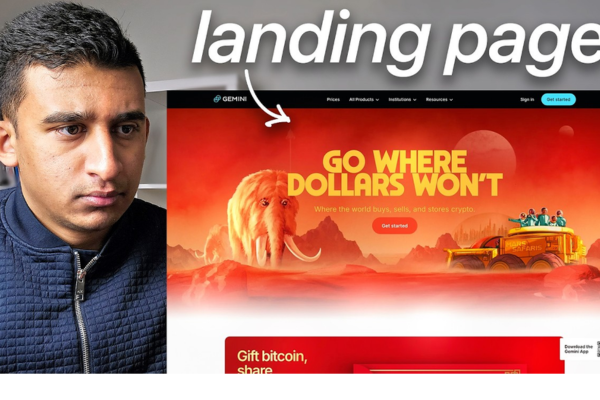
A landing page is a specific web page that users are directed to after clicking on an ad, email link, social media post, or other digital marketing campaign. Unlike a homepage or regular website page, a landing page is designed with a single, focused objective—usually to prompt a specific action such as making a purchase, signing up, downloading a file, or contacting the business.

In Google Ads, the landing page experience is a major factor affecting your Quality Score, Ad Rank, and Cost-Per-Click (CPC). A well-optimized landing page can significantly improve conversion rates and the overall success of your advertising campaign.

Definition of Landing Page
A landing page is a standalone web page created for a marketing or advertising campaign. It’s the “destination URL” of your ad, where users land after clicking. Its primary goal is to convert visitors into leads or customers by guiding them to take one focused action.

Example:
If you’re running a Google Ad for “Buy Metal Wall Art Online,” and users click your ad, they shouldn’t land on your general homepage. Instead, they should land on a page dedicated to showcasing your metal wall art products — with product images, descriptions, price offers, and a clear “Buy Now” button.

Types of Landing Pages

1. Click-Through Landing Page
Designed to warm up visitors before sending them to another page, such as a checkout or registration page. It’s often used in e-commerce.

2. Lead Generation (Lead Gen) Landing Page
Used to collect user data such as name, email, phone number, etc., usually through a form. It’s commonly used for service-based businesses, newsletters, or software trials.

3. Product Landing Page
Focused on a single product or service. Contains details, features, benefits, pricing, testimonials, and a strong call-to-action (CTA).

4. Thank You Page
This appears after a user completes an action like a form submission or purchase. It confirms the action and can offer upsells or next steps.

Key Elements of a Good Landing Page

1. Headline
Clear, compelling, and relevant to the ad or campaign that brought the user there.

2. Subheadline
Provides additional value or information that supports the headline.

3. Call-to-Action (CTA)
A bold and direct instruction—such as “Buy Now,” “Get a Free Quote,” or “Download eBook.” It should be prominently placed.

4. Visuals
High-quality images or videos that showcase your product, service, or offer. These should enhance trust and appeal.

5. Trust Signals
Reviews, testimonials, trust badges, certifications, or social proof that encourage credibility.

6. Contact Information
In case users have questions or want to reach out, add a visible phone number, chat option, or email.

7. Mobile Responsiveness
Since many users will access the landing page via mobile devices, it must be fast-loading and mobile-friendly.

8. Form or Action Button
This is essential for lead-gen pages. Keep forms short and only ask for necessary information.

Importance of Landing Pages in Google Ads

1. Directly Impacts Quality Score
Google evaluates your landing page for relevance, transparency, and ease of navigation. A better landing page experience can improve your Quality Score, which leads to better ad rankings and lower CPC.

2. Increases Conversion Rates
A targeted landing page eliminates distractions and focuses users on a single action, making them more likely to convert.

3. Improves User Experience
By matching the landing page content to the ad, users get what they’re expecting. This creates a seamless experience and reduces bounce rates.

4. Better Measurement and A/B Testing
Since landing pages are designed with a single goal, they’re easier to track and test. You can run A/B tests on headlines, images, CTAs, and layout to optimize performance.

Example of a Landing Page (Lazoro Business)
Let’s say Lazoro is running a Google Ad with the keyword “Buy Custom Metal Wall Art”.
The landing page should:

  • Show the exact product featured in the ad

  • Include product images, pricing, size options

  • Include a bold “Buy Now” or “Customize Yours” button

  • Mention delivery time, customer reviews, and secure payment methods

  • Avoid other links or menu items that distract from the buying action

This approach ensures users who clicked on the ad are not lost in the general website—they’re guided straight to the offer they care about.

Best Practices for Creating Landing Pages

  • Keep it focused: One page, one purpose

  • Ensure message match: Align your ad copy and landing page content

  • Load speed matters: Use compressed images and optimized code

  • Minimize distractions: Avoid unnecessary menus and outbound links

  • Test everything: Use A/B testing to continually improve

Conclusion
A landing page is a powerful tool in digital marketing that acts as the final and most crucial step in the user journey from ad click to conversion. It is designed for one specific goal—whether it’s making a sale, capturing a lead, or generating engagement. When built effectively, landing pages not only enhance the user experience but also improve ad performance, increase Quality Score, and deliver better return on investment. For any Google Ads campaign, a well-optimized landing page is essential to drive measurable and meaningful results.

What is Cost Per Click (CPC)?

Introduction
Cost Per Click, commonly known as CPC, is one of the most fundamental concepts in Google Ads and online advertising in general. CPC refers to the actual amount you pay each time a user clicks on your ad. It is the pricing model used in Pay-Per-Click (PPC) advertising, meaning advertisers only pay when someone takes the specific action of clicking on the ad—not just when the ad is shown.

CPC is a crucial metric because it directly affects your advertising budget, return on investment (ROI), and the overall profitability of your Google Ads campaign. Understanding how CPC works allows you to manage costs better and make smarter decisions in your marketing strategy.

Definition of CPC
Cost Per Click (CPC) is the amount an advertiser pays to Google every time someone clicks their ad.

CPC Formula:
CPC = Total Cost of Clicks ÷ Total Number of Clicks

For example, if you spend ₹1,000 and receive 200 clicks, your CPC is:
CPC = ₹1,000 ÷ 200 = ₹5 per click

Types of CPC

1. Max CPC (Maximum Cost Per Click):
This is the highest amount you’re willing to pay for a click on your ad. You set this manually or let Google adjust it automatically depending on your bidding strategy.

2. Actual CPC:
This is the real amount you end up paying for a click. It’s often less than your max CPC because you only need to pay the minimum amount required to beat the next advertiser’s Ad Rank in the auction.

3. Enhanced CPC (ECPC):
With Enhanced CPC, Google automatically adjusts your manual bids based on the likelihood of a conversion. If a click seems more likely to lead to a sale, Google may raise your bid for that click.

4. Average CPC:
This is the average amount you’re paying per click over time. It’s calculated by dividing your total cost by the number of clicks during a specific period.

Why CPC Matters in Google Ads

CPC affects many parts of your advertising performance, including:

  • Budgeting: Determines how much traffic you can afford based on your daily or monthly ad budget.

  • Profitability: If CPC is higher than the revenue per conversion, your campaign may not be profitable.

  • Campaign Planning: Knowing your CPC helps in forecasting results like number of clicks and potential conversions.

  • Performance Analysis: You can compare CPCs across keywords, devices, locations, and audiences to optimize your campaigns.

Factors That Affect CPC

1. Keyword Competition
Highly competitive keywords (like “insurance” or “loans”) often have a higher CPC because many advertisers are bidding on them.

2. Quality Score
Google rewards ads with high Quality Scores by lowering their CPC. A high Quality Score means your ad is more relevant, has a better CTR, and leads to a better landing page.

3. Ad Rank
Ad Rank is calculated based on your bid, Quality Score, and ad extensions. Even with a lower bid, a higher Quality Score can help you maintain a top ad position at a lower CPC.

4. Targeting Settings
Device, location, time of day, and audience type can all affect CPC. Ads targeted toward premium audiences or competitive geographies may cost more per click.

5. Ad Extensions
Using sitelinks, callouts, structured snippets, and other ad extensions can increase your ad relevance, improve CTR, and reduce your CPC by improving your Ad Rank.

6. Bidding Strategy
Your chosen bidding strategy (manual, automated, enhanced CPC, target CPA) also determines how much you end up paying per click.

Manual vs. Automated CPC

  • Manual CPC: You set the bids yourself for each keyword or ad group. Best when you want control.

  • Automated CPC: Google automatically adjusts your bids to get the most clicks within your budget. Best for larger campaigns or advertisers seeking efficiency.

How to Lower CPC

1. Improve Your Quality Score
Focus on writing relevant ads, selecting specific keywords, and optimizing landing pages for a better user experience.

2. Refine Keyword Targeting
Use long-tail keywords or negative keywords to avoid irrelevant clicks. Group keywords into tightly themed ad groups for more control.

3. Use Ad Scheduling and Geotargeting
Run your ads when and where they perform best. This reduces waste and brings more valuable clicks at lower cost.

4. Optimize Ad Extensions
Well-crafted ad extensions can increase CTR and reduce CPC by enhancing the value and visibility of your ad.

5. Test and Optimize Ad Copy
Use A/B testing to try different headlines, descriptions, and calls to action. Better-performing ads typically have lower CPCs.

Example of CPC in Real Life
Let’s say you’re running ads for your website Lazoro, which sells handcrafted metal wall art. You set a max CPC of ₹10 for the keyword “metal wall art online.”
If your ad appears 5,000 times (impressions) and is clicked 300 times, and you spend ₹2,400 in total, your CPC is:
CPC = ₹2,400 ÷ 300 = ₹8 per click

If your average sale brings in ₹1,000 and 1 in every 20 visitors makes a purchase, your cost per conversion is:
20 clicks × ₹8 = ₹160 per conversion
Since your profit margin is still healthy, this CPC is acceptable and sustainable.

Conclusion
Cost Per Click (CPC) is the price you pay for each user interaction with your ad in a PPC model like Google Ads. It is influenced by your bids, ad quality, competition, and campaign settings. Managing your CPC effectively ensures that your advertising remains profitable, efficient, and impactful. By improving Quality Score, optimizing targeting, and continually testing your ads, you can reduce CPC and maximize your return on investment.

How to Become a Digital Marketing Specialist

Digital marketing is one of the fastest-growing fields today. Many people are interested in building a career in digital marketing, and becoming a digital...

What is SMM in Digital Marketing

SMM, or Social Media Marketing, is one of the most important parts of digital marketing. In simple words, SMM is the process of using...

What is Google Analytics in Digital Marketing

Google Analytics is one of the most important tools in digital marketing. It helps businesses understand how people interact with their websites and online...

What is Google AdWords in Digital Marketing

Google AdWords is one of the most important tools in digital marketing. Many businesses use AdWords to reach their target audience online and increase...

What Is CPM in Digital Marketing

In digital marketing, understanding how your ads are priced and measured is very important. Different advertising models help marketers track performance and control spending....