Home Blog Page 37

What is the significance of Instagram Reels in modern content sharing?

Introduction

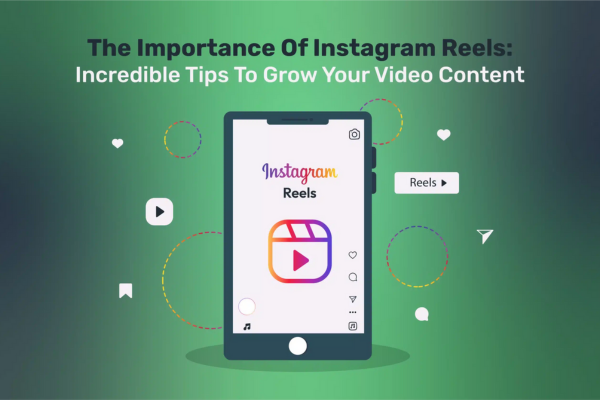
In the fast-evolving landscape of social media, video content has emerged as one of the most powerful and engaging forms of communication. Among the many platforms capitalizing on this trend, Instagram Reels stands out as a transformative feature that reshapes how users create, share, and consume content. Launched in August 2020, Instagram Reels offers a short-form video experience designed to rival TikTok, allowing users to produce 15 to 90-second multi-clip videos enhanced with music, effects, and creative tools.

This essay explores the significance of Instagram Reels in modern content sharing. It discusses the feature’s impact on user engagement, brand marketing, content democratization, and how it reshapes social interaction on Instagram and beyond. A practical example will further illustrate its power in today’s digital ecosystem.


1. Instagram Reels: A Brief Overview

Instagram Reels lets users create and share short, dynamic videos up to 90 seconds long. Users can record multiple clips, add music from Instagram’s vast library, insert special effects, text, and transitions, making it easy to produce entertaining or informative content quickly.

Reels appear in multiple places on Instagram: within the user’s feed, in the dedicated Reels tab, and most importantly, on the Explore page, where they can reach users beyond your followers. This discovery potential makes Reels a vital tool for increasing reach and visibility.


2. The Shift Towards Short-Form Video Content

Short-form video content has dominated the social media world due to its ability to capture attention quickly and convey messages efficiently. Platforms like TikTok popularized this format, proving that bite-sized, engaging videos are highly consumable and shareable. Instagram, recognizing this shift, introduced Reels to retain its user base and compete in this fast-growing niche.

Modern users favor short, entertaining, and easily digestible content that fits into their fast-paced lifestyles. Instagram Reels taps into this preference by providing an intuitive and creative outlet for both casual users and professional creators.


3. Why Are Instagram Reels Significant in Modern Content Sharing?

A. Enhanced Engagement and Reach

Reels have revolutionized engagement on Instagram by dramatically increasing the visibility of video content. Instagram’s algorithm favors Reels, often prioritizing them on the Explore page and Reels feed. This increased visibility helps creators and brands reach a wider audience, including users who don’t follow them yet.

Because Reels combine music, effects, and fast editing, they are highly engaging and shareable, encouraging viewers to like, comment, and share more than static posts or longer videos.

B. Democratization of Content Creation

One of the most significant impacts of Reels is how it democratizes content creation. Unlike traditional video production, which could require costly equipment and expertise, Reels provides simple tools that allow anyone with a smartphone to create professional-looking videos.

This lowers the barrier to entry, enabling everyday users, small businesses, and emerging influencers to compete with larger, established creators. The accessibility fosters a diverse content ecosystem, giving voice to a wide range of perspectives and creativity.

C. Boosting Brand Awareness and Marketing

For brands and marketers, Reels are an invaluable asset. Short videos are ideal for storytelling, showcasing products, tutorials, behind-the-scenes glimpses, or engaging challenges. Because Reels appear prominently in the Explore tab, businesses can attract new customers and generate buzz organically.

Moreover, Instagram provides analytics for Reels, allowing marketers to track engagement metrics and refine their content strategies. The combination of creativity, reach, and analytics makes Reels a cornerstone of modern social media marketing.

D. Encouraging Trends and Viral Content

Reels contribute heavily to the viral culture of social media. Trending audio clips, challenges, and memes often start or explode within the Reels community. Users participate by putting their unique spin on popular trends, helping content spread rapidly across Instagram and sometimes beyond to other platforms.

This virality fuels cultural moments, shapes online conversations, and provides creators opportunities to gain rapid visibility and followers.

E. Building Communities and Personal Connections

Reels foster authentic connections by allowing creators to show their personality, humor, and creativity in bite-sized formats. The informal, often playful nature of Reels encourages interaction and community-building.

Creators can respond to trends, collaborate with others, and engage directly with followers through comments and shares, strengthening relationships and loyalty.


4. The Broader Implications of Instagram Reels on Social Media

Instagram Reels is part of a broader transformation where visual and video content dominates communication. This shift affects not only content consumption but also content creation practices, marketing strategies, and platform evolution.

By integrating Reels seamlessly into the Instagram ecosystem, the platform blends traditional photo sharing with dynamic video storytelling. This creates a more holistic social experience catering to varied user preferences.

Furthermore, Reels has pressured other platforms to innovate, contributing to a competitive environment that continually improves user experience across the social media landscape.


5. Practical Example: How a Small Business Used Instagram Reels to Grow

Consider “EcoGlow,” a small eco-friendly skincare brand aiming to expand its online presence and customer base. Before using Reels, EcoGlow posted mostly photos and occasional long videos, struggling to gain traction beyond their loyal followers.

Strategy Using Reels

  • Step 1: Educational Content
    EcoGlow created short Reels demonstrating how to use their products effectively, such as a 30-second tutorial on applying a natural face serum.
  • Step 2: Trend Participation
    They jumped on trending audio clips and skincare-related hashtags like #SkincareRoutine and #EcoBeautyTips, making their content discoverable to users interested in natural beauty.
  • Step 3: Behind-the-Scenes
    They shared clips from their production process, showing sustainable sourcing and ethical manufacturing practices, which built trust and transparency.
  • Step 4: User-Generated Content
    Encouraged customers to share their own Reels using EcoGlow products with a branded hashtag (#GlowWithEco), fostering community engagement.

Results

Within three months, EcoGlow’s follower count doubled. Their Reels averaged 5 times more engagement than regular posts. Most importantly, traffic to their website increased significantly, translating into higher sales.

By leveraging Instagram Reels, EcoGlow connected authentically with a wider audience, building brand awareness and loyalty in a competitive market.


6. Conclusion

Instagram Reels has fundamentally reshaped modern content sharing by making short-form video content more accessible, engaging, and viral. It enhances user experience by enabling creativity and fostering community, while also providing brands with powerful marketing tools.

Reels democratize content creation, amplify reach, and encourage participation in trends that define digital culture today. Whether for individual creators, businesses, or casual users, Reels is a vital feature that drives engagement, builds connections, and propels growth in the competitive world of social media.

As social platforms continue to evolve, Instagram Reels represents a major step toward a future where short, dynamic videos dominate communication — fast, fun, and infinitely shareable.
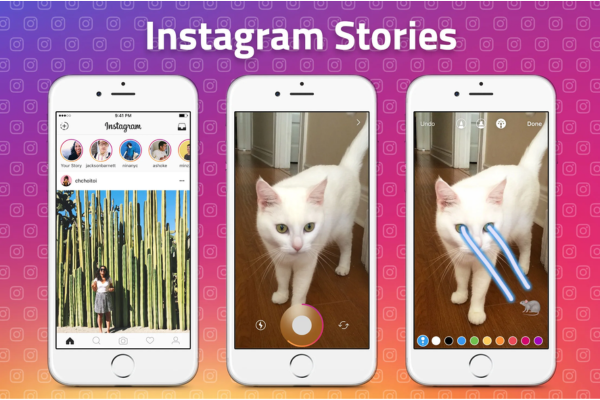
Explain the purpose of Instagram Stories and how they’re used

Introduction

Since its launch in 2010, Instagram has become one of the most influential social media platforms globally, with over a billion active users. While the platform began as a photo-sharing app centered around a personal feed, it has continuously evolved to include various features, including Instagram Stories—a function introduced in August 2016. Inspired by Snapchat, Stories quickly became one of Instagram’s most popular and dynamic features.

Instagram Stories allow users to post photos, videos, and other forms of media that disappear after 24 hours. This functionality has significantly changed how users engage with their audience, offering a more casual, timely, and interactive way of sharing content.

This essay explores the purpose of Instagram Stories, the ways in which they’re used, and offers an appropriate real-world example to demonstrate their value both for personal use and business strategies.


1. Purpose of Instagram Stories

Instagram Stories serve multiple purposes, making them a versatile feature for a variety of users—from individuals and influencers to brands and businesses. The primary purposes include:

1.1. Timely and Casual Sharing

One of the key purposes of Instagram Stories is to enable ephemeral, real-time communication. Unlike posts on the main feed—which tend to be curated, edited, and aesthetic—Stories are meant to be more spontaneous and casual.

  • Users can share moments as they happen without worrying about perfect visuals.
  • Stories disappear in 24 hours, reducing the pressure for perfection and permanence.
  • This encourages frequent sharing and more personal, behind-the-scenes content.

1.2. Increased Engagement and Interaction

Instagram Stories are highly interactive, allowing users to engage with their audience in creative ways. Through built-in tools like:

  • Polls
  • Questions and answers
  • Quizzes
  • Sliders
  • Countdowns

Stories create two-way communication, making followers feel involved and heard. This is especially useful for influencers and brands seeking to build authentic relationships with their audience.

1.3. Boosting Visibility and Reach

Instagram’s algorithm promotes Stories at the top of the home screen, meaning they are often the first piece of content a user sees when they open the app. For users or businesses looking to increase visibility, Stories provide a front-and-center platform to share updates or promotions.

Additionally, because of their temporary nature, users are more inclined to check Stories frequently so they don’t miss out, creating a sense of urgency and fear of missing out (FOMO).

1.4. Content Testing and Market Feedback

Instagram Stories provide a low-risk environment for testing ideas or gathering quick feedback. Businesses can:

  • Ask for customer opinions before launching a product.
  • Showcase two options (like A/B testing) and let the audience vote.
  • Test different tones, visuals, or messages.

The 24-hour lifespan makes it easy to experiment without cluttering the main feed or committing to long-term content strategies.


2. How Instagram Stories Are Used

Instagram Stories are used in a multitude of ways by different user groups. Below is a detailed look at their functionality and use cases.

2.1. Creating a Story

Users can post a Story by:

  1. Swiping right from the home screen or tapping their profile picture.
  2. Capturing a photo or video directly or uploading from the gallery.
  3. Adding text, music, stickers, filters, or interactive elements.
  4. Sharing it with all followers, Close Friends, or a custom audience.

Each Story plays for up to 15 seconds (videos) or until tapped through. Stories are grouped in chronological order and appear for 24 hours unless saved as Highlights.


2.2. Story Features and Tools

Stories come with various tools that enhance their utility:

  • Stickers: Used to tag people, add locations, time, temperature, etc.
  • GIFs and Emojis: For personalization and fun.
  • Music: Users can add background music from Instagram’s library.
  • Text and Drawing Tools: For adding captions, notes, or doodles.
  • Filters and AR Effects: Augmented reality filters make Stories more engaging.
  • Swipe-Up Links (now replaced by Link Stickers): Allow users to add links directly to their Stories.

2.3. Story Highlights

While Stories disappear after 24 hours, users can choose to save Stories as Highlights, which appear as circles below their bio on the profile page. Highlights are often used to:

  • Categorize content (e.g., Travel, Reviews, Behind-the-Scenes)
  • Extend the lifespan of valuable Stories
  • Provide new visitors with curated, evergreen content

2.4. For Personal Use

Individuals use Stories to share their daily lives, hobbies, and experiences in a relaxed way. Common personal uses include:

  • Sharing vacation moments
  • Posting real-time updates
  • Sharing music or memes
  • Birthday wishes or celebrations
  • Workout or meal updates

This creates a living diary effect, allowing friends and followers to stay updated on real-time activities.


2.5. For Influencers and Creators

For influencers, Stories are a vital tool for audience engagement and personal branding. They often use them to:

  • Share product reviews and promotions
  • Run polls or Q&A sessions
  • Share unfiltered, authentic moments
  • Promote new content (YouTube videos, blog posts)
  • Offer discount codes or affiliate links

Because of their informal nature, Stories allow influencers to appear more relatable and “real,” fostering deeper trust with their audience.


2.6. For Businesses and Brands

Instagram Stories are indispensable in modern digital marketing. Businesses use them for:

  • Product Launches: Announcing new items with interactive features.
  • Promotions and Flash Sales: Leveraging the 24-hour window to create urgency.
  • Behind-the-Scenes Content: Humanizing the brand with employee spotlights, process videos, etc.
  • Customer Testimonials: Reposting tagged Stories from customers.
  • Interactive Campaigns: Running polls, quizzes, or countdowns for events.

Instagram also offers Story Ads, where sponsored Stories appear between organic content, allowing brands to reach new users in a native format.


Example: Using Instagram Stories Effectively – “Blissful Yoga Studio”

Let’s consider a real-world example of how a small business—Blissful Yoga Studio—uses Instagram Stories to grow its community and promote its services.

1. Daily Class Updates

Each morning, the studio posts a Story showing the class schedule, instructor details, and motivational quotes. These Stories create consistency and encourage daily engagement from followers.

2. Behind-the-Scenes

They use Stories to show instructors prepping for classes, tidying up the studio, or engaging in wellness routines. This humanizes the brand and strengthens client loyalty.

3. Polls and Questions

The studio often uses polls like “Morning yoga or evening yoga?” or question stickers like “What’s your biggest challenge in meditation?” to get feedback and start conversations.

4. Testimonials

They repost tagged Stories from happy clients who share their experiences at the studio. These serve as social proof and are later saved to Highlights for new visitors to see.

5. Special Offers

Limited-time discounts for new members are announced via Stories with countdown timers to create urgency. They include a link sticker directing users to the sign-up page.

6. Community Spotlights

Once a week, the studio features a regular student in a “Member Monday” Story series, celebrating their journey and encouraging others to participate.

By combining personal, promotional, and interactive content, Blissful Yoga Studio creates a vibrant Story experience that informs, entertains, and drives action.


Conclusion

Instagram Stories have transformed the way users interact on the platform. Unlike the main feed, which is more permanent and polished, Stories offer a fleeting, flexible, and interactive mode of communication. They serve multiple purposes—casual sharing, boosting visibility, engaging followers, testing ideas, and driving business goals.

Used effectively, Instagram Stories can elevate personal branding, improve engagement, and provide a valuable connection point between users and their audiences. Whether you’re a casual user capturing daily moments or a business building a marketing funnel, Stories offer one of the most powerful tools in the Instagram ecosystem.


How do hashtags work on Instagram and why are they important?

Hashtags have become an essential feature of Instagram, playing a critical role in content discovery, engagement, and community building. Understanding how hashtags work and why they’re important is key to making the most of your Instagram strategy, whether you’re a casual user, influencer, or business. This essay will explain the mechanics of hashtags on Instagram, delve into their importance, and provide a practical example to illustrate their power.


1. What Are Hashtags on Instagram?

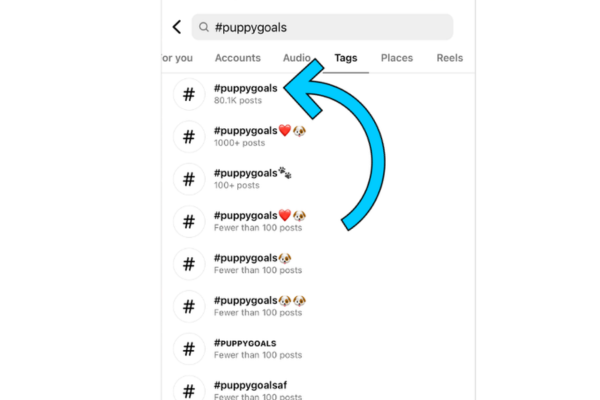
Hashtags are words or phrases preceded by the “#” symbol. On Instagram, hashtags categorize content and make it discoverable by other users. For example, if you post a photo of a beach and include the hashtag #BeachVibes, your post can appear in the hashtag feed for #BeachVibes, where anyone who searches or clicks on that tag can see it.

Instagram users can add hashtags in the photo or video caption, or in the comments. Hashtags can consist of letters and numbers but cannot include spaces or special characters (like ! or &). They are clickable and searchable, creating a direct way to find content based on themes or topics.


2. How Do Hashtags Work?

A. Content Discovery

When you use a hashtag in your post, it is grouped with other content that includes the same hashtag. Instagram users who follow that hashtag or search for it may see your post even if they do not follow you directly. This significantly expands the reach of your content beyond your existing followers.

B. Feed Algorithms and Explore Page

Instagram’s algorithm considers engagement and relevance. Posts that use hashtags and receive high engagement (likes, comments, shares) are more likely to be featured in the Top Posts section of a hashtag page or even on the Explore tab, which is Instagram’s discovery feed. This gives your content even broader exposure.

C. Hashtag Following

Users can follow specific hashtags just like they follow accounts. When someone follows a hashtag, Instagram will show top and recent posts from that hashtag in their feed. If your content uses a relevant hashtag, it could appear directly in their feed, again increasing visibility.

D. Insights and Analytics

Instagram Business and Creator accounts have access to post insights, which include data about how many impressions came from hashtags. This helps users understand which hashtags are driving traffic and engagement, allowing for better strategic planning.


3. Why Are Hashtags Important on Instagram?

A. Increased Visibility and Reach

Hashtags are one of the most effective tools for reaching new audiences. Unlike Facebook, where reach is often limited to your existing network, Instagram’s hashtag system allows your posts to appear in front of people with shared interests—even if they’ve never heard of you before.

For example, if a user is interested in fitness and regularly browses the hashtag #HomeWorkout, they may come across your post under that tag and choose to follow you for more content.

B. Niche Targeting and Community Building

Hashtags help you target specific audiences by interest, location, or activity. Niche hashtags, such as #MinimalistDesign or #TravelBloggersOfIndia, attract users with very specific interests. This leads to better engagement because the people who see your post are more likely to care about the topic.

Furthermore, regularly using certain hashtags can help you become part of a community. Engaging with content under that tag, commenting, and following others builds relationships and brand identity within a niche.

C. Brand Awareness and Marketing

For businesses and influencers, hashtags are a cost-effective way to promote products or services. Campaign-specific hashtags, like #ShareACoke or #JustDoIt, are used to encourage user-generated content, foster brand loyalty, and create viral momentum.

Branded hashtags also help track campaign performance. You can search for your branded hashtag to see how many users are participating, what kind of content they’re posting, and how far your message has spread.

D. Trend Participation and Virality

Jumping on trending hashtags is a great way to get noticed. For example, during events like the Olympics or Earth Day, millions of people use associated hashtags. Participating in these trends with relevant content increases the chance your post goes viral or receives high engagement.

E. Content Organization

Using hashtags also helps you organize your own content. If you frequently post about specific topics (e.g., #WeddingPhotography), those hashtags act like folders. Users visiting your profile can click on them to find more of your related content easily.


4. Best Practices for Using Hashtags

A. Use a Mix of Hashtag Types

  • Popular Hashtags (e.g., #Love, #InstaDaily): These have massive usage but are highly competitive.
  • Niche Hashtags (e.g., #PlantParents, #EcoBeautyTips): These have smaller, more targeted audiences.
  • Branded Hashtags (e.g., #NikeRunClub, #MyIKEAStyle): Used for marketing and community engagement.
  • Location Hashtags (e.g., #LondonEats, #NYCPhotographer): Useful for targeting specific areas.

B. Don’t Overuse Hashtags

Instagram allows up to 30 hashtags per post, but that doesn’t mean you should always use the maximum. Using 8–15 highly relevant hashtags typically performs better than stuffing your post with unrelated tags.

C. Stay Relevant

Always ensure your hashtags relate directly to your content. Misleading hashtags might get initial views, but they lead to low engagement and can hurt your credibility or even violate Instagram’s community guidelines.

D. Avoid Banned or Spammy Hashtags

Some hashtags are banned because they are associated with spammy behavior or inappropriate content. Using them can shadowban your post, reducing its visibility across Instagram.


5. Practical Example: Small Business Use Case

Scenario: A Handmade Jewelry Brand on Instagram

Imagine you run a small business that sells handmade jewelry and you want to increase your reach and engagement on Instagram.

You post a photo of a new bracelet you’ve designed and include the following caption and hashtags:

“Our new gemstone bracelet is here! Handcrafted with love and care to match any outfit. 💎✨
Available now in our Etsy store.
#HandmadeJewelry #JewelryDesign #SmallBusinessLove #BohoStyle #GemstoneBracelet #MinimalJewelry #SupportLocalMakers”

Here’s how the hashtags work for you:

  • #HandmadeJewelry and #JewelryDesign put your post in front of people actively looking for artisan-made jewelry.
  • #SmallBusinessLove connects your brand to a community that values supporting small, independent businesses.
  • #BohoStyle and #MinimalJewelry describe the aesthetics of your product, targeting users who like bohemian or minimalist fashion.
  • #GemstoneBracelet is very specific, attracting a niche audience that is likely to be interested in your product.
  • #SupportLocalMakers appeals to people who want to shop ethically or locally.

Your post gets 400% more engagement than usual. A new user who follows #MinimalJewelry sees your post in their feed, likes your aesthetic, and visits your profile. They follow you and even share the post in their story, expanding your reach further.

Later, you post a Story showcasing the bracelet being made, and use the hashtag #BehindTheScenes, adding another dimension to your content. You also start using a branded hashtag, #GemGlowByLuna, which encourages customers to tag you when they wear your jewelry. This user-generated content further amplifies your brand.


6. Conclusion

Hashtags are a vital part of Instagram’s ecosystem. They serve as powerful tools for discovery, engagement, branding, and community-building. When used strategically, hashtags help users connect with wider audiences, grow their following, and achieve their goals—whether those goals are personal expression, influence, or business growth.

By using a thoughtful mix of relevant hashtags, keeping up with trends, and tracking performance, users can transform their Instagram presence and unlock new opportunities. Whether you’re sharing art, promoting a product, or documenting your travels, the humble hashtag is your gateway to greater visibility and deeper connections.


Describe the structure of an Instagram profile.

Introduction

Instagram is one of the most popular social media platforms in the world, known for its clean, visual-based design and ease of use. At the heart of the platform lies the Instagram profile, which serves as a personal or brand identity page—offering a snapshot of who the user is, what they post, and how others can interact with them. Whether it’s for an individual, a business, a celebrity, or an organization, the Instagram profile is the central hub from which users engage with followers and express themselves.

This essay breaks down the complete structure of an Instagram profile, detailing its components and functionalities. It also includes a real-world example to illustrate how each part functions within the broader Instagram ecosystem.


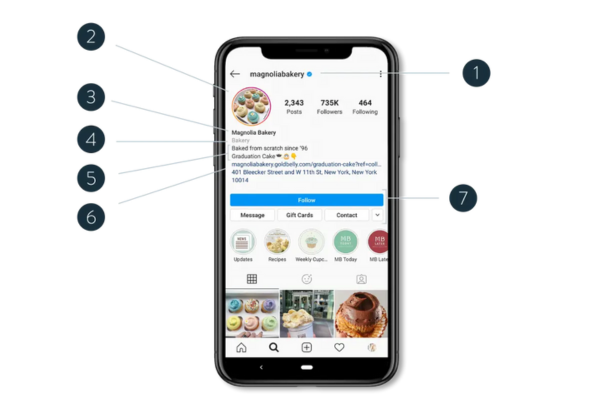
1. Profile Picture (Avatar)

At the top left of the Instagram profile, users display a circular profile picture, often referred to as an avatar. This is the first visual impression others get of a user.

  • Personal Accounts: Typically feature a headshot or selfie.
  • Business/Brand Accounts: Often use a company logo or product image.

The profile picture is static but clickable—it may expand or link to Stories (if active). This image appears next to the username in comments, direct messages, and throughout the app, making it an important part of brand or personal recognition.


2. Username (Handle) and Display Name

Every Instagram profile includes two names:

  • Username (Handle): Starts with “@” (e.g., @sunnytravels). This is unique to the user and functions as their identifier across the platform.
  • Display Name: Appears in bold text just under the profile picture. It can be the user’s real name, business name, or nickname and doesn’t need to be unique.

These identifiers are searchable and play a key role in discovery, tagging, and mentions across Instagram.


3. Bio (Biography Section)

Beneath the username and display name is the bio section—a short space (up to 150 characters) where users describe themselves or their brand. Though brief, the bio is a powerful tool for self-expression and branding.

  • Individuals may use it to list interests, hobbies, or a favorite quote.
  • Businesses may list services, contact details, or a tagline.

The bio can also include:

  • Clickable hashtags (e.g., #veganrecipes)
  • User mentions (e.g., @partnerpage)
  • Line breaks and emojis for style

In professional profiles, the bio may include call-to-action phrases like “DM for collaborations” or “Shop our latest drop below.”


4. Website Link

Instagram allows users to include one clickable link in their bio (Instagram previously allowed only one, but now some users can use link-in-bio tools to insert multiple links). This is a valuable feature for businesses, creators, and influencers.

Common uses:

  • Link to personal or business websites
  • Link to online stores or booking sites
  • Link to content (e.g., YouTube videos, newsletters)
  • Use of third-party tools like Linktree, Beacons, or Lnk.bio to house multiple links on one page

5. Contact and Action Buttons

Business and creator profiles have access to contact buttons, such as:

  • Call
  • Email
  • Directions

These buttons are configurable and sit below the bio. Some may also include:

  • Book Now / Reserve (for restaurants or service businesses)
  • Shop (links directly to Instagram’s shopping feature)

These buttons streamline interaction between followers and businesses, improving customer conversion rates directly from Instagram.


6. Story Highlights

Beneath the bio and buttons are Story Highlights—permanent collections of Instagram Stories. Normally, Stories disappear after 24 hours, but users can save them into Highlights and display them on their profile indefinitely.

Each Highlight includes:

  • A custom title (e.g., “Trips”, “Reviews”, “Recipes”)
  • A cover image (either selected from the Story or custom-designed)

Story Highlights serve as a way to organize content and present useful, entertaining, or informative material for new visitors to browse.


7. Follower/Follows/Post Counts

Directly under the display name or bio, Instagram shows three numerical stats:

  • Posts: Total number of posts shared on the main feed.
  • Followers: Number of people who follow the account.
  • Following: Number of accounts the user is following.

These stats serve as social proof and are often monitored for personal popularity or brand influence. While some users hide their like counts or follower numbers for privacy, these metrics are still essential for engagement and growth analysis.


8. Main Feed (Grid)

This is the visual gallery of a user’s posted content. It appears in a grid layout (3 columns by default) and includes:

  • Photos
  • Videos
  • Carousels (multiple images/videos in one post)

Each post is clickable, leading to a detailed view with likes, captions, comments, location tags, and sharing options.

Users can curate their feed for aesthetic purposes, using filters, themes, or color schemes. Influencers and brands often plan their grids carefully to maintain a cohesive visual identity.


9. Content Tabs (Navigation Options)

Modern Instagram profiles now include multiple tabs, usually located just above the photo grid:

  • Grid (Main Feed): All posts in chronological or curated order.
  • Reels: Short-form video content tab.
  • Videos (formerly IGTV): For longer video content.
  • Mentions/Tagged: Photos and videos where the user has been tagged.
  • Guides (optional): Curated articles or lists using Instagram content.

These tabs help visitors navigate content types more easily, especially for profiles with large amounts of content.


10. Reels, Lives, and Shopping Features

Depending on the account type and region, profiles may include:

  • Reels Section: Showcasing short videos similar to TikTok.
  • Live Badge: If a user is currently streaming, a “Live” badge may appear on their profile picture.
  • Shop Tab: For business profiles, users can view and purchase products directly from the Instagram profile via the shopping tab.

This makes Instagram not just a social network, but an e-commerce and content discovery platform.


Example: “GreenEats Vegan Café” Instagram Profile

Let’s use a real-world example to bring this structure to life.


Profile Name: GreenEats Vegan Café
Username: @greeneatscafe
Profile Picture: A vibrant green leaf logo
Display Name: GreenEats Vegan Café 🌱
Bio:
🌿 100% Plant-Based
📍 NYC | Dine-In & Takeout
👇 Order Online + Menu
Link: linktr.ee/greeneatscafe

Contact Buttons: Call | Directions | Reserve a Table

Story Highlights:

  • Menu 📖
  • Customer Reviews 🌟
  • Behind the Scenes 👩‍🍳
  • Events 🎉

Followers: 12.8K
Following: 452
Posts: 580

Grid Posts:

  • Carousel of weekly specials
  • Video of a chef preparing tofu stir-fry
  • Testimonials from customers
  • Event promotions for weekend brunch

Reels Tab:

  • 30-second food prep videos with music
  • Quick tips on plant-based nutrition
  • Chef Q&A sessions

Shopping Tab:

  • T-shirts with the GreenEats logo
  • Vegan sauces and meal kits
  • Gift cards for online ordering

This profile effectively uses every structural element—from its engaging bio and useful contact buttons to aesthetic visuals and story highlights—to create a cohesive, informative, and appealing brand presence.


Conclusion

An Instagram profile is much more than just a collection of images; it’s a carefully structured and strategic space for identity, branding, communication, and engagement. From the profile picture and bio to story highlights and shopping features, each element contributes to how a user or business is perceived and interacts with their audience.

Understanding the structure of an Instagram profile is crucial for anyone looking to maximize their impact on the platform—whether for personal use, brand building, or content creation. With the right setup, users can create a dynamic and engaging space that not only reflects their identity but also fosters meaningful interaction with followers.


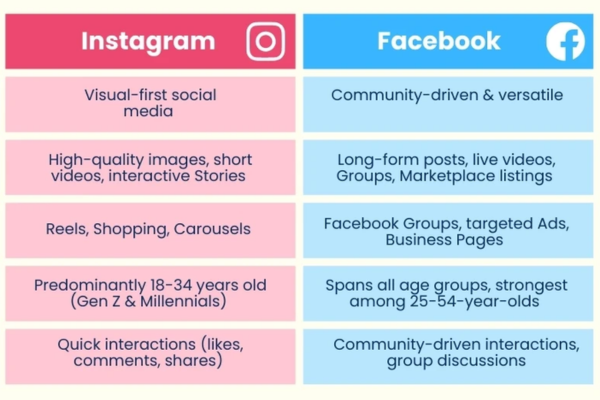
What is Instagram, and how is it different from Facebook?

Introduction

In today’s digital age, social media has revolutionized the way people connect, communicate, and consume information. Two of the most influential social media platforms are Facebook and Instagram, both owned by the parent company Meta Platforms Inc. While they may appear similar—each enabling users to share content, build social networks, and engage with communities—they are fundamentally different in design, purpose, and user experience.

This essay explores what Instagram is, how it works, and how it differs from Facebook in terms of core functionality, user demographics, engagement style, content format, and business strategy. An illustrative example will further highlight these distinctions.


What is Instagram?

Instagram is a photo and video sharing social media platform launched in October 2010 by Kevin Systrom and Mike Krieger. Its initial concept was simple: allow users to upload photos, apply filters, and share them with followers. In 2012, Facebook acquired Instagram for approximately $1 billion, recognizing its explosive growth and potential.

Over time, Instagram evolved into a highly visual platform that emphasizes aesthetics, creativity, and real-time sharing. It is designed primarily for mobile use and centers around a clean, image-first interface. Its major features include:

  • Posts (images/videos on your profile)
  • Stories (24-hour disappearing content)
  • Reels (short-form videos similar to TikTok)
  • IGTV (long-form video content)
  • Live streaming
  • Shopping (in-app e-commerce)
  • Direct Messaging (DMs)

Instagram thrives on visual storytelling, where images and videos convey messages more than text. Influencers, brands, and individuals use it to build aesthetic profiles, promote products, and share moments visually.


What is Facebook?

Facebook, launched in 2004 by Mark Zuckerberg and his college peers at Harvard, started as a campus-based networking site. It quickly expanded to become a global social network connecting billions. Unlike Instagram’s visual-first approach, Facebook offers a broader range of features designed to support text-based posts, social networking, community building, event planning, and discussion.

Key Facebook features include:

  • Status updates and posts
  • Groups and pages
  • Events and birthdays
  • Marketplace for buying/selling
  • Video sharing (including Facebook Watch)
  • News Feed
  • Messenger (its standalone messaging app)

Facebook’s strength lies in its comprehensive communication ecosystem, combining messaging, news, events, and social discovery into one platform. It is more information-heavy and diverse in the types of content it supports.


Key Differences Between Instagram and Facebook

1. Content Type and Presentation

  • Instagram is visual-centric. Photos, videos, and Stories are the main content types. Even captions are secondary to the imagery.
  • Facebook offers a wider array of content: long-form posts, links, shared articles, videos, polls, and event invites. Textual engagement is more common and encouraged.

Example: A restaurant might use Instagram to post a high-quality image of a new dish with minimal caption, while on Facebook, it might post a full review, customer comments, menu updates, and event details.


2. User Interface and Experience

  • Instagram’s interface is minimalistic, sleek, and optimized for smartphones. It emphasizes scrolling through visual posts in a grid or full-screen format.
  • Facebook’s interface is busier and more feature-rich, designed for both desktop and mobile use. It includes sidebars, menus, and a customizable News Feed.

3. Target Audience and Demographics

  • Instagram is particularly popular among younger users, especially Gen Z (ages 10–25) and younger millennials. It is a platform for trendsetters, influencers, and creatives.
  • Facebook has a more diverse age demographic, with strong adoption among users aged 30 and above. It is widely used for community groups, family connections, and broader social communication.

Stat Snapshot (as of 2024):

  • Instagram: 71% of users under age 35
  • Facebook: Most active user group aged 25–44, with growing use among seniors

4. Purpose and Communication Style

  • Instagram is used to share moments visually, promote brands, and discover trends. Its communication is indirect and visual—users show rather than tell.
  • Facebook is more conversational and informational. Users share opinions, news, events, and have longer interactions via comments and discussions.

Example: A user might share a meme or opinion article on Facebook and invite discussion, whereas on Instagram, they’d likely post a selfie or video clip with a short caption.


5. Content Longevity

  • Instagram content, especially Stories and Reels, is often short-lived or ephemeral. Stories disappear in 24 hours unless saved in Highlights.
  • Facebook posts remain on timelines indefinitely unless deleted, making it easier to revisit and reshare older content.

6. Business Tools and Advertising

Both platforms support advertising and commerce, but in different ways:

  • Instagram’s advertising is integrated visually with posts and Stories, often using influencer marketing. The Instagram Shop allows users to buy products directly in-app.
  • Facebook’s business tools are broader: Facebook Pages, Marketplace, targeted advertising via Meta Ads Manager, and deep user analytics.

Example: A fashion brand may use Instagram to launch a new clothing line with aesthetic product shots and link directly to purchase pages. On Facebook, the same brand may host a launch event, run a contest, or create a group for VIP customers.


7. Algorithm and Discovery

  • Instagram’s algorithm emphasizes engagement, recency, and relevance. It favors content that users interact with most (likes, saves, shares).
  • Facebook’s algorithm prioritizes meaningful interactions, such as comments and shares, especially among friends and family. It also serves more news and article content, depending on the user’s activity.

8. Community and Group Dynamics

  • Instagram has limited group functionality. Most interactions happen through followers and DMs.
  • Facebook has robust group and event features, allowing users to join communities based on interests, local areas, or professions.

Example: A local hiking club might organize meetups and discussions on Facebook, while members individually post hike photos on Instagram.


A Real-World Example: Coffee Shop Marketing Strategy

Imagine a local coffee shop called “Brew & Bean” trying to market itself using both Instagram and Facebook.

  • On Instagram, Brew & Bean posts daily photos of latte art, behind-the-scenes barista videos, Reels of seasonal drinks, and polls through Stories (“Which flavor should we try next?”). Their goal is to build a visually appealing brand and attract younger foot traffic.
  • On Facebook, Brew & Bean creates an event for a live music night, shares customer reviews, posts community updates, and joins local groups to promote its presence. Here, the goal is to build community engagement, drive event attendance, and foster longer-term customer relationships.

This dual approach shows how Instagram and Facebook serve complementary roles—one prioritizing visual branding and reach, the other fostering interaction and deeper connection.


Conclusion

Instagram and Facebook, though part of the same Meta ecosystem, serve different purposes and appeal to distinct user behaviors. Instagram excels as a visual storytelling platform, ideal for influencers, creatives, and brand-building. Facebook, on the other hand, is a social utility tool offering broader content diversity, deeper discussions, and community-based features.

Understanding the distinction is essential for users, businesses, and creators. Where Instagram captures attention through aesthetics and trends, Facebook offers tools for conversation, coordination, and information. Together, they represent two sides of modern digital communication—seeing versus saying, aesthetic versus functional, and brief connection versus deeper interaction.

As Meta continues to evolve these platforms with AI, AR, and the metaverse, their core differences will likely remain. Each platform plays a unique role in how we navigate the digital world, connect with others, and express ourselves.


What is the future of Facebook in the age of artificial intelligence and the metaverse?


Introduction

Facebook, now officially operating under its parent company name Meta Platforms Inc., has undergone a significant transformation since its inception in 2004. Originally a social networking platform, Facebook has grown into a technology behemoth with a massive user base exceeding 3 billion globally. As the digital landscape evolves, Facebook is increasingly shaped by two major technological forces: artificial intelligence (AI) and the metaverse. The company’s pivot toward these emerging domains signals a future that transcends traditional social media, aiming to redefine human interaction, commerce, entertainment, and even identity.

This essay explores the future of Facebook in the age of AI and the metaverse, analyzing how these technologies will reshape its services, user experiences, challenges, and opportunities.


AI: The Brain Behind Facebook’s Evolution

1. Personalized Content and User Experience

Artificial intelligence is already deeply embedded in Facebook’s ecosystem. AI algorithms decide what content users see on their News Feeds, recommend friends, filter spam, and suggest groups and events. In the future, these AI systems will become even more hyper-personalized. By leveraging machine learning models, natural language processing, and computer vision, Facebook will tailor every user’s experience uniquely—from the stories they see to the ads they receive.

Imagine a Facebook feed where AI understands not just your interests but your mood and context. For example, on a stressful day, Facebook might prioritize uplifting or relaxing content, automatically muting political debates or controversial topics. This kind of emotional intelligence could vastly improve digital well-being.

2. Advanced AI Moderation and Safety

Content moderation is one of Facebook’s most challenging tasks. Every day, millions of posts, comments, and videos are uploaded, and some include hate speech, misinformation, and harmful content. AI is critical to moderating this flood of data in real-time.

In the future, context-aware AI systems will play a more nuanced role. Instead of relying heavily on keyword detection, AI will analyze the semantic and emotional tone of a post, considering local cultures, slang, and humor. This will reduce false positives and negatives, allowing for more accurate moderation and a safer platform overall.

3. Enhanced Ad Targeting and Business Tools

Facebook generates the majority of its revenue through advertising. AI-driven analytics help businesses understand consumer behavior, create targeted campaigns, and optimize performance. In the future, AI tools will enable automated ad creation, chatbots for customer service, and predictive analytics that can forecast market trends.

For instance, a small business could input product details, and AI would generate compelling ad copy, design visuals, and determine the best times and audiences for posting—all without human marketers.


The Metaverse: A New Digital Frontier

1. Facebook’s Rebranding to Meta

In 2021, Facebook rebranded itself as Meta, signaling its commitment to building the metaverse—a persistent, shared, 3D virtual world where people interact through avatars. Mark Zuckerberg described the metaverse as the next chapter of the internet, where social connection is more immersive and embodied.

Meta has invested billions in developing this virtual world through its platforms like Horizon Worlds, Oculus VR (now Meta Quest), and AR/VR technologies.

2. Social Interaction and Digital Identity

In the metaverse, social media moves from text and images to 3D interactions. Instead of liking a friend’s vacation post, users might join them in a virtual recreation of Paris, exploring landmarks together as avatars. This immersive interaction enhances emotional connections and social presence.

Digital identities will also evolve. Users may have customizable avatars, digital wardrobes, and virtual homes. Facebook could become the platform for identity curation, allowing users to express themselves more freely and creatively in virtual spaces.

3. The Metaverse Economy

Facebook is positioned to lead in creating the metaverse economy, where users can buy virtual goods, attend concerts, go shopping, and even work remotely through their avatars. Meta has introduced tools for creators and businesses to sell digital products, such as clothing for avatars, virtual real estate, and event tickets.

A future example could involve a virtual clothing brand launching exclusively in Meta’s Horizon Worlds. Influencers and users could wear and promote these items, and blockchain-based ownership could give rise to a new digital fashion industry.


The Convergence of AI and the Metaverse

The real transformation lies in the intersection of AI and the metaverse. AI will act as the engine powering the metaverse, enabling:

  • Lifelike avatars: AI can simulate facial expressions and emotions, creating realistic avatars that mirror a user’s actual gestures and speech in real-time.
  • Intelligent NPCs (non-player characters): In the metaverse, users will interact not just with each other, but with AI-driven agents—virtual employees, concierges, teachers, or entertainers.
  • Language translation: Meta’s AI-driven universal translation tools aim to allow real-time multilingual communication in virtual spaces, enabling seamless global interaction.

Ethical and Privacy Considerations

With these advancements come serious ethical concerns:

  • Surveillance and data collection: As AI and the metaverse collect increasingly personal data—facial expressions, eye movements, biometric information—the risk of surveillance capitalism intensifies.
  • Mental health: Immersive virtual environments may exacerbate screen addiction, social isolation, or escapism. Ensuring that the metaverse promotes well-being rather than harm will be a critical challenge.
  • Bias in AI: Without careful design, AI algorithms may reinforce biases or make unfair decisions. For instance, avatar customization tools could reflect stereotypical norms, marginalizing minority identities.

Facebook will need to prioritize transparent governance, ethical AI design, and user consent in its next phase.


Competitive Landscape and Challenges

While Meta is a pioneer, it is not alone. Companies like Apple, Google, Microsoft, and Nvidia are also developing AI and metaverse technologies. Apple’s Vision Pro headset, for example, offers high-end spatial computing experiences that compete directly with Meta Quest. As competition intensifies, Facebook will need to balance innovation with usability and affordability.

Additionally, the future of Facebook will depend on public trust. Data privacy scandals, such as Cambridge Analytica, have eroded user confidence. Rebuilding trust will require Meta to be more accountable, transparent, and proactive in protecting user rights.


A Real-World Example: Virtual Education in the Metaverse

One illustrative example of Facebook’s future potential lies in virtual education. Imagine a platform within Meta’s ecosystem where students around the world attend interactive, immersive classes in the metaverse. Using AI-driven avatars, students can explore ancient Rome, conduct virtual science experiments, or collaborate on group projects in a 3D space.

AI can further personalize learning experiences by assessing student performance, identifying areas for improvement, and offering real-time tutoring. Teachers could use AI-generated lesson plans and teaching assistants to enhance education delivery.

This would revolutionize not just how we connect socially, but also how we learn—making education more engaging, accessible, and global.


Conclusion

The future of Facebook, as part of Meta, will be deeply interwoven with the trajectories of artificial intelligence and the metaverse. AI will refine and personalize the user experience, automate business processes, and ensure safety, while the metaverse will redefine how we interact, work, and socialize in digital environments. Together, they represent a paradigm shift—from a 2D screen-based world to a multi-dimensional, intelligent digital universe.

However, this transformation also demands responsibility. Facebook must navigate challenges around privacy, mental health, ethical AI, and digital inequality. If it succeeds, Facebook may not just remain relevant but become a foundational platform of the future internet, where digital and physical realities blend seamlessly.

Ultimately, the evolution of Facebook is a mirror of our broader societal journey—one where technology enhances human experience while forcing us to confront new philosophical and ethical questions about identity, reality, and connection.


What is a callout extension?

Definition:

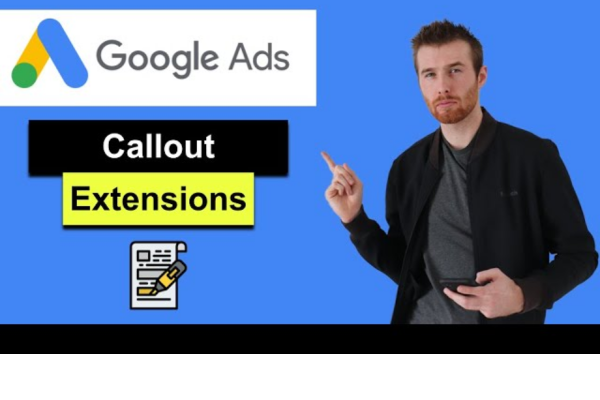
A callout extension in Google Ads is a type of ad extension that allows advertisers to include short, non-clickable pieces of text beneath their ads to highlight key features, benefits, or unique selling points of a product or service.

These extensions appear in text ads on the Google Search Network, and their purpose is to give users more reasons to click your ad by showcasing what sets your business apart — all without needing additional links.

Each callout is typically limited to 25 characters, and you can show multiple callouts at once (up to 10 can be added, and 2–6 may appear depending on ad rank and device).

Why Use Callout Extensions?

Callout extensions are simple, free to add, and help improve:

Ad visibility (they make your ad bigger and more informative)
Click-through rate (CTR) by offering more context
Ad rank, since Google Ads factors expected ad performance (including extensions) into ad placement

Importantly, you don’t pay extra for using callouts — you only pay when someone clicks your main ad.

What Can You Say in Callout Extensions?

You can use callouts to:

  • Highlight business features (e.g., “Free Shipping”, “24/7 Support”)

  • Promote policies or guarantees (e.g., “Price Match Guarantee”)

  • Mention services (e.g., “In-Store Pickup”, “Express Delivery”)

  • Build credibility (e.g., “Award-Winning Support”)

Example: Callout Extensions for Myntra

Let’s say Myntra is running Google Ads for their fashion platform.

Main Ad Headline:
Shop the Latest Fashion on Myntra – Upto 70% Off

Description:
Explore thousands of styles for men, women, and kids. Free shipping & easy returns.

Callout Extensions (examples):
100% Original Products
Free Delivery
Easy 14-Day Returns
Cash on Delivery
24×7 Customer Support
Over 5000+ Brands
New Arrivals Every Day
Safe & Secure Checkout

These callouts are not clickable, but they:

  • Increase user trust

  • Emphasize convenience

  • Provide quick highlights of Myntra’s services

Best Practices for Using Callout Extensions

Be Specific – Use precise value propositions like “No Hidden Charges” instead of vague ones like “Great Deals.”
Keep It Short – Each callout must be concise (25-character max). Aim for clarity.
Avoid Repetition – Don’t repeat words across multiple callouts or duplicate ad copy.
Use Sentence Case – Google recommends sentence case (e.g., “Free shipping”) over all caps.
Customize by Device – You can create mobile-preferred callouts like “Shop via App.”
Create at Least 4 – Google displays up to 4 at a time; having more gives it options to rotate.

Where to Apply Callout Extensions

Callouts can be added at the:
Account level – Applied to all campaigns and ads
Campaign level – For more control and relevance by objective
Ad group level – To tailor callouts to specific products or categories

For Myntra:
A “Men’s Shoes” ad group could use:

  • Free Size Exchanges

  • Top Sports Brands

  • Flat ₹500 Off First Order

A “Women’s Sarees” ad group might use:

  • Traditional & Modern Styles

  • Festive Discounts Live

  • Free Blouse Stitching Offers

Performance Tracking

Google Ads provides reporting on:

  • Impressions of each callout

  • Clicks on the ad when a callout is shown

  • Conversion performance (if tracking is set)

Even though callouts are not clickable, their presence improves overall ad engagement.

Common Mistakes to Avoid

  • Repeating callout text already in your ad copy

  • Using promotional content (like “50% Off”) — that’s not allowed in callouts (use sitelinks instead)

  • Including clickable actions (e.g., “Click here”) — not relevant for non-clickable text

  • Using punctuation marks at the end (Google disallows periods or exclamation marks in callouts)

Conclusion

Callout extensions in Google Ads are a powerful yet simple tool to increase the value and appeal of your search ads. They allow you to highlight benefits, differentiate your brand, and guide the user’s perception of your offerings.

For e-commerce platforms like Myntra, using callout extensions can help customers quickly understand the reliability, policies, and conveniences of shopping on the platform—thereby increasing trust and improving ad performance.

When used strategically, callouts are not just “add-ons,” but essential parts of a high-converting, user-focused ad strategy.

What is a Re-engagement Email and How Is It Written?

Introduction

In the fast-paced world of digital communication, email marketing remains one of the most effective tools for building relationships with your audience. But what happens when your subscribers stop opening your emails, clicking your links, or even noticing your content?

Do you give up on them?

Absolutely not. That’s where re-engagement emails come in.

A re-engagement email is a strategic message sent to inactive subscribers with the goal of reigniting interest and bringing them back into your active list. These emails are a critical part of email list hygiene and can significantly improve your campaign performance, deliverability, and ROI.

In this comprehensive guide, we will explore:

  • What a re-engagement email is

  • Why re-engagement emails matter

  • When and to whom they should be sent

  • How to write effective re-engagement emails

  • Examples and templates

  • Best practices and mistakes to avoid


1. What Is a Re-engagement Email?

A re-engagement email (also called a win-back email) is a message sent to subscribers who haven’t interacted with your emails for a certain period—typically 30, 60, or 90+ days. The purpose is to remind them of your value, renew interest, and encourage them to take action, such as opening, clicking, or purchasing.

Think of it as a digital handshake or a friendly nudge:

“Hey, we haven’t seen you in a while. Still interested?”

These emails might offer:

  • A discount or exclusive offer

  • A reminder of the benefits of staying subscribed

  • An update about what’s new

  • A request for feedback or preference updates

  • A simple question like, “Are you still there?”


2. Why Re-engagement Emails Matter

If you have 5,000 subscribers but only 1,000 actively engage with your emails, that’s a problem. Inactive users:

  • Skew your metrics (open and click rates)

  • Decrease deliverability (you may land in spam)

  • Waste money if you pay per subscriber

  • Hurt your sender reputation

Re-engagement emails solve this by:

  • Re-activating subscribers

  • Cleaning your list (those who don’t respond can be removed)

  • Improving your overall email performance

  • Reviving old leads or customers who may convert again

According to research:

  • Re-engagement campaigns have an average open rate of 12%–29%

  • Over 45% of recipients who open a re-engagement email will read subsequent emails


3. When Should You Send a Re-engagement Email?

Timing is key. A user is considered inactive if they haven’t:

  • Opened an email

  • Clicked a link

  • Made a purchase or taken action

…in a given time frame. This typically ranges from:

  • 30 days for daily senders

  • 60–90 days for weekly senders

  • 180+ days for occasional campaigns

The right window depends on:

  • Your email frequency

  • Subscriber expectations

  • Past engagement behavior


4. How to Segment Your Audience for Re-engagement

Before sending re-engagement emails, identify and segment the inactive users. Most email marketing tools (like Mailchimp, ConvertKit, Brevo, ActiveCampaign) allow you to create segments based on:

  • Last opened email

  • Last clicked link

  • Last login or purchase date

  • Time since subscription

This helps ensure that your re-engagement campaign reaches the right people and doesn’t disturb active users.


5. How to Write a Re-engagement Email

Writing a re-engagement email is a balance of honesty, persuasion, and value. You’re reminding people why they signed up and giving them a reason to come back.


✅ Step 1: Write a Compelling Subject Line

Your subject line is the most important part. It must:

  • Stand out

  • Spark curiosity or urgency

  • Be honest and warm

Examples:

  • “We miss you, Ayesha 🌟”

  • “Still interested in great content?”

  • “Should we stop emailing you?”

  • “Your 20% discount is waiting…”

  • “Time to reconnect?”


✅ Step 2: Acknowledge the Inactivity

Be transparent. Recognize that the subscriber hasn’t engaged recently.

“We noticed you haven’t opened our emails in a while, and that’s totally okay. Life gets busy!”

This builds trust and keeps the tone conversational.


✅ Step 3: Remind Them of the Value

What are they missing out on? Highlight the value you bring—whether it’s tips, products, discounts, inspiration, or updates.

“Here’s what you’ve missed: new study tools, productivity templates, and weekly motivation from experts.”


✅ Step 4: Offer a Reason to Stay

This can be:

  • An incentive (discount, bonus, freebie)

  • A sneak peek of new content

  • An emotional appeal (reminder of goals)

“Download our latest 2024 planner—exclusive to our email family.”


✅ Step 5: Include a Clear Call-to-Action (CTA)

Ask them to take action:

  • “Click to stay subscribed”

  • “Download your gift”

  • “Update your preferences”

  • “Yes, I’m still interested!”

The action should be easy and clear.


✅ Step 6: Give an Option to Unsubscribe

Respect their decision. Some people may not be interested anymore.

“If you’d prefer not to receive our emails, no hard feelings. You can unsubscribe below.”

This reinforces your authenticity and complies with email laws like GDPR and CAN-SPAM.


6. Real-Life Example of a Re-engagement Email

Scenario:

Simran runs a blog for college students called “StudyWithSimran”, where she shares study tips, digital tools, and productivity hacks.


Subject Line:

“Still want study tips, Amaan? 📚”


Email Body:

Hey Amaan,

We noticed you haven’t been opening our emails lately, and we totally understand—life gets busy.

But we didn’t want you to miss out on all the new study hacks, digital tools, and weekly productivity tips we’ve been sharing with students just like you.

✅ Free printable planners
✅ New blog: “Top 5 AI Tools for Smarter Studying”
✅ Mindset Mondays newsletter

If you still want to receive helpful, no-fluff content to boost your focus and beat procrastination…

👉 Click here to stay subscribed

Or, if now’s not the right time, feel free to unsubscribe. No hard feelings—we appreciate the time we shared.

Cheers,
Simran @ StudyWithSimran
[Unsubscribe link]


Result:

  • Open rate: 32% (compared to 18% average)

  • 21% clicked to stay

  • 6% unsubscribed

  • Recovered 200+ previously inactive users


7. Tips and Best Practices for Re-engagement Emails

Tip Why It Matters
Keep it short and clear Respect their time and reduce cognitive load
Use friendly, human language Builds trust and relatability
Add visuals (GIF, image, emoji) Enhances emotional connection
Test subject lines A/B testing helps improve open rates
Set up automation Saves time and keeps your list clean automatically
Follow up if needed A 2- or 3-part re-engagement series can be more effective

Example 2-Email Re-engagement Flow:

Email 1: “Still interested?”
Soft reminder with benefits and CTA to stay.

Email 2: “This is goodbye (unless you click here)”
Urgent tone. Final CTA. Then unsubscribe inactive users.


8. What Happens If They Don’t Engage?

If a subscriber doesn’t respond after a re-engagement series:

  • Remove or suppress them from future campaigns

  • Tag them as inactive (some platforms allow you to retarget later with ads)

  • Archive or delete them based on your strategy

This improves your:

  • Deliverability

  • Open/click rates

  • Subscriber quality


9. Common Mistakes to Avoid

Mistake Consequence
❌ Being too aggressive or spammy Pushes users away
❌ Using guilt or desperation Hurts your brand tone
❌ Sending without a clear CTA Leaves subscribers confused
❌ Not honoring unsubscribe requests Violates email laws
❌ Forgetting segmentation Sends irrelevant messages to the wrong users

Conclusion

Re-engagement emails are a critical part of a healthy email marketing strategy. They allow you to reconnect with subscribers who’ve gone quiet, bring them back into the fold, and clean up your list for better overall performance.

To write an effective re-engagement email:

  • Be honest and friendly

  • Remind subscribers of your value

  • Offer a clear next step

  • Respect their choice to stay or leave

When done well, re-engagement campaigns can revive relationships, re-activate sales, and boost your long-term email success—making your list not just larger, but smarter and more responsive.


✅ Final Re-engagement Email Checklist

Task Done
Segment inactive users
Write compelling subject line
Acknowledge inactivity
Share value and benefits
Include incentive or CTA
Add unsubscribe option
Follow-up email (if needed)

Want help drafting your re-engagement email series? Tell me your audience and brand style, and I’ll write a full 2–3 email sequence tailored for your needs!

How to Become a Digital Marketing Specialist

Digital marketing is one of the fastest-growing fields today. Many people are interested in building a career in digital marketing, and becoming a digital...

What is SMM in Digital Marketing

SMM, or Social Media Marketing, is one of the most important parts of digital marketing. In simple words, SMM is the process of using...

What is Google Analytics in Digital Marketing

Google Analytics is one of the most important tools in digital marketing. It helps businesses understand how people interact with their websites and online...

What is Google AdWords in Digital Marketing

Google AdWords is one of the most important tools in digital marketing. Many businesses use AdWords to reach their target audience online and increase...

What Is CPM in Digital Marketing

In digital marketing, understanding how your ads are priced and measured is very important. Different advertising models help marketers track performance and control spending....