Home Blog Page 49

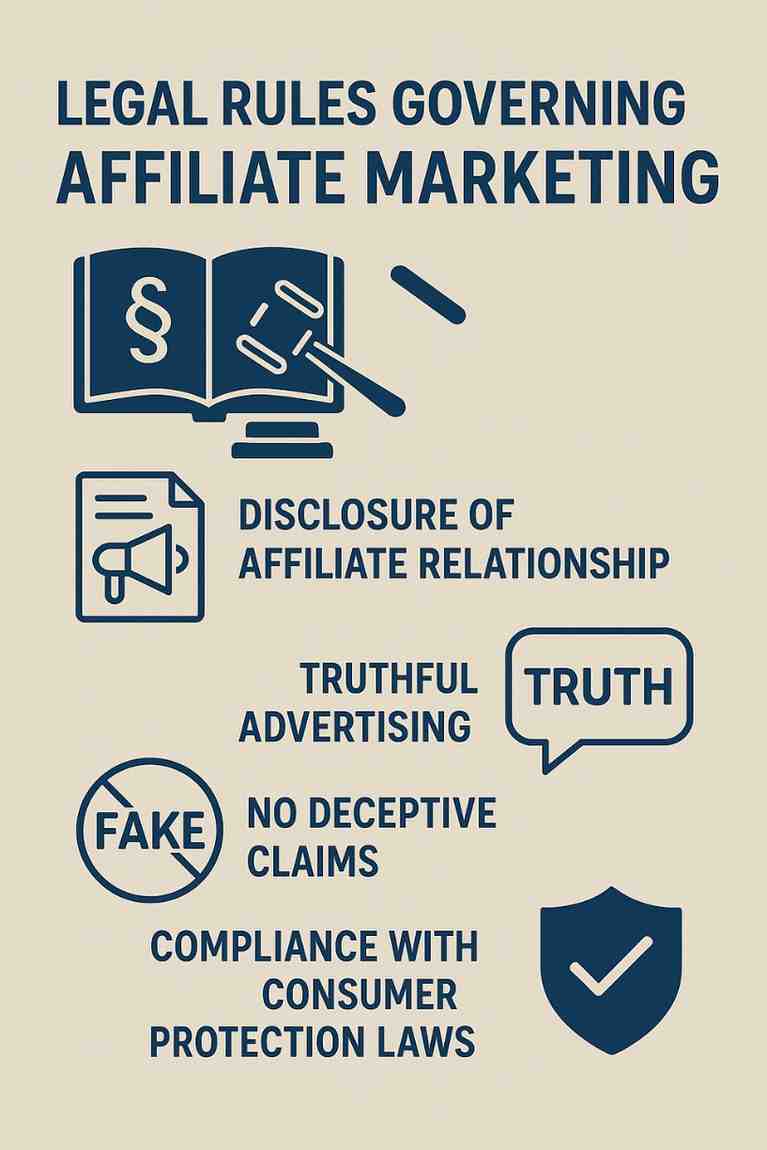
What Are the Legal Rules Governing Affiliate Marketing?

Affiliate marketing is a booming digital marketing strategy where individuals (affiliates) earn commissions by promoting a company’s products or services. While it offers significant income potential and business growth opportunities, affiliate marketing is also subject to legal regulations. These rules aim to ensure fairness, transparency, and protection for consumers, advertisers, and affiliates. Failure to comply with these laws can lead to penalties, fines, and even lawsuits.

This article explores the major legal rules governing affiliate marketing, covering regulations in the U.S. (especially from the Federal Trade Commission), Europe (such as the GDPR), and other global standards. We will also discuss best practices for compliance and conclude with a relevant example to show how these laws apply in real-life scenarios.


1. Federal Trade Commission (FTC) Guidelines – United States

The Federal Trade Commission (FTC) in the United States is one of the main regulatory bodies overseeing affiliate marketing practices. The FTC’s primary concern is consumer protection, especially in regard to advertising transparency and truth-in-advertising laws.

a. Disclosure of Affiliate Relationships

The FTC mandates that affiliates must clearly disclose their relationships with brands. In simple terms, if an affiliate receives a commission for promoting a product or service, the audience must be informed of this relationship clearly and conspicuously.

Key Rules:

  • The disclosure must be placed near the affiliate link, not buried in a footer or on a separate page.

  • It must be in plain, understandable language (e.g., “I earn commissions if you buy through this link.”).

  • Disclosures must be visible on all platforms – websites, blogs, social media posts, YouTube videos, etc.

Failing to disclose can lead to serious consequences, including legal actions against both the affiliate and the company they represent.

b. Truthful Advertising

Affiliates must not make false or misleading claims about a product or service. For instance:

  • You cannot say a product cures diseases if it doesn’t.

  • You must not exaggerate product benefits without proof.

  • Any claims made must be honest and substantiated by facts or personal experience.


2. General Data Protection Regulation (GDPR) – European Union

The GDPR is a strict data privacy regulation applicable to companies that collect or process personal data of individuals in the European Union (EU), regardless of where the company is based. Affiliate marketers must also follow GDPR when operating in or targeting EU users.

a. Data Collection Transparency

If an affiliate collects cookies to track referrals or user behavior (common in affiliate marketing), they must:

  • Get explicit consent from the user before placing tracking cookies.

  • Provide a privacy policy that clearly explains what data is collected and how it is used.

b. Right to Access and Erasure

Users have the right to:

  • Access their data collected via affiliate tracking.

  • Request deletion of their personal data.

Affiliates using email marketing or any user-based analytics must ensure they comply with GDPR’s data handling rules.


3. CAN-SPAM Act – United States

The CAN-SPAM Act applies to email marketing and is especially relevant to affiliates who use newsletters or promotional emails to share affiliate links.

Rules include:

  • Do not use misleading subject lines or headers.

  • Clearly identify the message as an advertisement.

  • Include a valid physical postal address.

  • Provide a working unsubscribe option.

  • Honor unsubscribe requests within 10 business days.

Violations of the CAN-SPAM Act can result in fines of up to $43,792 per email, making compliance critical.


4. Children’s Online Privacy Protection Act (COPPA)

If your affiliate marketing targets users under the age of 13, you must comply with COPPA. This law governs how websites and marketers collect data from children.

Requirements include:

  • Obtain verifiable parental consent before collecting any personal data.

  • Provide a clear privacy policy.

  • Ensure data is secure and confidential.

Most affiliates avoid marketing to children to steer clear of these strict regulations.


5. Platform-Specific Policies

In addition to government laws, many platforms have their own rules that affiliates must follow.

a. Amazon Associates Program

Amazon has a strict affiliate program with its own disclosure rules:

  • Affiliates must include a disclaimer such as:
    “As an Amazon Associate, I earn from qualifying purchases.”

  • They are not allowed to cloak or shorten links in a way that hides the Amazon domain.

  • Product reviews must be truthful and not incentivized.

Violating these terms can get an affiliate banned from the program.

b. Social Media Platforms

Each social media platform has unique rules regarding affiliate links:

  • Instagram and TikTok require the use of “#ad” or “#sponsored” hashtags.

  • YouTube’s community guidelines recommend verbal and written disclosures in videos.

  • Facebook Ads Manager may reject affiliate ads if they contain misleading content or unapproved landing pages.


6. International Legal Variations

Different countries have unique affiliate marketing laws. A few noteworthy examples:

  • Canada: Similar to the CAN-SPAM Act, Canada enforces CASL (Canadian Anti-Spam Legislation), which requires express consent before sending commercial electronic messages.

  • Australia: Under the Spam Act 2003, all marketing messages must include a way to unsubscribe and must not be deceptive.

  • India: While India lacks affiliate-specific laws, the Consumer Protection Act 2019 ensures that misleading ads and non-disclosures can be penalized.

Thus, affiliates working in multiple regions must research and comply with local regulations.


7. Contracts Between Affiliates and Merchants

Legal agreements or contracts are common in affiliate partnerships and typically cover:

  • Payment terms (e.g., per sale, per click).

  • Promotional guidelines.

  • Termination clauses.

  • Prohibited practices (like bidding on brand keywords or sending spam).

Affiliates must read the terms and conditions carefully before joining any program. Breaching contract terms could lead to termination or legal consequences.


8. Common Legal Mistakes in Affiliate Marketing

  1. Hiding Disclosures: Using ambiguous language like “This is a partner link” without clarification.

  2. No Cookie Consent: Especially on websites targeting European users.

  3. Misrepresenting Earnings: Affiliates claiming “You can make $10,000 a week!” without proof.

  4. Infringing Copyright: Using copyrighted logos, product images, or videos without permission.

  5. Overpromising: Saying a supplement “cures diabetes” without FDA approval or scientific backing.

These practices can lead to warnings, bans, lawsuits, or penalties.


9. Best Practices for Legal Compliance

  • Always disclose affiliate relationships clearly.

  • Use GDPR-compliant plugins for cookie consent (e.g., CookieYes, Cookiebot).

  • Ensure email campaigns comply with CAN-SPAM or international equivalents.

  • Avoid clickbait headlines or false claims.

  • Keep records of all consents, transactions, and contracts.

  • Stay updated with changes in laws and platform policies.


10. Real-Life Example: Affiliate Compliance

Example: Affiliate Blogger “Sarah’s Home Finds”

Sarah runs a blog reviewing home décor products and uses Amazon affiliate links. She earns commissions through user purchases. To stay compliant:

  1. She adds a disclosure at the top of every article:
    “This post contains affiliate links. I may earn a commission if you make a purchase through my links, at no extra cost to you.”

  2. Sarah uses a cookie consent plugin for EU users and links to her Privacy Policy page explaining how cookies are used.

  3. In her email newsletter, she includes:

    • A clear subject line (e.g., “Top Summer Decor Picks – Affiliate Deals Inside!”)

    • An unsubscribe link

    • Her full business address

  4. She avoids false claims in her reviews, giving honest opinions and using images provided by the merchant or created by her.

Because of these practices, Sarah avoids legal troubles, builds trust with readers, and maintains a successful affiliate business.


Conclusion

Affiliate marketing is not just about earning passive income—it is also about following legal and ethical standards. With strict regulations from entities like the FTC, GDPR, and local governments, affiliates must take proactive steps to disclose relationships, protect user data, and provide truthful information.

Understanding and following these legal rules not only protects affiliates from penalties but also builds long-term trust with audiences and merchants. Whether you are a beginner or an experienced affiliate, compliance should be at the core of your marketing strategy.

By keeping up with legal requirements, using transparency in promotions, and respecting user rights, affiliate marketing can be both profitable and responsible.
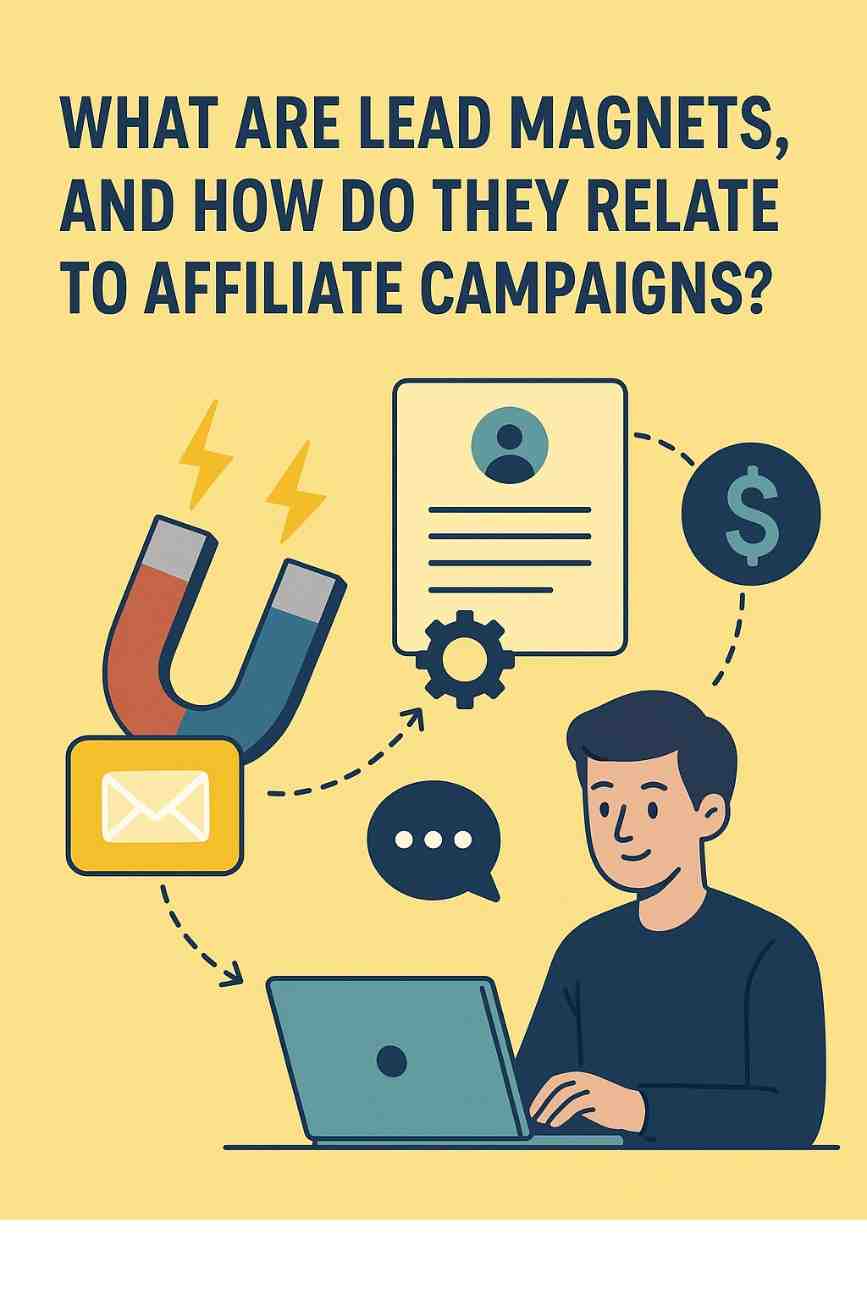
What Are Lead Magnets, and How Do They Relate to Affiliate Campaigns?

In the realm of digital marketing, lead magnets are powerful tools designed to attract potential customers by offering them something of value in exchange for their contact information, typically their email address. They serve as the entry point in a marketing funnel, enabling businesses or marketers to build a list of leads that can be nurtured into paying customers. When integrated into affiliate campaigns, lead magnets become a strategic asset, helping affiliate marketers capture leads, build trust, and promote affiliate products or services effectively. This detailed explanation will cover the concept of lead magnets, their mechanics, their relationship with affiliate campaigns, and provide a practical example to illustrate their application.


Understanding Lead Magnets

A lead magnet is a free, valuable resource or incentive offered to prospects in exchange for their contact details, such as name, email address, or phone number. The goal is to entice individuals who are interested in a specific topic or solution to opt into a mailing list or engage further with a brand. Lead magnets are often digital products that can be delivered instantly, making them cost-effective and scalable for marketers.

Characteristics of Effective Lead Magnets

For a lead magnet to be successful, it must possess certain qualities:

  1. High Perceived Value: The offer should feel valuable to the target audience, even if it’s free. It should address a specific problem or desire.
  2. Relevance: The lead magnet must align with the audience’s interests and the products or services being promoted.
  3. Immediate Delivery: Prospects expect instant access to the lead magnet, often via a download link or email.
  4. Specificity: A lead magnet that solves a specific problem (e.g., “7 Ways to Boost Your Website Traffic in 30 Days”) performs better than a vague offer (e.g., “Free Marketing Tips”).
  5. Ease of Consumption: The resource should be easy to understand and use, such as a short eBook, checklist, or video.
  6. Low Commitment: The audience should not feel they’re making a significant commitment by opting in.

Types of Lead Magnets

Lead magnets come in various formats, depending on the target audience and niche. Common examples include:

  • eBooks or Guides: In-depth resources on a specific topic.
  • Checklists or Cheat Sheets: Quick, actionable lists for achieving a goal.
  • Templates: Ready-to-use documents, such as email templates or social media graphics.
  • Webinars or Video Training: Educational content delivered in video format.
  • Free Trials or Samples: Access to a product or service for a limited time.
  • Quizzes or Assessments: Interactive tools that provide personalized results.
  • Discounts or Coupons: Exclusive offers to encourage purchases.
  • Toolkits or Software: Free tools or apps that solve a problem.

Why Lead Magnets Matter

Lead magnets are essential because they initiate a relationship with potential customers. By offering value upfront, marketers build trust and credibility, which are critical for converting leads into buyers. Additionally, lead magnets allow marketers to collect data, enabling personalized follow-up campaigns through email marketing, retargeting ads, or other channels.


Lead Magnets in Affiliate Campaigns

Affiliate marketing is a performance-based marketing strategy where individuals (affiliates) earn commissions by promoting products or services from other companies. Affiliates typically share unique tracking links that direct traffic to a merchant’s website, earning a commission for each sale, lead, or action generated through their efforts. Lead magnets play a pivotal role in affiliate campaigns by serving as the bait to attract and engage potential customers, ultimately driving conversions for affiliate offers.

How Lead Magnets Relate to Affiliate Campaigns

In affiliate marketing, the challenge is to stand out in a crowded market and convince prospects to click on affiliate links and make a purchase. Lead magnets address this challenge by:

  1. Attracting Targeted Traffic: A well-designed lead magnet draws in an audience that is already interested in the niche or product being promoted, increasing the likelihood of conversions.
  2. Building an Email List: Instead of sending traffic directly to an affiliate offer (where the affiliate has no control over the customer relationship), a lead magnet allows affiliates to capture leads’ contact information. This enables ongoing communication and multiple opportunities to promote affiliate products.
  3. Establishing Authority and Trust: By providing valuable content through a lead magnet, affiliates position themselves as knowledgeable and trustworthy, making prospects more receptive to their recommendations.
  4. Nurturing Leads: Not all prospects are ready to buy immediately. Lead magnets feed into an email sequence or funnel that educates, engages, and gradually promotes affiliate offers, improving conversion rates over time.
  5. Maximizing Lifetime Value: An email list built with lead magnets allows affiliates to promote multiple related offers, increasing the potential revenue from each lead.

The Mechanics of Using Lead Magnets in Affiliate Campaigns

Here’s how lead magnets are typically integrated into affiliate campaigns:

  1. Create a Niche-Specific Lead Magnet: The lead magnet should align with the affiliate product and the target audience’s needs. For example, if promoting a fitness program, a lead magnet could be a “7-Day Home Workout Plan.”
  2. Set Up a Landing Page: A dedicated landing page promotes the lead magnet, highlighting its benefits and including an opt-in form to collect contact details.
  3. Drive Traffic to the Landing Page: Affiliates use various channels, such as blog posts, social media, paid ads, or YouTube videos, to direct traffic to the landing page.
  4. Deliver the Lead Magnet: Once a prospect opts in, the lead magnet is delivered via email or a download link. This is often automated using email marketing tools like Mailchimp or ConvertKit.
  5. Follow Up with an Email Sequence: A series of emails nurtures the lead, providing additional value (e.g., tips, case studies) while subtly introducing the affiliate product. The emails include affiliate links to drive conversions.
  6. Track and Optimize: Affiliates monitor metrics like opt-in rates, email open rates, and affiliate link clicks to refine their strategy and improve performance.

Benefits of Using Lead Magnets in Affiliate Campaigns

  • Higher Conversion Rates: Leads who opt in for a lead magnet are more engaged and likely to trust the affiliate’s recommendations.
  • Control Over the Funnel: By capturing leads, affiliates can control the messaging and timing of their promotions, rather than relying solely on the merchant’s sales page.
  • Scalability: Once set up, a lead magnet and email funnel can run automatically, generating passive income.
  • Diversified Revenue: A single lead magnet can be used to promote multiple affiliate products in the same niche.

Challenges to Consider

While powerful, using lead magnets in affiliate campaigns comes with challenges:

  • Time and Effort: Creating a high-quality lead magnet and setting up a funnel requires upfront work.
  • Compliance: Affiliates must adhere to the merchant’s terms and conditions, as well as regulations like GDPR or CAN-SPAM for email marketing.
  • Competition: Many affiliates in the same niche may offer similar lead magnets, requiring creativity to stand out.
  • Maintenance: Lead magnets and funnels need regular updates to remain relevant and effective.

Example of a Lead Magnet in an Affiliate Campaign

Let’s explore a practical example to illustrate how lead magnets work in affiliate campaigns.

Scenario

An affiliate is promoting a project management software (e.g., ClickUp or Asana) that pays a commission for each new paid subscriber. The target audience includes small business owners, freelancers, and team leaders looking to improve productivity.

Step 1: Create the Lead Magnet

The affiliate creates a lead magnet called “The Ultimate Project Management Checklist: 10 Steps to Streamline Your Workflow”. This is a concise, actionable PDF checklist that helps users organize tasks, set deadlines, and collaborate effectively. The checklist is branded with the affiliate’s logo and includes a subtle mention of the affiliate software as a recommended tool.

Step 2: Build a Landing Page

The affiliate designs a landing page with a compelling headline: “Download Your Free Project Management Checklist to Boost Productivity!” The page highlights the benefits of the checklist, such as saving time and reducing stress, and includes a form to collect names and email addresses. The landing page is hosted on a platform like Leadpages or WordPress.

Step 3: Drive Traffic

The affiliate writes a blog post titled “How to Manage Projects Like a Pro: Tips and Tools for Success,” which ranks on Google for relevant keywords. The post includes a call-to-action to download the free checklist. Additionally, the affiliate promotes the landing page on social media (e.g., LinkedIn groups for entrepreneurs) and runs a small Facebook ad campaign targeting small business owners.

Step 4: Deliver the Lead Magnet

When a prospect submits their details, they receive an automated email with a link to download the checklist. The email also welcomes them to a “5-Day Productivity Challenge,” encouraging them to stay engaged.

Step 5: Email Sequence

The affiliate sets up a 5-email sequence using an email marketing tool:

  • Email 1: Delivers the checklist and provides a quick tip on task prioritization.
  • Email 2: Shares a case study of how a freelancer used project management software to double their output, with an affiliate link to the software.
  • Email 3: Offers a video tutorial on setting up a project board, subtly mentioning the affiliate software.
  • Email 4: Addresses common objections (e.g., “Is project management software worth it?”) and includes another affiliate link.
  • Email 5: Offers a limited-time discount or bonus for signing up for the software via the affiliate link.

Step 6: Track Results

The affiliate uses analytics tools to track landing page conversions (e.g., 30% opt-in rate), email open rates (e.g., 50%), and affiliate link clicks. If 100 people download the checklist and 10 sign up for the software, the affiliate earns commissions based on the merchant’s payout structure (e.g., $50 per sale, totaling $500).

Why This Works

The checklist is highly relevant to the target audience, providing immediate value while introducing the affiliate product naturally. The email sequence builds trust and educates leads, increasing the likelihood of conversions. By owning the email list, the affiliate can promote other related tools (e.g., time-tracking software) in the future.


Conclusion

Lead magnets are indispensable tools in digital marketing, particularly in affiliate campaigns. They attract targeted leads, build trust, and create opportunities for ongoing engagement, all of which are critical for driving affiliate conversions. By offering value upfront, affiliates can differentiate themselves, nurture relationships, and maximize revenue. The example of a project management checklist demonstrates how a well-crafted lead magnet, paired with a strategic funnel, can effectively promote an affiliate product while delivering value to the audience. For affiliates willing to invest in creating high-quality lead magnets and optimizing their funnels, the rewards include higher conversions, scalable income, and long-term customer relationships.

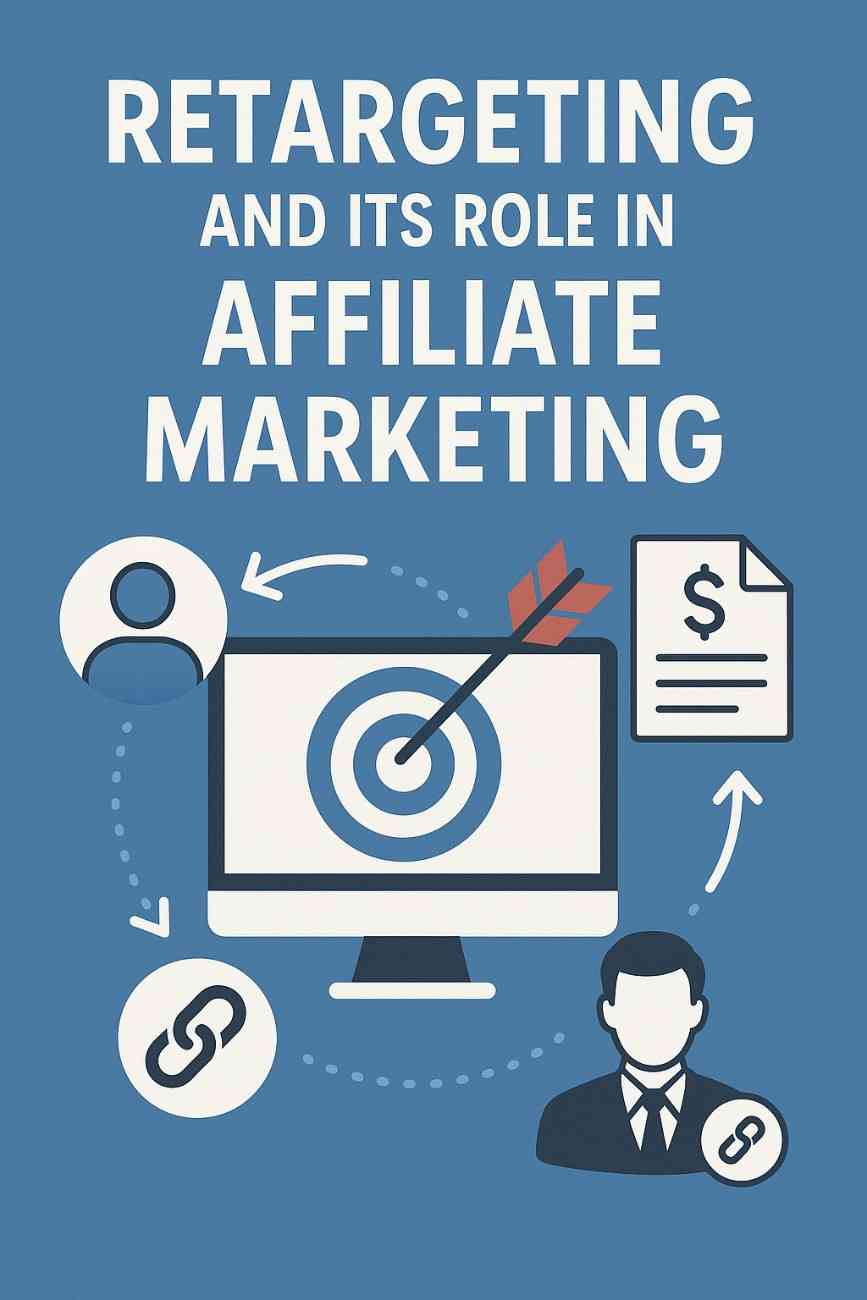
Retargeting and Its Role in Affiliate Marketing

In the competitive world of digital marketing, brands strive to capture and retain user attention. However, data shows that about 98% of visitors leave a website without taking any action, such as purchasing a product or signing up for a service. This is where retargeting comes into play. Retargeting is a highly effective strategy that helps bring back these visitors and increases the chances of conversion.

In the realm of affiliate marketing, retargeting has become an essential tool for driving sales and maximizing commissions. By showing relevant ads to users who have already interacted with a website or product, affiliates can dramatically improve conversion rates and boost their income. This article will explain what retargeting is, how it works, and how it is used in affiliate marketing, including a practical example.


What Is Retargeting?

Retargeting, also known as remarketing, is a form of online advertising that targets users who have previously visited a website or interacted with a brand but did not complete a desired action, such as making a purchase or filling out a form. It works by placing a small piece of code, called a pixel, on the user’s browser, which allows advertisers to track and serve them relevant ads on other websites and platforms.

There are two main types of retargeting:

1. Pixel-Based Retargeting

This involves adding a small, invisible snippet of JavaScript (the tracking pixel) to your website. When a user visits your site, this pixel stores a browser cookie, allowing ad networks like Google Display Network or Facebook Ads to show them relevant ads after they leave.

2. List-Based Retargeting

This method uses a list of email addresses or contact information that is uploaded to an advertising platform. If the platform can match these emails to users, it will show them targeted ads.


How Retargeting Works

Here’s a simple step-by-step breakdown of how retargeting works:

  1. User visits a website (e.g., an affiliate blog promoting fitness supplements).

  2. A tracking pixel or cookie is placed in their browser.

  3. The user leaves the site without buying anything.

  4. As the user browses other websites, the retargeting platform (like Google Ads or Facebook Ads) identifies them.

  5. The platform then displays targeted ads promoting the same or similar products the user was interested in.

  6. The user clicks the ad, returns to the affiliate site, and makes a purchase.

  7. The affiliate earns a commission from the sale.

This entire process happens in real time and is largely automated once the retargeting campaigns are set up.


Benefits of Retargeting

Retargeting is extremely powerful and offers several benefits:

1. Increased Conversion Rates

Visitors who are retargeted with display ads are 70% more likely to convert compared to those who are not.

2. Higher ROI

Since the audience has already shown interest, it is more cost-effective to market to them. This leads to a better return on investment (ROI).

3. Brand Recall

Even if a user doesn’t immediately convert, seeing your ad repeatedly builds brand awareness and increases the likelihood of future engagement.

4. Better User Experience

Retargeting can be customized to show relevant and timely ads, improving the user experience and reducing ad fatigue.


How Retargeting Is Used in Affiliate Marketing

Affiliate marketing is a performance-based model where affiliates earn a commission for referring customers to a merchant’s product or service. Retargeting enhances this model by helping affiliates:

1. Re-engage Lost Visitors

Not every visitor will buy something during their first visit. Retargeting allows affiliates to bring these visitors back and give them a second chance to convert.

2. Promote High-Intent Products

Affiliates often promote high-ticket items or services. Retargeting helps push users closer to purchase by reminding them of the value and features they were interested in.

3. Increase Click-Through and Conversion Rates

Since the audience is already familiar with the product, retargeted ads usually have higher CTRs and better conversion rates than standard display ads.

4. Build an Audience for Future Promotions

Using list-based retargeting, affiliates can build a custom audience for future campaigns, creating long-term value.


Popular Retargeting Platforms for Affiliates

Several platforms offer robust retargeting tools that affiliates can use:

  • Facebook Ads – Great for retargeting across Facebook and Instagram.

  • Google Ads (Display Network) – Ideal for showing ads on millions of websites.

  • AdRoll – Offers cross-platform retargeting including web, social, and email.

  • Criteo – Specializes in dynamic retargeting with personalized product ads.

  • Perfect Audience – Known for its simplicity and integration with Shopify, BigCommerce, etc.


A Practical Example: Retargeting in Action

Let’s consider an example to understand how retargeting works in affiliate marketing:

Scenario: Fitness Blog Promoting Protein Supplements

You run a fitness blog and are an affiliate for a company selling organic protein supplements. You write a review post titled “Top 5 Organic Protein Powders for Weight Loss in 2025.” In this article, you include affiliate links to the product pages.

Now, let’s say:

  • 5,000 people visit your blog post in a month.

  • Only 2% of them (100 people) click through and make a purchase.

  • You earn a $10 commission per sale, so you make $1,000.

But what about the other 4,900 visitors who left without buying?

Here’s where retargeting comes in.

Implementing Retargeting:

You place a Facebook Pixel and a Google Ads Pixel on your website. Now, when people visit your post, the pixels collect data about them (like their device, behavior, and interests).

You then create two retargeting campaigns:

  1. Facebook Campaign

    • Audience: People who visited your “Protein Powder” post.

    • Ad: A video testimonial from someone who lost weight using the protein supplement.

    • Call-to-Action: “Get 20% off your first order – limited time!”

  2. Google Display Campaign

    • Audience: Same as above.

    • Ad: Banner ad showing the product with “Free Shipping” and a time-sensitive offer.

These users start seeing your ads while browsing Instagram, watching YouTube videos, or reading other websites.

Results After Retargeting:

  • From the 4,900 non-buyers, 500 click on your retargeted ads.

  • 10% (50 people) convert and buy the product.

  • You earn another $500 in affiliate commissions.

  • Your overall revenue jumps from $1,000 to $1,500, increasing ROI significantly.

This is how retargeting turns missed opportunities into earnings.


Challenges and Best Practices

While retargeting is effective, it must be used strategically to avoid annoying or spamming users.

Challenges:

  • Ad Fatigue – Seeing the same ad too often can turn users away.

  • Privacy Concerns – Users are becoming more aware of how they are tracked.

  • Cost Management – Retargeting ads can get expensive if not monitored.

Best Practices:

  • Frequency Capping – Limit the number of times a user sees your ad.

  • Segmentation – Create different ad creatives for different types of users (e.g., visitors who added a product to cart vs. those who just browsed).

  • Personalization – Use dynamic ads that show the exact product the user viewed.

  • Exclude Converted Users – Don’t show retargeting ads to people who have already purchased through your link.


Conclusion

Retargeting is a powerful digital advertising technique that affiliates can leverage to increase their conversions, sales, and commissions. It allows marketers to reconnect with potential customers who have already shown interest but didn’t take action the first time. In affiliate marketing, where every click and conversion counts, retargeting helps in maximizing the value of traffic and reducing waste.

By combining affiliate marketing strategies with well-targeted retargeting campaigns, affiliates can not only increase their revenue but also build long-term relationships with audiences and advertisers alike.

When done right—with thoughtful segmentation, relevant content, and the right platforms—retargeting can turn your affiliate site into a high-performance, revenue-generating machine.


If you’d like, I can also provide templates for setting up Facebook or Google retargeting ads or tools that help automate this process.

Describe how Facebook ads work and how companies target users

Facebook has evolved from a social networking platform into one of the most powerful digital advertising tools in the world. Businesses of all sizes—from multinational corporations to local shops—use Facebook ads to reach their ideal audiences. With billions of users and a sophisticated data-driven advertising platform, Facebook allows advertisers to deliver highly personalized, targeted, and cost-effective marketing campaigns.

This essay explains in detail how Facebook ads work, how companies target users, why this method is so effective, and provides a relevant example to show how a business can successfully use Facebook ads.


1. Overview of Facebook Ads

Facebook ads are paid messages businesses post on Facebook that are targeted to specific users. These ads appear in a variety of formats and placements, including:

  • News Feed (mobile and desktop)
  • Stories
  • Marketplace
  • Video feeds
  • Messenger
  • Right-hand column (desktop only)
  • Instagram (since Facebook owns Instagram)

The goal of Facebook ads is to encourage users to take a specific action, such as clicking a link, watching a video, filling out a form, or making a purchase.


2. Setting Up a Facebook Ad Campaign

To run Facebook ads, businesses typically use Meta Ads Manager, the central tool for creating and managing advertisements across Facebook, Instagram, Messenger, and Audience Network.

Here’s a simplified step-by-step breakdown:

A. Choose a Campaign Objective

Facebook offers several marketing objectives grouped under three categories:

  1. Awareness
    • Brand awareness
    • Reach
  2. Consideration
    • Traffic
    • Engagement
    • App installs
    • Video views
    • Lead generation
    • Messages
  3. Conversion
    • Conversions
    • Catalog sales
    • Store traffic

The selected objective guides how the ad is optimized and shown to users.

B. Define the Target Audience

One of Facebook’s greatest strengths is its ability to target users based on extensive demographic and behavioral data. This step is where businesses define who they want to reach.

C. Set Budget and Schedule

Advertisers choose:

  • Daily or lifetime budget
  • Start and end dates
  • Delivery type (standard or accelerated)

D. Create the Ad

Advertisers design their ad by selecting:

  • Ad format (image, video, carousel, collection)
  • Media and text
  • Call-to-action (CTA) like “Shop Now,” “Learn More,” “Sign Up”

E. Review and Publish

The final step is to review the campaign settings and publish the ad. Once approved by Facebook, the ad goes live and begins reaching the targeted audience.


3. Types of Facebook Ad Formats

Facebook offers a variety of ad formats to help businesses reach their goals:

  • Image Ads: Simple and effective, ideal for promoting a product or brand.
  • Video Ads: Great for storytelling and product demonstrations.
  • Carousel Ads: Allow users to scroll through multiple images or videos in a single ad.
  • Slideshow Ads: Lightweight video ads using motion, sound, and text.
  • Collection Ads: Feature a primary video or image with product listings beneath.
  • Lead Ads: Allow users to fill out forms directly within Facebook.

Each format is designed for specific goals, user behaviors, and device types.


4. Facebook’s Targeting Capabilities

One of the most important aspects of Facebook advertising is its precision targeting. Facebook knows a lot about its users—demographics, interests, online behavior, purchase activity, location, device type, and more. This allows businesses to define exactly who should see their ads.

Here are the main targeting options:


A. Core Audiences

These are audiences defined by:

  • Demographics: Age, gender, education, relationship status, job title
  • Location: Country, state, city, zip code, or a specific radius around a location
  • Interests: Hobbies, favorite brands, activities, media preferences
  • Behavior: Device usage, travel habits, purchase behavior, page likes

B. Custom Audiences

These audiences are created using data the business already has, such as:

  • Customer email lists
  • Phone numbers
  • Website visitors (via Facebook Pixel)
  • App users

This allows businesses to re-engage users who have previously interacted with their brand—this is often called remarketing or retargeting.


C. Lookalike Audiences

Facebook can create audiences that “look like” existing customers based on shared behaviors and characteristics. Businesses can upload a list of current customers, and Facebook will find new users who resemble them.

Lookalike targeting is a powerful way to expand reach while still staying relevant to likely buyers.


5. Facebook Pixel and Conversion Tracking

To enhance targeting and measure success, businesses can install a Facebook Pixel on their website. This is a small piece of code that tracks user actions (e.g., page views, purchases, sign-ups).

Benefits of Facebook Pixel:

  • Tracks conversions from Facebook ads
  • Optimizes ads for specific actions (e.g., add to cart, complete purchase)
  • Builds retargeting audiences
  • Provides detailed analytics

For example, if a user visits a website but doesn’t complete a purchase, the business can show a follow-up ad reminding the user to return.


6. Budgeting and Bidding

Facebook ads operate on an auction system. Advertisers set:

  • Budget: Daily or total for the campaign
  • Bid strategy: Manual or automatic (Facebook optimizes for best results within the budget)

Costs vary depending on:

  • Competition for the audience
  • Time of day
  • Ad relevance and engagement

Facebook will try to show ads to users most likely to take the desired action—maximizing return on investment (ROI).


7. Measuring Success: Key Metrics

Advertisers can track performance through Meta Ads Manager. Important metrics include:

  • Reach: Number of unique users who saw the ad
  • Impressions: Total times the ad was displayed
  • Click-Through Rate (CTR): Percentage of viewers who clicked the ad
  • Cost per Click (CPC) or Cost per Impression (CPM)
  • Conversion Rate: Percentage of users who completed a desired action
  • Return on Ad Spend (ROAS)

Analyzing these results helps businesses refine future campaigns and improve performance.


8. Real-World Example: A Small Business Using Facebook Ads

Business: A local bakery named Sweet Crumbs

Objective: Increase foot traffic and online cake orders

Campaign Strategy:

  1. Awareness Campaign
    • Objective: Reach
    • Target audience: Local users aged 18–45 within a 10-mile radius
    • Ad: A video showing fresh-baked cupcakes and happy customers
    • CTA: “Visit Us Today!”
  2. Consideration Campaign
    • Objective: Traffic
    • Target audience: People who visited their website or interacted with the first ad
    • Ad: Carousel showing popular menu items
    • CTA: “View Our Menu”
  3. Conversion Campaign
    • Objective: Conversions
    • Target audience: Custom audience of people who added items to cart but didn’t purchase
    • Ad: Special discount code: “15% OFF on Your First Order”
    • CTA: “Order Now”

Results:

  • Reach: 18,000 local users
  • Website visits: 2,500
  • Conversions: 300 new orders in two weeks
  • Return on Ad Spend: 5:1 (for every $1 spent, they earned $5)

This shows how a small business can use Facebook ads effectively by targeting the right audience at the right time with the right message.


9. Challenges and Considerations

While Facebook ads offer many benefits, there are challenges:

  • Ad fatigue: Users get tired of seeing the same ads repeatedly
  • Policy violations: Ads must follow Facebook’s strict content rules
  • Ad competition: High competition can increase costs
  • Privacy concerns: Growing emphasis on data privacy (like Apple’s iOS tracking changes) impacts targeting

Advertisers need to stay updated, test multiple approaches, and prioritize quality, relevance, and transparency.


Conclusion

Facebook ads provide businesses with a powerful and flexible way to reach targeted audiences at scale. By offering advanced targeting tools, a variety of ad formats, and real-time performance tracking, Facebook empowers companies to run cost-effective, data-driven marketing campaigns that can drive real business results.

Whether a business is trying to build brand awareness, increase website traffic, generate leads, or drive sales, Facebook offers a solution tailored to each goal. Through tools like Custom Audiences, Lookalike Audiences, and the Facebook Pixel, companies can create personalized, meaningful ads that resonate with their audience.

In an increasingly digital economy, understanding how Facebook ads work and how to target users effectively is essential for any business that wants to grow online. With strategic planning, creative content, and data-driven decisions, Facebook advertising can be a game-changer for brands of all sizes.

How can users report abuse or fake content on Facebook?


In today’s digital world, social media platforms like Facebook play a central role in how we communicate, share information, and stay connected. However, with the vast number of users and the speed at which content is shared, platforms like Facebook also face the challenge of moderating content to protect users from abuse, fake information, hate speech, scams, impersonation, and other harmful behaviors. To help address these issues, Facebook provides a comprehensive system that allows users to report abuse or fake content directly through the platform.

This essay will explain in detail how users can report abuse or fake content on Facebook, why it’s important, what happens after a report is submitted, and provide a real-world example to demonstrate the process in action.


1. Why Reporting Abuse and Fake Content Matters

Facebook aims to be a safe, respectful, and trustworthy environment. However, the open nature of social media can sometimes lead to misuse. Abuse and fake content can include:

  • Harassment or bullying
  • Hate speech or threats
  • Misinformation or disinformation
  • Fake news or deepfake videos
  • Impersonation or identity theft
  • Spam or scams
  • Inappropriate images or graphic violence

When left unchecked, such content can harm individuals, spread panic, mislead the public, and degrade the overall experience on the platform. User reports are a vital part of Facebook’s moderation system—they alert Facebook’s review teams to content that may violate community standards.


2. How to Report Content on Facebook

Facebook makes it relatively simple for users to report abuse or fake content. Below is a step-by-step guide on how to report different types of content.


A. Reporting a Post or Comment

  1. Locate the post or comment you believe is abusive or fake.
  2. Click the three dots (•••) in the top right corner of the post or next to the comment.
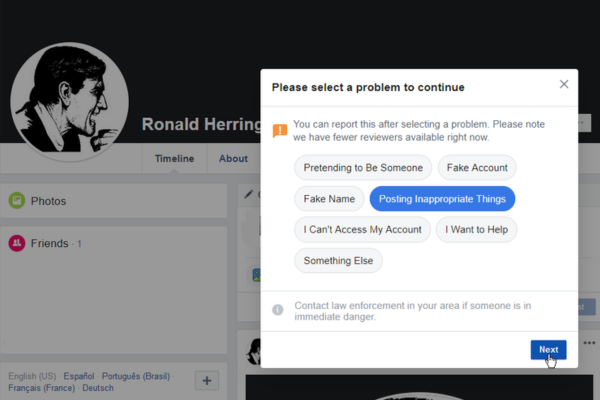
  3. Select “Report post” or “Find support or report comment.”
  4. Choose a reason from the list (e.g., hate speech, false information, spam, harassment).
  5. Follow the prompts to submit the report.

B. Reporting a Profile (Fake Account or Impersonation)

  1. Go to the profile you want to report.
  2. Click the three dots (•••) on their profile.
  3. Select “Find support or report profile.”
  4. Choose the reason: Fake account, impersonation, harassment, etc.
  5. Submit your report.

C. Reporting a Page or Group

  1. Visit the Page or Group.
  2. Click the More (•••) menu under the cover photo.
  3. Select “Report Page” or “Report Group.”
  4. Choose the most appropriate reason.
  5. Provide additional details if needed and send the report.

D. Reporting Messages in Messenger

  1. Open the Messenger chat.
  2. Click the person’s name at the top of the chat window.
  3. Scroll down and select “Something’s Wrong” or “Report.”
  4. Choose the reason and send the report.

E. Reporting Photos or Videos

  1. Click on the photo or video to open it.
  2. Select Options > Find support or report photo/video.
  3. Choose the reason and proceed with the report.

F. Reporting Fake News or Misinformation

  1. For posts with fake news, follow the same steps as reporting a post.
  2. Choose “False Information” as the reason.
  3. Facebook may later label the content, reduce its reach, or remove it if it violates policies.

3. What Happens After a Report Is Submitted?

Once a report is sent to Facebook:

  • The content is reviewed by Facebook’s moderation team or automated systems.
  • Depending on the violation, Facebook may:
    • Remove the content
    • Issue a warning or temporary restriction
    • Disable an account or page
    • Reduce distribution of false content
  • The reporter may receive a notification about the outcome of their report.
  • In sensitive cases (e.g., threats or criminal activity), Facebook may escalate the case to law enforcement authorities.

Note: Facebook’s Community Standards guide what is and isn’t allowed. Not every reported item will be taken down if it doesn’t violate the policies.


4. Additional Safety and Reporting Tools

Besides the basic report functions, Facebook provides additional tools to help users protect themselves and others.


A. Blocking and Unfriending

If a user is experiencing harassment or unwanted interactions, they can:

  • Block the person to prevent them from seeing their profile or messaging them.
  • Unfriend someone if they no longer want to be connected.

B. Restricted List

Users can add someone to their Restricted list, which means that person will only see content set to “Public.”


C. Facebook’s Oversight Board

For serious cases or when a user disagrees with a moderation decision, Facebook allows appeals to the Oversight Board, an independent body that reviews complex content cases.


D. Fact-Checking Partnerships

For addressing fake news and misinformation, Facebook partners with third-party fact-checkers. Content flagged as false by these partners may carry warning labels, and its visibility is reduced across the platform.


5. Importance of Community Reporting

Facebook employs artificial intelligence and human reviewers to detect problematic content, but community reporting is essential because:

  • Users see harmful content before moderators do.
  • Local languages, cultural nuances, and context matter—users help identify abuse others might miss.
  • Reporting empowers users to take part in keeping the platform safe for everyone.

6. Real-World Example: Reporting a Fake Charity Scam

Scenario:

During a natural disaster, like a flood, many people turn to Facebook to find information and ways to help. Anna, a college student, comes across a Facebook Page that claims to be collecting donations for flood victims. The page posts heart-wrenching photos and shares links to a donation website. However, Anna notices a few red flags:

  • The page was created only days ago.
  • It has very few followers.
  • The donation link redirects to an unverified payment site.

Anna suspects the page is a scam pretending to be a legitimate charity. She takes the following actions:

  1. Goes to the fake charity page.
  2. Clicks the three dots under the cover photo and selects “Report Page.”
  3. Chooses “Scams and Fake Pages” as the reason.
  4. Adds a note that the charity link seems suspicious and no official affiliation is shown.
  5. Submits the report.

A few days later, Anna receives a notification that Facebook removed the page for violating its policies. She also posts a warning to her local community group, encouraging others to be cautious about donating to unverified sources.

Conclusion of the Example:
Anna’s actions helped prevent others from potentially losing money to a scam. This example illustrates the power of individual reporting in maintaining safety and trust on Facebook.


7. Limitations and Areas for Improvement

While Facebook provides various tools to report abuse and fake content, the system is not perfect. Some common issues include:

  • Delayed responses to reports.
  • Incorrect moderation decisions, especially with automated systems.
  • Lack of transparency in why certain reports are dismissed.
  • Over-reporting or misuse, such as people reporting content simply because they disagree with it.

To improve, Facebook continues to invest in:

  • Better training for content moderators
  • More accurate AI detection tools
  • Improved appeals processes
  • User education campaigns

8. Tips for Users When Reporting Content

  • Be specific in your report; select the most accurate reason.
  • Avoid reporting content just because you disagree with someone’s opinion—focus on actual violations.
  • Use screenshots if you need to keep records of offensive or illegal content.
  • Encourage respectful dialogue instead of engaging with abusers directly.

Conclusion

Facebook gives users the ability to report abuse and fake content through a wide range of tools, including post reporting, profile reporting, and group moderation. These tools are essential for maintaining a safe, respectful, and trustworthy environment on the platform.

As more people rely on Facebook to stay informed and connected, responsible reporting becomes a shared responsibility. Users play a vital role in flagging harmful or deceptive content, protecting others, and shaping a positive online experience. With continuous improvements to its moderation system, education initiatives, and partnerships, Facebook aims to empower its community to speak up and take action when something isn’t right.

In essence, every user has the power to be part of the solution. Whether it’s reporting a scam, blocking a harasser, or flagging fake news, each action contributes to a safer digital world.

What are some common privacy settings on Facebook, and why are they important?

In the digital age, privacy is a growing concern—especially on social media platforms like Facebook, where people share personal information, photos, opinions, and even real-time locations. While Facebook connects users with friends, family, and communities, it also opens doors to potential risks if privacy is not properly managed. That’s why understanding and using Facebook’s privacy settings is crucial for maintaining control over personal information and protecting users from unwanted exposure, data breaches, or online harassment.

This essay explores the most common privacy settings available on Facebook, why they are important, and provides an example to illustrate how these settings work in real-life situations.


1. Privacy Settings and Tools Overview

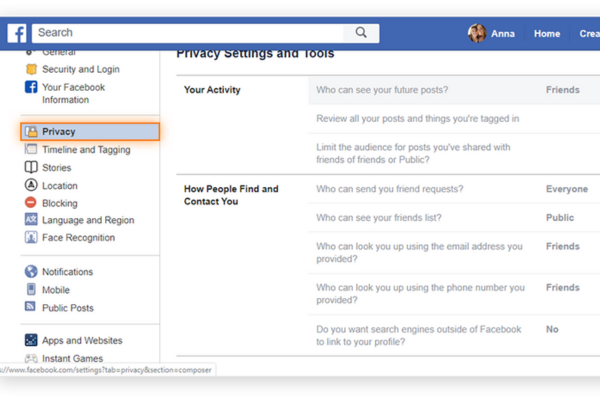
Facebook’s privacy settings allow users to customize who can see their posts, profile information, friend list, and more. These settings are typically found under the “Settings & Privacy” section, specifically in “Privacy Checkup” or the Privacy Shortcuts menu.

The main goals of these settings are:

  • To protect personal data from strangers or unwanted parties
  • To control who sees what content
  • To minimize risks like identity theft, cyberbullying, and misinformation

By setting boundaries, users gain agency over their digital presence, ensuring that Facebook remains a safe and enjoyable platform.


2. Common Facebook Privacy Settings

Below are some of the most widely used privacy settings on Facebook:


A. Who Can See Your Future Posts

This setting lets users decide who sees new content they post—such as status updates, photos, or shared links.

Options include:

  • Public (anyone on or off Facebook)
  • Friends
  • Friends except… (to exclude specific people)
  • Only me
  • Custom (you can include or exclude specific people or lists)

Why it matters: This prevents private thoughts, family pictures, or sensitive opinions from being seen by employers, strangers, or people who could misuse them.


B. Review Posts You’re Tagged In

Facebook allows others to tag users in posts or photos. This setting gives users control over whether a tagged post appears on their profile.

Users can:

  • Review each tag manually before it shows on their timeline
  • Allow automatic tagging (less secure)
  • Block certain tags from being visible at all

Why it matters: Someone else may tag a user in a compromising photo or irrelevant content. With this feature, users can prevent unwanted posts from appearing on their profile.


C. Who Can See Your Friends List

This setting allows users to control who can view their friend list.

Options include:

  • Public
  • Friends
  • Only me
  • Custom

Why it matters: Scammers may try to collect information or pose as someone’s friend by looking through their connections. Limiting friend list visibility reduces the chances of impersonation or fraud.


D. Profile and Cover Photo Privacy

While cover photos are public by default, users can control the visibility of their profile photos and all other uploaded images.

Settings include:

  • Who can see the photo
  • Who can comment or like the photo
  • Who can download or share it

Why it matters: Profile photos are often used to verify identity, but they can also be misused for fake profiles or image theft. Privacy settings help protect users from such risks.


E. Who Can Look You Up Using Your Email Address or Phone Number

Facebook allows people to search for users by their email or phone number—but this can be restricted.

Settings options:

  • Everyone
  • Friends of friends
  • Friends
  • Only me

Why it matters: Limiting this helps prevent spam, stalking, or harassment, especially when users share their contact info in other places.


F. Search Engine Visibility Outside Facebook

This setting determines whether a user’s Facebook profile can be found through search engines like Google.

Users can:

  • Allow or disallow search engine indexing of their profile

Why it matters: Disabling this option increases privacy, especially for users who want to keep a low public profile, such as teachers, minors, or individuals dealing with harassment.


G. Blocking and Restricted Lists

Facebook allows users to:

  • Block specific users (they won’t be able to see your profile or contact you)
  • Add users to a Restricted list (they stay friends, but only see public posts)

Why it matters: These tools are crucial for avoiding conflicts, managing professional relationships, or dealing with online threats.


H. Location Settings

Facebook can use your device’s GPS to track and share your location, especially through features like check-ins, events, or location-based ads.

Users can:

  • Disable location tracking completely
  • Choose not to share live location in Messenger
  • Manage settings in their mobile device’s app permissions

Why it matters: Sharing your location can pose a safety risk, particularly for children, women, or people in vulnerable situations.


I. Activity Log and Timeline Review

The Activity Log lets users review every action they’ve taken on Facebook, from posts to likes, comments, and shares.

Timeline Review enables users to:

  • Approve or hide posts from their timeline
  • Review tags before they go live

Why it matters: This allows users to curate their online identity and remove anything outdated, inappropriate, or embarrassing.


3. Importance of Facebook Privacy Settings

Understanding and using privacy settings is not just a matter of preference—it’s essential for digital well-being and personal security.


A. Protection from Scams and Fraud

Cybercriminals often use publicly available information to:

  • Impersonate users
  • Steal identity
  • Target users with scams

By limiting profile access and hiding contact info, users significantly reduce these risks.


B. Online Reputation Management

Everything posted online contributes to a user’s digital footprint. Employers, schools, or clients may look up individuals on Facebook. One inappropriate post or public comment can hurt a career or relationship.

Privacy settings allow users to:

  • Control what appears on their profile
  • Prevent others from tagging them in problematic content
  • Ensure that private moments stay private

C. Emotional and Mental Well-being

Too much exposure on social media can lead to:

  • Anxiety from unwanted attention
  • Harassment or cyberbullying
  • Pressure to share more than one is comfortable with

Privacy controls help create a safe space where users feel comfortable engaging without fear.


D. Protecting Vulnerable Users

Children, teens, and public figures are particularly vulnerable to online exploitation or abuse. With privacy settings, guardians or individuals can:

  • Prevent strangers from contacting them
  • Block or report abusers
  • Minimize exposure to harmful content

4. Real-World Example: Student Using Facebook Privacy Wisely

Scenario:

Sarah is a university student studying psychology. She enjoys sharing her academic journey, occasional photos with friends, and articles on mental health awareness. However, she is also applying for internships and is cautious about how her social media presence might be perceived.

How she uses privacy settings:

  • Sets her default post visibility to “Friends” only.
  • Uses the “Review Tags” feature to control which tagged posts appear on her timeline.
  • Hides her friend list and email address from the public.
  • Limits visibility of older posts by selecting “Limit Past Posts”.
  • Turns off search engine visibility for her profile.
  • Regularly checks her Activity Log to remove outdated or unnecessary content.

As a result:

  • Potential employers who view her profile see only a polished, public-facing version.
  • She feels secure sharing personal moments with friends without worrying about strangers seeing them.
  • Her digital identity aligns with her academic and professional goals.

Conclusion of the Example: Sarah’s careful use of privacy settings allows her to enjoy Facebook responsibly, protect her image, and avoid issues that could affect her future career.


Conclusion

Facebook’s privacy settings are essential tools for navigating the digital landscape safely. From controlling who sees your posts to managing search visibility and blocking unwanted contacts, these features help users maintain control, security, and peace of mind.

In an era where data can be misused or misinterpreted, and where online interactions can impact real-life outcomes, it is more important than ever for individuals—especially students, professionals, and vulnerable users—to understand and actively manage their privacy settings on Facebook.

Ultimately, these settings are not just about hiding information—they’re about empowering users to take charge of their digital identity and safety, ensuring that their Facebook experience is both enjoyable and secure.

Explain Facebook’s role in spreading news and information.


In the 21st century, social media has transformed the way people access and interact with information. Among the major platforms leading this revolution is Facebook, which plays a significant role in how news and information are distributed, consumed, and discussed globally. With over 2.9 billion active users, Facebook has become more than just a tool for social interaction—it is now one of the most influential platforms for news dissemination.

This essay explores Facebook’s role in spreading news and information, including its positive impacts, challenges, and responsibilities. It also discusses how users interact with news on the platform and provides a real-world example to illustrate these dynamics.


1. Facebook as a News Aggregator

Although Facebook was not originally designed as a news platform, it has evolved into a major source of news for millions of users. People now rely on their Facebook feeds to stay updated on current events, public issues, and cultural trends.

Key aspects of this transformation include:

  • Newsfeed Algorithm: Facebook’s News Feed shows content based on user preferences, behaviors, and interests. News stories appear alongside personal posts, making them more accessible and integrated into daily digital life.
  • Shared Content: Users frequently share links to articles, videos, and news updates, helping news spread organically through personal networks.
  • News Pages: Media organizations run official Facebook Pages where they post articles, conduct live reporting, and engage with their audiences.

As a result, Facebook has become a de facto news aggregator, where information from various sources converges in one place.


2. Personalization and Algorithmic Distribution

One of Facebook’s defining features is its algorithmic curation of content. Rather than displaying news chronologically, Facebook uses machine learning algorithms to tailor the News Feed to each user.

Factors influencing what news appears include:

  • The user’s previous likes, shares, and comments.
  • The popularity of the post (number of likes, comments, and shares).
  • The credibility of the source (based on user reports and third-party fact-checkers).

This personalized distribution has benefits:

  • It increases user engagement by showing relevant content.
  • It helps niche or local news reach interested audiences.
  • It supports smaller publishers that might otherwise struggle for visibility.

However, it also has downsides, such as the “filter bubble” effect, where users are only exposed to information that aligns with their existing beliefs.


3. Viral Sharing and Speed of Information

Facebook enables users to share content with just a click, leading to rapid viral distribution of news. A single post can reach thousands—or even millions—of users within hours.

This ability to spread information quickly has important implications:

  • During emergencies, Facebook can be a lifeline, spreading critical information fast.
  • In social movements, activists can use Facebook to raise awareness and organize.
  • For independent journalism, Facebook provides an audience beyond traditional media gatekeepers.

Yet the same feature also allows false or misleading content to spread at alarming speeds, especially when it provokes emotional reactions like anger or fear.


4. Facebook’s Role in Crisis Reporting and Public Awareness

Facebook has increasingly been used to spread news during crises and disasters. When traditional media channels are inaccessible or slow, Facebook often becomes the go-to platform for updates.

Examples include:

  • Natural disasters: Users and organizations post real-time updates about earthquakes, hurricanes, or floods.
  • Political crises: Citizens report developments from conflict zones or during protests.
  • Public health: During the COVID-19 pandemic, Facebook was widely used to share health guidelines, case numbers, and vaccination information.

Facebook also offers tools like the Safety Check feature, which allows users to mark themselves as safe during disasters, adding a layer of reassurance and real-time awareness.


5. Challenges of Misinformation and Fake News

Despite its many benefits, Facebook has faced intense criticism for being a platform where misinformation and fake news can thrive.

Challenges include:

  • Clickbait headlines designed to attract attention but mislead readers.
  • Deepfake videos and altered images that deceive audiences.
  • Conspiracy theories that gain traction in echo chambers.
  • Political propaganda and foreign interference.

These problems became especially apparent during major events like the 2016 U.S. presidential election, the COVID-19 pandemic, and various geopolitical conflicts.

To combat this, Facebook has introduced:

  • Third-party fact-checking partnerships
  • Labeling and warning systems for false information
  • Downranking of unreliable sources
  • Community standards that prohibit harmful misinformation

Still, many critics argue that more transparency and proactive measures are needed to truly address these issues.


6. Facebook’s Impact on Journalism

Facebook has fundamentally altered the landscape of journalism. While it has helped media companies expand their reach, it has also disrupted traditional business models.

Positive impacts:

  • News outlets gain access to massive audiences.
  • Independent journalists can publish directly to the public.
  • Engagement metrics provide real-time feedback on what readers care about.

Negative impacts:

  • Media companies depend on Facebook’s algorithm, which can change without notice.
  • There is pressure to prioritize viral content over in-depth journalism.
  • Ad revenue has shifted from news websites to Facebook, straining newsroom resources.

These dynamics have forced many publishers to adapt, often by focusing on social media strategies and digital storytelling techniques.


7. Facebook Groups and Community Journalism

Beyond public pages and News Feeds, Facebook Groups play a vital role in spreading localized or specialized news. Community groups can act as mini-news hubs, where members share updates about neighborhood events, public safety, or local politics.

Benefits of Facebook Groups include:

  • Hyperlocal focus: News relevant to small areas or specific communities.
  • User participation: Residents contribute stories or eyewitness accounts.
  • Real-time updates: Posts are often faster than traditional local media.

However, moderation is crucial, as these groups can also become breeding grounds for misinformation if not properly managed.


8. User Engagement and Public Discourse

One of Facebook’s most significant contributions to the information ecosystem is how it enables public discussion around news topics.

Users can:

  • Comment on news stories
  • Debate issues with others
  • Share personal perspectives and lived experiences
  • Engage with journalists and public figures directly

This interactive model fosters civic engagement and can lead to greater awareness of social, political, and economic issues. However, it also has drawbacks, such as toxic comment sections, the spread of hate speech, and polarization due to algorithmic echo chambers.


9. Example: Facebook’s Role During the COVID-19 Pandemic

Scenario:

During the COVID-19 pandemic, Facebook became one of the most important platforms for sharing news and updates. Governments, health organizations, news outlets, and individuals all used Facebook to spread vital information.

Here’s how Facebook played a role:

  • Health organizations like the WHO and CDC used Facebook Pages to share verified information about the virus, symptoms, and precautions.
  • National and local governments posted updates on lockdowns, safety protocols, and vaccination sites.
  • News outlets shared breaking news, live updates, and expert interviews.
  • Users posted personal stories, recovery experiences, and community resources like where to find masks or food supplies.
  • Facebook launched a COVID-19 Information Center, featuring authoritative sources and updates.

At the same time, Facebook faced criticism for allowing vaccine misinformation and conspiracy theories to circulate widely. In response, it increased its efforts to flag misleading posts, remove harmful content, and promote verified sources.

This example illustrates the dual role Facebook plays: both as a vital tool for spreading credible information and as a platform vulnerable to misinformation.


Conclusion

Facebook has become a powerful platform for the distribution, discussion, and discovery of news and information. It allows users to access updates quickly, interact with stories, and share content with vast networks. For publishers, it offers reach and engagement on an unprecedented scale.

However, with this power comes responsibility. Facebook’s algorithms, while efficient in personalizing content, can create filter bubbles and promote misinformation. The platform’s influence on journalism, politics, and public discourse is immense, and it must continue evolving to balance freedom of expression with factual integrity.

Ultimately, Facebook’s role in spreading news and information is a reflection of the digital world it helped shape—a world where information is more accessible than ever, but where critical thinking and media literacy are more essential than ever, too.

How can small businesses benefit from using Facebook?

How Can Small Businesses Benefit from Using Facebook?

In the digital age, social media has become an essential tool for businesses, especially small enterprises looking to grow, compete, and thrive in a competitive marketplace. Among various platforms, Facebook stands out as one of the most powerful and accessible tools for small businesses. With over 2.9 billion monthly active users as of 2025, Facebook offers small businesses an unparalleled opportunity to reach a wide audience, build relationships, and increase sales.

This essay explores in depth how small businesses can benefit from using Facebook, the specific features that empower them, and concludes with a relevant real-world example that illustrates these advantages in action.


1. Establishing a Strong Online Presence

One of the most fundamental benefits of Facebook for small businesses is the ability to establish an online presence quickly and affordably. Unlike building a website—which can require time, technical knowledge, and money—creating a Facebook Business Page is free, easy, and effective.

With a Business Page, companies can:

  • Share their location, contact details, business hours, and services.
  • Post updates, photos, and videos to showcase their products or services.
  • Provide customer support through messaging and comments.

This digital presence helps small businesses gain visibility, making it easier for local and global customers to find them online.


2. Targeted Advertising

Facebook offers one of the most powerful and precise advertising platforms available, and it’s particularly beneficial for small businesses working with limited budgets.

With Facebook Ads, businesses can:

  • Target users based on location, age, gender, interests, behaviors, and more.
  • Set specific budgets and campaign durations to control spending.
  • Create different ad types: image ads, video ads, carousel ads, and more.
  • Retarget users who have previously interacted with the business’s page or website.

This level of targeting means small businesses don’t waste money on irrelevant audiences. Instead, they can focus on reaching people who are most likely to become customers.


3. Engaging with Customers and Building Relationships

Facebook is not just a promotional tool—it’s a two-way communication platform. Small businesses can engage directly with their customers, respond to inquiries, and build relationships that foster loyalty.

Features that facilitate customer engagement:

  • Facebook Messenger: Allows instant communication with current or potential customers.
  • Comments and Reactions: Customers can interact with posts, providing valuable feedback.
  • Polls, Events, and Live Videos: Increase engagement by involving the audience in the business’s activities.

This ongoing interaction helps businesses create a community around their brand, encouraging customer retention and referrals.


4. Promoting Products and Services

Small businesses can use Facebook to creatively showcase their offerings without the need for expensive marketing materials. With engaging content like photos, videos, and Facebook Reels, they can highlight:

  • New product launches
  • Special promotions or discounts
  • Behind-the-scenes glimpses
  • Customer testimonials

Visual storytelling through Facebook posts and Reels makes a business feel more authentic and relatable, which can significantly boost trust and appeal among users.


5. Selling Directly on Facebook

One of the major enhancements Facebook has introduced is Facebook Shops, which allows businesses to create an online storefront directly on their Facebook page.

Benefits of Facebook Shops include:

  • Seamless shopping experience without needing a separate website.
  • The ability to tag products in posts and stories, making it easy for customers to click and purchase.
  • Integration with inventory systems and other e-commerce platforms.

For small businesses without the resources to build a full-fledged e-commerce site, Facebook Shops is a game-changing feature that opens up new sales channels.


6. Access to Business Insights and Analytics

Facebook provides detailed analytics and insights that help businesses understand their performance and audience better. Through Facebook Insights, business owners can track:

  • Page views and likes
  • Post reach and engagement
  • Audience demographics
  • Best posting times

These insights enable businesses to optimize their content, adjust their strategies, and focus on what works best, making their marketing efforts more efficient.


7. Hosting Events and Building Local Awareness

For businesses that operate in a specific locality, Facebook offers excellent tools to boost local awareness. Hosting or promoting events is an effective way to bring in foot traffic or online attention.

With Facebook Events, businesses can:

  • Promote sales, in-store events, or online webinars.
  • Send automatic reminders to interested attendees.
  • Allow users to invite their friends, increasing exposure organically.

By promoting events or even using Facebook Ads to target local customers, small businesses can strengthen their presence in their communities.


8. Encouraging User-Generated Content and Reviews

Small businesses can benefit from user-generated content (UGC), such as reviews, check-ins, photos, and shared posts by customers. Positive reviews and customer photos help build social proof, which is crucial for winning new customers.

On a Facebook Business Page, customers can:

  • Leave public reviews and rate the business.
  • Tag the business in posts or check-ins.
  • Share experiences, which are often more trusted than branded content.

Encouraging customers to leave feedback not only improves credibility but also enhances visibility as these interactions appear in the timelines of their friends.


9. Cost-Effective Marketing for Startups

Compared to traditional marketing (TV, radio, print), Facebook is incredibly cost-effective, making it ideal for startups and small businesses with tight budgets. Even a small daily ad spend can generate significant reach if used wisely with Facebook’s targeting tools.

Additionally, organic marketing—using regular posts, live videos, and engagement—is free and still highly effective when done consistently and creatively.


10. Cross-Platform Integration with Instagram and WhatsApp

Since Facebook (now Meta) also owns Instagram and WhatsApp, small businesses can enjoy cross-platform integration:

  • Ads can be run simultaneously on Facebook and Instagram.
  • Messenger and Instagram Direct can be managed from a single inbox.
  • Businesses can add WhatsApp contact buttons to Facebook pages or ads for instant communication.

This ecosystem makes it easier for small businesses to manage communication, marketing, and sales from a centralized place, increasing efficiency.


Example: A Small Boutique Leveraging Facebook

Scenario:

Emma runs a small boutique called Trendy Threads in a mid-sized town. With limited foot traffic and no large budget for advertising, Emma turns to Facebook to grow her business.

Here’s how she uses Facebook effectively:

  1. Page Setup and Branding:
    • She creates a Facebook Business Page, adds her logo, cover photo, contact info, and a short description.
    • She includes her shop’s hours, location, and a link to her online catalog.
  2. Posting Content:
    • Emma posts weekly fashion tips, new arrival photos, and styling videos.
    • She uses Facebook Reels to show quick outfit transformations and “behind the scenes” videos of her boutique.
  3. Running Ads:
    • Emma sets up targeted Facebook Ads aimed at women aged 18–45 in her city and surrounding areas.
    • She promotes her weekend sales and gets hundreds of clicks to her website.
  4. Engaging with Customers:
    • She answers customer queries through Messenger.
    • She responds to comments and encourages customers to post photos wearing their purchases.
  5. Selling Through Facebook Shop:
    • Emma lists her best-selling items in her Facebook Shop.
    • Customers can browse and buy without leaving the platform.
  6. Hosting Events:
    • She hosts a “Virtual Fashion Show” live on Facebook and gives real-time discounts to viewers.
    • The event helps her double her sales for the week.

Results:

  • Emma’s customer base grows beyond her local town.
  • She gets new orders every day from people who discovered her through Facebook.
  • Her engagement increases, and her boutique becomes a recognized brand in her area.

This example highlights how a small business with limited resources can use Facebook to grow significantly and connect meaningfully with customers.


Conclusion

Facebook provides a powerful and accessible platform for small businesses to reach more people, build lasting relationships, and grow their brands. From cost-effective advertising and customer engagement to online sales and valuable insights, Facebook equips small businesses with the tools they need to compete in today’s digital economy.

By using features such as Business Pages, Facebook Ads, Messenger, Reels, and Shops, small businesses can not only survive but thrive—turning their social presence into a true driver of success. Whether it’s a boutique, bakery, or consulting service, Facebook can be the foundation of a modern marketing strategy tailored to small business needs.

How to Become a Digital Marketing Specialist

Digital marketing is one of the fastest-growing fields today. Many people are interested in building a career in digital marketing, and becoming a digital...

What is SMM in Digital Marketing

SMM, or Social Media Marketing, is one of the most important parts of digital marketing. In simple words, SMM is the process of using...

What is Google Analytics in Digital Marketing

Google Analytics is one of the most important tools in digital marketing. It helps businesses understand how people interact with their websites and online...

What is Google AdWords in Digital Marketing

Google AdWords is one of the most important tools in digital marketing. Many businesses use AdWords to reach their target audience online and increase...

What Is CPM in Digital Marketing

In digital marketing, understanding how your ads are priced and measured is very important. Different advertising models help marketers track performance and control spending....