Home Blog Page 9

How to use Google Data Studio with Google Ads?

Introduction
Google Data Studio (now part of Looker Studio) is a free, powerful tool that helps marketers turn raw data into clear, customizable, and interactive reports and dashboards. When paired with Google Ads, it allows you to visualize your ad performance across campaigns, keywords, demographics, devices, and more—all in real time. For businesses like Myntra, Zara, or Accosoft India, using Google Data Studio with Google Ads offers deeper insights, better reporting for clients or teams, and faster decision-making.

Here’s a complete guide on how to connect Google Ads to Data Studio and create meaningful visualizations that track your advertising ROI effectively.

Step 1: Access Google Data Studio (Looker Studio)
Go to https://datastudio.google.com and sign in with your Google account. This should be the same account that has access to your Google Ads account.

Step 2: Connect Google Ads as a Data Source

  1. Click on “+ Blank Report” to start a new report.

  2. A window will pop up asking you to select a data source. Click on “Create new data source.”

  3. In the list of connectors, select “Google Ads”.

  4. Choose the Google Ads account (or multiple accounts if you’re managing several clients).

  5. Grant necessary permissions and click “Connect.”

  6. Review the available fields (like campaign, impressions, clicks, CPC, CTR, conversions, cost, etc.) and click “Add to Report.”

Your Google Ads account is now successfully connected to Data Studio.

Step 3: Design Your Report
Once the data source is added, you can start designing your dashboard:

– Click “Add a chart” and choose from different visualizations:
→ Tables (for detailed campaign performance)
→ Time series graphs (to see trends over time)
→ Pie charts (to show budget split)
→ Scorecards (to show total impressions, clicks, conversions, cost)
→ Geo maps (to show performance by location)

– Use filter controls to let viewers filter by campaign, ad group, device, location, etc.
– Add date range controls so users can compare performance by week, month, or custom periods.

Example Dashboard for Zara’s Google Ads
Let’s say Zara runs Google Ads to promote their seasonal campaigns. In Data Studio, you can create a dashboard with:

Scorecards showing total impressions, clicks, cost, and conversions
– A line graph showing cost vs conversions over the last 30 days
– A bar chart comparing conversion rate by device (mobile vs desktop)
– A table breaking down performance by campaign (e.g., Spring Launch, Sale, New Arrivals)
– A geo map showing which cities or regions are generating the most sales

Step 4: Use Filters and Segments
Data Studio allows you to apply filters to include or exclude certain data. Examples include:

– Showing only campaigns with conversions above 10
– Excluding Display campaigns if you’re only analyzing Search
– Focusing on branded keywords only
– Segmenting by location, device, or demographics
– Comparing performance this month vs last month

This lets you drill down to the exact information that matters for business decisions.

Step 5: Customize Design and Branding
You can fully customize the layout to match your branding:

– Add logos, brand colors, fonts
– Rename charts and tables with clear labels (e.g., “Top 5 Performing Campaigns”)
– Use data blending to combine Google Ads with other sources like Google Analytics or CRM data
– Create interactive reports that your team or client can explore without editing the source data

Step 6: Share and Automate Reports
– Click on “Share” at the top-right corner to give access to teammates or clients
– You can set up email delivery of the report weekly or monthly
– Use “View” mode to preview the final version without edit controls
– Make your report interactive by adding drop-down filters for campaign, device, or location

Use Cases for Different Businesses

Myntra
– Track ad spend, cost per conversion, and sales by city
– Compare performance across different product categories (e.g., Men’s, Women’s, Kids)
– Monitor high-performing keywords driving mobile app installs

Zara
– Monitor Google Ads campaigns for seasonal launches
– Visualize which countries or states respond better to ads
– Optimize by device and audience demographics

Accosoft India (B2B Software)
– Track conversion quality over time (form submissions, demo bookings)
– Compare ad performance for different software modules (billing, inventory, HR)
– Identify which keywords drive the most qualified leads

Tips for Maximizing Google Data Studio with Google Ads
Use calculated fields: For example, create a new field to calculate ROAS (Revenue / Cost)
Blend data sources: Combine Google Ads and Google Analytics for full-funnel reporting
Visualize trends: Use time series charts to identify when performance improved or dropped
Focus on KPIs: Highlight key metrics like CPA, ROAS, CTR, and conversion rate
Simplify for clients: Use scorecards and clean visuals to make reports easy to understand

Conclusion
Using Google Data Studio with Google Ads transforms raw ad data into meaningful, visual, and easy-to-understand insights. Whether you’re a large eCommerce platform like Myntra, a fashion brand like Zara, or a software provider like Accosoft India, Data Studio lets you see what’s working in your campaigns, what needs attention, and where your budget is delivering the best returns. With easy integrations, real-time updates, and powerful visualization tools, Google Data Studio is a must-have reporting solution for any business running Google Ads.
How to set up UTM parameters?

Introduction
UTM parameters (Urchin Tracking Module) are short snippets of text added to the end of a URL to help you track the effectiveness of digital marketing campaigns in tools like Google Analytics. These parameters don’t affect how your page works—they simply allow platforms like Google Analytics to understand where visitors are coming from, what campaign brought them, and how they interacted with your content. If you’re running multiple campaigns (email, Google Ads, social media, etc.), setting up UTM parameters properly gives you clear, accurate data to measure performance.

For example, if Myntra runs ads on Instagram, Google Search, and YouTube, UTM tagging helps them see exactly which channel drove the most purchases or sign-ups.

What Are UTM Parameters?
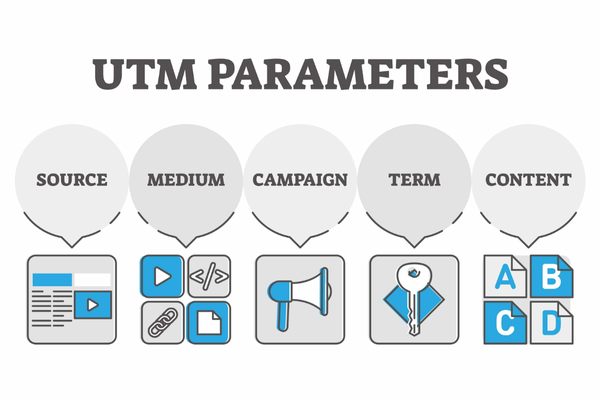
UTM parameters are five types of tags that you can add to any URL. These include:

  1. utm_source – Identifies the source of traffic (e.g., google, facebook, newsletter)

  2. utm_medium – Identifies the marketing medium (e.g., cpc, email, social)

  3. utm_campaign – Identifies the campaign name or promotion (e.g., summer_sale, product_launch)

  4. utm_term – Tracks paid search keywords (mostly for Google Ads)

  5. utm_content – Differentiates between multiple ads or links (e.g., button1, textlink)

Example of a URL with UTM parameters
Original URL:
https://www.myntra.com/women-dresses

With UTM:
https://www.myntra.com/women-dresses?utm_source=facebook&utm_medium=social&utm_campaign=summersale&utm_content=videoad1

Step-by-Step: How to Set Up UTM Parameters

Step 1: Decide What You Want to Track
Before creating UTMs, clarify what you want to analyze. Ask:
– What platform is sending the traffic? (utm_source)
– What type of ad or channel is it? (utm_medium)
– What specific campaign is it a part of? (utm_campaign)
– Are there multiple creatives or links? (utm_content or utm_term)

For example, Zara might want to track users from a Facebook story ad promoting a new collection.
utm_source = facebook
utm_medium = social
utm_campaign = winter_launch
utm_content = story_ad1

Step 2: Use Google’s Campaign URL Builder
The easiest way to build UTM-tagged URLs is by using Google’s Campaign URL Builder

  1. Paste your website URL

  2. Fill out required fields (source, medium, campaign)

  3. Optionally, fill in term and content

  4. Google will automatically generate a URL with UTM parameters

  5. Copy and use this URL in your ad, email, or post

Example:
Website URL: https://www.zara.com/in/en/new-arrivals
Source: instagram
Medium: social
Campaign: jan_launch
Content: video1

Generated URL:
https://www.zara.com/in/en/new-arrivals?utm_source=instagram&utm_medium=social&utm_campaign=jan_launch&utm_content=video1

Step 3: Add UTM-Tagged URLs to Your Ads or Links
Use the generated URL wherever you want to track user behavior. Examples:
– Paste in Google Ads as the Final URL or Tracking Template
– Use in email newsletters for buttons or CTAs
– Add to Instagram or Facebook ad destination links
– Insert in blog posts linking to internal product pages

Step 4: View Campaign Data in Google Analytics
Once your campaign is live and traffic is flowing, open Google Analytics:

  1. Go to Google Analytics (GA4)

  2. Navigate to Reports > Acquisition > Traffic acquisition

  3. Look for Session source/medium or Session campaign

  4. Filter by your UTM values to see how each campaign is performing
    You can analyze metrics like users, sessions, bounce rate, conversion rate, and revenue per UTM-tagged campaign.

Best Practices for UTM Setup
– Always use lowercase letters (e.g., utm_source=google, not Google)
– Be consistent in naming conventions (don’t use “newsletter” in one place and “email” in another)
– Use hyphens or underscores to separate words (e.g., winter_sale, not wintersale)
– Avoid using too many terms—stick to the main three: source, medium, campaign
– Keep UTM links clean and avoid using them on internal links (only use for external campaigns)

When to Use UTM Parameters
– Google Ads (though auto-tagging handles most data)
– Social media posts and ads (Facebook, Instagram, LinkedIn)
– Email marketing campaigns
– Influencer or affiliate links
– Banner ads or display campaigns
– QR codes
– SMS campaigns
– Press releases or sponsored content

Example: Zara’s Email Campaign
Zara is launching a new collection and sends a newsletter to 1 million subscribers.
Link: https://www.zara.com/in/en/new-arrivals?utm_source=newsletter&utm_medium=email&utm_campaign=winter2025

When users click this link, Zara can track in Google Analytics how many recipients visited the site, browsed products, added to cart, or made a purchase—all from that email campaign.

Conclusion
Setting up UTM parameters is a simple yet powerful step in digital marketing that gives you visibility into which traffic sources are delivering results. Whether you’re running campaigns for a fashion brand like Zara, an eCommerce platform like Myntra, or a B2B software firm like Accosoft India, UTM tagging helps you make smarter decisions with your data. By consistently applying UTMs across all external campaign links and reviewing their performance in Google Analytics, you’ll know exactly what’s working and where to invest more budget.

What are the best bidding strategies for B2B?

Introduction
Bidding strategy is one of the most critical elements of a successful B2B Google Ads campaign. Unlike B2C, where conversions might mean an instant sale, B2B often involves a longer sales funnel, higher-value products or services, and complex decision-making processes. For B2B brands like Accosoft India (software solutions) or Mehta Groccers (bulk supply for retailers), the goal of advertising is often to generate qualified leads, get quote requests, or book product demos, not just drive traffic. Therefore, selecting the right bidding strategy ensures you’re optimizing for leads that actually turn into revenue—not just website visits or app installs.

1. Target CPA (Cost-Per-Acquisition)
What It Is: Google automatically adjusts your bids to try to get as many conversions as possible at or below the cost per acquisition you set.
Why It Works for B2B: It’s ideal for B2B because it optimizes around actual lead generation, such as contact form submissions, demo sign-ups, or quote requests. These are trackable actions tied directly to the sales funnel.
When to Use: You have at least 30–50 conversions in the past 30 days, you know your average cost per qualified lead, and you have conversion tracking set up properly.
Example: Accosoft wants to pay ₹500 per demo sign-up. Using Target CPA, Google optimizes their bids to get as many sign-ups as possible within that cost.

2. Maximize Conversions
What It Is: Google uses your daily budget to get you the highest possible number of conversions, regardless of cost per conversion.
Why It Works for B2B: It’s a great starting point for newer B2B campaigns that don’t yet have historical data. It helps train Google’s algorithm by focusing entirely on getting conversions like form submissions or email leads.
When to Use: You have limited conversion history, you want to scale up quickly to build data, and you’re not yet ready to set a strict target CPA.
Example: Mehta Groccers launches a B2B campaign for retailers. They use Maximize Conversions to get as many inquiries as possible on a ₹3,000/day budget without worrying about the cost per lead initially.

3. Maximize Conversion Value (with Target ROAS)
What It Is: Google tries to maximize the total value (like deal size or expected revenue) from conversions, not just the number of conversions.
Why It Works for B2B: In B2B, not all leads are equal. Some clients may spend ₹10,000; others ₹1,00,000. This strategy helps you focus on quality and value over quantity.
When to Use: You assign a conversion value to each lead (via CRM or backend integration), you want to optimize for high-revenue clients, and you’re tracking deal value or assigning values to key in-app actions.
Example: Accosoft notices that users who download case studies tend to convert into high-value clients. They assign values to each conversion type and let Google maximize the conversion value.

4. Manual CPC with Enhanced CPC (ECPC)
What It Is: Manual CPC allows you to control your bids at the keyword level, while Enhanced CPC lets Google increase or decrease bids slightly based on the chance of conversion.
Why It Works for B2B: It gives more manual control, which is great when targeting high-value keywords or when traffic is expensive and niche. ECPC adds a layer of automation without giving up full control.
When to Use: You’re running a low-volume campaign in a niche B2B sector, you want to test keywords individually, or you’re concerned about budget control or overly aggressive automation.
Example: A logistics firm bids manually on specific terms like “bulk cargo transport services India” and uses ECPC to slightly boost bids for users more likely to convert.

5. Target Impression Share (Brand Awareness/Competitor Bidding)
What It Is: Google shows your ads in a top position for a set percentage of impressions for a particular keyword or keyword group.
Why It Works for B2B: Great for branding or competitive conquesting, especially in industries where being seen by decision-makers repeatedly is key. Can be used to dominate SERP visibility for your brand or competitor terms.
When to Use: You want to appear for your brand name consistently, you want to outrank competitors for certain terms, or you’re focused on visibility in the early funnel.
Example: A B2B SaaS brand wants to ensure they show up 100% of the time when people search “Zoho CRM alternative” or “best ERP for SMEs.” Target Impression Share ensures consistent visibility.

6. Smart Bidding with Conversion Value Rules (Advanced)
What It Is: You apply value rules based on audience segments or device types. Google then adjusts bids to prioritize high-value users.
Why It Works for B2B: You can tell Google that leads from Mumbai or desktop devices (where your sales team converts better) are more valuable, and Google will bid more aggressively on those.
When to Use: You have clear performance data by audience type or location, you want more advanced bidding control layered on automation, and you’re integrating offline data from CRM.
Example: A software company sees better conversions from India Tier 1 cities and desktop devices. They assign a 1.5x value multiplier to those combinations using conversion value rules.

7. Portfolio Bid Strategies (Multi-Campaign Optimization)
What It Is: A portfolio bid strategy lets you apply the same bidding rules to multiple campaigns, ad groups, or keywords.
Why It Works for B2B: If you’re running several campaigns targeting the same business goal, a portfolio strategy helps unify optimization, saving time and improving efficiency.
When to Use: You run multiple campaigns across products or locations, you want a consistent CPA or ROAS target, or you need better control and reporting across many campaigns.
Example: Mehta Groccers runs different campaigns for retailers, wholesalers, and hotel partners. They apply one target CPA portfolio bid strategy across all campaigns focused on quote requests.

Which Strategy Should You Choose?
If you’re just starting a B2B campaign with no conversions, use Maximize Conversions. If you want predictable lead costs, go for Target CPA. If you’re looking for more revenue from fewer, high-value leads, choose Target ROAS or Maximize Conversion Value. If you want full control in a small or niche market, use Manual CPC with Enhanced CPC. If you’re running brand or competitor awareness ads, Target Impression Share is ideal. And if you manage multiple campaigns with the same goal, Portfolio Bidding Strategy works best.

Conclusion
In B2B advertising, your Google Ads success depends as much on how you bid as it does on what you say in your ad. Since B2B buyers are fewer, more specific, and more valuable, you must choose a bidding strategy that aligns with your lead quality goals—not just clicks or traffic. Use Target CPA or Target ROAS for mature, data-rich accounts. Start with Maximize Conversions if you’re launching something new. Explore Enhanced CPC or Manual CPC for more control, especially in niche segments. And always ensure that your conversion tracking is accurate, so Google can properly learn and optimize. The smarter your bidding strategy, the better your chances of reaching actual business buyers and turning ad spend into B2B revenue.

How to run Google Ads for B2B?

Introduction
Running Google Ads for a B2B business requires a different strategy than B2C (Business-to-Consumer) campaigns. While B2C typically targets impulse or quick decisions, B2B buyers follow a longer, more rational, and relationship-focused buying cycle. Your Google Ads strategy should reflect this by targeting the right decision-makers, using specific keywords, offering value-driven content, and optimizing for lead generation rather than instant sales. For example, a company like Accosoft India that sells B2B software, or Mehta Groccers targeting retailers and wholesalers, would need a B2B-focused ad approach to generate meaningful results.

Here’s a detailed, step-by-step guide to running effective B2B campaigns using Google Ads:

1. Define Clear B2B Goals
Before creating your campaign, identify exactly what you want to achieve:
Generate qualified leads (demo sign-ups, form submissions, quote requests)
Drive traffic to B2B landing pages (product/service info, whitepapers)
Increase brand awareness among decision-makers in specific industries
Promote events, webinars, or product launches
Retarget website visitors who didn’t convert

Unlike B2C, you’re rarely aiming for immediate sales. Instead, your goal is often to start a sales conversation.

2. Choose the Right Campaign Type
For B2B, the following Google Ads campaign types are highly effective:

Search Campaigns: Best for targeting intent-based users searching for solutions (e.g., “CRM software for small business”)
Display Campaigns: Ideal for brand awareness and remarketing to past visitors
Performance Max: Automatically shows ads across all networks but needs strategic control
Video Campaigns (YouTube): Good for building trust and showcasing B2B products
Discovery Campaigns: Useful for brand awareness in a visually engaging format

Search campaigns are usually the primary driver for B2B leads, while display, remarketing, and video support them.

3. Conduct Laser-Focused Keyword Research
B2B searches are typically low in volume but high in value. Focus on:
– Long-tail keywords like “best ERP solution for manufacturing companies”
– Industry-specific terms like “bulk food supplier for hotels” or “metal decor wholesalers”
– Brand or competitor terms (use carefully)
– Problem-based queries like “how to automate HR processes”

Use tools like Google Keyword Planner, SEMRush, or Ahrefs to identify high-intent, niche B2B keywords.

4. Create High-Quality, Intent-Driven Ad Copy
Your ad copy should:
– Speak directly to business decision-makers
– Address their pain points and offer solutions
– Include CTAs like “Request a Demo,” “Get a Quote,” “Download Guide”
– Highlight trust-building elements: certifications, client logos, or years of experience
– Use numbers or benefits where possible (“Cut costs by 30%” or “Trusted by 500+ retailers”)

Example Ad for Accosoft ERP:
Headline 1: “Best ERP for Small Manufacturers”
Headline 2: “Start Your Free 14-Day Trial”
Description: “Automate billing, inventory, and production. Cloud-based. No setup cost. Trusted by 300+ SMEs.”

5. Use Landing Pages Built for B2B Conversion
Send users to dedicated, focused landing pages, not your homepage. These pages should:
– Speak specifically to your target industry (e.g., ERP for pharma companies)
– Include social proof (testimonials, case studies, certifications)
– Offer lead magnets (whitepapers, product brochures, webinars)
– Include strong CTAs: “Schedule a Consultation,” “Download PDF,” “Book a Call”
– Be fast, mobile-friendly, and aligned with the ad message

For example, Mehta Groccers targeting retailers should use a landing page specifically about bulk ordering benefits for resellers, not general consumer shopping.

6. Use Advanced Audience Targeting
B2B targeting can be tricky, but Google offers several options:

Detailed Demographics: Target company size, industry, job role (Google uses AI-based categorization)
Custom Segments: Build audiences based on keywords your B2B buyers search
In-Market Audiences: Use Google’s curated lists like “Business Software,” “CRM Solutions,” “Commercial Equipment”
Customer Match: Upload email lists of existing clients or B2B leads
Remarketing: Target users who visited specific B2B pages or engaged with content

For example, you can create a Custom Segment targeting users who searched for “bulk grocery supplier for hotels” and visited competitor sites.

7. Optimize for Conversions, Not Clicks
Track true B2B conversions, such as:
– Form submissions
– Demo registrations
– Whitepaper downloads
– Quote requests
– Phone calls (use call tracking)
Integrate Google Ads with Google Analytics, CRM tools (like HubSpot or Zoho), and Google Tag Manager for better conversion tracking.

Use a Target CPA or Maximize Conversions bidding strategy to let Google optimize for leads rather than traffic.

8. Use Ad Extensions Strategically
Add relevant extensions to maximize visibility:
Sitelinks: Link to case studies, pricing pages, or feature comparisons
Call Extensions: Allow business inquiries to come in via phone
Lead Form Extensions: Collect leads directly from the ad without needing a landing page
Structured Snippets: Show services offered or industries served

Example for B2B logistics: Sitelinks – “Get Pricing,” “Track Deliveries,” “Schedule a Pickup,” “Industries Served”

9. Set Up Remarketing Campaigns
Most B2B buyers won’t convert on the first visit. Use remarketing to:
– Show display ads to past visitors
– Remind them of your offers or new case studies
– Re-target users who downloaded a guide but didn’t contact sales
– Use Video remarketing via YouTube to engage warm prospects

Example: Accosoft can retarget users who visited the ERP pricing page with a video ad saying, “Still looking for ERP? Let’s talk.”

10. Monitor and Optimize Regularly
Use Google Ads reports and Google Analytics to track:
– Cost per lead
– Keyword performance
– Conversion rates by device or location
– Search terms triggering your ads (exclude irrelevant ones)
– Demographic breakdown of converters
Use this data to improve keyword bidding, ad messaging, landing pages, and targeting.

11. Use A/B Testing for Continual Improvement
Test different:
– Headlines
– CTAs
– Landing page variations
– Bidding strategies
– Ad creatives (text vs. video vs. display)

Even small copy changes like switching from “Download Brochure” to “Get Free Brochure” can improve conversions.

12. Align Ads with Sales Team and CRM
For successful B2B campaigns:
– Ensure leads from Google Ads are sent directly to your CRM
– Track which lead sources result in closed deals
– Share feedback between marketing and sales to improve ad targeting and messaging
This helps reduce wasted ad spend and improves lead quality.

Conclusion
Running Google Ads for B2B requires a more strategic, long-term approach than B2C. It’s about capturing high-intent search traffic, delivering value through content, and guiding decision-makers through a thoughtful purchase journey. By focusing on specific keywords, creating compelling landing pages, using precise audience targeting, and optimizing for qualified leads—not just traffic—you can turn your Google Ads into a powerful growth engine for your B2B company. Whether you’re promoting business software, bulk supplies, industrial services, or training programs, these strategies ensure your ads reach the right professionals and drive meaningful results.

How to run an app promotion campaign?

Introduction
Running an app promotion campaign through Google Ads is one of the most effective ways to drive app installs, re-engagements, and in-app actions on both Android (via Google Play Store) and iOS (via Apple App Store). Google’s App Campaigns (formerly known as Universal App Campaigns) use automation to display your ads across Google Search, Google Play, YouTube, Google Display Network, and Discover, ensuring maximum reach. For brands like Myntra, Zara, or Skechers with mobile shopping apps, app campaigns help reach users at every stage of the mobile journey—from awareness to install to purchase.

Here’s a complete step-by-step guide to launching and optimizing an app promotion campaign:

Step 1: Prerequisites and Setup Checklist
Before you begin your campaign setup, make sure of the following:

  1. Your app is published on Google Play Store or Apple App Store

  2. You have a Google Ads account

  3. Conversion tracking is properly set up to measure installs and in-app actions

  4. Firebase or App Conversion Tracking SDKs are integrated (especially for advanced in-app events)

  5. Your app store listing is fully optimized (with a strong title, screenshots, and description)

Step 2: Log In to Google Ads and Start a New Campaign

  1. Go to Google Ads and sign in

  2. Click the + New Campaign button

  3. Choose a campaign goal:
    – For installs, select App Promotion > App Installs
    – For engagement, select App Promotion > App Engagement

  4. Choose the platform: Android or iOS

  5. Enter the app name or package ID, and Google will detect your app automatically

  6. Click Continue

Step 3: Configure Campaign Settings
Campaign Name: Name your campaign clearly (e.g., “Myntra App Installs – Android – June 2025”)

Campaign Subtype:
App Installs: Focus on getting more installs
App Engagement: Re-engage existing users
App Pre-Registration (Android only): Promote an app before launch

Bidding Strategy:
– For installs: Use target CPI (cost per install) or maximize installs
– For in-app actions: Use target CPA (cost per action) if conversion tracking is set up
– Google will optimize your bids automatically to get the best results within your target

Budget:
– Set a daily budget (e.g., ₹5,000/day for Myntra app launch in Tier 1 cities)

Language and Location Targeting:
– Choose languages your app supports
– Select regions or countries where you want to show your ads
– For example, Zara may target only metro cities like Delhi, Mumbai, and Bangalore

Step 4: Add Your Ad Assets
App campaigns don’t use traditional ads. Instead, you provide assets, and Google mixes and matches them automatically to create the best-performing ads.

Required Assets:
Headline (max 30 characters) – e.g., “Shop Zara on the Go”
Description (max 90 characters) – e.g., “Get free delivery & easy returns”
Images – Use app screenshots, lifestyle images, or banners
Videos (optional but recommended) – Add 10-30 second vertical or landscape videos
HTML5 or rich media assets (optional)
Google will test various combinations of your assets to find the best-performing ones.

Step 5: Set Up Conversions (If Targeting Actions Beyond Installs)
To optimize for actions like signups, purchases, or cart additions:
– Set up in-app events via Firebase, Appsflyer, Branch, or Adjust
– Link Firebase to Google Ads
– Mark these actions as conversion goals
– Google will use this data to find more high-quality users

Step 6: Launch and Monitor
– Review your campaign details
– Click Publish Campaign
– Your ads will begin running across YouTube, Play Store, Discover, Gmail, and more
– Allow 7–10 days for the campaign to enter the learning phase and stabilize performance

Step 7: Optimization Tips
Review asset performance in Google Ads under “Asset Report”
– Pause low-performing images, headlines, or videos
– Test new creatives every 2–3 weeks
– Adjust CPI or CPA bids based on actual install cost or cost per action
– Use geo-level data to refine targeting (e.g., exclude regions with low ROI)
– Set up ad group segmentation based on user intent, demographics, or device types

Step 8: Use Deep Linking (Optional but Powerful)
Deep linking ensures that users who install and open your app are taken directly to specific in-app content.
– For example, Skechers can send users directly to the “Men’s Running Shoes” section
– Use Firebase Dynamic Links or custom URI schemes

Step 9: Use Advanced Audience Targeting (For Engagement Campaigns)
For re-engagement campaigns:
– Upload customer lists (e.g., past app users)
– Target users who haven’t opened the app in 30 days
– Use similar audiences to reach new but similar users
– Create event-based audiences (e.g., added to cart but didn’t purchase)

Example: Myntra App Install Campaign
– Goal: Drive 50,000 installs in 30 days at ₹20 CPI
– Platform: Android
– Bidding Strategy: Maximize installs
– Assets: Images of fashion products, 30-second vertical video, headline “India’s Top Fashion App”
– Budget: ₹10,000/day
– Result: 58,000 installs in 28 days, ₹17.25 CPI, 14,000 first purchases

Example: Zara App Engagement Campaign
– Goal: Re-engage users who haven’t opened the app in 60 days
– Platform: iOS
– Audience: Users with last in-app action over 60 days ago
– Bidding: Target CPA for “Add to Cart”
– Message: “Zara New Arrivals Are Waiting”
– Result: 12,000 re-engaged users, 3,000 conversions, ₹90 cost per cart

Conclusion
Google App Campaigns offer a fully automated, high-impact way to promote mobile apps to large audiences across Google’s ecosystem. Whether you’re launching a new app or trying to bring back inactive users, app promotion campaigns simplify ad creation, optimize targeting, and ensure that your budget is being spent to attract the highest-quality users. By using the right bidding strategies, creative assets, conversion tracking, and audience targeting, brands like Myntra, Zara, or Skechers can successfully scale their mobile presence and drive strong app engagement and sales.

How to measure Brand Lift with Google Ads?

Introduction
Brand Lift is a measurement solution offered by Google Ads that helps advertisers evaluate the real impact of their video and display campaigns on users’ perceptions, awareness, and purchase intent. While most advertising metrics focus on user actions such as clicks or conversions, Brand Lift provides insights into what users think or feel about your brand after seeing your ad. It does this through survey-based questions and behavioral data, helping brands like Zara, Skechers, or Myntra understand whether their ads are truly influencing audience sentiment, even if those users don’t immediately click.

Understanding Brand Lift
Brand Lift works by creating two separate groups within your target audience. One group is shown your ad (exposed group), while the other group is not (control group). Both groups are then presented with a brief survey asking about your brand, and their responses are compared to measure how your ad influenced brand perception. In some cases, behavioral signals such as an increase in brand-related searches can also be used as part of the measurement, especially in Brand Lift 2.0.

Metrics Measured Through Brand Lift

  1. Ad Recall – Measures how many users remember seeing your ad

  2. Brand Awareness – Measures if users have heard of your brand

  3. Consideration – Indicates whether users would consider purchasing from your brand

  4. Favorability – Reflects the user’s opinion of your brand

  5. Purchase Intent – Tracks whether users are more likely to buy from you

  6. Brand Interest – Observes lift in organic brand searches after ad exposure

Requirements to Use Brand Lift
To use Brand Lift, advertisers must meet certain eligibility criteria. These include having a significant media budget (typically ₹5,00,000 or more), running a video or display campaign (mainly on YouTube), and partnering with a Google Ads representative. Brand Lift is not available to all advertisers by default. Additionally, your campaign must have a sufficient run time—at least 7 to 14 days—to allow for accurate measurement.

How Brand Lift Works Step-by-Step
First, you coordinate with your Google Ads team to activate Brand Lift for your campaign. You’ll provide basic brand and product information, as well as approve the survey questions. Google will then segment your target audience into two parts: a control group that doesn’t see the ad, and an exposed group that does. Once your campaign is live, Google will serve identical surveys to both groups via YouTube and the Display Network. For example, a user might see the question “Have you seen a video ad for Zara in the past two days?” with multiple-choice answers. Google collects survey responses and compares them to measure the difference in brand recall or favorability. If the exposed group shows significantly more awareness than the control group, the campaign is considered successful in lifting brand perception.

Brand Lift 2.0 and Behavioral Signals
Brand Lift 2.0 enhances the traditional model by tracking behavioral signals rather than relying only on surveys. One major feature is Search Lift, which tracks how many users exposed to the ad later searched for your brand on Google. For instance, if users who watched Zara’s summer ad are more likely to search “Zara dresses,” Google will report a positive search lift. It also tracks Lifted Users (those who searched after exposure) and Cost per Lifted User, which helps you assess how efficiently your ad drove brand interest.

Example: Zara’s Brand Lift Campaign on YouTube
Suppose Zara launches a YouTube campaign promoting its new spring/summer collection. Their goal is to increase brand awareness and drive more traffic to their site. Google segments the audience into control and exposed groups. Both are asked, “Which of the following brands have you seen advertised recently?” The results show that 37% of the exposed group recalls Zara’s ad, while only 20% of the control group does. That’s a 17% ad recall lift. In addition, Google notices a 25% increase in organic searches for “Zara linen dresses” among the exposed group, indicating a strong behavioral lift. This gives Zara insights that their campaign is improving brand recall and search behavior, even if not all users click on the ad immediately.

Tips to Maximize Brand Lift
Use broad but relevant audience targeting to ensure statistical reliability. Keep your ad creative tightly aligned with your brand and campaign message to increase recall. Deliver your ads across multiple YouTube placements including desktop, mobile, and YouTube TV. Ensure the survey questions are simple, neutral, and well-worded to avoid skewing results. Let the campaign run long enough to allow machine learning and audience response patterns to stabilize.

How to View Brand Lift Results
If Brand Lift is activated, you can view survey and behavioral results directly within your Google Ads account under the “Brand Lift” tab. You’ll see metrics like percent lift, number of survey responses, and confidence intervals. For Brand Lift 2.0, metrics such as Lifted Users and Search Lift are included. Alternatively, your Google account manager may provide you with external reports containing detailed insights broken down by demographics, devices, and audiences.

When Should You Use Brand Lift
Brand Lift is ideal when launching new products, testing creative effectiveness, or investing in top-of-funnel awareness campaigns. It’s especially helpful when you want to prove that your video ads are having a long-term impact on brand memory and not just short-term clicks. For example, if Skechers is introducing a new product line and wants to know how many people remember seeing their ad or intend to purchase, Brand Lift can give reliable data beyond just CTR or impressions.

Conclusion
Brand Lift offers a clear way to measure how your advertising influences audience perception, awareness, and interest. For companies like Zara or Skechers, it provides valuable insights into what users think after watching their ads and whether the campaign is building meaningful brand engagement. With survey data and behavioral signals, advertisers can move beyond guesswork and make creative and strategic decisions based on how audiences actually respond. When used strategically, Brand Lift helps brands evaluate the real impact of their video advertising efforts and improve campaigns for even greater brand success.

What are best practices for video campaigns on YouTube?

Introduction
Video campaigns on YouTube offer a highly engaging format to connect with your audience, build brand awareness, and drive action. With billions of users watching YouTube content every day, video advertising presents a powerful opportunity for businesses like Zara, Skechers, or Myntra to visually showcase their products, tell compelling brand stories, and convert viewers into customers. However, to succeed on YouTube, it’s not enough to simply upload a video — you must follow strategic best practices in campaign setup, audience targeting, creative production, and performance optimization.

Here are the top best practices for running successful YouTube video campaigns through Google Ads:

1. Define Clear Objectives
Before launching any campaign, identify what you want to achieve:
Brand Awareness: Use skippable in-stream ads or bumper ads
Consideration: Use non-skippable ads or video discovery ads
Conversions: Use in-stream for action with strong CTAs and landing pages
App Installs: Use app campaign formats that integrate video
Knowing your goal allows you to select the right campaign type, bidding strategy, and targeting method.

2. Choose the Right Video Ad Format
YouTube offers various ad formats, each suited for different objectives:
Skippable In-Stream Ads (TrueView): Play before or during videos, viewers can skip after 5 seconds
Non-Skippable In-Stream Ads: 15-second unskippable ads, ideal for brand awareness
Bumper Ads: 6-second unskippable ads for fast impressions
Video Discovery Ads: Appear in YouTube search results and related videos section
In-Feed Ads (Previously Discovery): Appear on the homepage or in video suggestions
In-Stream for Action Ads: Drive conversions with clickable elements and custom CTAs

For example, Skechers might use skippable in-stream ads to promote a new sneaker line with a CTA leading to the product page, while Zara may use bumper ads during fashion week to build buzz around a seasonal launch.

3. Hook the Viewer in the First 5 Seconds
The first 5 seconds of your video are critical, especially in skippable formats.
– Capture attention visually and audibly
– Show your product or brand immediately
– Pose a problem or highlight a benefit quickly
– Use branding, motion, and curiosity to encourage viewers to continue watching

Example: Zara’s ad for a new summer collection might open with a fast-paced montage of vibrant outfits with a voiceover saying, “Style your summer in seconds – only at Zara.”

4. Follow the ABCD Creative Framework (Recommended by Google)
A – Attract attention: Use strong visuals, bright colors, and motion
B – Brand early and often: Show your logo, mention your brand name
C – Connect with emotion: Tell a relatable story, use music and human expression
D – Direct the viewer: Use a clear call-to-action (“Shop now,” “Learn more,” etc.)

This method improves ad recall, engagement, and conversion rates.

5. Use Audience Targeting Strategically
YouTube allows targeting across various audience types:
Demographics: Age, gender, income, parental status
Affinity audiences: Based on interests (e.g., fashion lovers, tech enthusiasts)
In-market audiences: People actively researching products like yours
Custom segments: Create your own audience using keywords or URLs
Remarketing: Target users who visited your site or viewed your videos

Example: Myntra can target users in the 18–34 age group interested in fashion or people actively searching for “online clothing deals.”

6. Layer Targeting for Better Results
Combine targeting options to narrow down your audience for better precision.
For instance, target in-market audiences for shoes aged 25–40 who have also searched for competitor brands like “Nike” or “Adidas.”

7. Optimize Your Video for Mobile
Most YouTube traffic comes from mobile devices.
– Ensure your video is visually engaging even on small screens
– Use large fonts, close-up shots, and vertical or square video ratios when possible
– Add subtitles or captions for users watching without sound
– Make sure landing pages are mobile-optimized

8. Add Strong Calls-to-Action (CTAs)
Tell users exactly what to do after watching:
– Use overlays, end screens, and companion banners
– Direct viewers to visit your website, shop, subscribe, or learn more
– Use “Shop Now,” “Try Now,” or “Book Today” in the final 5 seconds

9. Test Different Creatives and Variants
Run multiple versions of your video to test different hooks, lengths, messages, and visuals.
Use A/B testing to identify what resonates best with your target audience.

Example: Zara can test one video that focuses on comfort and another on high fashion appeal — then analyze which one converts more viewers.

10. Use Conversion Tracking and Google Tag Manager
– Set up conversion actions like purchases, sign-ups, or leads in Google Ads
– Install tracking via Google Tag Manager or directly on your site
– Enable enhanced conversions to improve tracking accuracy

This data allows Google’s machine learning to optimize your bids and placements for better performance.

11. Choose the Right Bidding Strategy
Maximize conversions: Best for conversion-focused campaigns
Target CPA: Control cost per acquisition
Target ROAS: Ideal for revenue-driven campaigns
CPV (Cost per View): Used for awareness and engagement
Make sure to align your bid strategy with your campaign goals.

12. Use Companion Display Banners (Optional)
For skippable in-stream ads, include a 300×60 banner image that shows next to the video.
This helps reinforce your message and provides an extra CTA.

13. Analyze and Optimize Performance Regularly
Monitor key metrics in Google Ads:
– Views and View Rate
– Average Watch Time
– CTR (Click-through Rate)
– Conversions and ROAS
– Audience retention (available in YouTube Studio)
Make adjustments by pausing underperforming videos, changing targeting, or increasing budget for top performers.

14. Use YouTube Video Ad Sequencing (Advanced)
Video sequencing allows you to show a series of videos to the same user in a specific order.
– Tell a progressive story
– Educate before selling
– Build deeper engagement over time
This is great for brand storytelling campaigns.

Example: Skechers can run a sequence where the first video introduces the shoe line, the second focuses on features like memory foam, and the third offers a limited-time discount.

15. Leverage Performance Max Campaigns for YouTube Integration
Performance Max can automatically place your videos on YouTube alongside Shopping and Display ads. Make sure to include video assets when creating Performance Max campaigns.

Conclusion
YouTube video campaigns offer immense potential for reaching high-intent and broad audiences through compelling visual storytelling. Brands like Zara, Skechers, and Myntra use video campaigns not just for awareness, but for driving measurable business outcomes like purchases, app installs, and sign-ups. By following best practices—like optimizing your creative, targeting smartly, using clear CTAs, and continuously testing—you can maximize the impact of your video ads on YouTube and grow your brand across Google’s most engaging channel.

What is feed optimization?

Introduction
Feed optimization is the process of improving and refining the data in your product feed—the file or data source submitted to Google Merchant Center—to ensure your product listings perform better in Google Shopping Ads, Performance Max campaigns, and Free Listings. It involves modifying elements like product titles, descriptions, images, pricing, categorization, and custom labels to increase visibility, click-through rates (CTR), and conversions.

For eCommerce brands like Zara, Skechers, or Myntra, where hundreds or thousands of products are being advertised at once, a well-optimized feed helps ensure that the right product is shown to the right audience at the right time.

Why Is Feed Optimization Important?
Google Shopping Ads don’t rely on keywords the way Search Ads do. Instead, Google uses the information in your product feed to determine when to show your ads. A poorly optimized feed can result in your products showing up for irrelevant searches, low impressions, or high cost-per-click (CPC). Conversely, a well-optimized feed improves your ad relevance, ranking, and return on ad spend (ROAS).

Core Elements of Feed Optimization

  1. Product Titles
    The product title is one of the most important factors in matching a product to a user’s search.
    – Place the most relevant keywords first
    – Include product attributes like brand, color, size, gender, or material
    – Avoid unnecessary terms like “New” or “Best” unless it’s part of the actual product name
    Example:
    Bad: “Stylish Dress – Zara”
    Optimized: “Zara Women’s Black Cotton Midi Dress – Size M”

  2. Descriptions
    Google scans product descriptions to understand context. A strong description should:
    – Reinforce keywords from the title
    – Mention benefits, features, and materials
    – Be readable and natural
    Example:
    “Comfortable and breathable black cotton midi dress for women by Zara. Perfect for summer outings, casual events, or brunch. Available in sizes XS to XL.”

  3. Images
    – Use high-resolution images with white or neutral backgrounds
    – Avoid logos, watermarks, or promotional text on images
    – Include alternate angles or lifestyle images if possible (especially for apparel)
    Zara, for instance, uses model images showing the full dress, fabric texture, and fit — this improves CTR.

  4. Price Accuracy and Competitiveness
    – Always sync your website and feed pricing
    – Use supplemental feeds or automatic item updates to reflect real-time pricing
    – Competitive pricing increases chances of winning ad placements

  5. Availability
    Ensure that stock availability (in stock, out of stock, preorder) is updated regularly. Nothing hurts performance more than listing unavailable products.

  6. Product Type and Google Product Category
    – “Product type” is your own custom taxonomy
    – “Google product category” must be selected from Google’s pre-defined list
    A well-defined category improves relevancy and reporting.

Example:
Product Type: Apparel > Women > Dresses > Maxi
Google Category: Apparel & Accessories > Clothing > Dresses

  1. Custom Labels
    Custom labels help you segment your feed in campaigns. Use them to group products by:
    – Season (e.g., Summer, Winter)
    – Performance (e.g., Bestseller, Low ROAS)
    – Promotions (e.g., On Sale)
    This allows you to set different bids for each group.

  2. GTIN/MPN/Brand
    – Always include Global Trade Item Numbers (GTINs) or Manufacturer Part Numbers (MPNs)
    – Google uses these to match products with its database
    – Missing GTINs can result in lower impressions

  3. Promotions and Sales Pricing
    – Use sale_price and promotion_id attributes
    – Set up promotions in Google Merchant Center like “Buy 1 Get 1 Free” or “20% Off”
    These make your ads more attractive and increase CTR

  4. Landing Page Experience
    – Ensure product pages load quickly and match feed data (title, price, availability)
    – Pages should be mobile-friendly and include clear call-to-action (CTA) buttons
    Example: Skechers ensures their landing pages match the ad in terms of product, price, and images — improving user trust and conversion rates.

Tools for Feed Optimization

  1. Google Merchant Center Diagnostics
    Shows errors, disapprovals, and suggestions related to your feed.

  2. Feed Rules
    In Merchant Center, you can create rules to automatically modify your feed values.

  3. Supplemental Feeds
    Allow you to add or update data (e.g., add promotional labels) without touching the main feed.

  4. Third-Party Tools
    Platforms like Feedonomics, Channable, and DataFeedWatch help optimize and manage complex feeds at scale.

Common Feed Optimization Strategies

– Add gender, size, and color in apparel titles
– Use brand + product type + key feature in titles
– Replace generic product IDs with descriptive custom labels
– Use dynamic pricing updates for sales and seasonal discounts
– Localize language and currency for multiple country feeds
– Set up regular automatic feed fetches (daily or hourly)
– Test image variations (e.g., model shots vs. flat lays)

Example: Feed Optimization for Zara
Original Title: “Long Dress”
Optimized Title: “Zara Women’s Long Blue Linen Maxi Dress – Size M”
Description: “Lightweight and breathable linen fabric makes this maxi dress ideal for summer. Features sleeveless design, V-neckline, and a flattering fit. Available in sizes S to XL.”
Category: Apparel & Accessories > Clothing > Dresses
Custom Label: Summer_2025
Result: Higher impression share, more clicks, and improved ROAS

Example: Feed Optimization for Skechers
Original Title: “Men’s Running Shoes”
Optimized Title: “Skechers Men’s Black Mesh Running Shoes – Memory Foam – Size 9”
Description: “Comfortable Skechers running shoes for men with breathable mesh and responsive memory foam. Ideal for gym, track, or daily wear.”
Price: ₹2,999 (synced daily from website)
Custom Label: High_Margin
Result: Improved visibility on high-intent search terms like “memory foam running shoes under 3000”

Benefits of Feed Optimization

– Increases product impressions by matching relevant queries
– Improves CTR due to better visuals and product descriptions
– Lowers CPC by improving feed quality and relevance
– Boosts conversions by attracting high-intent users
– Enhances machine learning in Performance Max and Smart Shopping
– Reduces disapprovals and data errors in Merchant Center

Conclusion
Feed optimization is not a one-time task but an ongoing process that ensures your product listings are competitive, relevant, and visible. For eCommerce brands like Zara and Skechers, optimizing product titles, images, pricing, categories, and descriptions helps maximize performance across all Google Ads campaigns. A well-optimized feed enables Google to better understand and display your products to the right users, which directly translates to better ROI, higher sales, and more efficient ad spending. Whether you’re managing 50 products or 50,000, feed optimization is the foundation of successful product advertising on Google.

How to Become a Digital Marketing Specialist

Digital marketing is one of the fastest-growing fields today. Many people are interested in building a career in digital marketing, and becoming a digital...

What is SMM in Digital Marketing

SMM, or Social Media Marketing, is one of the most important parts of digital marketing. In simple words, SMM is the process of using...

What is Google Analytics in Digital Marketing

Google Analytics is one of the most important tools in digital marketing. It helps businesses understand how people interact with their websites and online...

What is Google AdWords in Digital Marketing

Google AdWords is one of the most important tools in digital marketing. Many businesses use AdWords to reach their target audience online and increase...

What Is CPM in Digital Marketing

In digital marketing, understanding how your ads are priced and measured is very important. Different advertising models help marketers track performance and control spending....